• Skip to primary navigation
  • Skip to main content
Danny Brown

Danny Brown

podcaster - author - creator

  • About
  • Podcasts
  • Journal

Blog Tips

What Happens When You Change Your Blog Subscribers Over to a Newsletter Format?

About three months ago, I made the decision to change up the way my blog posts were delivered to email subscribers.

While RSS subscribers would still receive the usual instant notification once a post went live, email subscribers would now get my post as part of a weekly newsletter.

This decision was driven by three key reasons:

  • Up until that point, I had been using Feedblitz for delivering emails to my subscribers. However, I’d become very disenchanted with that service – erratic subscriber metrics, and severe lack of templates/template customization, being just two areas I felt Feedblitz were letting me down. This played into the second reason for changing delivery format.
  • I’d been thinking of running a newsletter format for a while, but I wanted it to be different from many of the newsletters I used to receive. Instead of just being sales pitches for a blogger’s books or products, I wanted to have a newsletter that was more intimate, without just being focused on my own stuff. This played into reason three.
  • Earlier this year, I took stock of the content I was producing, and decided to stop writing solely about marketing, social media, etc., and instead write more personal content that talked about the things that really mattered to me, as a human being. This shift in focus now gave me the more personal touch needed for the newsletter content I wanted to create, and moving away from Feedblitz to MailPoet allowed me to create the type of newsletter that would let me achieve these goals.

Once I decided that the time was right for me personally to move to a newsletter format, I wanted to make sure that it was right for my subscribers. So I went back over 6 months worth of Google Analytics in the campaign settings, and how the metrics there tied into the metrics I had for my email subscribers.

Two things stood out:

  • Many email subscribers weren’t interacting any further with the post, other than opening the email and then reading the content via their own inbox (at that point, my feed was set to Full Post);
  • Many email subscribers weren’t clicking on the day the email went out. Instead, they were (probably) saving it in their To-Do list, and then opening the email later. Further analysis showed this “later time” was the weekend.

With this extra data, I was confident that now was the time to make the switch to a weekly format. In the words of Upworthy, what happened next might surprise you.

The Benefits of Switching to a Newsletter Format

Changing the delivery format of the blog was weird, at first. I’ve always been used to writing a post, hitting publish, and then seeing it go out to whoever had subscribed, either by email or RSS.

By changing the delivery to a weekly newsletter, this meant only RSS subscribers would get instant notification – email subscribers would have to wait until 10.00am EST on Sunday morning (my chosen delivery time, based on previous open metrics).

Initially, I thought this might have an impact on traffic to the blog, comments, shares, etc. While I’m not too bothered about social shares (anyone can tweet or Like a post, but it takes commitment to subscribe and read), I was curious to see how the new format would play out when it came to reading a post.

  • Would “out of sight, out of mind” play a part? After all, if folks were used to immediate updates, would they forget to check their email on a Sunday morning for the newsletter?
  • Would interaction suffer? I’m a fan of blog posts that invoke conversations (no matter where that may be – blog, Google+, Facebook, etc.). Would changing to a less regular format inhibit the willingness to interact?

Thankfully, for the most part, these “fears” would appear to be unfounded.

Out of Sight, More on Mind

Whether it was the fact that email subscribers now had an exact day and time when to expect my content, or whether it was because it was the weekend and folks had more time on their hands, I’m not too sure. However, my fear of being out of sight, out of mind didn’t take shape.

Clicks on the Open metric were up from my previous provider. Up until then, I was hovering around the 10-11% open rate. Not poor, but certainly not great when comparing to the standard 13-14% that many email metrics say is the expected open rate of subscriptions.

By switching to a weekly newsletter, it was clear that folks were opening the email which, as we know, is the first major hurdle to overcome. Better still, the metrics were showing that I was hitting industry standard metrics – an improvement of 3-4% from the previous delivery format (click to enlarge).
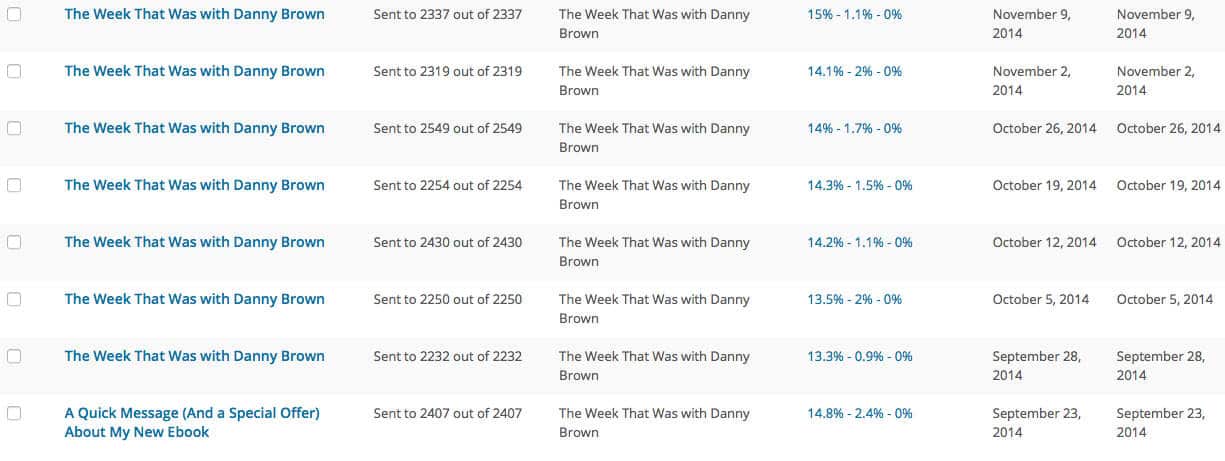
Danny Brown newsletter open

On top of that, clickthrough rate was also better. While the screenshot above shows clickthroughs of approximately 1-2%, these are based on overall emails sent, as opposed to emails opened. When you adjust that, the clickthrough rate is around the 12-14% – again, a major improvement on my previous delivery option.

This tells me that my subscribers know when to expect my newsletter, and are ready for it, hence the increased opens.

Additionally, it also tells me they’re willing to click through more. Admittedly, I now have an excerpt for my content versus full feed, so to read my latest post you have to click through. However, it’s the clickthrough of the content I’m recommending that shows an increase in interaction.

Interaction Wins On Two Fronts

In his recent guest post on my blog that shares his viewpoint on newsletter delivery, Randy raised the question of visitors, as well as social shares and comments, suffering due to the newer format. From that post, Randy mentions,

If shares and comments are to be viewed as social proof, the number of these?on Danny?s site?has dropped significantly from what were showing with his pre-newsletter?articles. I assume of course, that Danny?s readers are opting to read the?newsletter rather than engage online. Nothing wrong with that. But what about?getting visitors to his website?

As mentioned in the previous section, visitors have gone up due to increased open and clickthrough rate. In addition, pages per session and average session duration have increased, as subscribers clicking through are taking time to check out any other posts they may have missed.

It’s not only my own site that’s benefiting, though. As mentioned, each newsletter I send out links to two other articles I feel are worth reading. Based on my MailPoet metrics, these are also getting visited with healthy clickthrough rates (often, equal to my own content clicks).

With regards comments and social sharing, the social proof aspect doesn’t bother me as much. Comments can take place anywhere – my blog, on G+, etc. Same goes for sharing – anyone can share, not everyone that sees a share will visit.

A?quick comparison of posts before and after making the switch to newsletter delivery shows that comments on the blog posts are, indeed, down a little (from 506 for the previous three months, to 421 for the three months since I made the switch).

However, using the Data Hub Activity on Google Analytics, I can see discussions around the post are up across social media. Additionally, I’m having more conversations via email from subscribers that mail me directly to talk about a post, and I’ve really been enjoying that.

Social media referrals are also up, as you can see from the image below. The drop in Facebook traffic can be written off based on the amount of traffic I received from an evergreen post about Facebook for Android, which accounted for thousands of shares in the previous period (click to enlarge).
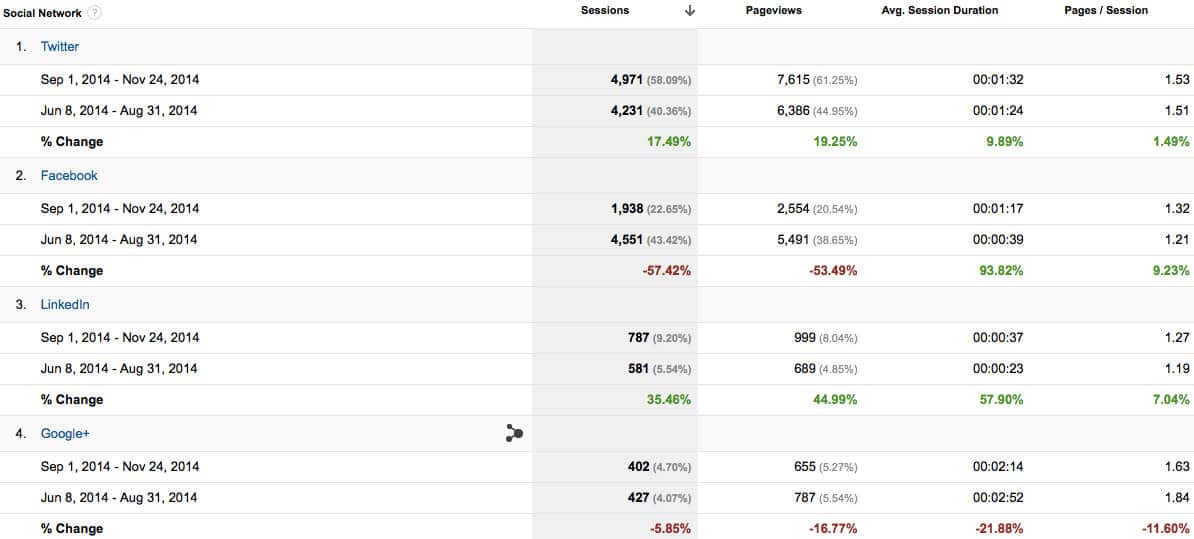
Danny Brown social media referrals

Indeed, pretty much every metric is up, with the exception of Google+. Which makes perfect sense, given it’s the network where I spend the least amount of time.

All in all, I’d say the vanity metrics since moving to a newsletter format have either remained static, or had a very minor drop. More importantly, the valuable metrics – open rates, clickthroughs, action taken, etc., have increased.

On Moving to a Newsletter Delivery Format – My Takeaways

It’s certainly been interesting to watch how things have changed since making the switch way back in August. While not for everyone, I know that changing to a newsletter format has been a success as far as I’m concerned.

As well as improving on some key metrics that I wasn’t getting with my previous email delivery option, the change to a weekly format has allowed me to spend less time online, and more time offline with my family, a huge plus in my books.

Additionally, it’s enabled me to think bigger and to really look at content outside the usual social media bubble, both to drive the type of content I want to write about, as well as find articles and posts that my subscribers may want to read. Feedback from my subscribers (so far) has shown that the time I spend finding content to share is worth it.

I’m also getting to spend more time checking out new tools and technology, which allows me to share that with newsletter subscribers. Looking at clickthrough rates, I’ve sent a decent amount of traffic to tools like Flare, Atomic Reach and Sumo, which is excellent to see, as they’re all great tools to help you with your content.

Is this approach for everyone? No, and that’s something that was highlighted and led to some great conversations in the comments after Randy’s guest post on my blog. However, if you are considering making a similar switch, my advice (for what it’s worth) would be:

  • Go either or, and not both. Offering both email subscriptions to your blog, and a subscription to a newsletter, could be confusing. Additionally, I’ve seen bloggers promote their newsletters with the blurb, “Get my best stuff here”. If that’s the case, why would I want to subscribe to your second-rate blog? So, keep blogging, just choose which delivery system you want to go with.
  • Offer real value, and not just more selling. As evident by my own metrics, my own content hasn’t lost out because I share content from other people in my newsletter. So don’t be afraid to share stuff that doesn’t solely drive subscribers to your latest landing page. My own experience would suggest that’s appreciated.
  • Be open to personal interactions. Because I open each newsletter with my personal thoughts on anything that may have happened to me, or the world around me, it’s led to a far more personal experience for my subscribers. This has led to some wonderful conversations in private via email. If you make the switch, be sure to give your subscribers the attention they’re giving to you.

Switching to a newsletter format isn’t for everyone, and your own analytics will help guide your decisions should you be considering the switch.

However, for me, it’s been one of the more rewarding decisions I’ve made when it’s come to my blog. Now, I can’t wait until I sit down on a Saturday evening to pen the following day’s newsletter, and I have no regrets about making the switch.

In fact, I only wish I’d done it sooner…

This originally appeared as a guest post on the Kayak Marketing blog.

Three Web Design Trends to Consider for 2015

Web trends

Ever since businesses started using the internet for commerce, one thing’s been constant: the need to evolve with consumer behaviors.

Much like local brick-and-mortar stores need to adapt to compete with off-site retailers, so, too, do businesses need to adapt to the way customers interact with their sites when making a purchase.

As we move into a more mobile-driven landscape?and one where frictionless buying truly is the holy grail?website design mindsets need to change with the ever-evolving buyer. With that in mind, here are three of the more popular web design trends for next year.

1. Truly Interactive Storytelling

There’s a lot of buzz online at the moment about how businesses need to tell better stories to connect with their customers. The problem is, while this advice is generally good, it also places a lot of pressure on business owners to try to work out what your story is and how to tell it. Some companies have found a way to do it?just take a look at Tesla Motors.

The company’s Go Electric page answers consumer questions about the evolution of the Tesla motor, how the?electric-powered cars work, the benefits to users and much, much more. Check it out for yourself?simply scroll down the page and see how the story plays out with multiple forms of media.

This is the way to tell your brand’s story, and you don’t need the design budget of Tesla to do so.

If you run a WordPress powered site, Aesop Story Engine is a wonderful solution that enables you to blend multiple media together to tell one cohesive story. From text and full-width images to overlaid videos, PDF embeds and historical timelines, it’s an excellent and inexpensive solution for your business.

If you’re not on WordPress, then Readz offers another solution for combining multiple media together into an embeddable presentation that can be used on pretty much any main web platform. (You can see an example of the “9LIVES” project here.)

This online form of brand storytelling is a powerful and inexpensive way to interact more with your customers and a great way to set yourself apart from your competitors.


2. Richer Backgrounds on Web Pages

One of the most underused components in web design is the background of your site’s pages. Many sites are content to have a simple dark font on a white background (or vice versa) and let the copy do the talking. However, you’re missing a big?opportunity to really attract your visitors’ attention.

While there’s been a rise over the past few years in using background images, the ability to really make backgrounds more than just static images opens up a whole new world of design potential. HTML video, for instance, allows you to have fully responsive HD video embedded in the background of whatever your sales page or call-to-action may be.

Think of sports teams?selling season tickets: You enter which game you went to that year,?and the site loads video replays of that game’s best plays on-screen.?Depending on which seat you choose, the video can highlight that, and the call-to-action could might be “Relive the magic again?your seat is reserved.”

The design is simple, effective and plays to the buyer’s impulses, given their connection to the product, their sentiment around a victorious day and the very seat from which they watched it all happen.

3. One-Page Scrolling Instead of Clicking

Scrolling website design, which is when?all the information about your company, services and more is on one page, has its?critics, mainly because of its potential impact on SEO and how one-page design is implemented. But there’s no denying that it’s becoming more popular?and understandably so.

Instead of having to worry about poorly implemented navigation menus that use multiple drop-down tabs, the one-page site can offer an elegant and effective experience for the end user.

Additionally, one-page websites are perfect for the kind of?interactive storytelling highlighted at the start of this article.

Themeforest offers a great collection of HTML, site templates, WordPress themes and more that offer one-page scrolling with excellent support and documentation. Some good examples?of one-page scrolling sites include:

  • My Life Without Me
  • Beatrate
  • Whitmans

The Future Is Bright

These three trends are just a few examples of where the web is heading from a design point of view in the coming 12 months and beyond. Also making inroads in Web design are:

  • retina display, which allows for much higher-resolution browsing on tablets, smartphones and hi-definition monitors;
  • material design, which takes the current-darling flat design and adds slight gradients and layers to achieve a richer effect; and
  • a more personalized experience?driven by cookies?that remembers a visitor’s preferences and loads up a customized UX on their next visit.

Creative web design offers everyone a chance to make their business stand out. The great news is, the cost is becoming less prohibitive and the potential is only beginning to be realized.

This post originally appeared on my monthly column at OPENforum.

Video: Why Flare Social Sharing is Much More Than Just a Sharing App

Influence marketing metrics

For many content creators, regardless if they’re bloggers, media companies, agencies or full-on publishers, ease in sharing your content is key in helping you attract a wider audience.

With a host of different options for this, especially when it comes to WordPress (the self-hosted version), it can be difficult to choose which one offers the best choices and features.

Personally, I’ve tried multiple solutions, from free options to premium options like MashShare and Ultimate Social Deux. However, the social sharing option I always came back to was the Flare sharing plugin, from Filament Apps (owned by Digital Telepathy).

From the early version last year, Flare (and now Flare Pro) has become my de-facto option when it comes to social sharing options on my blog, and those I manage.

From customer insights to full branding options, as well as one of the best solutions when it comes to optimizing social sharing for mobile browsers, Flare (for me) is the only sharing solution any content creator serious about increasing reach and understanding their audience should be using (but I’m biased).

This video shows why (expand the video to full screen and HD for best viewing). To try Flare for your own blog, hop on over here to create an account.

Enjoy.

http://youtu.be/GlcauBFkJQA

3 Types of Editorial Calendar to Manage Your Business Blog

Blog challenge

This is a guest post by Sarah Arrow, and is part of her 30 Day Blogging Challenge.

30 day blogging challenge

If you’re going to grow your blog, and publish content that your audience will love on a regular basis then you’ll need an editorial calendar.

In this post I’m going to share with your three types of editorial calendars, and how to populate them so that they free up your time and work for you.

When planning future blog posts ask yourself these questions about reaching your audience:

  • Where does your audience currently get their information?
  • What sources are trusted and what sources are considered unreliable?
  • What sources have the highest traffic flow for your demographic?

Editorial Calendar Planning – Things to take into consideration:

  • Monthly conversation theme.
  • Weekly conversation theme.
  • Blog post title.
  • Target audiences (primary, secondary & tertiary)
  • Author (more than one person can contribute to your business blog)
  • Editor – who’s going to oversee the content and chase the blog posts?
  • Buyer?s cycle (awareness, consideration, preference, purchase, loyalty)
  • Draft due date – Content has to go out in a timely fashion and when it’s relevant.
  • Primary keywords?(5-10) for your blog posts and headlines
  • Supporting image(s)
  • Other supporting media (image, video, podcast)
  • Embed in other resource kits or publications
  • Syndication
  • Possible whitepaper ?/ free report (repurpose)
  • Client testimonial / graphics

At the end of this article, you’ll be able to download a free editorial calendar template to help you with your planning.

Your editorial calendar isn’t carved in stone, it can and should be adapted to your needs and your business. When doing your first editorial calendar it’s easy to get overwhelmed.

You don’t have to include everything listed above, at once. You can add in parts as you become more adept at planning your blog posts.

Let’s investigate the editorial calendar tools:

A day to a page diary.

There’s nothing that beats a good old-fashioned diary when it comes to creating your editorial calendar.

When you buy a diary it comes with all the important dates in it already. Christmas, Easter and all the religious holidays are marked. You then mark in all the dates that are important to your ideal readers.

If your ideal reader is based in the US and is a mom, you’ll know that the school holidays start in June and the kids go back to school in August.

If your ideal reader is a mum in the UK, then the school holidays start at the end of July, and the kids go back in September, unless its Scotland in which case the kids go back to school at the end of August.

The next step is to locate all of the conferences and national seminars your prospect is likely to attend and mark them in the diary.

Then add in the things that impact on your life including birthdays, anniversaries and important business dates. Remember to add in staff training days, staff birthdays and anything else you celebrate in your workplace.

Your diary is now about half full. But you’re not done yet. Go and get a copy of Blog Energizer.

This will give you all the crazy holidays out there like; national jam week, international?soccer day as well as things like international women’s day and black history month. In your diary copy over any of the events that your ideal reader will love.

Then check out the blogging prompts here and add them into your diary. If you add in one a week, you’ll find your editorial calendar is pretty full up with things surrounding your prospect, her interests and where she’ll be.

You now just have to add in the titles to your editorial calendar spreadsheet, and you’ve pretty much got all your content ideas planned out for a year in advance.

Not only that, you’ll have a good idea what your prospect wants to read, and when. Nothing beats the diary when it comes to planning :).

WordPress Editorial Calendar plugins.

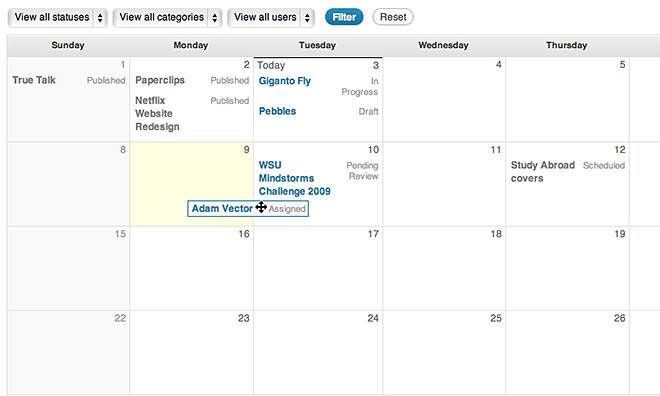
The?Edit Flow??plugin shows in your WordPress dashboard areas and will help you manage communications between you and your contributors.

If you’ve got a business blog with regular members of your team contributing, the Edit Flow plugin will save you a lot of time and hassle. If it’s just you, and you’re writing your own business content then the Edit Flow Plugin isn’t as important.

Edit flow

Features of the Edit Flow calendar include:

  • Calendar – A convenient month-by-month look at your content in your WordPress dashboard area.
  • Custom Statuses – Define the key stages to your workflow.
  • Editorial Comments – Threaded commenting in the admin for private discussion between writers and editors.
  • Editorial Metadata – Keep track of the important details.
  • Notifications – Receive timely updates on the content you’re following.
  • Story Budget – View your upcoming content budget. Handy if you purchase content.
  • User Groups – Keep your users organized by department or function.

The WordPress Editorial Calendar is a great tool for sites with just one main contributor, and you can use it with a contributors too, if you prefer. The best part about this plugin is that you can drag and drop your blog post titles all around your calendar.

Wordpress calendar

Writing about something and a disaster happens? Too sensitive to publish the post? Drag it three months into the future and write something else instead.

Features of the WordPress Editorial Plugin include:

  • See all of your posts and when they’ll be posted.
  • Drag and drop to change your post dates.
  • Manage your drafts with our new drafts drawer.
  • Quick edit post titles, contents, and times.
  • Publish posts or manage drafts.
  • Easily see the status of your posts.
  • Manage posts from multiple authors.

Got an assistant? Give her your day to a page diary and ask her to add in all the dates as drafts on the corresponding date in the Editorial Calendar plugin. You then have a visual in your dashboard. You can then drag, drop, delete and publish accordingly.

The only downside is when you see you have 300 drafts in your calendar and not enough time to write up the content *sigh*.

Co-Schedule

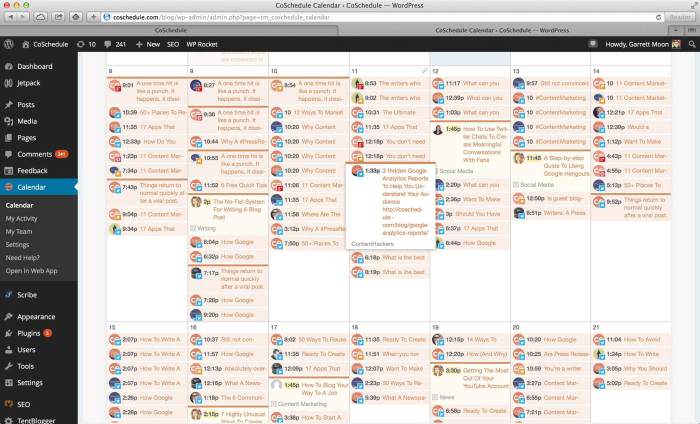
Co-Schedule is the new kid on the block when it comes to editorial calendars, and it’s been getting rave reviews from bloggers everywhere.

Its biggest advantage over a diary and the Editorial Calendar plugin is the ability to automate posts to social media. This eliminates some of the time suck of promoting your content.

Coschedule

  • Drag And Drop Editorial Calendar
  • Lightweight WordPress Plugin
  • Automated Social Publishing
  • Simple Team Communication
  • All-In-One Publishing Solution
  • No More WordPress Hacking
  • Small monthly fee

The third most common type of editorial calendar is an Excel Spreadsheet. It’s not exclusive to WordPress and many spreadsheets can be imported into Google Docs and shared with other people.

This means at any point people can access the calendar and see what they’re meant to be doing and when. This is also handy when you use a content management system other than WordPress for your blogging activity.

The spreadsheet isn’t limited to just content planning, it can also be expanded into who is promoting what and where. You can also keep track of your call to actions in the spread sheet and monitor what’s the most effective and why.

Like the WordPress plugins, you can add the diary to the spreadsheet to give you an overview of what’s going on in your prospect’s world.

Spreadsheets make it easier to present data in the form of charts, and make it easy for you to see in a single glance what’s working and what’s not. The only downside to a spreadsheet editorial calendar is that it takes over your life and you start to think in cells and merges.

Here’s a copy of one of my spreadsheets.

Blog Editorial Calendar Template_overview

It’s empty, you’ll have to add in your own content. Right click and save as to your desktop.

An editorial calendar in whichever format you choose is a powerful tool, and will enable you to blog consistently for any amount of time.

Sarah ArrowAbout the author: Sarah Arrow is one of the UK’s leading bloggers. She loves all things blog. You can find her on her own blog at sarkemedia.com or organising blogging challenges (of which this post is a part of). Her first one was back in 2007, and she instantly loved how her writing muscle developed when she worked it hard.

If you’ve already subscribed to Sarah’s 30 day business blogging challenge then you’ll have an editorial planning checklist attached to your email.?Not subscribed? Join?here.

image: Cindy Gedenspire

How to Optimize Your Blog for Faster Loading in Three Easy Steps

Recently I’ve shared why your site needs to be ready for mobile, both for visitors in general as well as potential customers (not to mention how Google is calling foul on sites that don’t offer an optimized mobile experience).

However, while mobile is important, just as important is the user experience when it comes to load time of your site, whether that’s a business site or a blog like this.

While Google hasn’t come out directly and said they will penalize low performance sites when it comes to how fast (or slow) they load for visitors, the clues are definitely there:

  • How Website Speed Actually Impacts Search Rankings (Moz)
  • 50 Reasons Your Website Deserves to Be Penalized By Google (KISSmetrics)
  • How Load Time Affects Google Rankings (QuickSprout)

And as mobile becomes ever more pervasive for browsing habits, slow performing websites on desktop browsers are really going to suffer on mobile – which is why you need to look at optimizing your site for faster loading.

To help you, I’ve put together this short walkthrough on using a combination of CDN and caching solutions that I use on this blog as well as my other domains.

It’s made a huge difference since I made the changes (I share the results of one before and after in the walkthrough) – hopefully it should do the same for your site(s) too.

Note: While the walkthrough is primarily for self-hosted WordPress blogs, the CDN solution supports multiple platforms.

  • « Go to Previous Page
  • Page 1
  • Page 2
  • Page 3
  • Page 4
  • Page 5
  • Page 6
  • Interim pages omitted …
  • Page 13
  • Go to Next Page »
© 2026 Danny Brown - Made with ♥ on Genesis