• Skip to primary navigation
  • Skip to main content
Danny Brown

Danny Brown

podcaster - author - creator

  • About
  • Podcasts
  • Journal

Blog Tips

Blog Comments and Experimentation – Or Why @Livefyre Is Here to Stay

Community conversations

So, if you’re a regular reader of this blog (and thank you!), I think I owe you an apology for any dizziness I may have caused you in the last couple of months.

As a regular visitor, you’ll know that I’ve been experimenting with what comment system to go with – native WordPress (in use for the last couple of weeks), Disqus (in use for about 6 weeks prior to that), or Livefyre (in use again now, and a system I’ve raved about many a time).

The reason for this was simple – user experience here is key. You take the time out of your day to come and spend some time here, when you could be choose from a million other blogs at that given time.

For that, I thank you. And to extend that thanks, if you like, I want to try and make your stay here as enjoyable and user-friendly as I can.

That’s the reason behind choosing the Genesis framework and the Optimal child theme (affiliate links). Since activating them a few months back, folks have been kind enough to comment on the easy navigation, and the responsive design makes it very easy to read on mobile browsers.

That user experience extends into the comments – I want to encourage you to share your thoughts, and extend the conversation beyond the post and with each other.

This is kind of where native WordPress comments falls down, and leaves both Livefyre and Disqus ahead. All you need do is compare a post where there are a lot of comment threads, and you can soon get lost with native WordPress, wondering who’s replying to who.

Not so much Livefyre and Disqus, where you can clearly see the thread and who the conversation is aimed at.

And, for a while, I was thinking of sticking with Disqus as I experimented with the new 2012 version – it’s very slick. Community comments, popular conversations elsewhere and a beautiful interface make it a very tempting platform. And yet…

Here we are, back with Livefyre, and this time it’s for keeps, for a few simple reasons.

Livefyre Support is Awesome

If there’s one area that Livefyre excels at, it’s their customer support and community support team. It must be a culture they have over there – from Jenna Langer to Jeremy Hicks, and current Community Manager supreme Dhara Mistry, Livefyre clearly encourages interaction at a very high level.

While I was experimenting, I had some issues on switching Livefyre back on, due to a minor conflict with Disqus and some WordPress avatars. I also couldn’t fully sync comments over that have been left during my activation of Disqus.

Step up Livefyre, and Dhara and her team of engineers.

Dhara Mistry
Click image to enlarge

They worked way beyond what any support would normally offer and ensured all the glitches were fixed. Not only that, Dhara kept me up-to-date at every touchpoint, and even recommended I hold off until they locked down a fix for my specific needs.

All this while rolling out a brand new version of their commenting system, as well as fielding questions and support tickets from users with Livefyre currently installed on their sites.

This kind of service and constant communication is a huge factor for me when it comes to any business, and the fact Livefyre don’t even charge the majority of its users, yet still offer that kind of support? I’m sold.

Livefyre Is The Natural Evolution of Blog Commenting

As I mentioned earlier, I’ve been a rabid fan of Livefyre since it launched, and was one of the early users of the platform.

I love its real-time chat system as well as the social media integration of conversations from Twitter and Facebook, as well as the ability to share across multiple networks.

But that was Livefyre back then – the recently-released beta version of Livefyre 3 shows you exactly where this platform is heading, and I love it. You want your blog comments to be truly social and interactive? Check out what Livefyre has for you.

Social Comments Integrated

Livefyre social comments
Click image to enlarge

With the previous version of Livefyre, they already had a pretty cool way to bring conversations from Twitter and Facebook into your comments section. If someone tweeted about your post, and added extra commentary, or it was shared on specific Facebook Pages, these would be pulled into the post at the end of the comments.

Now, however, they fall neatly into the comment stream itself, based on timestamp. And, if you reply back via the comment, it goes back to Twitter automatically, to answer the person that shared. Further conversations continue to fall back into your comments – very cool.

Rich Text Editor

Livefyre rich text editor
Click image to enlarge

One of the biggest “gripes” of the previous version of Livefyre was the inability to make your comment more dynamic. While the likes of WordPress and Disqus allowed you to drop HTML in to add bold, italic or other font edits, Livefyre was stuck with its standard font.

Not any more. Now you have a rich text editor that allows you to choose bold font, italic, underscore, insert a hyeprlink, bulleted lists and numbered lists.

Additionally, and one that a lot of commenters and bloggers were asking for, is the ability to edit your comment if you make a mistake. However, this only works if the blogger with admin duties enables this feature on Livefyre.

It may be small changes, but these features make comments more dynamic and highlight the parts that need to be highlighted.

Livefyre Supports Rich Media

Probably one of my favourite new features is the way Livefyre 3 truly turns your comments into a fully-fledged multimedia experience.

Normally, when you leave a comment on other blogs that don’t have Livefyre, and you want to show a video or image, you have to grab the link to YouTube or Flickr, and then the reader of your comment has to click through to see what the video or image is.

Not with Livefyre.

Instead, they keep your readers engaged on your blog by embedding the rich media directly into the comments area.
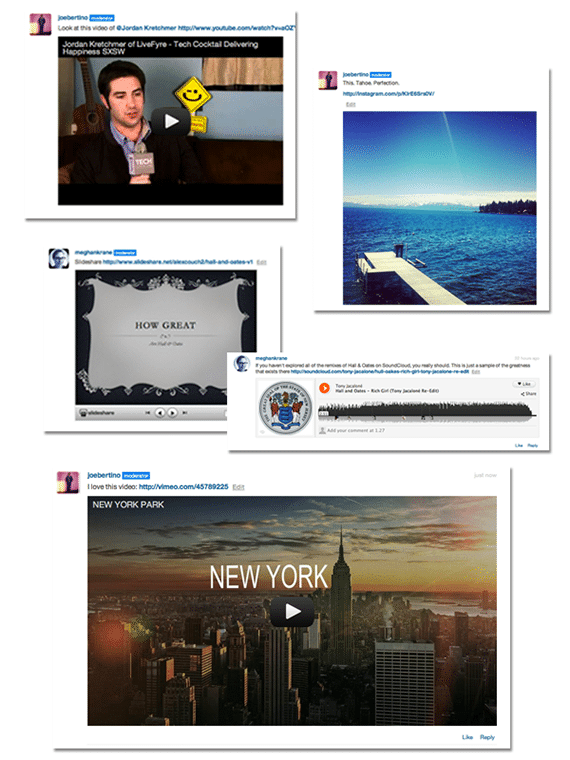
Livefyre rich media embed
Click image to enlarge

Currently supported platforms include YouTube and Vimeo (video), Flickr and Instagram (images), Slideshare (presentations), SoundCloud and Spotify (music), animated GIFs from MySpace and Wikipedia (the articles appear in-stream).

To show this media content, simply grab the URL of its parent page and drop alongside your comments, and Livefyre does the rest. It’s pretty damn cool and can make for a very entertaining comments section.

Livefyre and Multi-Site Admin

One of the new features that came out before the current beta version of Livefyre 3 was the revamped admin area for bloggers.

Livefyre Site Moderation
Click image to enlarge

Now, instead of having to hunt through reams of comments to filter one out, you can search directly by username, IP address, if it was a user logged in via Twitter or Facebook, keywords, and much more.

You can choose to do this while having all your sites open, or just one domain at a time. You can also quickly check if any comments have been filtered into pending or spam, ensuring all comments you want approved are done so.

It’s a slicker version of the previous admin area and a very welcome addition to the product.

So Is Livefyre Perfect?

Is anything? Okay, I know, glib answer and I apologize, because we all know Jessica Alba is perfect… Moving on!

As I mentioned, Livefyre 3 is currently in beta, so the version being used on blogs currently is one that will experience some hiccups as the platform moves into a wider public release.

Some of the current glitches, from my own use and conversations I’ve seen online, include:

  • The SocialSync tagging doesn’t always work the way it should, meaning you can’t tag your friends on Facebook and Twitter (by using the “@” symbol and then typing their name until it appears). For a social commenting system, this is a core part of Livefyre’s appeal.
  • Sometimes it looks like there’s no comment box, whereas it’s just Livefyre rendering. The load time has been improved from the previous Livefyre, but could sill be optimized further.
  • Styling Livefyre to suit your blog design requires CSS, and not every blogger is comfortable with this. The advantage of Disqus in this respect is it inherits the font, style and design from your blog, so should match up every time.
  • It’d be great to see your commenters’ activity across the web without having to click on their profile. A lightbox when hovering over the username would be great, and encourage commenters to visit other blogs in the Livefyre family.

In fairness, the last two are personal choices as opposed to glitches, but I feel they’d make the platform even more complete than it is currently, and its current iteration is pretty damned impressive.

So, Livefyre Is Here to Stay Then?

As I mentioned at the start of the post, if you’ve felt a little dizzy recently with the comment system changes, I apologize. But it’s the last time it should happen.

I’ve been an early supporter of Livefyre and the platform has continued to grow way beyond its potential from its early days. That continues to be the case as new features and slicker processes get added, and it’s definitely my commenting platform of choice.

Mind you, I have to take my hat off to Disqus – they’ve really upped the game with Disqus 2012, and the interface and integration is very slick. Plus, they also sent out a very fun Welcome package of Disqus goodies – thanks, guys!

But, I have to say, Livefyre just feels what a comments system should be – live, interactive, media-rich, socially-enabled and much more. Simply put, it feels like home.

And, as a blogger, that’s all I can ever ask for from a comments system. Here’s to the conversation.


Quit Treating Your Blog Readers Like Second Class Chumps

Blog readers and chump bloggers

Blog readers and chump bloggers

Bloggers are a breed apart from many other online outlets. That?s not meant in a grand or condescending way ? just that it takes a very different mindset to be a blogger, and one that stays the course.

Of course, a large part of this success comes from the readers a blogger attracts. These readers turn into subscribers, turn into loyal members of your community, turn into ?brand advocates? for your blog.

Essentially, your readers dictate much of how your blog is viewed by the interactions both on your domain and on their own networks. So why would you want to treat them like chumps?

You?re not treating your readers like chumps? You?re looking after them? Are you sure? Let?s take a quick check.

You?re Killing Their Eyes

Content is King. It?s the rallying cry of many bloggers ? and, for the most part, it can be true. After all, without content, you have no readers, right? But what good is content when it?s surrounded by a craptastic design?

For those of you that were born before 1990, I have one thing to say to you ? GeoCities! Yeah, you know what I?m talking about. For the benefit of our readers who?re not as ancient as me, GeoCities was Yahoo?s website building platform. It was meant to offer an easy option for non-technical people to be able to build their own sites.

The problem was, once you give a non-technical person the key to tech tools, chaos ensues. Cue some of the ugliest pieces of crud ever seen online!

Jump forward to today. With tools like WordPress and Genesis (affiliate link), it?s never been easier to get a professional-looking website or blog up-and-running quickly and without too much hard work.

If you want to encourage readers to enjoy your site and stick around for more, then make your place welcoming. After all, would you go back to a dayglo pink website with yellow font and dancing pixel people? Exactly.

  • Takeaway. You want to encourage readers to come back? Make your offering an attractive one.

You?re Acting Like a Cheapskate

One of the big trends in blog reader behaviour is the rise of mobile browsing. With the popularity of iPhone, Android and tablets, web browsing behaviour has shifted dramatically in the last 12 months and will continue to move towards mobile.

So why aren?t you looking after your mobile visitors?

If you?re using WordPress, for example, there are a host of themes that are built with a responsive design.

This means no matter what browser display your visitor comes in on, the site will adapt (check For Bloggers By Bloggers out on a tablet or smartphone, and then compare it to the web version). Again, Genesis offers several themes in this area ? check out their Theme Chooser tool and select Mobile Responsive.

If you?re happy with your existing theme, you might be using something like WPtouch to offer a mobile version of your site. But here?s the thing ? why are you using the free version?

As useful as it is, it?s actually very limited ? it doesn?t even support threaded conversations on the comments, for example. Which, if your blog has a lot of comments, can soon lead to an unholy mess where replies to comments aren?t in context, and the conversation can soon become messy and convoluted.

For as little as $49, you can add a whole host of features by upgrading to WPtouch Pro. Dedicated iPad styling, retina support, theme styling, threaded comments and much, much more. That?s got to be worth $49, no?

  • Takeaway. Your readers add value to your blog. Are you treating them as valuable?

You?ve Joined the Mail Service

Remember when you first started blogging, and your passion was burning to be the best blogger out there? You were going to write the most amazing posts, start the most intense conversations around them, and attract the coolest audience.

And, you kinda achieved that. So you got lazy, and started posting any old stuff. You?d take a picture and write some nonsense about the hidden meaning behind it for small business owners.

Or you?d write a Top 10 list that offered absolutely nothing new to the topic of that list, or the people/services on it.

Or you?d write a post about how awful it is to be you, and that you should be able to write what you want because it?s your blog and your readers should be grateful you?re still churning out content.

Stop this. STOP THIS NOW.

No one cares about bloggers that feel they?ve conquered the market and can do what they want. Readers came to you for a reason ? they don?t want a diluted version of that, because you want to get fat off your affiliate ads and crappy ebooks.

You want to be an awesome blogger that everyone wants to read? Then write epic shit ? every time!

Sure, share your ebooks and premium courses and affiliate ads ? but make sure they offer value to your readers just as much as they offer dollars to your pocket.

Don?t sacrifice what made you great by attaching it to the mundane. Be great the way you aspired to be great.

  • Takeaway ? the minute you start mailing your content in, stop blogging. It benefits no-one.

These are just three of the ways you?re short-changing your readers. You might not like being told this, especially if you?re guilty of any of the points above.

Then again, doing the right thing doesn?t always come easy. But the results are more than worth the effort.

This post originally appeared on For Bloggers By Bloggers.

Read, Savour, Comment, Share ? Your Four Step Guide to Blogging Success

Blurred lines

Four steps to blogging success

You start blogging because you want to do something. Be someone. Be a part of something.

It doesn?t matter what your goals are ? thought leader, business leads, brand awareness, monetization, or even just a place to post thought ? you blog because of a particular reason.

The problem is, no matter how good the reason may seem to you, the traction isn?t coming fast enough for you. Which is okay, actually ? successful blogging is a marathon, not a sprint (damn these cheesy quotes!).

But for anyone that?s looking to try and speed up the success process, stop looking too deep into why you might be lagging, and instead think about adopting these four approaches that every blogger should aim toward, if they want to be successful.

1. Read

This might seem like common sense, but read other blog posts as much as you write you own. Look at the best writers in the literary world ? do you think they just read their own books and become great because of that?

No. Instead, they?re reading other authors in their niche, as well as up-and-coming authors in other niches but who have interesting approaches to storytelling. Mimic this.

Think about the blogs and bloggers you?d like to emulate, and see what sets them apart. It could be language, tone, formatting, etc. If you want to be the best, learn from who you feel are the best.

2. Savour

So many bloggers rush to get the next post ready to go. They feel that the more frequent their content, the more search engine value they?ll receive, and the more visitors they?ll get.

The thing is, though, your readers aren?t superhero ninja reading robots. Like the rest of us, they only have a finite amount of time every day to allocate to reading a blog.

So, instead of blasting out content left, right and centre and hoping the SEO benefits will come, take the time to sit back and let your readers savour your posts.

Let the content sink in, and the comments around the post end naturally. You can usually tell when a post has reached its zenith ? don?t force the issue, let it happen and then post the next update.

You don?t have to do this, especially if you have a schedule that works for you ? but wouldn?t it be nice to treat a blog post like a vintage wine instead of a tequila shot once in a while?

3. Comment

One of the most popular questions we get asked here is, ?How do I get more comments?? ? it?s easily in the top five questions for most bloggers.

And, unfortunately, there isn?t any real right or wrong answer, because every reader is different. Oftentimes, the most amazing blog posts get a few comments, while the most inane get hundreds. And vice versa, before you think, ?A-Ha! Let?s write an inane post!?

So, instead of telling you how to get more comments ? although that is covered here ? my piece of advice here is simple: make it easy to comment.

  • Use a friendly comment system. This can be your native option (the one that comes with your blog?s design), or a third-party option like Disqus, Livefyre or IntenseDebate (but allow guests to post when using third-party options).
  • Have an open comment policy. Unless your business dictates you absolutely must moderate all comments (which breaks up the flow), allow anything to be posted, as long as it adheres to your comment policy.
  • Encourage discussion. If someone leaves a comment, reply (where a reply makes sense). Make the reader feel welcome and they?ll come back (especially if you encourage discourse with respect and boot off comment bullies).
  • Kill the captchas. Seriously. Captchas used to be used as an excuse for stopping spam, but with the amount of anti-spam filters have now, this is a lame excuse. Captchas are the birth control of blog commenting ? if you want to propogate, drop the barrier to entry.

Make it easy to comment and guess what? People will generally comment.

4. Share

You?re the greatest blogger the world has ever seen and your content is amazing ? so why the heck are you making it so difficult to share with others?

The amount of times I?ve landed on a blog post, loved it, then went to share it with my networks only to find there were no social sharing options? GAH!

This isn?t 1999, folks ? we have hundreds (if not thousands) of ways to share a blog post without just relying on optimized copy for search engines (though, please, don?t forget that either).

You want your blog to grow? Make it easy for folks to help you in that goal.

It?s pretty easy to add sharing options to your blog, no matter what platform you?re on (though if you?re on self-hosted WordPress, even better with the amount of plugins available).

So why would you write the best stuff to keep hidden from the world? Your blog isn?t Rapunzel ? come out of your tower and let it be shared.

It?s pretty straightforward ? whatever your goal is in blogging, you?re not going to get there by making it hard to be found and interacted with.

The good news is, you don?t have to do a heck of a lot to get the cogs moving ? ready to get started?

This post originally appeared on our blog resource centre For Bloggers By Bloggers.

This Blog is Moving – How to Update Your RSS Subscription

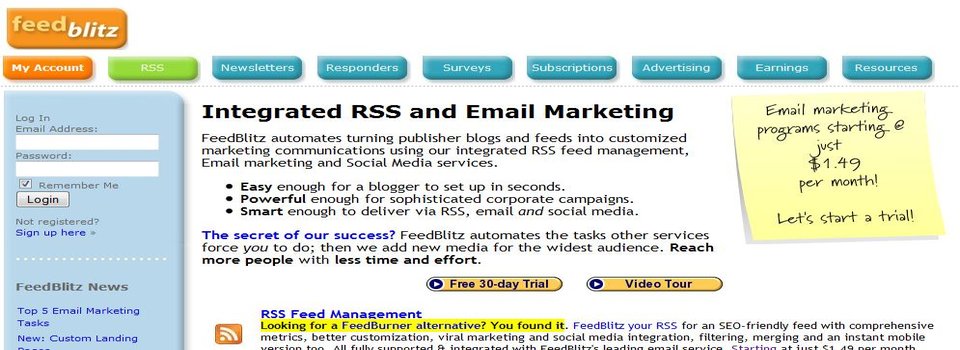
Feedblitz blog subscription service

Feedblitz blog subscription service

For the last four years, I’ve used the Feedburner service on this blog for folks that are kind enough to subscribe.

It was the simplest and – at the time – most effective way for bloggers to offer subscription options. Then Google bought it, and it went downhill.

Subscriber numbers were all over the place; often whole subscriber services disappeared; and the support for issues turned into something pretty non-existent. Although, in fairness, that’s true of pretty much any Google product…

However, I – like many other bloggers using Feedburner – persevered, in the hope it’d finally work out. Then I read this recent blog post over at The Way of The Web, which suggested Google may be about to close Feedburner down. From that post:

But today two things have happened. The Google Adsense for Feeds Blog has announced it has closed;

?After some consideration, we recognize that we?re just not generating enough content here to warrant your time, so we won?t be posting here any longer.?

Which is true, given the last prior post was in October, 2010.

But also the @Feedburner Twitter account is being closed from today as well. The Feedburner API was already deprecated and is due to close in October, 2012.

Now, while Google may keep Feedburner going, the signs aren’t good. So, time to move.

I’d looked at Feedblitz before as an alternative, but at the time it looked a little clunky as far as migrating feeds over. Let it be noted, however, that I am the world’s crappiest techy-type person, so that could have been down to me…

However, when I checked it out again earlier this week, it looked a lot smoother. Email subscription transfers for existing subscribers was pretty straightforward to do, and all new email subscribers should be going over to the new Feedblitz option.

RSS was even simpler – a straightforward feed redirect from Feedburner for the next 15 days, and then this blog should all be on the Feedblitz platform.

What I also like about Feedblitz are the social options – you can subscribe via a host of social networks too, so you’d get a Twitter mention once a post goes live, for example. There are also some pretty nifty analytics available, as well as newsletter options and more.

There is a cost involved, but that’s only for email subscriptions – if people subscribe to your blog by RSS feed, then that’s free for you to manage.

I don’t really do justice to the Feedblitz options here (especially the support from founder Phil Hollows) – so check them out for yourself and , if you’re currently on Feedburner, you might want to consider moving your own blog over.

  • Note: As of February 2 2015, I no longer use Feedblitz. Details can be found here.

How to Pitch This Blog

How to pitch a blog

How to pitch a blog

Before I start this post, i just want to give a heads up that it’s geared towards PR folks and advertisers.

If you’re more a “normal reader” of the blog, and don’t fall within these two industries, feel free to skip this post completely and come back on the next regularly scheduled updates. 🙂

So, with that heads up out the way, let’s get cracking.

How to Pitch Your Story or Partner On Your Product

I get a lot of pitches form either PR agencies or consultants on behalf of their clients, or from business people themselves wondering if I’d be interested in taking a look at their new product or service.

This is cool – after all, this blog looks to help you, the reader, in being more successful in whatever it is you want to succeed in, from your business and where social media fits to understanding blogging and everything in-between.

The problem is, the pitch needs to fit the audience here – and very often they come nowhere near that. In the last week alone, I’ve received pitches on vodka and fashion news.

Now, while I might like the odd vodka shot now and again, I’m anything but fashionable and single malt scotch is my tipple of choice (though Whyte & Mackay may change that!).

So, here are some ways for you to increase your chance of being shared here:

1. Know my readers

They’re a huge reason this blog exists so understand who they are. A really simple way to do this is use the Demographic feature on Alexa. You can also use tools like Quantcast to grab more information about this blog’s audience. If you’re looking for me to introduce you to them, at least give them the courtesy and respect they deserve by understanding whether or not they’re right for you.

2. Know my topics

I don’t think I’ve ever written about fashion. I know I haven’t written about healthcare. So why pitch these topics? I make it really easy to see what this blog is all about – you just need to check the black category navigation menu at the top of every page. Or, simpler still, check the About This Blog page. If you don’t take the time to see if there’s a fit, why should I take the time to make the fit?

3. Check the archives

A lot of the time when I’m pitched, it’s clear the person behind the outreach hasn’t carried out even the barest of research on this blog. If they had have done, they would have known I’d already talked about their topic before, often more than just the once. Save your time – use the Search This Blog option in my sidebar (or homepage), and use the keywords for your pitch/product/service. If the story angle has been covered, it’s not likely I’m going to do it again.

4. Know my style

I recently received a pitch where the PR agency wanted to control the editorial; only allow for positive praise; and moderate the comments for negative replies. I told them to go shit a porcupine (maybe not in these words, but you get the drift). The voice of a blogger is his or her currency when it comes to readers and their trust – don’t compromise that. Ever. If you don’t understand the tone here – upfront, no bullshit, honest and questioning – then don’t pitch me.

Save Time By Being Diligent

These are just some tips to help you have a better chance of sharing your news here. While the tips are mostly geared towards PR outreaches, they can also be applied to advertorial content and partners.

It’s pointless asking me if I’m interested in advertising skincare products or painting materials, when this blog is primarily about marketing, social media, business, digital/mobile trends and occasionally the odd blogging tip. So try and make the advertorial partnerships a relevant fit for that kind of audience.

If you want to interact with some of the smartest folks on the web, then I’m very fortunate to have them share their expertise in the comments regularly.

They’re probably also interested in hearing from you – as long as you do it right. Sound fair?

Note: While these tips are for this blog, you can pretty much transpose the basics to any blogger you’re looking to connect with.

  • « Go to Previous Page
  • Page 1
  • Interim pages omitted …
  • Page 4
  • Page 5
  • Page 6
  • Page 7
  • Page 8
  • Interim pages omitted …
  • Page 13
  • Go to Next Page »
© 2026 Danny Brown - Made with ♥ on Genesis