• Skip to primary navigation
  • Skip to main content
Danny Brown

Danny Brown

podcaster - author - creator

  • About
  • Podcasts
  • Journal

Blog Tips

Sorry Affiliate Bloggers, But Your About Page Disclosure Doesn’t Cut It

Way back in December 2009, the FTC finally launched its guidelines regarding the use of endorsements and testimonials in advertising.

The goal was simple – with the increase in digital advertising and the rise in bloggers monetizing their blogs through advertorials and paid content (sponsored, affiliate or otherwise), the FTC ?wanted to ensure consumers were aware when something was being promoted for pay versus being a genuine recommendation.

The guidelines covered all forms of advertising, but it was the part about social media – and blogs in particular – that had a lot of people up in arms at the time, despite the fact that all the FTC guidelines were doing was encouraging honesty between blogger and reader.

The?FTC made it clear what it expected of bloggers with an example regarding a video game blogger, summarized below:

A… video game expert maintains a blog where he posts about his gaming experiences. A manufacturer of a newly released game system sends…. a free unit and asks him to write a review. He… writes a favourable review [where his] relationship to the advertiser is not clear, [meaning] readers are unlikely to know that he has received the system free of charge.

The FTC continues that the blogger should “…clearly and conspicuously disclose that he received the system free of charge”, and that the manufacturer should advise him that disclosure should be forthcoming.

Seems simple enough, right? Clearly not, as the last five years plus since the new guidelines came into play show.

If The Big Guys Don’t Care, Why Should You?

Recently, a well-known social media blogger wrote a review of Google’s Chromebook. The blogger shared his experience on how the features of a $200 Chromebook helped his business make 150x its cost in revenue for a course the blogger ran.
Chromebook

All good, all excellent stuff. Lots of good reasons why someone should buy this particular Chromebook.

Then?you click the highlighted link for the Chromebook itself.

If you look at the URL in the image above, you’ll see “Link ID” and then a number. This is your typical Amazon affiliate link, which means the blogger in question is making a percentage of every Chromebook sold through his link.

Nothing wrong with that – except nowhere in the blog post is it mentioned an affiliate link is being used for the Chromebook link. But that doesn’t matter, right, because the blogger has a disclosure sentence on his About page.
Blog disclosure about page

As far as disclosures go, this is a pretty good one – it makes it nice and clear that affiliate links are to be expected, and that the blogger uses the products he endorses as well, increasing the relevancy of the promotion.

The problem is, this isn’t enough.

While having a disclosure section on your About page is fine, it only works if people actually visit that page and are aware of your affiliate tendencies.

Which, as the FTC makes clear in its updated guidelines, isn’t enough.
FTC affiliate guidelines

As highlighted in the image above, the guidelines are very clear when it comes to how endorsement is presented.

In some instances, where the link is embedded in the product review, a single disclosure may be adequate. When the product review has a clear and conspicuous disclosure of your relationship – and the reader can see both the product review and the link at the same time – readers have the information they need. Putting disclosures in obscure places – for example, buried on an ABOUT US… page – isn’t good enough.

And it’s this failure to disclose on-page where so many bloggers are tripping up, either deliberately or through lack of awareness.

But that isn’t really an excuse.

Why It’s Not Just Your (Blogging) Pocket That Could Be Hit

The FTC has made it clear that it will penalize non-disclosure, and examples of bloggers and advertisers making a profit from false advertising. Not disclosing affiliate relationships falls within this, as does not being clear on what’s a sponsored post.

The fact that bloggers are still bypassing this important part of disclosure is surprising, given it’s been more than five years since the original guidelines were published, and two years since the last update.

Not exactly new guidelines to get your head around, are they?

And it’s not as if there aren’t enough articles and blog posts around the web sharing why bloggers need to disclose or face the consequences.

Now for some, it may be that they genuinely think an About page disclosure is adequate.

For others, it may be they feel the FTC is being two-faced, and should go after celebrities and magazines that endorse products/run advertorials without disclosure (point is – there are laws already in place to prevent this).

But that’s neither here nor there.

If you’re a blogger, and you’re looking to make an extra few bucks through endorsements of any kind – paid, sponsored, affiliate – you need to disclose, simple as.

If you don’t, you run the risk of being fined by the FTC.

But, perhaps more importantly, if you don’t disclose, either knowingly or unknowingly, it suggests a couple of things:

  • You’re deliberately misleading me, the reader
  • You’re not up-to-date on the guidelines/laws that impact the industry you sell knowledge in

It doesn’t really matter which point you belong in, because they both mean the same thing – why should I trust your content if you either don’t care, or don’t know, about something that impacts the relationship with your readers?

For any blogger, the answer to that shouldn’t be a question they’re willing to pose.

Update April 8, 2015: Brian Hawkins made a good point in his comment about the FTC not making it clear where disclosure should be. This was addressed in their 2013 update, which you can find details of?here, or download the full PDF version here.?

Does Your Blog Really Need to Provide an RSS Feed Anymore?

Back in 2010, I published a blog post about the choices bloggers gave?when it came to how readers consumed their content.

The gist of the post was simple: should it be via RSS, or email?

My own take was bloggers should offer both (remember, this was at a time when RSS was still the #1 choice for bloggers to distribute their content). In the comments section after the post, the majority of commenters thought email was the better option too.

– I?m with you 100%! The blogs I never, ever want to miss (including yours) are ones I subscribe to via email. In addition to making sure I don?t miss anything this also allows me to read at my leisure and if I get swamped for a week or so I know which posts I still have to read. Michelle Mangen.

– Maybe it?s the Boomer in me, but I only read?on a daily basis?the blogs of those to whom I can subscribe via email, or perhaps on a blog roll. I realize, of course, that I may be missing out on some good reads; but the blogger is missing me as a subscriber. Ken Jacobs.

Even back then, both bloggers and readers were seeing the value of email, and (perhaps) the diminishing return of RSS. The thing is, though, it didn’t seem to matter – Google Reader was king and RSS feeds were the currency of any blog worth its salt.

Man, how times do change.

Alas, Google Reader, I Knew Thee Well

In March 2013, Google announced it was closing down its Reader service. For most content creators who had built a healthy subscriber base via RSS, this came as a bit of a shock.

In Google’s own words, however, perhaps it shouldn’t have been as big a shock.

We know Reader has a devoted following who will be very sad to see it go. We?re sad too.?There are two simple reasons for this: usage of Google Reader has declined, and as a company we?re pouring all of our energy into fewer products. We think that kind of focus will make for a better user experience.

When the company behind the leading RSS solution says use of its product has declined, you know it marks a change in how we, as readers, consume content. Perhaps it’s the other part of the statement that says more, though: “We think that kind of focus will make for a better user experience.”

As a long-time user of Google Reader, both as a provider of content and a consumer of one, the user experience was a major pain in the ass. Yes, you could create folders based on topics and categories, but if you subscribed to a lot of blogs, even that minimal filtering option soon became overrun and clunky.

As content moved into a cleaner, richer experience – both on the web and (increasingly) on mobile – RSS feeds and the way they’re curated became less attractive.

For me, I’d even say RSS feeds are pretty much redundant, and not worth the effort of trying to grow.

Email = Investment, Trust and Loyalty

Think about the one area you spend most of your day, personally and professionally. It doesn’t matter what job you’re in, or what social media channel you prefer over the other, or what smartphone you use – the one thing we all have in common is email.

Our inboxes rule us. Whether it’s getting notifications about a friend’s update on Facebook, or confirming tickets, or replying to a question that can’t wait until you get to the office, our email inbox is still the most-used direct communication tool we use.

It’s one of the reasons I switched my commenting solution (and soon-to-be subscription solution) to Postmatic. If it doesn’t matter where and when people are accessing email, because it’s second nature and easy to do, doesn’t it make sense to use that as your primary content distributor, conversation starter and loyalty builder?

Why would you want to continue using a clunky, increasingly-irrelevant piece of technology like RSS feeds that offer less value and less return for your content investment?

Looking at my own analytics for the last 30 days, I had just under 16,500 sessions (Google’s new name for visitors). Of that, guess how many came via RSS? 10,000? 5,000? 1,000?

Chance would be a fine thing. What I actually got, you can see below.

Danny Brown RSS

A whopping 335 sessions, or just over 2% of all traffic for the 30 day period. Worse still, the bounce rate is atrocious – RSS readers are simply reading the article and leaving my site (when/if they actually visit).

While I’ve never really used my blog as a lead generator (so I’m not particularly bothered about bounce), for any content creator looking to use their blog as a business creator, that bounce rate would be a major stumbling block.

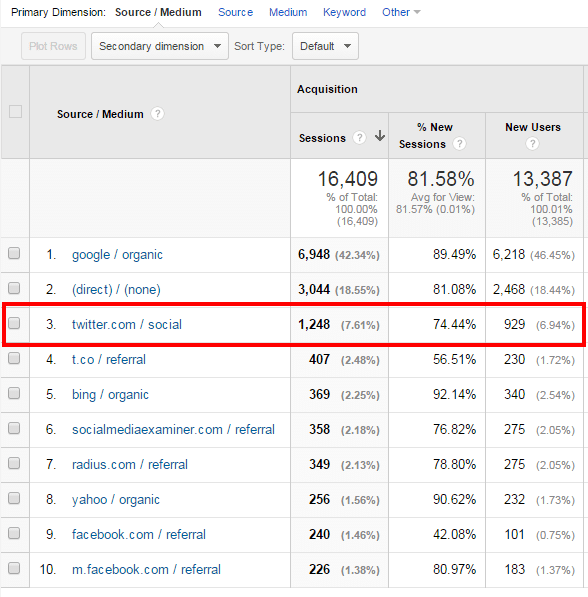
What makes this lack of traction stand out more is when you look at some of the other traffic drivers – in particular, Twitter (which is ironic, given a recent article about Twitter’s own lack of value for traffic).

Even in the image above, you can see automated Twitter feeds (where blog posts are aggregated by RSS-to-Twitter) accounts for almost the same amount of traffic as a dedicated RSS solution like Feedly.

When you dig a little more into the analytics, you can see Twitter actually blitzes RSS out of the water.

Danny Brown Twitter

Direct traffic from Twitter accounted for almost 1,250 visits – almost 10x the amount from my RSS subscribers. Add in the indirect traffic using Twitter’s link-shortener, and you can see why Twitter is a better RSS solution than actual RSS feeds themselves.

In the direct stats, almost 2,500 of the 3,044 total is from my email subscribers – beginning to see a pattern? If you want quality traffic and trust in your content, RSS is not going to get you it.

RSS = Really So-over-it Syndication

Okay, it’s a play on words for what RSS actually stands for (Really Simple Syndication), but for me personally so-over-it would be a better choice of words.

Anyone can subscribe to an RSS feed. One click of the mouse, done. And (more usually than not) forgotten. When I stopped using my reader account a few years back, I kid you not – I must have had about 500+ blog feeds in there. Do you think I regularly visited them all?

Hell no – as Michelle Mangen mentions in her quote at the beginning of this post, the blogs I wanted to really subscribe to were done by email – and that’s been the way I’ve subscribed for the last 4-5 years.

There are multiple benefits to this:

  • Like I mention, anyone can subscribe by RSS. Doesn’t mean squat. Giving someone your email address, though, and trusting them not to take advantage of that? That’s the kind of investment you want in your content.
  • Email subscribers are more adaptive to change. When I recently changed my email and RSS subscription methods, I shared an update post via both email and RSS. 81% of my email subscribers updated their subscription – 81%. Guess how many RSS subscribers updated their feed? 9% – quite the difference.
  • The best relationships are those one-to-one interactions you get when someone replies to your blog post with an email about how it made them feel. I’ve had some of the most personal and powerful conversations via email after a post has gone live – RSS could never hope to achieve that.
  • When Google Reader closed its doors, I lost 6,500 subscribers overnight. 6,500! Now, given, many of them may not have visited anyway, but you take away 60% of a blog readership overnight and see what happens. Another reason I refocused my energy into email.

Content is changing. How we consume content is also changing. We don’t need “traditional” RSS anymore. We have social channels, as well as sites like This. and Flipboard, to aggregate and syndicate.

But they’re all external, and you’re competing for space with thousands of other like-minded souls. Email, on the other hand – you have these eyeballs, and they’ve chosen you over the competition already.

Now might just be the time you consider dumping that good old blog RSS feed for good or, at the very least, stop promoting it as an option to subscribe (you’ll see that I only offer email subscriptions in the box below this post).

After all, is it really doing you any good?

A version of this post originally appeared on the Wood Street Inc. blog.

Why I Don’t Want You to Come Back to My Blog Post After You Comment

Empty blog

One of the things that continues to intrigue me when it comes to content is how we interact with each other after reading a post.

I’ve shared various thoughts on how I see digital conversations evolving, and how we need to close the loop more on making the experience the best it can be for everyone involved – blogger, reader, subscriber or occasional visitor.

Due to a change in how readers consume content and how they discuss it afterward (and, more specifically, where they discuss it), many bloggers have decided to switch off blog comments altogether.

For me, this is a lost opportunity for these bloggers, as the often rich exchanges of thoughts and ideas help take a blog post to a much higher level than it was originally.

Especially when the likes of Postmatic make it incredibly easy for everyone to comment, and comment intelligently (as in, the natural way comments should be handled).

Postmatic

Commenting as An Everyday Action

Think about your daily activities – what’s (probably) the one thing you do the most, regardless of setting (personal or professional)?

It’s probably composing and/or replying to emails, right? Because email is the one thing that remains the same, regardless of technology advances and solutions – you get a message and you reply. Simple.

So why isn’t blog commenting as simple? Why do we need to have multiple solutions all offering (useful, but still fractured) features? Why do we need to provide passwords, sign in options, social actions and more?

[clickToTweet tweet=”Why do we need so many different blog comment options? Actually, we don’t. #content” quote=”While choice is great, the truth is we don’t need so many different blog comment solutions.”]

The truth is, we don’t. While Livefyre’s SocialSync option is pretty cool, and Disqus’s tagging and recirculation community feature is nice, they’re still disparate commenting options.

If I prefer Livefyre, I don’t want to have to create a Disqus account (and vice versa).

This disparate approach to commenting is one of the reasons a lot of bloggers are using when it comes to justifying switching comments off. Instead of commenting on blogs, social channels are preferred as it’s where people spend their time anyway.

Which ties us back to email as a commenting option, because people are already there and using it in pretty much everything they do.

Which is great news if you have a self-hosted WordPress blog.

Read, Reply, Rinse and Repeat

It seems obvious when you think about it – you (usually) get a blog post update via email, you get notifications of new tweets, Facebook statuses, G+ interactions, etc., via email, and you get notifications of a new comment on a blog post via email.

Taking that to its natural next step, Postmatic enables readers and commenters to reply to a blog post and/or comment via email, too. Instead of having to be at point of origin (the blog post itself), the Postmatic experience is pretty seamless:

  • You receive the latest blog post via email from your favourite blogger(s)
  • You read the post in your email inbox, and want to leave a comment
  • Instead of flipping through to the blog, you hit your email’s Reply button
  • You type your comment and hit Send.

And that’s it – job done. Once you hit send, the email is converted into a comment and appears on the post. If it’s in reply to an existing comment, it appears after that (threaded, if the blogger has that option set up).

Postmatic reply

Further comments and replies will come to your Inbox, and you simply continue to use your email to continue the conversation.

It’s so simple, you wonder why it hasn’t been done before (well, unless it has, but I haven’t seen it, and the Postmatic implementation is super easy).

What I’d Like to See Added

I’ve just started using Postmatic, and I can see how popular it could become. Email is such a natural function for us, and we’re not limited by platform – desktop or mobile email is just as easy to use as each other.

Because of this, organic conversations can now be second nature too – we’re not having to jump over to multiple blog posts, nor do we have to worry if the blogger has their site optimized for the mobile experience.

[clickToTweet tweet=”Email is second nature to everyone, regardless of tech know-how. Blog comments should be too.” quote=”Email is second nature to everyone, regardless of tech know-how. Blog comments should be too.”]

These two points alone should see Postmatic find a pretty big userbase, and make blog commenting “popular” again. It’s also pretty good when it comes to features and support.

Postmatic features

While the existing?setup and features are easy and uncomplicated, some features that would make great additions would be welcome in future updates:

  • Currently, it’s for self-hosted WordPress only, and native WordPress comments. If Jason Lemieux, the Postmatic developer, can offer support for other platforms, either as a shortcode or line of script, it could really make Postmatic one of the default systems for commenting. (Note: Jason has kindly worked behind-the-scenes to make Postmatic work with wpDiscuz, which I currently use for comments).
  • The newsletter option that Postmatic offers, while excellent, doesn’t support custom deliveries (like the weekly newsletter I deliver, for example). Support for this is coming, so I look forward to seeing how it’s implemented.
  • Social sharing from the email would be useful. Given Postmatic’s goal is to make commenting easy, by letting you reply from your own email, sharing of posts could be affected if traffic to comment on an actual blog post is reduced. Including sharing options would definitely help here.

All things considered, though, I’m really impressed and excited by the possibilities of Postmatic. Making it feel as second nature as writing an email could really see the resurgence of comments at source.

And for many bloggers, that alone puts Postmatic in a great position to be an essential content tool.

To see how Postmatic works, simply reply to the comment I’ve left below the post, or leave your own comment and see how the reply is handled.

A Look Under the WordPress Hood at DannyBrown.me

Hybrid comments

Every now and again, I’ll get asked what plugin or solution I’m using on this blog to achieve a certain effect or result.

Because I use self-hosted WordPress to power this blog, it means there’s a crazy amount of add-ons, plugins and other optimization and performance solutions for bloggers to choose from.

While that choice is great, it can also be overwhelming.

Since I’m a self-confessed geek that likes to try out pretty much most things on this blog in the name of experimentation, I’ve used a fair few solutions in the six-plus years I’ve been blogging here.

It’s been a while since I last took a look at what’s underneath, so here’s what’s currently powering my blog, and why you might want to consider it for yours.

To make it easier (in case you’re already really happy with your sharing solution, for example, but looking to get more server speed), I’ve separated them into four main categories.

While some plugins may crossover into other categories, I’ve gathered them into the following areas:

  1. Security
  2. Optimization
  3. Visibility
  4. Growth

The solutions below are a mix of free and premium – what version you use depends on your need. Let’s dig in!

1. Security

While we may want a lot of eyeballs, shares, subscribers, downloads and more from our blogs, we need to make sure we actually have a blog up and running, that’s safe from attacks, and that can be restored if anything happens to it.

While there are various solutions out there, these are the ones I like and currently use.

Anti-Malware and Brute-Force Security by ELI

While WordPress is a great solution for any blogger, it can also be prone to frequent brute force attacks (where hackers try and gain access to your blog by multiple username and password attempts). The Anti-Malware and Brute-Force Security plugin by ELI is a great way to counter these attacks.

Anti-Malware Security and Brute-Force Firewall – WordPress plugin WordPress org English Canada

Features include:

  • Automatic removal of known threats and back-doors
  • Automatic blocking of SoakSoak and other known malware
  • Quick Scan options to give an overview of current threat status
  • Complete scan to look at every part of your WordPress site

This is one of the most comprehensive plugins I’ve used when it comes to brute force protection – definitely recommended.

Check out Anti-Malware and Brute-Force Security by ELI here.

Login Lockdown

Tying into the brute force attack method of trying to access your blog via multiple attempts at guessing your username and password, the Login Lockdown plugin does exactly what it says on the tin, by locking down access to your blog after a set number of attempts.

Login Lockdown

You can:

  • Set the maximum number of attempts to log in before locking down access
  • Set how long a failed attempt is locked out for
  • Hide login error messages
  • Lockout invalid usernames (useful for a blog with limited amounts of users in the backend)

While it’s a pretty simple plugin, it’s effective. And you can’t ask for more than that.

Check out Login Lockdown here.

Monitive

If your content is created for any kind of business value, the uptime of your site is crucial. Heck, even if you’re a personal blogger like me, uptime is still hugely important and something to keep an eye on.

Monitive makes this process easy. Simply create and account and they’ll start monitoring your site’s uptime.

Monitive

Frequency, type of alerts and reports are determined by the plan you’re on, but even the free account’s pretty awesome.

Check out Monitive here.

VaultPress

One of the worst things that can happen to any blogger is to lose his or her content due to a crash, hack, glitch or simple user error. If you have years of content, this loss can be even more painful.

VaultPress is a fantastic solution that not only backs up and restores your site (with real-time back up options), but also protects your themes, plugins and settings into the bargain.

VaultPress

Given that it’s from Automattic, the creators of WordPress.com, it’s almost guaranteed that this will be a great plugin, and so it is.

  • Alternative: iThemes offer an alternative called BackupBuddy. I was using this, but found it was causing load issues due to continuous creations of CRON jobs, so made the switch to VaultPress. More information on that issue can be found here.

Check out VaultPress here.

2. Optimization

Along with security, optimization of your blog should be one of the things you’re constantly tweaking. Google has already advised it will penalize slow sites as well as those that aren’t mobile-friendly.

Apart from your own penalization, though, the user experience – that of your readers – should be top of mind too.

Here are the solutions I use for optimizing my blog.

Akismet

One of the granddaddy’s of the WordPress plugin world, Akismet is probably a mainstay in the majority of WordPress blogs online today when it comes to protecting blogs from comment and trackback spam.

Akismet

It also allows you to see how many comments have been approved by regular commenters, and enables you to bulk clean your comments area from span, keeping your site free of extra load and bulk.

Check out Akismet here.

Anti-Spam

While Akismet does a pretty good job of keeping spam at bay, it can still be beaten by automated scripts that bypass its algorithm. This is where Anti-Spam comes into play.

antispam

It inserts an invisible checkbox, kind of like a captcha, that automated scripts don’t see. This adds an excellent second layer of filtering, and one that only real people will bypass (even though they’re not aware it’s there). This plugin has essentially killed all but the most determined of spammers on my site.

Check out Anti-Spam here.

CDN Linker

One thing that every blogger should be concerned about is site load. Not only is Google looking unfavourably on slow sites, but visitors are more prone to leave a site that doesn’t load in an acceptable time.

CDN Linker is a plugin that makes the connection between your preferred CDN solution (more on that shortly) and your site (even if you’re using a local caching option). It’s lightweight, easy to set up, and effective.

Check out CDN Linker here.

MaxCDN

I’ve mentioned earlier how Google doesn’t look favourably on sites that load slow. A lot of these load issues are caused by sites hosting images and files on their own servers. If they’re not set up for this, cue load issues.

MaxCDN is an excellent solution that does the heavy lifting for you, and lets you just get on with the important stuff like content.

CDN by MaxCDN | Experts in Content Delivery Network Services

I use a hybrid of MaxCDN, CDN Linker, and WP Super Cache to keep my load times to a minimum. Because of the theme design I use (media rich, large featured images), this has made a huge difference in my own blog’s performance, and is well worth the monthly cost to do so.

Check out MaxCDN here.

WangGuard

Run a blog for any decent amount of time and you’ll get your fair share of spam commenters. As well as being a pain in the ass for bloggers, spam commenters (or sploggers) can ruin the experience for other commenters too.

WangGuard counters this by detecting and removing sploggers through a variety of ways – checking for duplicate emails, checking emails against DNS servers, enabling honeypot traps and more. An excellent solution.

Check out WangGuard here.

wpDiscuz WordPress Comments

While?there’s been a lot of talk recently about blog comments dying, I don’t buy into that. Sure, they may be moving more onto social channels, but there’s still life in “traditional blog comments” yet.

A relatively new plugin, wpDiscuz offers a sleek and elegant approach to comments, without all the bells and whistles that other commenting solutions come with.

It also uses native WordPress comments as its starting point, and this makes using wpDiscuz super easy.

  • Simple name and email requirement to leave a comment
  • Ajax powered to stay on-comment as well as utilizing “load more comments” versus pagination
  • Voting up and down options
  • Social sharing options
  • Customizable to fit your theme brand and design
  • In-depth backend to optimize usernames, commenter options, notifications of new discussions and more

I’ve recently started using wpDiscuz after being impressed with it on my wife’s publisher site. Its clean, simple to use, fast, and – most importantly – lets you keep full control of your comments on your own domain.

Note: After having issues with the Ajax loading, as well as mobile commenting, I disabled wpDiscuz. I now use Postmatic, for commenting via email, as well as their own commenting solution, Epoch.

  • Alternative: Previous to wpDiscuz, I’d experimented with a hybrid comment system on Inline Comments and G+ Comments, but have had to disable for now due to a theme incompatibility. Livefyre is also an excellent solution.

Check out wpDiscuz here.

WP Lightbox 2

When bloggers use images on their sites, it can be pretty hard to see the detail, dependent on both how much text is on the image, and the blog’s design (a small main content area will limit the image’s dimensions).

WP Lightbox 2 allows your readers to click on the image, and it’ll expand into a more optimal size (even on mobile). You can also create galleries as well as photo albums, and filter how large the image displays, based on browser screen size.

Check out WP Lightbox 2 here.

WP Smush Pro

Tying back into the optimization combination of MaxCDN, WP Super Cache and CDN Linker, WP Smush Pro helps keep media file sizes down by reducing an image file’s size on upload.

WP Smush Pro

With the option to optimize existing images, and extremely simple set-up, it’s a great way to keep server load down even if you’re not using any other caching or optimization solutions.

Check out WP Smush Pro here.

WP Super Cache

As sites get heavier with load, caching content is a great way to ensure your visitors get to enjoy a speedy site. Caching simply means you’re “pre-loading” saved content, instead of having to load new files on every visit.

WP Super Cache is one of the best, as well as one of the simplest (even though it still has pretty in-depth features if you want them).

  • Legacy cache versus supercache, offering more options on where your content is preloaded from
  • Comment compatibility (comments will still show up right away)
  • Dynamic caching for certain pages
  • Cache rebuild to ensure each new visitor gets optimal load

There are a host of features on WP Super Cache, and it’s pretty easy to set up (with excellent support).

I don’t actually use it as my main caching solution – I leave that to MaxCDN, WP Super Cache and CDN Linker (and I explain here how to do that).

  • Alternatives: One of the most popular caching plugins is W3 Total Cache. From personal experience, I found this too intensive for my needs. A simpler solution is Quick Cache.

Check out WP Super Cache here.

3. Visibility

Of course, it’s all well and good having great security, and optimizing your blog ready for all the traffic that will come your way, knowing they’ll be presented with a safe and optimized blog. Not so fast, Skippy.

Making sure your content is seen is, surprise surprise, pretty key too – and if you think that’s an obvious statement, you’d be wrong, sadly.

Working on the visibility of your blog will be a constant challenge, but doesn’t have to be one you’re not prepared for.

Infinite SEO

There are a lot of blog posts that will tell you SEO is dead and content is the new king. While SEO as a standalone tactic may not be as important as is used to be, it’s still a key part in any successful content plan.

Infinite SEO is a great plugin with a host of features that anyone can use:

Infinite SEO
  • Control over page or post SEO
  • Preview for how your SEO will look in search results
  • mozRank and Page Authority based on external links
  • Intensive sitemap creation and indexing
  • Automatic internal linking for better cross site authority
  • Multisite and BuddyPress integration.

While there are several other SEO plugins around, for me this one beats them all.

  • Alternatives: I’ve previously used the hugely popular WordPress SEO from Yoast, as well as the All-in-One SEO Pack, and both are excellent alternatives to Infinite. Yoast is more involved, and probably better suited to more advanced needs.

Check out Infinite SEO here.

RSS Footer

This is a bit of an older plugin, so you may not want to use it (often older plugins can cause conflicts with later versions of WordPress or, occasionally, a security concern).

However, I’ve used RSS Footer for years with no issue. When used, it adds a simple sentence to your RSS feeds, and shows where the content was first published. Great for more visibility if your content is syndicated, even better to beat content scrapers at theor own game.

  • Alternative: RSS Footer has actually been enveloped into its developer’s SEO plugin (it’s from the same guy that built WordPress SEO). However, you can still download the original plugin on its own if you don’t use WordPress SEO.

Check out RSS Footer here.

Social Warfare

Perhaps the most effective way of getting any content seen is through social sharing, and there are no shortage of excellent solutions around, both free and premium.

I’ve experimented with more than my fair share, and the one I’m impressed with the most currently is Social Warfare.

Social Warfare: Your Ultimate Social Sharing Arsenal

The name alone should tell you this plugin means business.

  • Cached share counts for faster loading
  • Sort posts by social popularity
  • Customize tweets for optimized sharing
  • Optimize images for sharing on Pinterest
  • Optimized images for sharing on Twitter, Facebook, Google+ and LinkedIn
  • Use different meta descriptions for open graph sharing
  • Integrated Sniply Buster plugin to combat the Sniply content hijacking script
  • Multiple design options, including responsive buttons, and sticky share options

As I mention, I’ve used countless sharing plugins and this one has really impressed me. The developers are also great at listening to suggestions and pretty fast with support issues.

  • Alternatives: Two great alternatives to Social Warfare are Flare from Filament Apps, and the Monarch sharing plugin from Elegant Themes. Both offer multiple design options, stats, mobile sharing options and more.

Check out Social Warfare here.

4. Growth

Ironically, this part of blogging is one I never really used to care about. And, to a degree, I still don’t: you won’t see any annoying pop-ups shouting at you to subscribe before you’ve even seen the content, and I don’t use my newsletter to sell anything.

However, as content consumption gets even more fractured, and audience attention dwindles, growing your blog and its community is key to any kind of success and longevity.

Elastic Email

There are a host of email service providers when it comes to blog newsletters – MailChimp and AWeber are probably the two best known.

However, depending on the size of your list, these can get costly, which is why Elastic Email is such an excellent solution.

Elastic Email

While you can use Elastic Email as your newsletter form builder as well as sender, I prefer to use MailPoet for my forms (as shown further down), and Elastic Email for my delivery.

Features are excellent:

  • Easy subscriber cleansing tools
  • Real-time reputation monitoring to show your current status (spammy or trusted)
  • Activity reports
  • Single API to integrate other newsletter services (the way I do it with MailPoet)

Perhaps the best feature of Elastic Email though is the price.

Starting at $0.99 per 1,000 emails, the cost goes down as your email numbers increase. I’m currently only paying $0.39 per 1,000 emails – a small fraction of what I’d pay with other providers. And it’ll only decrease in cost as I continue – result!

Check out Elastic Email here.

Magic Action Box Pro

Look to the bottom of this post, or any other on my blog, and you’ll see only one call-to-action (CTA) – a subscription box for my weekly newsletter.

As I move more into personal content and interactions, the newsletter is perfect for me, and Magic Action Box Pro is perfect for what I need.

Magic Action Box pro
  • Support for any autoresponder service
  • Gated content options
  • Multiple and responsive templates
  • Sales box and sharing box options
  • Simple placement choices

While I don’t use many of the features (gated content and sales-oriented CTAs), what I do use has made a huge difference in email sign-ups. And for something that’s been built to provide that lift, you can’t ask for much more than that.

Check out Magic Action Box Pro here.

MailPoet Newsletters

While it’s all well and good getting new subscribers, if you’re not delivering emails that are appealing, you’re simply turning these new subscribers off.

MailPoet is an excellent email template builder that also comes with analytics around your subscriber actions, multiple list options, the option to implement in widgets and pages, and more. There’s also a WangGuard MailPoet Connector plugin to stop spammy email sign-ups.

MailPoet - A newsletter plugin for WordPress

I moved to MailPoet from Feedblitz?earlier this year and I wish I had done it a hell of a lot sooner. Easy to use, far more design options, and simply a better experience – recommended.

Check out MailPoet here.

Note: As of June 18, I’ve made the full switch to Postmatic for email delivery and comments by email – you can find out more about that here.

Future Plugins and Solutions – And You

Of course, as any blogger will tell you, just as content direction and voice is always in flux, so are the plugins and solutions we use on our blog.

While the options above are my current choice, they’ll be added to very soon with two very cool solutions that take content interaction and discussions in very interesting directions – more info on that soon.

Also, being on self-hosted WordPress, we’re so very lucky to have an amazing community of developers who are always trying to improve every experience – front end, back end, reader, blogger – that to stand still would be foolish (and impossible).

I can’t wait to see what comes next – in the meantime, though, I’d love to hear what you’re using.

Fire away – the comments are below, and all yours!

Important Message for RSS Subscribers – This Feed is Moving

Two and a half years ago, I moved my blog from Google’s Feedburner service to Feedblitz, due to concerns over the continuation of Google’s service.

Because of these concerns, it made sense to make the switch to Feedblitz to ensure delivery of this blog by either email or RSS.

Unfortunately, the experience with Feedblitz has been a poor one. Very limited email templates, delivery issues, and wonky metrics that fluctuated all over the place made for a frustrating time – especially for a paid service, and one where its competitors offered far more for the same price.

So, I moved my email off Feedblitz a few months ago, and this weekend I moved my RSS feed off Feedblitz too, and back over to Feedburner Feedio.

If you subscribe to this blog by RSS, there’s currently a 30 day redirect from the Feedblitz feed. This means you’ll still get any posts I publish between now and the end of February, at least.

To continue receiving posts after then, you need to update your feed with the following address:

http://www.feedio.co/@dannybrown

And that’s it – simple! Thanks for subscribing so far, and I hope to see you around after I finally close the door on Feedblitz.

Cheers!

  • « Go to Previous Page
  • Page 1
  • Page 2
  • Page 3
  • Page 4
  • Page 5
  • Interim pages omitted …
  • Page 13
  • Go to Next Page »
© 2026 Danny Brown - Made with ♥ on Genesis