• Skip to primary navigation
  • Skip to main content
Danny Brown

Danny Brown

podcaster - author - creator

  • About
  • Podcasts
  • Journal

Insights

Using Social Media Right – For You

Chris Brogan wrote a post the other day about connecting your Twitter profile to LinkedIn. His take was that it’s annoying, and you should only be sharing some of your Twitter stuff.

There are a ton of folks that say you shouldn’t be tweeting about what you had for breakfast, or how silly your cat is. Doing that means you’re not using Twitter right.

Then you have folks that say you shouldn’t connect Foursquare to your Twitter account, because no-one wants to know that you’re sitting on a patio having a cold one somewhere, or you’re in Best Buy getting a game for your Xbox 360.

Again, it’s “not the right way” to use the service.

Here’s a little heads up – there’s no right or wrong way to use social media.

There is a right way to use it for you and your needs, though, and that’s different.

To take Chris’s point about Twitter and LinkedIn, I worked with a client in the service industry. They used Twitter to help resolve issues and technical queries. We fed their Twitter feed into LinkedIn and Facebook.

Because of this, they won three big clients who were impressed at how quickly they resolved issues, and how concerned they were for their customers. Where did these clients come from? Two from LinkedIn and one from Facebook. The three new clients equated to six figure contracts – something that would have been missed had the Twitter account of my client not been linked up elsewhere.

As for not using Twitter to share personal stuff? Look at Twitter’s own description of the service – “Twitter is a rich source of instant information. Stay updated. Keep others updated. It’s a whole thing.” Nowhere does it say, “Please keep this business related.”

And sharing what you’re up to on Foursquare allows others to see your tastes. We keep complaining about ineffective advertising – by sharing what we like, we’re allowing marketers and advertisers insights into what we’d like to see from them. Seems like a win-win (as long as they don’t abuse our trust, obviously).

This whole “doing social media right” mindset seems to miss the mark. Who said that using Twitter or LinkedIn should be one way and one way only? Where did these “social media rules” come from? I don’t recall seeing a Social Media Ten Commandments movie. You?

Social media is just like anything else – people will either like what you’re doing or not. They’ll either agree with your viewpoint or they won’t. The ones that agree will be your customers; the ones that don’t probably weren’t a good fit anyways.

And isn’t that the way business and personal relationships have always been anyway?

Creative Commons License photo credit: QualityFrog

Facebook Pisses Off Users. Again.

Bonsai Interactive Facebook Page

For all its cool connectivity features and business tools, Facebook can still manage to piss users off even when it’s trying to be helpful.

Whether it’s new privacy features gone mad, or redesigns to the site itself, Facebook always seems to divide its userbase between happy, non-chalant and hate. Now a new feature for Facebook Page admins – Getting Started – seems to be getting more criticism than praise.

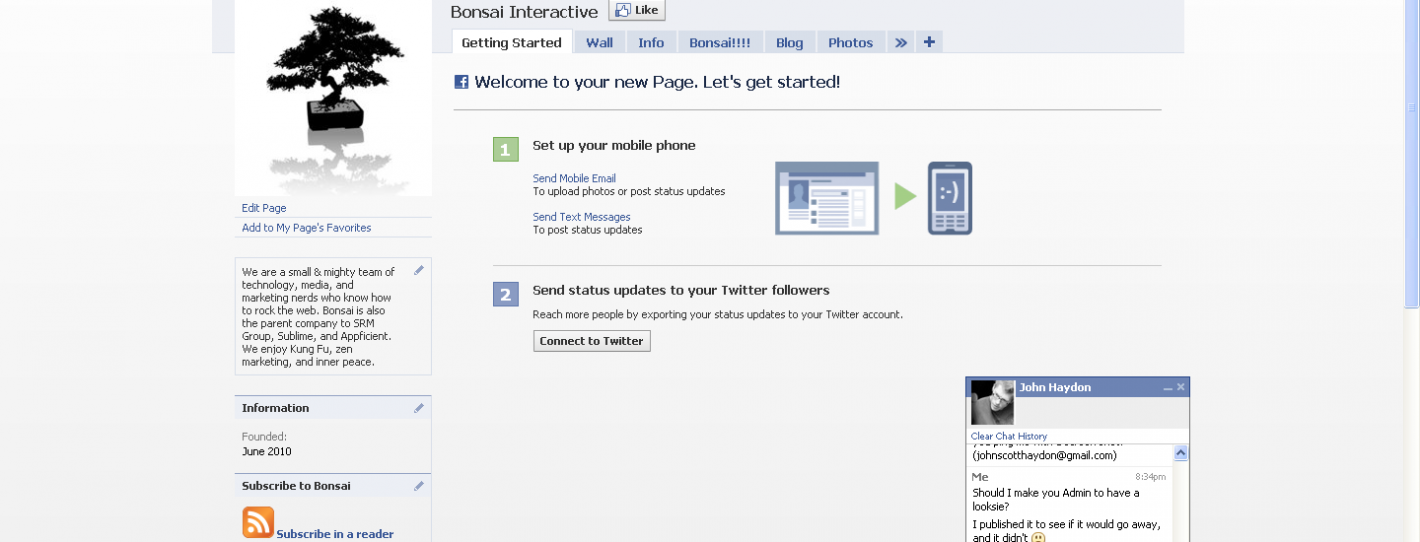
I only noticed it when I jumped on to design the new Bonsai Interactive Facebook Page. Instead of the normal tabs along the menu like Wall, Info and Photos, there was also a new tab called Getting Started.

Bonsai Interactive Facebook Page

As it suggests, it offered some tips on how to set your Facebook Page up. Great – anything that helps new Page users get the best from their Page has to be great, right?

Hey, it’s Facebook – so, no, is the short answer.

Since I already know how to set a Page up, I went to hide the tab. And found that I couldn’t. There was no way for me to drag it into non-displayed tabs, nor was there an option for me to delete the tab either.

In fact, the only way I could get rid of the damn thing was to link my Twitter account to the Page, as well as my mobile phone.

Riiiiiight…

The social side of me wants to think that this is just a way to connect your accounts together and make it easy to populate your Facebook Page from either Twitter or your mobile phone.

The cynical side of me sees it as another way for Facebook to have more information about you, and then possibly open up that information (purposely or not) to mobile ad companies and Twitter spammers.

I opened up a Help Ticket on Facebook last Thursday, asking how to remove. As of writing this post, no-one from Facebook has actually answered.

But there are plenty of other frustrated users complaining about this “helpful” addition.

Facebook upsets Page Admins

Like I say, I can see the benefit of having a Getting Started tab, especially for new Page users. But not having a way to delete or remove it manually, while it takes up a tab that could be used for something more beneficial to the Page, seems kinda lame to me (I had to link my Twitter and mobile accounts and then remove access to get rid of the tab).

What’s your take on it? Have you seen this new feature yet, and is it useful or just another Facebook faux pas?

Gen Y Isn’t Leaving Social Media – Are You Ready For Them?

Pewter Internet Gen Y social sharing survey

A new study from the Pew Internet and American Life Project makes for interesting reading on Gen Y and their presence in social media/social networking.

Pewter Internet Gen Y social sharing survey

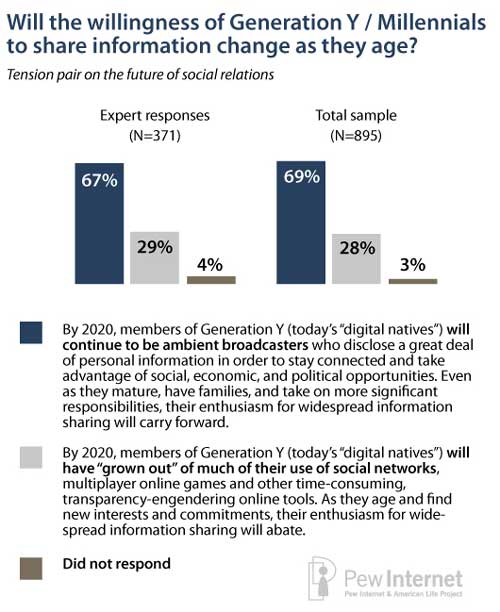
Using the responses from a cross-section of 895 technology stakeholders and experts, including the likes of?Clay Shirky and?Jeff Jarvis, the survey shows their belief that Gen Y won’t be leaving social media anytime soon. This is in contrast to various opinions on why Gen Y isn’t using social media.

According to the Pewter survey, 67% of respondents agreed that Gen Y will still be using social media and be active on networks by 2020. Not only that, but their connectivity will have grown and, even in parenthood, they’ll be active and open members of various social networks.

29% disagreed, saying Gen Y will have outgrown their current online use (including gaming) as new commitments take up their time.

The reasoning for those 67% believing Gen Y will continue to grow their connectivity is the very reason many detractors use against social networking – its openness and ability to share information. Couple that with the benefits of growing brand reputation and it makes sense for Gen Y to continue being active users in the space (and continuing to grow in uptake).

So what does this mean for you, as a business owner?

The obvious answer is that you need to take a look at your current approach and see if you’re ready for this huge potential audience (for example, half of YouTube’s users are under 20).

  • Does your company have Gen Y employees on your social media team?
  • Can you employ a Gen Y community manager to communicate your message?
  • Are you social mapping to find out where your Gen Y customers are?
  • Is your sales message adapting to also include Gen Y tastes and needs?
  • Are you taking part in dedicated chats like?#u30pro to understand what Gen Y feels about business, careers and more?
  • Are you reading blogs from the likes of Matt Chevy, Lauren Fernandez, David Spinks and Teresa Basich (amongst others) to understand this audience better?

While you might not be targeting Gen Y at the minute, they will be your customers of the future. Maybe it’s time to make sure you’re ready for that future now.

You can download the full Pew Internet report here.

Introducing Bonsai Interactive

Ucubd Offers Cool Mashup Options for Bloggers

Ucubd

UcubdI love hearing about cool new start-ups, and Ucubd might be one of my favourites, at least as much as fun factor goes.

Standing for “you cubed”, Ucubd is (in their own words) “a mashup platform that allows bloggers and other web publishers to combine popular social media content from YouTube, Twitter, Amazon and others and embed these mashups on their sites or link to them on our site.”

So, basically, Ucubd creates a fun info box based on the information you give it.

How It Works

Ucubd is based around embed codes (like those found on YouTube and Hulu), which you would normally use to embed your favourite video on your blog, website or anywhere that accepts HTML code.

The platform then looks at the video and produces relevant content to it. This could be tweets based around a keyword, or products on Amazon using the same formula.

Ucubd then places a box next to the video with that information. So, for example, you get the latest trailer for The Expendables movie, and you’ll have tweets about all the buzz surrounding this cool-looking guy flick.

Or, you get a video about the World Cup winners history, and you see products like books, tee shirts, footballs and more on sale at Amazon.

There are also templates for Hulu and Flickr, and the option to use Flash and Silverlight in your mash-ups (depending on the template used).

Once you create your mash-up, you can then customize the theme to suit your blog or site; get embed codes or links for blogs, websites or forums; and share via your social networks.

Ucubd and the Semantic Web

One of the cool features about Ucubd is its tie-in to the semantic web.

By tying relevant products and platforms together, Ucubd is part of the growing number of technologies that doesn’t just want to rely on simple keyword searches, but how these keywords are being used by communities and socially connected profiles.

So, in essence, you could make a mash-up, and if you’re logged in via the upcoming Facebook Connect option, similar mash-ups by your friends might pop up on your radar.

You could then feasibly find partners to work with on a collaborated project; or find like-minded people that you could exchange ideas with; or simply find new mash-ups and use them to expand your own.

The technology isn’t perfect. When I tried to make some mash-ups, Ucubd simply used the first word of the YouTube video I selected, and as you can imagine, the results were pretty funky! But, you can define what keywords are used, so this isn’t too much of an issue.

Additionally, the website embed code seems to open up your mash-up on the Ucubd website – it’d be much better to keep on your own site, for obvious reasons (the HTML-only code is ideal for blog sidebars).

The templates are also a little limited at the minute, being restricted to tweets and Amazon products that tie-in with your embed code.

However, these are minor quibbles on a new platform. The idea behind it is fun and solid, and as much as you could make countless fun mash-ups, there could also be a great business use for something like Ucubd (think presentations or after-show events).

Here’s a mash-up of my TEDx talk. What do you think – something that bloggers could find useful?

  • « Go to Previous Page
  • Page 1
  • Interim pages omitted …
  • Page 89
  • Page 90
  • Page 91
  • Page 92
  • Page 93
  • Interim pages omitted …
  • Page 174
  • Go to Next Page »
© 2026 Danny Brown - Made with ♥ on Genesis