
• Skip to primary navigation
  • Skip to main content
Danny Brown

Danny Brown

podcaster - author - creator

  • About
  • Podcasts
  • Journal

Insights

6 Small But Sweet Updates to Jugnoo and Other Stuff

Jugnoo social crm

Over the last few months, lots of folks have asked why they’d want to use Jugnoo versus their current platform of choice (say, Hootsuite, Tweetdeck, Trackur, etc).

It’s a fair question – all are good platforms with their own strengths. The easy answer (at first) is to make clear that Jugnoo is more than just a social dashboard or search platform – it’s a full-on business solution.

The next thing to show is that everything at Jugnoo has been built from the ground up to work in tandem with each other. Our social dashboard doesn’t just allow you to keep up with your networks, but also shows sentiment and intent that’s normally reserved for social monitoring.

Our social monitoring solution doesn’t just keep you on top of what’s being said about your brand or competitors, it also ties into our visual data solution that creates context out of disparate conversations online.

Jugnoo buzz visualyzer
(click image to expand)

Our visual data solution not only shows you in clear, buzz-driven analysis what’s being said and by whom, but it also connects that information to our patent-pending lead generation platform, where we can help you identify where an opportunity is as well as track all the actions that happened around that lead after your connected with them.

Which brings us back to the social dashboard, where you can continue that connection, as well as create specific promotions for that audience using our Social Hub (for example, if you wanted to help promote your charity goals, like the SMAC! Sock Monkeys Against Cancer campaign).

When you compare all we offer against all others offer, it starts to paint a picture of why you might want to check Jugnoo out, especially when it comes to the current pricing model while still in beta we’re due to come out of beta mode before the end of the year).

So, sure, we have all the “big stuff” taken care of – but that’s how it should be. It’s the little things that make the difference to the user experience, and we’re taking care of that too. Here are just six ways we’re doing that today.

1. Facebook Comments as a Stream

Jugnoo Facebook Comments stream
(click image to expand)

One of the great things about our users is they’re always helping us improve the platform. A suggestion we had after our last update was to enable the option of saving Facebook comments as a separate stream in the dashboard. This would allow users to have select conversations open and keep up-to-date with these, as opposed to trying to jump back into updates later. We thought that was a great idea, so we’ve implemented that feature.

2. Rich Media Embed

Jugnoo video embed
(click image to expand)

No-one wants to have to jump through hoops to view something online. You wouldn’t go to a blog, see a small part of a feature image or video and have to click to another site to see it in full. Social dashboards should be the same and, yes, we were a little behind the game here while we focused on our bigger visual data solutions. But consider that corrected now, with the ability to view images and watch videos in-stream.

3. Twitter Followers Stream

Jugnoo twitter followers
(click image to expand)

Another request from our users was to enable the option of a stream dedicated to your Twitter followers. This allows you to see your new follows (making it easier to thank them), as well as the profiles and tweet history of that person, to see if they’re a fit for you. A simple change but one that can help you connect just that little bit better.

4. Full Twitter Profile Information

Jugnoo twitter profile
(click image to expand)

When we updated the last time around, we introduced the social profile box across accounts. This let you see at a glance the key information on the user you’d just connected with. However, again, Twitter was left wanting a little as we concentrated on Facebook and how its open graph gave us more information to play with. Now, though, you get the same full experience on Twitter – timeline, mentions to that person and their favourite tweets. It’s not a huge update, but it is one we should have launched earlier. Lessons learned!

5. Predictive Twitter Usernames

(click image to expand)

Unless you’re already in a conversation with someone on Twitter, or you know their username outright (not always an easy thing), it can be a pain to locate someone to start a conversation. This is where the predictive username feature comes into play – simply start typing the first letters of the person you want to chat with and Jugnoo will offer you options to select from. Choose the user and send your message.

6. Link Previews

Jugnoo link preview
(click image to expand)

One of the downsides of social media can be the amount of phishing that goes on, especially on Twitter – sending someone a link to you (usually by DM) that allows the sender to hack your account and take over your profile (if you click the link). Additionally, you don’t know if a link to a blog post is something you’d be interested in reading before you click through, wasting time if it does turn out to be a wet noodle of a post. The new link preview option lets you see what you’re clicking through to and help you prevent both phishing attempts and crappy content views. Bonus!

And There’s More…

These are just six little updates that make the bigger Jugnoo user experience in general a lot smoother and cleaner, but they’re just a very small part of what’s coming in the next few weeks.

As I mention in the post, integration and collaborative solutions are a key part of what we’re trying to achieve here. We already have social teams to allow multiple users on the same account, and this will be enhanced with workflow, so you can allocate the right task to the right person and keep track of progress.

One of the things we’re really excited about, and one that ties everything together, is how we’re going to be integrating the dashboard stuff with the more visual solutions we provide. While I can’t go into too much detail at the minute, get ready for social dashboards to really be taken to the next level, both visually and operationally…

We have some fun times ahead – maybe it’s time to check us out and see for yourself how we can help you with your goals on social media.

Note: the features above are scheduled to be released to users a week today, on November 14.

Why HR Needs to Address Social Media (Infographic)

Social media and HR

Social media and HR

While social media is perfect for customer service and marketing, there’s a growing need for a company’s Human Resource (HR) team to be involved too.

I’ve written on ways HR can use social media in job searches, but that’s just one way. Increasingly, HR needs to be far more active in social media – from compliance to employee satisfaction at their jobs, and much more.

A new infographic from Compliance and Safety offers a multitude of reasons why HR needs to be more involved, along with examples of why it’s a good idea over a bad one.

Some of the statistics from the infographic include:

  • 91% of recruiters use social networks.
  • Almost half of U.S. companies block their employees from accessing social networks.
  • While Goldman Sachs invested in Facebook, it bans its employees from accessing the site.

There are some interesting takeaways from the infographic, but the key message (and one that all brands should be seriously thinking about) is workplaces actually become more effective and innovative if social media access is encouraged.

Don’t let your brand be one of the archaic ones.


There’s Nothing Savvy About Marketing or Newsjacking Disasters

Hijacking bad things

Hijacking bad things

This week, the eastern coast of the U.S. has been battered by Hurricane Sandy, one of the biggest storms to make land in the U.S.

The states of Connecticut, Delaware, District of Colombia, Maryland, New Jersey, New York, North Carolina, Pennsylvania, Rhode Island, Virginia and West Virginia have all bore the brunt of this “superstorm”.

So far, 16 people in the U.S. are confirmed dead. One woman died in Toronto, Canada after flying debris hit her. 50 people lost their lives in Haiti and the Caribbean as Sandy’s deadly path took shape.

And this is just the early hours of the disaster. Sadly, like any storm of this magnitude, the death toll and damage is likely to be worse yet, not to mention animals and livestock caught up in the devastation.

With all this in mind, you’d think we’d be more concerned about the welfare of those in harm’s way than taking advantage of some cool marketing opportunities, right?

Then again, this is the marketing industry we’re talking about – and I say that as part of that very industry, which is why this appalls me even more.

The Opportunity of Disaster

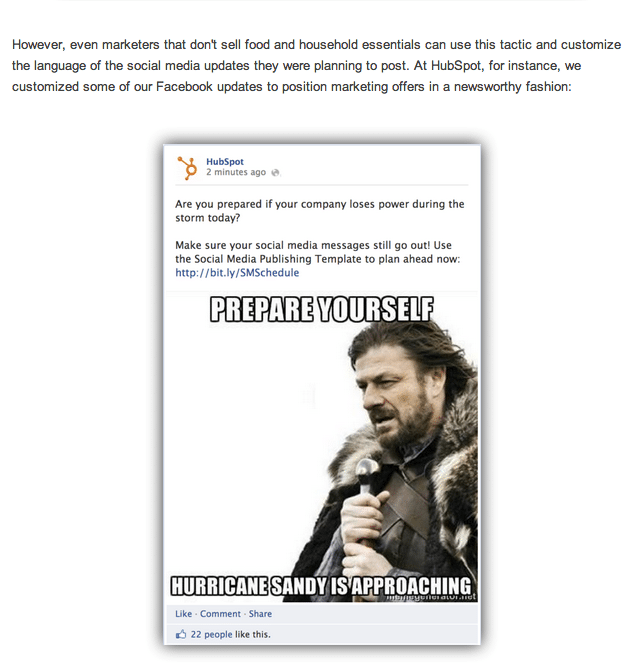
Yesterday, the inbound marketing business HubSpot published 5 examples of companies that have “newsjacked” (the practice of taking news stories and using them to your advantage) the disaster that is Hurricane Sandy.

HubSpot themselves took some heat in the comments, forcing them to edit the post – although it’s still not worded in a terribly sympathetic way.

Examples included a Hurricane Hair board on Pinterest, to a make-up company advising you how to look great by candlelight and ensure your nails are tip top. Because chipped nails while sifting through the debris of your destroyed home wouldn’t be the done thing, right?

While none of the examples are as tacky as the Kenneth Cole Cairo tweet – and one does offer generators and air mattresses for those affected by the storm – they don’t paint a great picture of the companies either.

The comments on the HubSpot post are pretty split – some defend the companies and their “marketing savvy”, while others call out the practice as well as HubSpot for the article.

As I mentioned earlier, HubSpot felt inclined to edit the post, so it’s possible the article was more “offensive” and some of the commenters didn’t see the earlier version (at a guess).

Can Newsjacking Work?

There’s no doubt that a hot topic is a way to get yourself – personally or professionally – into the “spotlight”. Heck, marketers and bloggers do it all the time on Twitter during various tweetchats, #blogchat often experiencing some of the worst hijacking from people desperate to share their blog posts.

Yet none of these are taking advantage of disasters to sell their product or service. It’s like hacking into the 911 emergency lines to call your girlfriend to save on your phone bill.

Can newsjacking work? For sure – if it’s done right. David Meerman Scott, who wrote the book Newsjacking, offers ways to interlope into other news stories and infiltrate your brand or message, and there are great examples in there.

However, it’s also very telling that David himself commented on the HubSpot piece, with less than a favourable view:

Newsjacking something related to death and destruction is very dangerous. I’m reading this morning that 20 people have died and there is billions of dollars in damage. That’s not fun nor funny.

If your company has a legitimate tie to the disaster and you are genuinely seen as being helpful then okay. For example, a home improvement superstore could blog “just received a shipment of 250 generators in the Boston store.”

But a frivolous attempt at newsjacking to draft off the news of the storm to sell a product unrelated to the storm is bad form and may trigger a negative backlash. A restaurant that says “Storm special – 35% off all appetizers” is not a good idea.

When the guy that wrote the book on newsjacking doesn’t see the benefits of these examples, then you know they’ve missed the boat and, perhaps, HubSpot has too with their article.

Although they also had their own frivolous moment with their specific Facebook post – because, yes, company messages going out are far more important than the company making sure their employees are safe.

5 Hurricane Sandy Newsjacks From Marketers

So who knows..?

Additional reading: Doug Haslam, “Newsjacking” – A Good Idea with Dangerous Pitfalls

Blogging as Part of Your Marketing Strategy

Blogging and your marketing strategy

Blogging and your marketing strategy

Last week, the good folks over at Social Media Breakfast Waterloo were kind enough to invite me over to speak to their members.

The topic was crowd-sourced, and the chosen talk was on how blogging could be used as part of your marketing strategy. Since the audience was made up of every business size, from solo entrepreneurs to SMB owners and C-suite executives, it was a great topic to be talking about.

You can view my presentation below, but i just wanted to highlight the four key points that you can take away for your own blog and marketing combination.

1. Research

One of the most important things you can do before you start a business blog is research whether your customers and audience actually want one. It’s all well and good saying, “Well, our competition has a blog – we should too!”. But that’s just setting yourself up for failure.

Look at your customer base; are they the kind that read blogs? Are they mobile-led (which would suggest a blog-friendly audience)? Are they computer-literate?

A slaughterhouse in Moldova is probably not going to need a blog; a hospitality industry business probably should have one. Ask your customers if they’d be interested in a blog – a questionnaire, an email, when they’re in your store, etc.

Having a ready audience will immediately increase your chances of having a decent corporate blog.

2. Strategy

Just as important as the research angle is the strategy one. If you launch a business blog and you don’t have defined goals with it, you’re just wasting valuable time and resources in maintaining it.

Will it be for lead generation? Will it be to promote your business’ thought leadership? Is it to handle service questions, or give the latest news on product or company updates? Is it to get to know your customers better and what makes them tick?

Have a solid strategy in place on what you want to achieve, and how you wish to achieve it. Then set timelines in place to measure how you’re doing, and adapt accordingly.

You wouldn’t go into business without a clear goal and plan – why would you do anything different with another angle of your business?

3. Consistency

If there’s one thing that blog readers hate, it’s inconsistency. This can be across multiple areas – publishing posts, comment systems (yes, I’m guilty of this one!), voice, editorial, writers and more.

And there’s a simple reason for this – there are currently between 180 and 200 million blogs out there, and reader interest is becoming shorter and shorter as publications vie for eyeballs. So if you’re confusing your reader with ever-changing positions on your blog, they’ll more often than not decide it’s not worth hanging around.

If you want to keep your readers and grow your blog, be consistent.

  • If you’re going to post once a week, make it the same day and the same time of day. If you’re going to post 2-3 times a week, keep it the same days.
  • If you’re going to be primarily a text blog, remain that way. If you’re going to be a video-led blog, be that blog. You can mix things up now and again, but keep the prime focus the one you set up yourself up as.
  • Keep the tone consistent. if you’re going to be a serious blog, remain in a serious tone. If you’re looking to show the fun side of your business, highlight that with pictures and a lighter tone.

If you keep to the goals you set out with, and the way you set out reaching them, it’ll cause less confusion and encourage readers to stay with you.

4. Measurement

One of my biggest bugbears is when I speak with business owners and ask them about analytics and measurement, and how they’re tracking their success based on their goals, and they reply with a blank stare and an, “Uh….” soundbite.

If you’re not tracking your activity, how do you expect to know if you’re succeeding; where you’re succeeding; where you need to adapt and more?

The best of it is, you can track all this stuff for free (with the exception of cost of man hours to do so).

  • Use Google Analytics or Woopra to track your web visits, as well as where the traffic is coming from, what your visitors are doing while on site, where they’re going afterwards, and much more. See which content works, which doesn’t, and amend your approach accordingly.
  • Track social media success with tools like Jugnoo (I’m biased, but we do track pretty well!), Most Shared Posts, or social campaigns in your analytics solution(s). By knowing what content resonates, and where, you can be far more strategic on your approach to both your blog and that platform.
  • If you’re selling products from your business blog, use something like WooCommerce and Improvely. This can identify the source of the purchase, the referral, the costs involved and much more.

You don’t have to run a bells and whistles measurement solution – but for the love of all things common sense, please do have at least some way to track what you’re doing!

As I mentioned, these are the four key areas for any business blog to really concentrate on and get right. There are more, which the presentation looks at. But as a starting point, they should be the ones you answer if you want your business blog to succeed.

The rest is up to you.

On Listening to Those That Make Your Blog What It Is

Listening to your blog community

A couple of weeks back, I sent an email out to my subscribers asking about blog comment systems.

The main gist of the question was centered around which option readers preferred – the WordPress native system, or third-party options like Livefyre and Disqus.

The reasoning was simple – while I might provide the original content, I firmly believe that the real magic of a blog post comes in the comments afterward. It’s where new ideas can be formed; feedback given; and new friendships and relationships forged.

Simply put, content may be king but community is the whole royal courtyard.

The results and feedback from that email showed that, while WordPress native was the simplest option, people did prefer the more social aspects of Livefyre and Disqus.

Out of these two, the majority of votes went to Disqus. Reasons included:

  • The ability to answer directly from your email notification
  • Better sign-in experience on mobile browsers
  • The community aspect of knowing what your commenters were saying elsewhere and the ability to join that conversation
  • A better way to track all your comments elsewhere

While some answers preferred Livefyre for its ability to integrate social conversations into the comments, there were also concerns re. mobile reading, and a more cliquey feel to Livefyre communities (though personally I would say that’s more down to the blogger and their interactions versus the system itself).

With that feedback, it was clear that – despite my love of Livefyre – readers preferred the approach to comments Disqus takes. Hence the reason it’s back on the blog after a trial run of the new version earlier this year.

Now, you could say that it’s my blog and I can run whatever options I want on here. And that’s true – but it’s also missing the point.

A blog without a community is simply a news channel. A community without interaction is simply a dead zone waiting to go somewhere else. A dead zone is the path to oblivion for a blog.

This blog has always been about your voice and interaction too – you bring different points of view and great ideas all the time. Why would I want to limit that?

So, thanks for being here and thanks for the feedback on how you wish to be here – here’s to continued conversations.

Update 19 March 2013: After experiencing some issues with Disqus – slow load time (particularly on mobile browsers), comments disappearing and filters not working properly – I’ve reinstalled Livefyre, with its new version 4.0.

  • « Go to Previous Page
  • Page 1
  • Interim pages omitted …
  • Page 40
  • Page 41
  • Page 42
  • Page 43
  • Page 44
  • Interim pages omitted …
  • Page 174
  • Go to Next Page »
© 2026 Danny Brown - Made with ♥ on Genesis