• Skip to primary navigation
  • Skip to main content
Danny Brown

Danny Brown

podcaster - author - creator

  • About
  • Podcasts
  • Journal

Latest posts from Danny Brown

Enjoy the latest posts from Danny Brown, and feel free to add your own thoughts in the comments after the post.

Permission Spamming for Friends

The Thoughtpolice PledgeMy friend John Haydon posted an interesting status update on his Facebook profile. Short and simple, it said: “Dear Facebook user. Please don’t tag me in a photo or video unless I’m actually in the photo or video. Thanks.”

And it stopped and made me think – are we now offering permission spamming for friends on social networks?

The minute we sign up for a service like Facebook, Twitter, LinkedIn, etc, we offer our details so we can find our existing friends or online connections, and hook up with them on our new network too.

The service we sign up for assures us that our details are safe and they won’t use or give them to third-party marketing and advertising services.

Yet it doesn’t really include that same option for friends.

That then leads to a whole slew of tags or similar on Facebook (just as John mentions) that have nothing to do with us, apart from our connection to that person.

Or there’s the Direct Message on Twitter where latest blog posts are pimped, or services shilled (though to be honest, I’m pretty fortunate in the connections I have on Twitter that they only DM me great stuff that I’d want to know about anyway).

The same goes for LinkedIn, where bulk and copy/paste messages are sent out promoting a service or product that, more often than not, holds no real interest for the person it’s been sent to. There’s also video responses on YouTube and even spam coming through on the likes of Skype and BlackBerry Messenger.

Of course, a lot can be put down to the networks not making it clear to the user that just by using a certain service, friends can be spammed (or the equivalent of unwanted messages).

Take the Facebook Like option, for example. If you like my Facebook Page, then (from what I’ve been reading) any updates on my page could appear on your wall, unless you (or I) have amended our settings so that doesn’t happen.

Now, I don’t want to spam you just as much as you don’t want to be spammed, and it’s certainly not deliberate. But Facebook makes this almost mandatory, which then pisses you off and makes my page offer less value, when I want it to be the complete opposite.

And therein lies the problem with all this new “social” approach, whether it’s networking or media. To be social, we have to open up certain doors.

But what happens when these doors turn our friends into spammers? And how do we differentiate the unwanted spam from the unaware spam? Thoughts?

Creative Commons License photo credit: Adam UXB Smith

A Quick Heads-Up on Access to the Blog

Hi guys,

Just wanted to give you a quick heads-up on access to the blog over the next couple of days. I’m in the process of switching web hosts from Hostgator to BlogOnCloud9.

While I’ve been pretty happy with Hostgator, I’m finding that as my blog grows (and the other domains that I currently have live, as well as a couple that will be soon) I need a host that can grow with my needs.

BlogOnCloud9 fits these needs, particularly with their cloud partnership with RackSpace.

I’ll be writing a little bit more about the differences I see (or hopefully see, anyway!) shortly. In the meantime, the blog may have some access issues in the next 24-48 hours. If so, I apologize, and hopefully the benefits of the changeover will make up for any inconvenience.

Cheers!

Simple News Aggregation with Guzzle

As more businesses get used to social media and how they can utilize it for their needs, news aggregation and brand monitoring has become a key part of the puzzle.
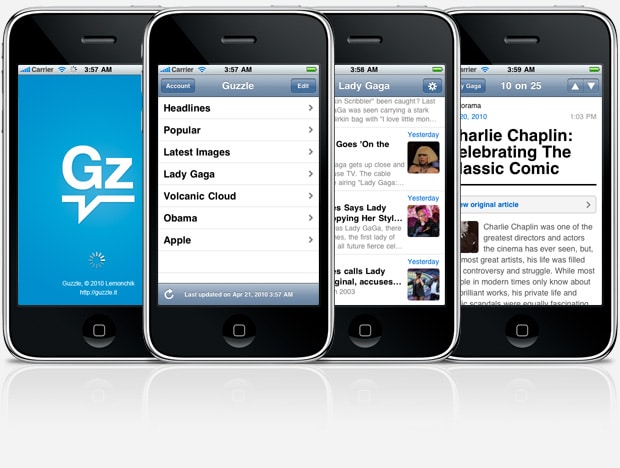

While there are a host of premium models available, including Radian6, Meltwater Buzz and the recently released IBM model, these can often be prohibitively expensive for smaller businesses.

Then there are the free platforms, like Surchur, SocialMention and Trackur.

The problem is, while these platforms offer great information, the way this information is presented can be a little confusing to anyone not used to using the platforms. Additionally, they’re more geared to social media mentions and interactions, when all a company might be after is more news related.

Step up Guzzle, from Marca Tatem of French web developers Lemonchik. And it’s pretty damn cool.

The Guzzle Approach

Where Guzzle makes it really easy for anyone to use is in its visual approach and how you can customize it to your tastes, whether they be text, visual or a little of both.

Jump to the Guzzle homepage, and you can either start customizing your page, or watch a screencast video introduction. This video shows you the basics of how Guzzle works, and is pretty short. Then it’s just a matter of setting up your feeds.

When you select Click Here link to start building your Guzzle page, it takes you to a screen where you can either go with preselected topics like Headlines, Popular or Latest Images, or Add Your Own Topics. It’s this second option that you want to start playing with.

Keywords, Phrases, People and More

By typing in descriptive terms of the news you’re interested in, Guzzle then starts scanning feeds across the Internet to get the latest stories about that person, brand, product or more.

When you’ve entered all the terms you’re interested in and hit the I’m Done button, the results will show on the page and in the manner you prefer. So, if you just want headlines, you get that; if you want headlines and source of the story, you get that. If you want extended copy, you get that, and so on – it’s really up to you.

While the headline only option is useful enough, the extended option is really cool. This is where Guzzle begins to look like a really tidy online news site, with images and extended copy making the information really easy on the eyes. You can separate by categories as well, to make it even easier to scoot over.

Desktop and Beyond

As well as being a web application, Guzzle also lets you have a pseudo desktop version. If you sign up for an account (which is free), you can save your searches and not have to keep setting up new ones every time you open your browser – perfect for when you’re not at your own desk.

On top of that, you can also get Guzzle on your iPhone. Offering the same options as the web version, having the news you need at your hands could be a great deal breaker when talking with potential clients and why they need your services. Especially if you give them breaking news even they weren’t aware of…

Not Quite Perfect – Yet

Of course, with any new product (and especially a news monitoring platform), there are always going to be some bugs or “shortfalls”, for want of a better word.

While the search engine is pretty robust – it uses the likes of?Pubsubhubbub, Open Calais and various online resources – it still seems a little hit and miss.

For instance, being the egomaniac I am, I typed in both “danny brown” and “danny brown blog”. The results that came back had nothing to do with me, and were all tied into the U.K. government and new Prime Minister David Cameron. While I agree I’m not particularly newsworthy, on the other platforms like Surchur, etc, the relevant information comes back.

Of course, maybe if there was a news story about me at the minute, results might be different. But as a key part of the service, not having details on a search could obviously prove problematic.

Apart from that, Guzzle seems to be a pretty cool way to track the news you care about. Tie it in with a solid social media monitoring platform as well, and you’re looking good.

It’ll be interesting to see how the application grows, and if it becomes more tied to social or remains more news-led. Either way, it’s a great addition to an already-burgeoning scene.

How about you? Have you tried Guzzle yet? Or what alternatives do you use?

Why Being Obvious Can Be Original Too

Sometimes we look for the smartest ideas and the way-out-there jumping off points to tell a story. We look for the abstract to make people think that our products must be worth knowing, since they can’t be told in a simplistic manner.

And yet sometimes being obvious can be original too. Take a look at this picture of a parking lot opposite the Kansas City Library in the U.S. state of Missouri.

If you came across this building in the street, two things would be apparent – it’s a place tied into books. And it’s cool as hell.

Some other things that stand out?

  • It doesn’t have artsy pretensions, although it’s definitely a work of art.
  • It doesn’t shout, “Look at me!” but it does grab your attention.
  • By going with the classic titles it lends itself to timeless quality.

Sometimes we look for the smartest ideas and the way-out-there jumping off points to tell a story. But as this image shows, being obvious can grab someone’s attention in the simplest of ways.

Something more businesses could learn from. No?

photo credit: jonathan_moreau

15 Reasons Your Business Sucks

15 reasons your business sucks

Or maybe just 15 ways your business could be optimized to appeal more to the folks you’re missing but would like not to miss.

  1. You don’t revisit your business plan regularly to re-align your current needs.
  2. You have one way and one way only to contact you.
  3. You advertise once a week with no surprises.
  4. You silo your teams.
  5. You don’t see the people, just the numbers behind the people.
  6. You haven’t updated your website since 2004.
  7. You offer just one payment option.
  8. You cut corners on investment.
  9. You don’t measure results properly.
  10. Your reinvestment budget pays for your weekend cottage.
  11. Yours is the only voice in the company.
  12. You think automated phone trees are the best thing since sliced bread.
  13. You don’t consider social media.
  14. You ignore the smaller fish for the blue whales.
  15. You’re recognizing the compartments of this list you’re currently reading.

Any to add?

  • « Go to Previous Page
  • Page 1
  • Interim pages omitted …
  • Page 190
  • Page 191
  • Page 192
  • Page 193
  • Page 194
  • Interim pages omitted …
  • Page 283
  • Go to Next Page »
© 2026 Danny Brown - Made with ♥ on Genesis