• Skip to primary navigation
  • Skip to main content
Danny Brown

Danny Brown

podcaster - author - creator

  • About
  • Podcasts
  • Journal

Latest posts from Danny Brown

Enjoy the latest posts from Danny Brown, and feel free to add your own thoughts in the comments after the post.

Review: Use Interviews to Increase Your Blog Traffic by Tim Jahn

Tim Jahn Increase Your Blog Traffic with Interviews ebook

Tim Jahn Increase Your Blog Traffic with Interviews ebookAs a rule, I generally don’t have book reviews here. I figure there are enough other bloggers that do a far better job than I could, so I pretty much leave the reviews to them.

Now and again, though, I’ll take a look at one that I feel is different enough and offers some solid advice for you, whether that be from a business angle; a social media angle; or – in this case – a blogging angle.

Of course, it helps when the author is someone I respect, and the topic is something that he can speak about with authority because he’s been there, done that.?Which is exactly what Tim Jahn offers with his new ebook, Use Interviews To Increase Your Blog Traffic.

Walking the Talk

Taking the success Tim’s found with his video interview series Beyond The Pedway, which he started back in 2009 and has seen more than 150 interviews since, Use Interviews To Increase Your Blog Traffic does exactly what it says on the book’s cover.

Prior to beginning Beyond The Pedway, Tim wrote a text-based blog (which still rates as one of my favourites today). Then he launched BTP and, within a few short months, saw his traffic increase by more than 650%. The reason? Simple – video interview = people-to-people = natural promotion.

As Tim shows in the ebook, people like to both be spoken about, and share where and when they’re spoken about. So video interviews are a win-win all round – but only when done properly.

Comfort Zones

Anyone can set up a video interview series. Video conferencing, Skype and other platforms make face-to-face time quick and painless. But as Tim shares in his ebook, there’s much more to successful interviewing than being able to split screens.

Tim offers solid advice on interviewing techniques; setting the scene; the right kind of research; and having the ability to make your interviewee feel as if they’re just having a chat with an old friend. Which, obviously, makes for a far better interview.

Having been interviewed by Tim myself a couple of months back, I can attest to his approach – he definitely knows his stuff, and makes sure that each interview not only gets your story across, but has the flexibility to wander into other areas that might be of interest to the viewer.

Knowing your subject; offering them the airtime they need; and researching their story to share the relevant parts to your audience; all these points and more are covered in Tim’s ebook, and make it a valuable resource for anyone either thinking about, or currently struggling with, an interview site or blog.

Tim also includes two bonus cheat sheets – one that includes 20 sample questions to get your interviewer groove on, and another that shares sample pitch emails to give you the best chance of snagging your chosen interviewee.

It’s a People Thing

As both Tim and David Siteman Garland show, video interviews are awesome ways to have a more interactive blog and share the stories of people that can help you get to where you want to be in your niche.

As Tim shows in his ebook, it’s also a great way to grow your own blog’s traffic into the bargain. Which is never a bad thing.

With actionable tips, great examples of what works and what doesn’t, as well as cheat sheets to help you stand out, Use Interviews To Increase Your Blog Traffic is a solid resource that anyone looking to run an interview blog should check out.

You can find more information on the ebook, and how to buy it – it’s a premium ebook, priced $19 -?here (non-affiliate link).

It’s Okay

its okay

When the Wright Brothers first dreamed of taking to the sky, they didn?t know what they were doing. But it turned out okay.

When Yuri Gargarin headed into the unknown on that historic first space flight, he didn?t know what he was doing. But it turned out okay.

When Ghandi pioneered?satyagraha as the non-violent counter to tyranny, he didn?t know if what he was doing would work. But it turned out okay.

History?s greatest moments are built on people who didn?t know what they were doing. But they turned out okay.

The point?

It?s okay to not know what you?re doing – it could be just the spur you need for your?own greatness.

Twitter Bans the Use of Hashtags

twitter hashtags

One of the most useful features on Twitter is being withdrawn as of today – the hashtag.

For anyone not on Twitter, a hashtag is the universal # symbol, and helps to separate individual conversations from the overall Twitter stream. For example, if I want to just talk with people about silly jokes, I would use the hashtag #sillyjokes. This would help others just follow that conversation by opening up a browsing window just for that hashtag.

There are some hugely popular hashtags, like #blogchat – a chat about blogging, oddly enough – and #socialmedia – a topic about social media (who said us social media types weren’t smart?). But, as of today, no more.

Twitter issued a statement saying that they were stopping the use of hashtags because of its connotation with drug use. Hash is slang for hashis, also known as cannabis, a drug known for making you feel sleepy. Not something that’s much use when you’re on the fast-paced world of Twitter.

“While we recognize cannabis may be legal in some countries, it’s obviously a concern for us to be associated with drug use. Even if Twitter co-founder Ev might look stoned to some folks, we can assure you he isn’t – he’s just a laid-back happy chappy!”

The announcement probably doesn’t come as a surprise – Twitter is looking to monetize its service, and being too stoned to click on promoted ads isn’t beneficial to anyone.

So, farewell hashtag – we knew you when, and you were fun. Guess it’s back to the drawing board for the Bong Button that was due to replace the Tweet button…

More details of the Twitter ban on hashtag use can be found here.

Using Lijit As a Content Marketing Platform

Lijit search

If you take a look at the sidebar to the right of this post, you’ll see the Lijit logo next to the search box. Lijit is a third-party search platform for bloggers – and a heck of a lot more on top.

While it’s perfectly fine to use whatever standard search box comes with your blogging platform (or add something like Google Custom Search), using Lijit takes all the goodness of your search box options and then amplifies it to the power of, oh, eleventy billion or so.

Here’s why.

Snapshot Audience Intelligence

While you can’t beat something like Google Analytics or Woopra for a full-on overview of your site traffic, Lijit gives you a great and user-friendly checklist for you to see how your blog is performing and help you target areas to work on.

Lijit search

By looking at these stats for the last 30 days on here, I can see that I had just under 20,000 unique readers, but just over 48,500 page views. So this tells me that the average reader is spending time checking out at least one more page or post while they’re here – great for keeping your bounce rate down.

Additionally, I can also see that almost a quarter of these page views came from search engines, which is great news since it means I’m not relying solely on social networks for my audience. So, if Twitter or Facebook died overnight, I’d still have a nice amount of blog traffic. It also means my SEO (search engine optimization) is working too, for the topics I want to be found for.

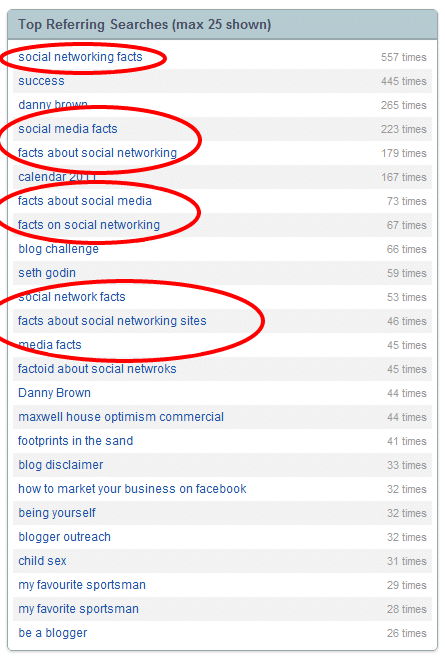
I can also see what the most popular search is – both on-site and off-site – and I can use that to tailor future blog posts and topics.

Blog Content Guidance By Your Audience

While I always say that you need to be writing for you first and that everything else is a bonus, it also makes perfect sense to ensure you’re at least aware of what your audience wants to read about. After all, they’re the ones that make blogging so enjoyable, by sharing their thoughts in the comments and making you look at topics in a new light.

So why wouldn’t you want to write on something that clearly interests them (and bring new readers to your blog into the bargain)?

social media factsLook at the figure to the right, for instance, and you can see that one of the most popular search terms in the last 30 days has been for “social media facts”, or other keyword terms based around that.
That search is pretty understandable, since I wrote a post last year on 52 cool social media facts that turned out to be pretty popular and resulted in a lot of social shares and syndication.

However, because Lijit shows me within my dashboard that this is still a pretty popular term – and the original post was written last summer, so the stats are already out of date – then perhaps I should be thinking of updating the post, and include newer networks.

Additionally, I can ask myself whether it might be an option for me to compile an ebook, which looks at the stats and collates them into a more flowing form.

And, say I was to offer some strategies based around the social media facts, could that ebook be premium, or would I want to offer it as a free ebook, which could then lead to premium offerings down the line?

So as you can see, already I’m starting to get a feel for my audience and understand both the current readers, and those coming in from search engines and what they’re looking for while they’re here.

Location Based Marketing – Not Just for Mobile

By using Lijit so far, I’m seeing where my audience is coming from, and what searches are happening not only off-site, but on-site too. This is allowing me to build up my audience’s profile which in turn is helping me write content that they’re going to read.

This is key for both personal and business blogs, and everything in between.

But then we can start taking that one step further, and really start writing content for a specific target audience. Not only that, but then we can start using our other social profiles in a far more strategic way.

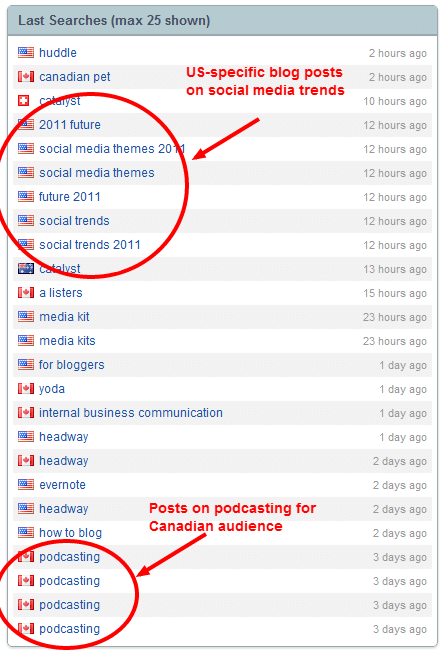
location based content marketingFor example, you can see by looking at the image on the right that there are two key pieces of information that stand out, that I could tailor into future posts:

  • A lot of U.S. visitors are looking for information about social media trends for 2011.
  • A lot of Canadian visitors are looking for information on podcasting.

This means I can now tailor some posts around social media trends and how they affect U.S. social media users for the next six months or so.

These can be for personal social media use in the U.S.; mobile browsing; social media and business use in the U.S.; is the U.S. falling behind in social media use compared to the rest of the world or leading the way; and more.

Switching to Canada, I could then tailor posts based around podcasting and its position within the Canadian space. Is it more popular in Canada than elsewhere; are there opportunities for guest posts from Canadian podcasters; can businesses use podcasting more in Canada, as opposed to text or video blogging?

These are just some of the approaches I could take. As you look more into the Lijit dashboard and the intelligence it builds around your readers – especially internal searches from the Lijit search box – you can really begin to blog strategically. Which is perfect for growing your existing blog audience.

The Added Bonus of Community Content

While Lijit is great for intelligence based around your readers and audience, one of the things I really like about the platform is how it lets you promote other parts of your own network, and that of your community.

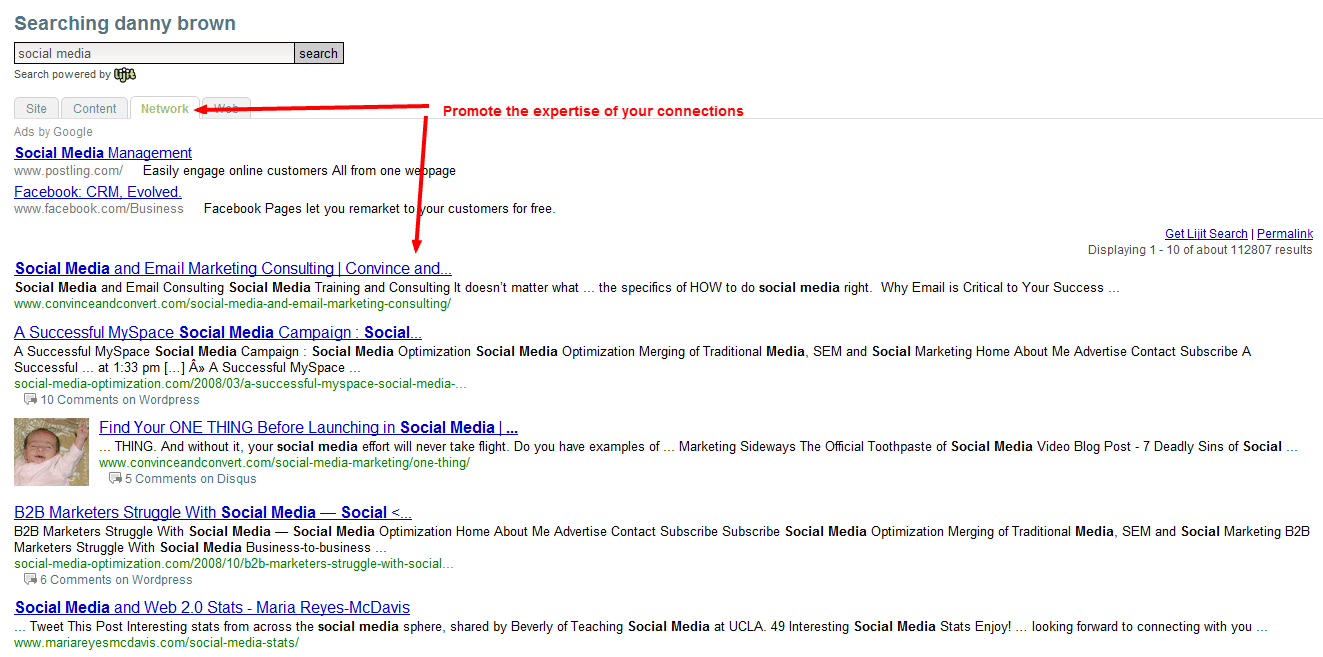
When you set up your Lijit account, you can add all your other profiles from around the web (as seen by the Content Tab on the search result in the image below). This then lets you pull search results from other blogs you might have, or your company website, or video channels, etc.

community intelligence

Next to the Content Tab is your Network Tab. This looks to your social profiles, along with any blogs you may link out to via your blogroll, and shares similar posts based around the search term on your blog.

The nice thing about this is that you’re not only allowing your reader to get the most comprehensive results for their query, you’re also sharing the cool folks you’re connected with and (potentially) driving traffic to their site too. Which is nice.

These are just some of the ways you can use Lijit to build a content marketing strategy for your blog. There are more, and this recent case study by Marketing Sherpa expands on some of these (disclosure – it features a certain Scotsman…).

Any blogger will tell you that knowing your audience is key – Lijit makes this just that little bit more effective. Which is never a bad thing, right?

Sunday Brunch – Organizational Tools

Grandpa Pete's Bagels
John's favourite brunch place, Grandpa Pete's Bagels in Stroudsburg, PA

Welcome to a new episode of Sunday Brunch, where we talk about your questions on social media, marketing, business tips, entrepreneurship and more.

Today?s question is from John Komatsoulis, owner of Learn About LLC, a Business Development Firm with offices in North Miami Beach, Florida, Albrightsville, Pennsylvania & Montreal, Canada. John asks:

?What tools do you use to keep your day organized??

Thanks for the question, John, and I hope the video helps.

If you have a question, you can send it in via the form below. There?s also a file upload option, if you want to send in a picture of your favourite Sunday Brunch place.

Cheers, and see you same time, same place next week for some more Sunday Brunch chats.

Resources:
As mentioned in the video, below are the four resources I use that you might find useful:

  • Google Docs.
  • Huddle.
  • Tungle.
  • Hootsuite.

This post contains a video. If you can’t see it displayed properly in your feed, you can view it directly here.

[gravityform id=6 name=SundayBrunch Question Form]

  • « Go to Previous Page
  • Page 1
  • Interim pages omitted …
  • Page 147
  • Page 148
  • Page 149
  • Page 150
  • Page 151
  • Interim pages omitted …
  • Page 283
  • Go to Next Page »
© 2026 Danny Brown - Made with ♥ on Genesis