• Skip to primary navigation
  • Skip to main content
Danny Brown

Danny Brown

podcaster - author - creator

  • About
  • Podcasts
  • Journal

social media

Community, Loyalty and the Power of Give

DSC_0641Last night on Twitter, I was part of the?#sbt10 chat, part of the Start Blogging Today project (disclosure – I’m a partner in the project). As usual, there were a ton of great topics discussed on how to make your blog work better for you.

One of the conversations that arose was how to reward loyalty – i.e., how to make sure that your blog community knows you appreciate them.

Michael Schechter asked how you’d go about that, and I suggested exclusive content as one option (similar to what I did with my free Facebook marketing ebook).

Of course, that approach on a blog would mean that to really benefit from exclusive content, your readers/community would have to be subscribed to a newsletter or email subscription. Which would then negate the rest of your readers that don’t subscribe this way, but still show loyalty by coming back time and again.

So what ways could you reward on your blog, for both subscribers and everyday visitors/readers?

Loving Your Blog Community

Face it, without a community a blog is nothing more than a broadcast platform. Your community nurtures the growth of your blog; it helps share with others; it defends if needed; and it keeps you growing as a blogger by sharing great insights in the comments.

It doesn’t matter if it’s a personal blog or more business-oriented – community is the real king (sorry, content lovers). For business blogs, community is the relationship to the sale – look after it and look after your business.

So what are some of the ways to reward a loyal blog community?

Exclusive Content

As I mentioned earlier in the post, this would normally be via a newsletter or email subscription, so may negate some of your readers (although it’s a great way to build an even more loyal community on subscription too). Some of the things you could offer could be:

  • A free ebook;
  • White papers;
  • Solid business advice not normally seen on your blog;
  • Discounted offers on affiliate programs.

There’s a lot you can make exclusive to really say “thanks for being part of my community”. You’ll have a better idea of what would appeal to yours – all you need to do is put that into action.

The Freemium Model

Because exclusive content needs an exclusive outlet to really make it work, you run the risk of excluding the readers that visit every day, comment and are as just as important a part of your community as subscribers.

7/365
So how do you make sure that you’re not ignoring them and focusing on your exclusive content?

  • Episodic content. This can work in two ways. You can either write a series of educational posts on topics your readers would find useful, or you can offer the first chapter of any ebooks that exclusive content subscribers receive. That way, “normal readers” still receive value and can decide whether to expand into the subscription option.
  • Actionable content. Want to be seen as a thought leader or serious blogger in your space? Then offer action points that anyone visiting your blog can take away and make work for them.?John Haydon does this all the time for Facebook strategies, while CopyBlogger offers solid tips on writing for search engines. Help others; help you.
  • Highlight your community. Another way to reward your community is to give them some reader love. By coming to your blog every day and commenting or sharing you, your community is helping you grow awareness of you. So do the same for them. Have them guest post on your blog, or post about someone from your community frequently. We all like to feel appreciated; make sure your blog community knows you appreciate them.

Protecting Your Community

Growing your blog community is the first part; but it doesn’t stop there. Just as your community nurtures you and helps you, so you need to do the same in return, but take it to an extra level – by protecting them.

Think about it – if someone’s taking the time out of their life and schedule to read and share their thoughts on your blog, the very least you should be doing is making sure it’s somewhere that they want to hang out, and feel comfortable doing so.

  • Make it clear you won’t tolerate abuse to your community. One of the best things about any blog is the comments section – so many great thoughts and ideas can come from here, and new friendships can be made. So making it a safe haven is paramount – protect your commenters, protect your blog.
  • Have a comment policy. Currently I don’t have one, purely because I’ve been really fortunate in having commenters who pretty much respect each other’s point of view. But it’s an idea I’m thinking of, and it can help you set both guidelines for new visitors, as well as assure your current community you have their best interests at heart.?Ari Herzog has an excellent example of how a blog comment policy could look.

These are just some examples of how you can use your blog to reward the people that make it what it is. There are a ton of other things you could do (and we discuss a bunch of them over in the Start Blogging Today forums).

You could use some of them; you could use all of them – the main thing is you’re at least doing something to reward your blog community.

After all, they reward you just by stopping by each time – thanking and looking after them is the least you can do, no?

Creative Commons License photo credit:?jammcm
Creative Commons License photo credit:?Kelly Schott

Why I’m Loving expo-MAX Analytics

If you run any kind of online business presence – blog, website, e-commerce store – then one of the key things to have in place is an analytics system for measuring your metrics.

This can be to gauge traffic, time spent on site, hot spots and much, much more. If you don’t have any kind of analytics in place, then you’re not seeing the bigger picture and missing out on valuable information that can take your site or business to the next level.

There are a ton of great measuring platforms available, some free, some premium, some of which I’ve spoken about before.?While I use a mix of?Quantcast and Google Analytics for this site currently, over the last few days I’ve been messing around with expo-MAX analytics.

And I have to say, I’ve been pretty damned impressed.

Who is expo-MAX?

Primarily an advertising solutions company, expo-MAX helps both advertisers and publishers to gain a larger share of their target audience.

For advertisers, they help you identify your strengths and eliminate your weaknesses, and tie it in with a fully monitored fraud prevention system so your ad spend can’t be gamed by fraudulent clicks.

On the publisher front, expo-MAX helps put you in touch with advertisers that are relevant to your blog or website. No generic Google Ads or similar – and by doing so, it should help you earn a decent return from any advertising you offer on your site.

But it’s the analytics package that interests me, and might do the same for you too when you see some of the cool stuff it does.

expo-MAX Analytics

While Google Analytics is a great free platform to measure the traffic, bounce rate and more to your site, often it doesn’t give you the information you really want (something Mack Collier points out in a recent post). So, good but not ideal.

expo-MAX, on the other hand, delivers a bunch of extra information with real-time metrics and then some.

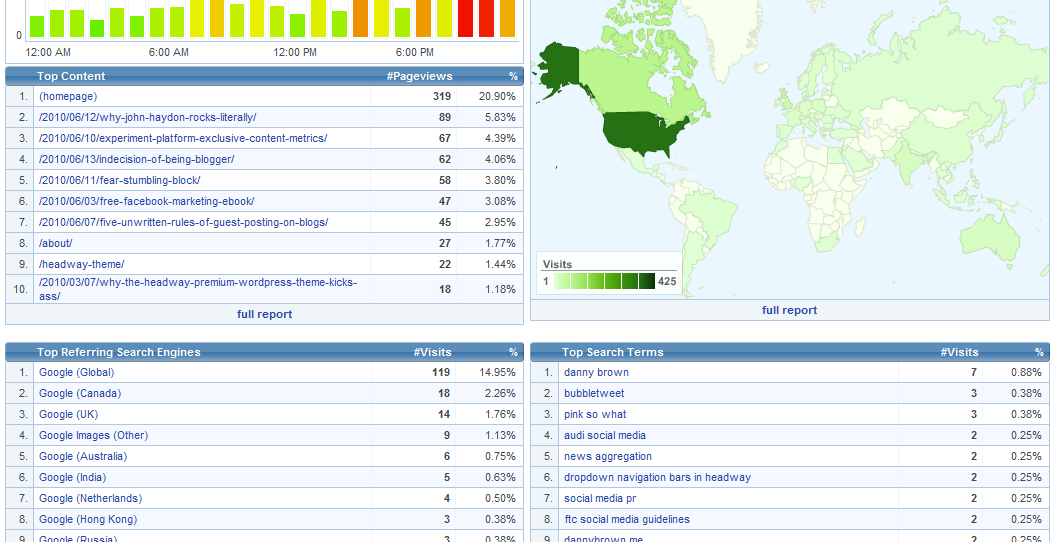
For example, say I want to gauge when the busiest time on my blog normally is. While I can get this with Google, it’s a bit of a pain to go through the process of correlating that with other information relevant to that time.

With expo-MAX, however, I can see the time of day that gets peak traffic, as well as the country that traffic comes from at any given time. I can also see referring sites, the most popular content and the top search terms that brought traffic to me – all on the same page. You can then dig deep into this information for even more metrics.

You can see how this would benefit you as a blogger or business owner. Say you have a promotion for North American audiences – you can then tailor publishing that offer to the busiest time of the day for that audience. You can also look at the titles of the posts that gained most traction, and work that into your promotion as well (titles can have a huge sway on visits).

Social Media Analytics

So far, much like Google and pretty much most other decent analytics platforms. And for the most part, that amount of information will be all many bloggers need. But if you really want to get into where your traffic comes from, expo-MAX has a pretty cool trump up its sleeve with social analytics.

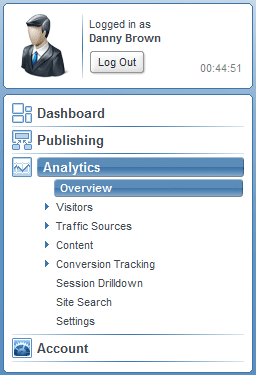
When you’re in your dashboard area, you can delve into your traffic sources and get a feel for who’s sending you the most traffic. Normally you’ll get some of this information on other platforms. But where expo-MAX differs (as far as I’m aware of from other platforms I’ve used) is by showing you the most prolific users.

For instance, once I’m in the traffic sources area, I can click on Referring Sources. This shows me the top 20 referring sites. Currently, Twitter is the site that provides most traffic to my blog, accounting for 19% of my traffic. If I click on the Twitter link, though, I can then see which Twitter user sends the most traffic my way (thanks,?Jim Connolly!).

Click on any of the other top 20, and you get more information again about that site’s top “providers”, if you like.

My current top 5 traffic sources are Twitter, Headway Themes (affiliate link), Google,?Networked Blogs and PR Daily – by clicking each of these, I can see what kind of audience I’m attracting and the type of link that saw them come here in the first place.

Let’s say you wanted to offer a customer appreciation promotion – you can see how having the information that expo-MAX offers in its social analytics would be of use.

Does expo-MAX Replace Google?

For me, yes. While Google Analytics is an excellent platform, it still doesn’t quite offer the amount of information that I’d personally want to use.

As well as the features I’ve highlighted here, you have a huge amount of information at your fingertips with expo-MAX. It even tells you what page of Google you’re on for the search term that brought your traffic (I found out I was on page one for the search term ftc social media guidelines, for instance, and saw how much traffic came to my blog for that term). Then you have conversion tracking, bounce rates, detailed drill down into information…. you need it, you pretty much got it.

I’ve only been messing with the tool over the weekend, and I’m already sold on it. For a free platform, it offers an incredible amount of information, and when I complement it with Quantcast for more detailed demographics, I’ve got all the information I could possibly want on my blog traffic.

From a blogger or business point of view, it’s pretty clear to see the benefits expo-MAX offers. Couple that with the very clean and user-friendly interface and support documentation,?the ability to track multiple sites?and the fact you can choose from a free or premium account, and I can see expo-MAX gaining a huge chunk of the web analytics market.

How about you? Will you be trying it, and what platforms do you currently use to track your metrics?

Note: This blog no longer runs on the Headway framework. Instead, it’s a custom WordPress design by Lisa Kalandjian of SceneStealer Graphics.

An Experiment in Platform Exclusive Content – The Metrics

Free Market Your Business with Facebook ebook from Danny BrownLast week, I released a free 33-page ebook titled 7 Ways to Market Your Business on Facebook.

As the title suggests, it offered a few ways you could use Facebook to take your business to your customers, by using the platform’s various strengths – Pages, Apps, Ads, etc, – as a jumping-off point. But there was a small “catch”, if you like.

As an experiment in offering exclusive content tailored specifically to connect the relevant platform and users, I limited availability of the ebook. Instead of sharing via this blog, or uploading as a presentation on Slideshare, you could only get it via my Facebook Page, and only if you liked the page in question.

The reason was two-fold – I wanted to see how popular platform-specific content would be (after all, my blog would probably offer more chance of traction), and I also wanted to use it as an experiment to show clients how Facebook can be used to increase brand awareness.

And it’s been interesting to see the results. Here are just some of the key metrics.

Facebook Metrics

The day before the ebook was made public, there were 190 people that ?liked? my Facebook page. The day of publication, that jumped to 265. The day after that, 389. Now, one week later, the number sits at 466 at the time of writing this post ? an increase of?more than 245%.

Because the ebook was only available via Facebook, and only after you liked the page, I made sure that there were no “hidden clauses” once you’d downloaded the ebook. If you wished, you could unlike immediately – the onus was on me to make sure I tried to keep you interested with content that you’d find interesting after the ebook was finished.

So far, it seems to be working – only 7 people have unsubscribed since the ebook went live last week. I think that’s a pretty acceptable number for any new subscribers that came just for the ebook itself.

Additionally, the continued interaction on the page has stayed steady even after the initial “rush” for the download. Daily active users increased by more than a third, and new Likers continues to grow as well.

The demographic breakdown was pretty interesting, as it showed a distinctly different readership from my blog analytics. While the majority of traffic to this blog according to Google and Quantcast is male and 35+, the split for the Facebook page is a lot closer.

In fact, there’s little to separate things when you look at users that fall within the 24-54 age group. Something to keep in mind as I share content on the page in future.

Traffic and Downloads

Of course, the Facebook numbers only tell half the story. Once you liked the Facebook page (if you hadn’t already), you were then given a download link to get the free ebook.

To measure the traffic here, I used a vanity URL via bit.ly, and tied that into Google Analytics for web visits. Again, it was pretty interesting to see where the traffic came from and the peak periods.

The bit.ly traffic shows that my request to keep the download Facebook-exclusive was “honoured” (and thank you so much for that!).

While I wasn’t stopping anyone from sharing away from Facebook, for the experiment to work, keeping the ebook limited to that platform would be the best way to gauge how successful the exclusive approach was.

As bit.ly shows, of the 368 downloads, 358 came from the vanity URL, of which 340 came directly from the Free Ebook tab I set up on my Facebook Page just for this experiment. Only 13 “cheated” and sent folks directly to the download link.

I’m more than happy with this figure, though, as there were no hard and fast “rules” to stop anyone from sharing the download link outside Facebook. So again, thanks everyone for “playing the game”.

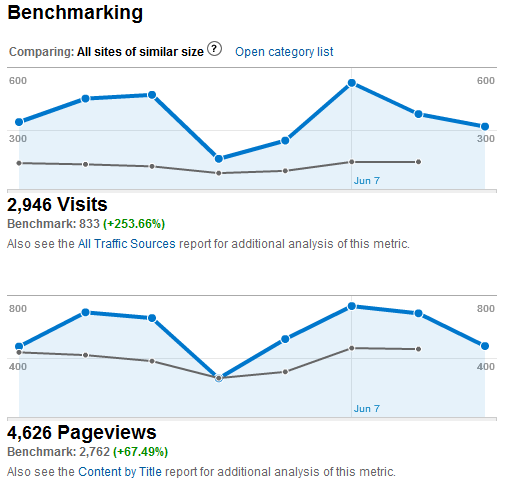
The Google Analytics stats show how overall site traffic increased both just after the launch, and with my mention on Twitter about writing the post you’re reading now. Connect that to the steady ongoing traffic?that the post is still receiving, and it shows that the experiment had, and still has, some good traction.

So, again, positive results – so far, so good.

Takeaways and Future Plans

So what’s the point in all these figures, graphs and information? After all, it’s just an ebook, right? Well, yes and no.

As I mentioned in the original post, I made the ebook an exclusive to Facebook to see how it compared to more traditional offers. The last free ebook I did,?Why Simple Works, was shared via my blog and Slideshare and could also be embedded or sent via email. That saw more than 1,400 eventual downloads, all told. So, a distinct drop in numbers with the Facebook one.

However, the 1,400 downloads for Why Simple Works only made up about 35% of the traffic to the various download options. The stats for 7 Ways to Market Your Business on Facebook saw downloads accounting for almost 77% – more than double the “popular” multi-platform sharing option.

It also saw a 245% increase in platform audience – something the more open sharing of the previous ebook didn’t achieve.

Now, think of this information as a business:

  • 77% active participation in an offer
  • 245% increase in your core audience
  • Jump in web traffic of more than 250%
  • 36% growth in daily user interaction

If this had been a business or non-profit promotion and you had these figures, I think it’s safe to say that it could be viewed as a pretty successful campaign, no?

From a personal viewpoint, I’ll definitely be offering more platform-exclusive content (look out for an ebook on social responsibility within the workplace soon from the SRM Group).

From an experiment point if view, I think it’s something that can be of value to show clients why Facebook can be such a useful platform for promotions and incentives. And that’s immediate value right there.

How about you? Have you offered anything similar? And if you downloaded the ebook, was it worth the “extra step” you had to take to get it, and do you see value in exclusives?

The Five Unwritten Rules of Guest Posting on Blogs

If you’re a blogger, you may have been asked to write a guest post by another blogger.?Or, you might have offered a guest post yourself to a blogger you admire.

Either way, writing a guest post opens you up to a whole new audience and can increase your own readership into the bargain.

Blog readers that may never have heard of you otherwise now have their eyes on you.

Add to that the credence that comes with someone else thinking enough of you to have you on their blog, and a guest post is a pretty big thing.

So it’s only fair that you follow the five unwritten rules when it comes to guest posting on other blogs.

Make It Great

This should pretty much go without saying, but the amount of guest posts I’ve read where you can see the author has basically just mailed it in is both surprising and disappointing.

If someone has taken the time to give you real estate on their blog and put you in front of their audience, the very least you can do is make sure that the post you provide is top notch. Before you send the post, ask yourself the following questions:

  • Would I be happy posting this on my own blog?
  • Is this the best this post can possibly be on this topic?
  • Am I being relevant to the audience of the blog I’m posting on?

Unless you can answer yes to at least two of these questions (the relevance factor may not come into play if the blog owner wants to mix things up a bit), then your guest post isn’t ready.

Research

What’s your guest post going to be about? Did you make the suggestion of the post, or did the blog owner ask you to guest? Either way, one thing you need to make sure of is that you do your research.

This could be of the blog’s archives, to get a feel for the topics that normally appear there. More than likely it’s going to be about the topic you’re writing about. Names, places, facts, statistics, references – all these and more need to be checked before you submit your post.

Let’s face it, you wouldn’t write a load of bull on your own blog, would you? So why even think about doing it to another blogger? Quote your sources and link to external references and sites and make sure the blogger you’re writing for doesn’t end up looking an ass as he or she tries to cover your mistakes in the comments.

This might seem a harsh view, but think of it as if it was your blog. Get the facts right; get the blog right.

Format

While content is often quoted as king when it comes to blog posts, the look and feel of a post can go a long way toward its readability. You can have the greatest blog post in the world, but if it looks like crap then readers will be put off from the start.

When you guest post for someone, provide the format you want it to appear in. Think of how you’d want it to appear on your blog, and then make sure you provide that information with the post itself:

  • Header(s) and sub-header(s).
  • Bullets or numbers.
  • Hyperlinks to external sources or sites.
  • Images with accreditation to the source.
  • Author bio.

If you’re unsure on the formatting side, take a look at the blog you’re going to guest on and go with the formatting that blogger uses. Or, simply ask them.

Don’t Be Self-Serving

Okay, so we know that guest posting on another blog offers you new eyeballs and therefore potentially new readers of your own blog. After all, if the readers of the blog you’re guesting on like what you have to say, it’s a pretty safe bet they’ll check out more of your own stuff too.

So why ruin that by pimping yourself shamelessly throughout your guest post?

If you’re using resources and links to external articles to back up your guest post, don’t make all the links to older posts on your own blog. You (probably) don’t do that on your own posts – instead, you highlight other great content and thoughts elsewhere (or at least should be). So why should that be any different on your guest post??Having great content is one thing, but linking to no-one but yourself is just a lesson in narcissism. And you can be sure the readers of the blog you’re appearing at will notice that too.

By all means, link to a post of yours you think might be relevant – but let the readers find out for themselves how great your other stuff is too. Because if you write a great guest post and it’s not self-serving, you can be sure folks will check your stuff out as soon as they’ve finished reading your guest post.

Remember to Visit

When you write a guest post, where do you stop? Is it the moment you finish typing and hit the Send tab on your email, or is it a quick visit to see how popular your post was?

Or are you a blogger who genuinely cares, so you’ll follow up your guest post much like you’d follow up a post on your own blog? After all, it’s still your name on the post, so why should you act any differently just because it’s not on your own blog?

  • Respond to comments made by the readers of the blog you’re guesting on.
  • Promote via social networks, much the same as you’d promote your own stuff.
  • Connect with commenters online and continue to build the relationship started on your guest post.
  • Write a post on your own blog, expanding the discussion started in your guest post and link to it, offering more traffic to the blogger who’s giving you real estate space.

While you don’t have to follow these unwritten rules when guest posting on another blog, they help you stand out as someone who actually gives a damn.

After all, if you can’t be bothered to offer anything but your best when taking over another blogger’s baby, should you even bother at all?

How about you – what would you add as an unwritten rule when guest blogging?

Posterous Grows Up as a Blogging Platform

Posterous blog platform

Posterous blog platformI’ve loved the idea of Posterous from the start.

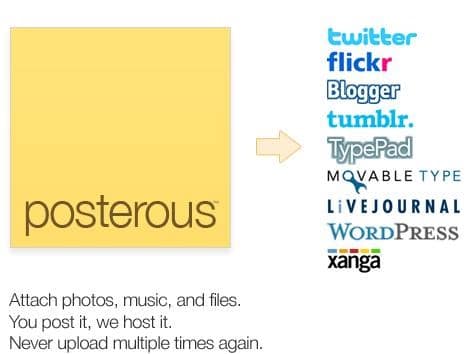
As a quick-start blogging platform, Posterous offers a pretty robust platform to build your blogging expertise from.

One of the biggest things that puts many folks off from starting a blog is often the time commitment needed.?Yet with the ability to post via email, Posterous allowed anyone to experiment.

I’ve introduced a few clients to blogging via Posterous, and it’s given them the confidence to swap to “full-on” blogging via WordPress and self-hosting.

And I have a Posterous account that I use for short-form blog posts. Ideas, basically, that I might expand into longer thoughts here. So, yeah, I’m a fan of Posterous.

Yet for all the good stuff that Posterous offers, it’s always been a lightweight version of blogging (at least to these eyes). No search engine optimization offerings, no real ownership, and none of the ability to expand your blog the same way you can with a dedicated one (pages, for example, and sidebars/toolbars).

Until now.

Posterous Grows Up with Pages

A new feature just announced by Posterous sees the platform become a more bona-fide alternative to full-on blogging. With the addition of Pages, you can now have a pretty cool little online hub to build your brand, business or services from.

Previous to this addition, all you had on your Posterous blog was your posts and any sidebar that came with the theme you chose (Posterous has about a dozen or so pre-built templates for you to choose from). While this is ideal for a simple blog, it doesn’t really offer much in the way of additional information (About, Services, Contact, etc) that you see on more “traditional” blog platforms.

Pages now allows this, and a little bit more.

Now you can have a dedicated About Page with Posterous, where you can expand on who you are and what you do/offer. You can also offer a Contact Page, a Services Page – heck, anything you want to add, you can. And setting it up couldn’t be simpler – just add the new page from your admin area, fill out the content and hit Publish. You can even drag-and-drop the navigation to rearrange where the page sits on your nav bar.

The other cool feature that Pages allows you to do is redirect that page. Let’s say you want to use Posterous as a simple outlet, and your main site is an e-commerce one elsewhere. You can set up a page called Store, for example, and use the redirect function to open up your full-on e-commerce store.

On my Posterous account, I’ve used the new Pages redirect feature to direct folks to my Contact Page here, as well as my accounts at Twitter, Facebook and LinkedIn.

This feature alone puts Posterous above many premium WordPress themes – although the Headway theme (affiliate link) I use on this blog has this ability – and suddenly turns the platform into a more fleshed-out option for bloggers.

Does Posterous Replace Dedicated Blogging?

Having said that, Posterous still doesn’t beat a full-on self-hosted WordPress blog just yet.

There’s still no dedicated SEO options (although you can tag your post with keywords). Nor are there options for plug-ins that a WordPress blog offers, which can really turn a blog into a free-standing social hub. And obviously, as a free platform, you’re still restricted by the terms and conditions of using Posterous.

But then again, that’s probably not the audience that Posterous is after. The platform offers a quick and easy introduction to blogging, and with the addition of Pages, allows even the most inexperienced of bloggers a great starting point.

And that’s all that matters at the end of the day, no?

Note: This blog no longer runs on the Headway framework. Instead, it’s a custom WordPress design by Lisa Kalandjian of SceneStealer Graphics.

  • « Go to Previous Page
  • Page 1
  • Interim pages omitted …
  • Page 28
  • Page 29
  • Page 30
  • Page 31
  • Page 32
  • Interim pages omitted …
  • Page 55
  • Go to Next Page »
© 2026 Danny Brown - Made with ♥ on Genesis