• Skip to primary navigation
  • Skip to main content
Danny Brown

Danny Brown

podcaster - author - creator

  • About
  • Podcasts
  • Journal

Search Results for: postmatic

Does Your Blog Really Need to Provide an RSS Feed Anymore?

Back in 2010, I published a blog post about the choices bloggers gave?when it came to how readers consumed their content.

The gist of the post was simple: should it be via RSS, or email?

My own take was bloggers should offer both (remember, this was at a time when RSS was still the #1 choice for bloggers to distribute their content). In the comments section after the post, the majority of commenters thought email was the better option too.

– I?m with you 100%! The blogs I never, ever want to miss (including yours) are ones I subscribe to via email. In addition to making sure I don?t miss anything this also allows me to read at my leisure and if I get swamped for a week or so I know which posts I still have to read. Michelle Mangen.

– Maybe it?s the Boomer in me, but I only read?on a daily basis?the blogs of those to whom I can subscribe via email, or perhaps on a blog roll. I realize, of course, that I may be missing out on some good reads; but the blogger is missing me as a subscriber. Ken Jacobs.

Even back then, both bloggers and readers were seeing the value of email, and (perhaps) the diminishing return of RSS. The thing is, though, it didn’t seem to matter – Google Reader was king and RSS feeds were the currency of any blog worth its salt.

Man, how times do change.

Alas, Google Reader, I Knew Thee Well

In March 2013, Google announced it was closing down its Reader service. For most content creators who had built a healthy subscriber base via RSS, this came as a bit of a shock.

In Google’s own words, however, perhaps it shouldn’t have been as big a shock.

We know Reader has a devoted following who will be very sad to see it go. We?re sad too.?There are two simple reasons for this: usage of Google Reader has declined, and as a company we?re pouring all of our energy into fewer products. We think that kind of focus will make for a better user experience.

When the company behind the leading RSS solution says use of its product has declined, you know it marks a change in how we, as readers, consume content. Perhaps it’s the other part of the statement that says more, though: “We think that kind of focus will make for a better user experience.”

As a long-time user of Google Reader, both as a provider of content and a consumer of one, the user experience was a major pain in the ass. Yes, you could create folders based on topics and categories, but if you subscribed to a lot of blogs, even that minimal filtering option soon became overrun and clunky.

As content moved into a cleaner, richer experience – both on the web and (increasingly) on mobile – RSS feeds and the way they’re curated became less attractive.

For me, I’d even say RSS feeds are pretty much redundant, and not worth the effort of trying to grow.

Email = Investment, Trust and Loyalty

Think about the one area you spend most of your day, personally and professionally. It doesn’t matter what job you’re in, or what social media channel you prefer over the other, or what smartphone you use – the one thing we all have in common is email.

Our inboxes rule us. Whether it’s getting notifications about a friend’s update on Facebook, or confirming tickets, or replying to a question that can’t wait until you get to the office, our email inbox is still the most-used direct communication tool we use.

It’s one of the reasons I switched my commenting solution (and soon-to-be subscription solution) to Postmatic. If it doesn’t matter where and when people are accessing email, because it’s second nature and easy to do, doesn’t it make sense to use that as your primary content distributor, conversation starter and loyalty builder?

Why would you want to continue using a clunky, increasingly-irrelevant piece of technology like RSS feeds that offer less value and less return for your content investment?

Looking at my own analytics for the last 30 days, I had just under 16,500 sessions (Google’s new name for visitors). Of that, guess how many came via RSS? 10,000? 5,000? 1,000?

Chance would be a fine thing. What I actually got, you can see below.

Danny Brown RSS

A whopping 335 sessions, or just over 2% of all traffic for the 30 day period. Worse still, the bounce rate is atrocious – RSS readers are simply reading the article and leaving my site (when/if they actually visit).

While I’ve never really used my blog as a lead generator (so I’m not particularly bothered about bounce), for any content creator looking to use their blog as a business creator, that bounce rate would be a major stumbling block.

What makes this lack of traction stand out more is when you look at some of the other traffic drivers – in particular, Twitter (which is ironic, given a recent article about Twitter’s own lack of value for traffic).

Even in the image above, you can see automated Twitter feeds (where blog posts are aggregated by RSS-to-Twitter) accounts for almost the same amount of traffic as a dedicated RSS solution like Feedly.

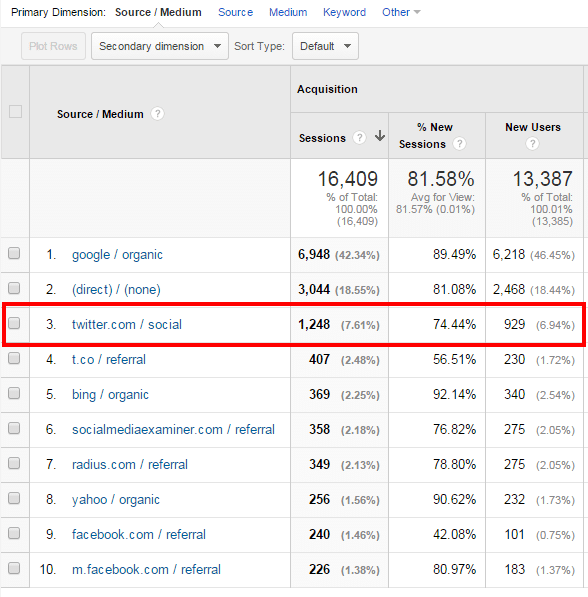
When you dig a little more into the analytics, you can see Twitter actually blitzes RSS out of the water.
Danny Brown Twitter

Direct traffic from Twitter accounted for almost 1,250 visits – almost 10x the amount from my RSS subscribers. Add in the indirect traffic using Twitter’s link-shortener, and you can see why Twitter is a better RSS solution than actual RSS feeds themselves.

In the direct stats, almost 2,500 of the 3,044 total is from my email subscribers – beginning to see a pattern? If you want quality traffic and trust in your content, RSS is not going to get you it.

RSS = Really So-over-it Syndication

Okay, it’s a play on words for what RSS actually stands for (Really Simple Syndication), but for me personally so-over-it would be a better choice of words.

Anyone can subscribe to an RSS feed. One click of the mouse, done. And (more usually than not) forgotten. When I stopped using my reader account a few years back, I kid you not – I must have had about 500+ blog feeds in there. Do you think I regularly visited them all?

Hell no – as Michelle Mangen mentions in her quote at the beginning of this post, the blogs I wanted to really subscribe to were done by email – and that’s been the way I’ve subscribed for the last 4-5 years.

There are multiple benefits to this:

  • Like I mention, anyone can subscribe by RSS. Doesn’t mean squat. Giving someone your email address, though, and trusting them not to take advantage of that? That’s the kind of investment you want in your content.
  • Email subscribers are more adaptive to change. When I recently changed my email and RSS subscription methods, I shared an update post via both email and RSS. 81% of my email subscribers updated their subscription – 81%. Guess how many RSS subscribers updated their feed? 9% – quite the difference.
  • The best relationships are those one-to-one interactions you get when someone replies to your blog post with an email about how it made them feel. I’ve had some of the most personal and powerful conversations via email after a post has gone live – RSS could never hope to achieve that.
  • When Google Reader closed its doors, I lost 6,500 subscribers overnight. 6,500! Now, given, many of them may not have visited anyway, but you take away 60% of a blog readership overnight and see what happens. Another reason I refocused my energy into email.

Content is changing. How we consume content is also changing. We don’t need “traditional” RSS anymore. We have social channels, as well as sites like This. and Flipboard, to aggregate and syndicate.

But they’re all external, and you’re competing for space with thousands of other like-minded souls. Email, on the other hand – you have these eyeballs, and they’ve chosen you over the competition already.

Now might just be the time you consider dumping that good old blog RSS feed for good or, at the very least, stop promoting it as an option to subscribe (you’ll see that I only offer email subscriptions in the box below this post).

After all, is it really doing you any good?

A version of this post originally appeared on the Wood Street Inc. blog.

A Social Conversation About Social Conversations

Community conversations

For the last few months, I’ve been thinking about how content is panning out, both from a creation and distribution angle.

As someone whose blogged since the late 90’s, it’s been interesting to watch the medium evolve from simple text on a screen to full-on media rich experiences, not to mention seeing how social media has swallowed some of the mainstays that were previously exclusive to blogging.

Perhaps one of the things that’s changed the most is the area of conversations. It used to be they were the sole domain of the blogger – post content, discuss afterwards in the comments.

Yet since Twitter and Facebook became popular, there’s been a lot of talk on whether this means the end not only for blog comments, but blogs themselves.

Personally, I don’t buy into it. Yes, we’re in the process of evolution – but like anything, evolution is good. It helps us grow, both as content creators and consumers of that content.

What bloggers need to do is consider how they’re doing things, and adapt to more organic ways.

You Don’t Preempt a “Normal” Conversation, So Why Preempt a Social?One?

Think about the best conversations you have. It could be with friends, family, lovers, partners, colleagues – heck, it could be with the bartender at your favourite local.

The point is, it doesn’t matter where it is, because the place isn’t the instigator of great conversations – the people are. Not just people, though, but the way that conversations naturally ebb and flow as questions and answers are exchanged – that’s where the gold comes from.

This is why organic conversations in a blog post’s comments often raise the post itself higher than the original content – because the points raised in a blog’s comments section can drive some amazing back-and-forth conversations, if both blogger and commenter are open to it.

It’s something that content itself has tended to struggle with – it’s not as easy to replicate that organic feeling.

Take interviews, for example.

If a blogger wishes to interview someone for their blog, it’s usually a Word document that’s sent over to the guest with a series of questions. The guest looks at them, answers, and sends back via email. The blogger formats and then publishes – job done.

(Note: this is based on written form blogging – obviously video bloggers and podcasters can enjoy the type of spontaneity found in “normal” conversations)

The problem with this is it’s a very canned approach.

[clickToTweet tweet=”Blog interviews can read like the content version of canned laughter – forced and unattached” quote=”Blog interviews can read like the content version of canned laughter – forced and unattached”]

There’s no spontaneity, no flow, no feeling that it’s an interview. Instead, it (usually) reads more like someone sent someone else a bunch of questions beforehand, and the responses are carefully planned to put the interviewee in their best light.

This is where ReplyAll comes into play.

Not Comments, Not Live Chat – Just Great Conversations

Imagine if you could have a conversation as if you were in the same room as the other person – shouldn’t that be the goal of social conversations (interviews, Q&As, etc.)?

The developers behind ReplyAll think so, and their solution does a pretty good job of making that happen.

ReplyAll.me

Much like the Postmatic solution I’ve introduced on this blog, ReplyAll does everything via email. However, unlike typical email conversations for interviews, where there are a maximum of two emails exchanged (questions document sent, answers document recieved), ReplyAll conversations can literally be endless.

The set-up is simple:

  • You, the content creator, comes up with a topic for discussion;
  • You decide what guest(s) you’d like to discuss this topic with;
  • You create a ReplyAll around this topic, and send out email invites to participate;
  • You post the first question, and hit Send;
  • The replies come in, you continue the questions, more replies come in, and so on.

It’s straightforward, simple, and a great way to have an evergreen discussion around a topic, while not impacting anyone’s busy schedule. Questions can be replied to at any time, and they’ll drop into the conversation.

And, much like Postmatic, because it’s done by email, you get an instant notification that there’s a new question or reply, and you choose whether or not to participate further.

Because of this approach, it makes for a more natural conversation where an intended direction of a conversation can take a sudden swing, based on the reply of one (or more) of the participants.

[clickToTweet tweet=”The best conversations ebb and flow like a river – ReplyAll provides both, and more” quote=”The best conversations ebb and flow like a river – ReplyAll provides both, and more”]

The ability to invite other guests to the conversation is an added bonus. Let’s say there’s a question no-one really has a definitive answer to – someone suggests, “You know who’d know this one? NAME – let’s ask her.” An email invite is sent, and the answer soon follows.

It’s a great way to lead a real conversation/discussion, versus a planned and sterile Q&A that can happen when answers are already provided.

What Would Be Cool to See

While ReplyAll is a pretty cool piece of tech at the moment, there are some areas that it could either improve in, or would be great to see added in future updates.

  • Currently, ReplyAll needs you to jump back over to your ReplyAll dashboard to participate in a conversation. So, when you get an email notifying you of a new reply, you can’t simply reply to that email. This is where Postmatic shines, and keeps the conversation flowing because you don’t have to take additional actions. Co-founder Zach Abramowitz has mentioned this will appear in a future update.
  • Social interactions to add to social commentary. Because of the way social channels have taken a lot of the impetus away from commenting on an actual blog post, it’d be great to have the ability to include (moderated) social chat around a ReplyAll topic as well. It’s the kind of approach that Coverit Live does well – albeit for a cost. If ReplyAll could find a way to do this, it’d add more layers to its functionality.
  • Alerts on drifting conversations. One of the great things about ReplyAll’s approach is it’s based on your time – you choose when to reply. Of course, this could also see conversations drift, as some guests take longer than others to reply. It’d be nice to set some form of timescale and follow-up alert, to advise a response is needed (or ask if the participant wishes to drop out).

However, apart from the native email functionality, these are mostly nice-to-haves.

What ReplyAll currently does, it does it very well. Embedding a conversation on your blog or website is as simple as dropping a piece of script into the page. Replies then update once received, and the ReplyAll discussion grows until the host ends it.

As content continues to evolve, and the conversations around content evolve with it, it’s interesting to see how developers are addressing them. Along with Postmatic, ReplyAll seem to be taking it back to where it all began – email.

Given most of the world still prefers this method of communication, that may be no bad thing at all.

Check out ReplyAll for yourself here.

For an example of how ReplyAll works, below is a chat between Zach and myself that took place over a 3-day period earlier this month. Look out for more experiments with this format here soon.

Why I Don’t Want You to Come Back to My Blog Post After You Comment

Empty blog

One of the things that continues to intrigue me when it comes to content is how we interact with each other after reading a post.

I’ve shared various thoughts on how I see digital conversations evolving, and how we need to close the loop more on making the experience the best it can be for everyone involved – blogger, reader, subscriber or occasional visitor.

Due to a change in how readers consume content and how they discuss it afterward (and, more specifically, where they discuss it), many bloggers have decided to switch off blog comments altogether.

For me, this is a lost opportunity for these bloggers, as the often rich exchanges of thoughts and ideas help take a blog post to a much higher level than it was originally.

Especially when the likes of Postmatic make it incredibly easy for everyone to comment, and comment intelligently (as in, the natural way comments should be handled).

Postmatic

Commenting as An Everyday Action

Think about your daily activities – what’s (probably) the one thing you do the most, regardless of setting (personal or professional)?

It’s probably composing and/or replying to emails, right? Because email is the one thing that remains the same, regardless of technology advances and solutions – you get a message and you reply. Simple.

So why isn’t blog commenting as simple? Why do we need to have multiple solutions all offering (useful, but still fractured) features? Why do we need to provide passwords, sign in options, social actions and more?

[clickToTweet tweet=”Why do we need so many different blog comment options? Actually, we don’t. #content” quote=”While choice is great, the truth is we don’t need so many different blog comment solutions.”]

The truth is, we don’t. While Livefyre’s SocialSync option is pretty cool, and Disqus’s tagging and recirculation community feature is nice, they’re still disparate commenting options.

If I prefer Livefyre, I don’t want to have to create a Disqus account (and vice versa).

This disparate approach to commenting is one of the reasons a lot of bloggers are using when it comes to justifying switching comments off. Instead of commenting on blogs, social channels are preferred as it’s where people spend their time anyway.

Which ties us back to email as a commenting option, because people are already there and using it in pretty much everything they do.

Which is great news if you have a self-hosted WordPress blog.

Read, Reply, Rinse and Repeat

It seems obvious when you think about it – you (usually) get a blog post update via email, you get notifications of new tweets, Facebook statuses, G+ interactions, etc., via email, and you get notifications of a new comment on a blog post via email.

Taking that to its natural next step, Postmatic enables readers and commenters to reply to a blog post and/or comment via email, too. Instead of having to be at point of origin (the blog post itself), the Postmatic experience is pretty seamless:

  • You receive the latest blog post via email from your favourite blogger(s)
  • You read the post in your email inbox, and want to leave a comment
  • Instead of flipping through to the blog, you hit your email’s Reply button
  • You type your comment and hit Send.

And that’s it – job done. Once you hit send, the email is converted into a comment and appears on the post. If it’s in reply to an existing comment, it appears after that (threaded, if the blogger has that option set up).

Postmatic reply

Further comments and replies will come to your Inbox, and you simply continue to use your email to continue the conversation.

It’s so simple, you wonder why it hasn’t been done before (well, unless it has, but I haven’t seen it, and the Postmatic implementation is super easy).

What I’d Like to See Added

I’ve just started using Postmatic, and I can see how popular it could become. Email is such a natural function for us, and we’re not limited by platform – desktop or mobile email is just as easy to use as each other.

Because of this, organic conversations can now be second nature too – we’re not having to jump over to multiple blog posts, nor do we have to worry if the blogger has their site optimized for the mobile experience.

[clickToTweet tweet=”Email is second nature to everyone, regardless of tech know-how. Blog comments should be too.” quote=”Email is second nature to everyone, regardless of tech know-how. Blog comments should be too.”]

These two points alone should see Postmatic find a pretty big userbase, and make blog commenting “popular” again. It’s also pretty good when it comes to features and support.

Postmatic features

While the existing?setup and features are easy and uncomplicated, some features that would make great additions would be welcome in future updates:

  • Currently, it’s for self-hosted WordPress only, and native WordPress comments. If Jason Lemieux, the Postmatic developer, can offer support for other platforms, either as a shortcode or line of script, it could really make Postmatic one of the default systems for commenting. (Note: Jason has kindly worked behind-the-scenes to make Postmatic work with wpDiscuz, which I currently use for comments).
  • The newsletter option that Postmatic offers, while excellent, doesn’t support custom deliveries (like the weekly newsletter I deliver, for example). Support for this is coming, so I look forward to seeing how it’s implemented.
  • Social sharing from the email would be useful. Given Postmatic’s goal is to make commenting easy, by letting you reply from your own email, sharing of posts could be affected if traffic to comment on an actual blog post is reduced. Including sharing options would definitely help here.

All things considered, though, I’m really impressed and excited by the possibilities of Postmatic. Making it feel as second nature as writing an email could really see the resurgence of comments at source.

And for many bloggers, that alone puts Postmatic in a great position to be an essential content tool.

To see how Postmatic works, simply reply to the comment I’ve left below the post, or leave your own comment and see how the reply is handled.

A Look Under the WordPress Hood at DannyBrown.me

Hybrid comments

Every now and again, I’ll get asked what plugin or solution I’m using on this blog to achieve a certain effect or result.

Because I use self-hosted WordPress to power this blog, it means there’s a crazy amount of add-ons, plugins and other optimization and performance solutions for bloggers to choose from.

While that choice is great, it can also be overwhelming.

Since I’m a self-confessed geek that likes to try out pretty much most things on this blog in the name of experimentation, I’ve used a fair few solutions in the six-plus years I’ve been blogging here.

It’s been a while since I last took a look at what’s underneath, so here’s what’s currently powering my blog, and why you might want to consider it for yours.

To make it easier (in case you’re already really happy with your sharing solution, for example, but looking to get more server speed), I’ve separated them into four main categories.

While some plugins may crossover into other categories, I’ve gathered them into the following areas:

  1. Security
  2. Optimization
  3. Visibility
  4. Growth

The solutions below are a mix of free and premium – what version you use depends on your need. Let’s dig in!

1. Security

While we may want a lot of eyeballs, shares, subscribers, downloads and more from our blogs, we need to make sure we actually have a blog up and running, that’s safe from attacks, and that can be restored if anything happens to it.

While there are various solutions out there, these are the ones I like and currently use.

Anti-Malware and Brute-Force Security by ELI

While WordPress is a great solution for any blogger, it can also be prone to frequent brute force attacks (where hackers try and gain access to your blog by multiple username and password attempts). The Anti-Malware and Brute-Force Security plugin by ELI is a great way to counter these attacks.

Anti-Malware Security and Brute-Force Firewall – WordPress plugin WordPress org English Canada

Features include:

  • Automatic removal of known threats and back-doors
  • Automatic blocking of SoakSoak and other known malware
  • Quick Scan options to give an overview of current threat status
  • Complete scan to look at every part of your WordPress site

This is one of the most comprehensive plugins I’ve used when it comes to brute force protection – definitely recommended.

Check out Anti-Malware and Brute-Force Security by ELI here.

Login Lockdown

Tying into the brute force attack method of trying to access your blog via multiple attempts at guessing your username and password, the Login Lockdown plugin does exactly what it says on the tin, by locking down access to your blog after a set number of attempts.

Login Lockdown

You can:

  • Set the maximum number of attempts to log in before locking down access
  • Set how long a failed attempt is locked out for
  • Hide login error messages
  • Lockout invalid usernames (useful for a blog with limited amounts of users in the backend)

While it’s a pretty simple plugin, it’s effective. And you can’t ask for more than that.

Check out Login Lockdown here.

Monitive

If your content is created for any kind of business value, the uptime of your site is crucial. Heck, even if you’re a personal blogger like me, uptime is still hugely important and something to keep an eye on.

Monitive makes this process easy. Simply create and account and they’ll start monitoring your site’s uptime.

Monitive

Frequency, type of alerts and reports are determined by the plan you’re on, but even the free account’s pretty awesome.

Check out Monitive here.

VaultPress

One of the worst things that can happen to any blogger is to lose his or her content due to a crash, hack, glitch or simple user error. If you have years of content, this loss can be even more painful.

VaultPress is a fantastic solution that not only backs up and restores your site (with real-time back up options), but also protects your themes, plugins and settings into the bargain.

VaultPress

Given that it’s from Automattic, the creators of WordPress.com, it’s almost guaranteed that this will be a great plugin, and so it is.

  • Alternative: iThemes offer an alternative called BackupBuddy. I was using this, but found it was causing load issues due to continuous creations of CRON jobs, so made the switch to VaultPress. More information on that issue can be found here.

Check out VaultPress here.

2. Optimization

Along with security, optimization of your blog should be one of the things you’re constantly tweaking. Google has already advised it will penalize slow sites as well as those that aren’t mobile-friendly.

Apart from your own penalization, though, the user experience – that of your readers – should be top of mind too.

Here are the solutions I use for optimizing my blog.

Akismet

One of the granddaddy’s of the WordPress plugin world, Akismet is probably a mainstay in the majority of WordPress blogs online today when it comes to protecting blogs from comment and trackback spam.

Akismet

It also allows you to see how many comments have been approved by regular commenters, and enables you to bulk clean your comments area from span, keeping your site free of extra load and bulk.

Check out Akismet here.

Anti-Spam

While Akismet does a pretty good job of keeping spam at bay, it can still be beaten by automated scripts that bypass its algorithm. This is where Anti-Spam comes into play.

antispam

It inserts an invisible checkbox, kind of like a captcha, that automated scripts don’t see. This adds an excellent second layer of filtering, and one that only real people will bypass (even though they’re not aware it’s there). This plugin has essentially killed all but the most determined of spammers on my site.

Check out Anti-Spam here.

CDN Linker

One thing that every blogger should be concerned about is site load. Not only is Google looking unfavourably on slow sites, but visitors are more prone to leave a site that doesn’t load in an acceptable time.

CDN Linker is a plugin that makes the connection between your preferred CDN solution (more on that shortly) and your site (even if you’re using a local caching option). It’s lightweight, easy to set up, and effective.

Check out CDN Linker here.

MaxCDN

I’ve mentioned earlier how Google doesn’t look favourably on sites that load slow. A lot of these load issues are caused by sites hosting images and files on their own servers. If they’re not set up for this, cue load issues.

MaxCDN is an excellent solution that does the heavy lifting for you, and lets you just get on with the important stuff like content.

CDN by MaxCDN | Experts in Content Delivery Network Services

I use a hybrid of MaxCDN, CDN Linker, and WP Super Cache to keep my load times to a minimum. Because of the theme design I use (media rich, large featured images), this has made a huge difference in my own blog’s performance, and is well worth the monthly cost to do so.

Check out MaxCDN here.

WangGuard

Run a blog for any decent amount of time and you’ll get your fair share of spam commenters. As well as being a pain in the ass for bloggers, spam commenters (or sploggers) can ruin the experience for other commenters too.

WangGuard counters this by detecting and removing sploggers through a variety of ways – checking for duplicate emails, checking emails against DNS servers, enabling honeypot traps and more. An excellent solution.

Check out WangGuard here.

wpDiscuz WordPress Comments

While?there’s been a lot of talk recently about blog comments dying, I don’t buy into that. Sure, they may be moving more onto social channels, but there’s still life in “traditional blog comments” yet.

A relatively new plugin, wpDiscuz offers a sleek and elegant approach to comments, without all the bells and whistles that other commenting solutions come with.

It also uses native WordPress comments as its starting point, and this makes using wpDiscuz super easy.

  • Simple name and email requirement to leave a comment
  • Ajax powered to stay on-comment as well as utilizing “load more comments” versus pagination
  • Voting up and down options
  • Social sharing options
  • Customizable to fit your theme brand and design
  • In-depth backend to optimize usernames, commenter options, notifications of new discussions and more

I’ve recently started using wpDiscuz after being impressed with it on my wife’s publisher site. Its clean, simple to use, fast, and – most importantly – lets you keep full control of your comments on your own domain.

Note: After having issues with the Ajax loading, as well as mobile commenting, I disabled wpDiscuz. I now use Postmatic, for commenting via email, as well as their own commenting solution, Epoch.

  • Alternative: Previous to wpDiscuz, I’d experimented with a hybrid comment system on Inline Comments and G+ Comments, but have had to disable for now due to a theme incompatibility. Livefyre is also an excellent solution.

Check out wpDiscuz here.

WP Lightbox 2

When bloggers use images on their sites, it can be pretty hard to see the detail, dependent on both how much text is on the image, and the blog’s design (a small main content area will limit the image’s dimensions).

WP Lightbox 2 allows your readers to click on the image, and it’ll expand into a more optimal size (even on mobile). You can also create galleries as well as photo albums, and filter how large the image displays, based on browser screen size.

Check out WP Lightbox 2 here.

WP Smush Pro

Tying back into the optimization combination of MaxCDN, WP Super Cache and CDN Linker, WP Smush Pro helps keep media file sizes down by reducing an image file’s size on upload.

WP Smush Pro

With the option to optimize existing images, and extremely simple set-up, it’s a great way to keep server load down even if you’re not using any other caching or optimization solutions.

Check out WP Smush Pro here.

WP Super Cache

As sites get heavier with load, caching content is a great way to ensure your visitors get to enjoy a speedy site. Caching simply means you’re “pre-loading” saved content, instead of having to load new files on every visit.

WP Super Cache is one of the best, as well as one of the simplest (even though it still has pretty in-depth features if you want them).

  • Legacy cache versus supercache, offering more options on where your content is preloaded from
  • Comment compatibility (comments will still show up right away)
  • Dynamic caching for certain pages
  • Cache rebuild to ensure each new visitor gets optimal load

There are a host of features on WP Super Cache, and it’s pretty easy to set up (with excellent support).

I don’t actually use it as my main caching solution – I leave that to MaxCDN, WP Super Cache and CDN Linker (and I explain here how to do that).

  • Alternatives: One of the most popular caching plugins is W3 Total Cache. From personal experience, I found this too intensive for my needs. A simpler solution is Quick Cache.

Check out WP Super Cache here.

3. Visibility

Of course, it’s all well and good having great security, and optimizing your blog ready for all the traffic that will come your way, knowing they’ll be presented with a safe and optimized blog. Not so fast, Skippy.

Making sure your content is seen is, surprise surprise, pretty key too – and if you think that’s an obvious statement, you’d be wrong, sadly.

Working on the visibility of your blog will be a constant challenge, but doesn’t have to be one you’re not prepared for.

Infinite SEO

There are a lot of blog posts that will tell you SEO is dead and content is the new king. While SEO as a standalone tactic may not be as important as is used to be, it’s still a key part in any successful content plan.

Infinite SEO is a great plugin with a host of features that anyone can use:

Infinite SEO
  • Control over page or post SEO
  • Preview for how your SEO will look in search results
  • mozRank and Page Authority based on external links
  • Intensive sitemap creation and indexing
  • Automatic internal linking for better cross site authority
  • Multisite and BuddyPress integration.

While there are several other SEO plugins around, for me this one beats them all.

  • Alternatives: I’ve previously used the hugely popular WordPress SEO from Yoast, as well as the All-in-One SEO Pack, and both are excellent alternatives to Infinite. Yoast is more involved, and probably better suited to more advanced needs.

Check out Infinite SEO here.

RSS Footer

This is a bit of an older plugin, so you may not want to use it (often older plugins can cause conflicts with later versions of WordPress or, occasionally, a security concern).

However, I’ve used RSS Footer for years with no issue. When used, it adds a simple sentence to your RSS feeds, and shows where the content was first published. Great for more visibility if your content is syndicated, even better to beat content scrapers at theor own game.

  • Alternative: RSS Footer has actually been enveloped into its developer’s SEO plugin (it’s from the same guy that built WordPress SEO). However, you can still download the original plugin on its own if you don’t use WordPress SEO.

Check out RSS Footer here.

Social Warfare

Perhaps the most effective way of getting any content seen is through social sharing, and there are no shortage of excellent solutions around, both free and premium.

I’ve experimented with more than my fair share, and the one I’m impressed with the most currently is Social Warfare.

Social Warfare: Your Ultimate Social Sharing Arsenal

The name alone should tell you this plugin means business.

  • Cached share counts for faster loading
  • Sort posts by social popularity
  • Customize tweets for optimized sharing
  • Optimize images for sharing on Pinterest
  • Optimized images for sharing on Twitter, Facebook, Google+ and LinkedIn
  • Use different meta descriptions for open graph sharing
  • Integrated Sniply Buster plugin to combat the Sniply content hijacking script
  • Multiple design options, including responsive buttons, and sticky share options

As I mention, I’ve used countless sharing plugins and this one has really impressed me. The developers are also great at listening to suggestions and pretty fast with support issues.

  • Alternatives: Two great alternatives to Social Warfare are Flare from Filament Apps, and the Monarch sharing plugin from Elegant Themes. Both offer multiple design options, stats, mobile sharing options and more.

Check out Social Warfare here.

4. Growth

Ironically, this part of blogging is one I never really used to care about. And, to a degree, I still don’t: you won’t see any annoying pop-ups shouting at you to subscribe before you’ve even seen the content, and I don’t use my newsletter to sell anything.

However, as content consumption gets even more fractured, and audience attention dwindles, growing your blog and its community is key to any kind of success and longevity.

Elastic Email

There are a host of email service providers when it comes to blog newsletters – MailChimp and AWeber are probably the two best known.

However, depending on the size of your list, these can get costly, which is why Elastic Email is such an excellent solution.

Elastic Email

While you can use Elastic Email as your newsletter form builder as well as sender, I prefer to use MailPoet for my forms (as shown further down), and Elastic Email for my delivery.

Features are excellent:

  • Easy subscriber cleansing tools
  • Real-time reputation monitoring to show your current status (spammy or trusted)
  • Activity reports
  • Single API to integrate other newsletter services (the way I do it with MailPoet)

Perhaps the best feature of Elastic Email though is the price.

Starting at $0.99 per 1,000 emails, the cost goes down as your email numbers increase. I’m currently only paying $0.39 per 1,000 emails – a small fraction of what I’d pay with other providers. And it’ll only decrease in cost as I continue – result!

Check out Elastic Email here.

Magic Action Box Pro

Look to the bottom of this post, or any other on my blog, and you’ll see only one call-to-action (CTA) – a subscription box for my weekly newsletter.

As I move more into personal content and interactions, the newsletter is perfect for me, and Magic Action Box Pro is perfect for what I need.

Magic Action Box pro
  • Support for any autoresponder service
  • Gated content options
  • Multiple and responsive templates
  • Sales box and sharing box options
  • Simple placement choices

While I don’t use many of the features (gated content and sales-oriented CTAs), what I do use has made a huge difference in email sign-ups. And for something that’s been built to provide that lift, you can’t ask for much more than that.

Check out Magic Action Box Pro here.

MailPoet Newsletters

While it’s all well and good getting new subscribers, if you’re not delivering emails that are appealing, you’re simply turning these new subscribers off.

MailPoet is an excellent email template builder that also comes with analytics around your subscriber actions, multiple list options, the option to implement in widgets and pages, and more. There’s also a WangGuard MailPoet Connector plugin to stop spammy email sign-ups.

MailPoet - A newsletter plugin for WordPress

I moved to MailPoet from Feedblitz?earlier this year and I wish I had done it a hell of a lot sooner. Easy to use, far more design options, and simply a better experience – recommended.

Check out MailPoet here.

Note: As of June 18, I’ve made the full switch to Postmatic for email delivery and comments by email – you can find out more about that here.

Future Plugins and Solutions – And You

Of course, as any blogger will tell you, just as content direction and voice is always in flux, so are the plugins and solutions we use on our blog.

While the options above are my current choice, they’ll be added to very soon with two very cool solutions that take content interaction and discussions in very interesting directions – more info on that soon.

Also, being on self-hosted WordPress, we’re so very lucky to have an amazing community of developers who are always trying to improve every experience – front end, back end, reader, blogger – that to stand still would be foolish (and impossible).

I can’t wait to see what comes next – in the meantime, though, I’d love to hear what you’re using.

Fire away – the comments are below, and all yours!

Blog Comments, Digital Universes, and the Future of Social Conversations

Grandiose

Back in “the good old days”, conversations around a blog post would happen at source – the blog itself. This led to a few direct results:

  • The blogger would be seen as an “authority figure”, since the ability to spark conversation meant his or her thoughts were worth listening to and debating;
  • Commenters could share their thoughts and, by adding extra value to the conversation, potentially increase awareness and interest in their own blogs or social footprints.

Then social media happened (and, yes, I firmly place blogging as one of the granddaddy’s of social media, but for this post I’m going to separate the distinction).

Instead of blogs being the sole recipient of comments, now there were Facebook discussions, Twitter conversations and, more recently, Google+ threads. The domain of the blogger was no longer the domain of the conversation.

For bloggers, this was seen as a major problem – just Google has social media killed blog comments to see how much concern there is. Personally, I blame crap content over social conversations when it comes to this complaint, but then I’m a grumpy bugger.

For brands, who used blogging as a way to garner immediate and direct feedback on company culture, product launches, etc., the problem was more pronounced.

Instead of being able to monitor on a single domain, the question of scale reared its head as multi-channel conversations painted a much more fractured picture of how their brand was perceived.

The thing is, this new challenge shouldn’t be viewed as a challenge, but an opportunity.

The Hyper-Extended Conversation

While having multiple discussions going on at the same time causes its own set of problems as far as scale goes, it’s also nothing really new.

Just because a pre-social blog post kept comments on its domain, that doesn’t mean the topic wasn’t being discussed elsewhere. Email shares and forum posts, for example, continued the conversation away from the eyes of the blogger.

Additionally, despite what many bloggers might think, our blogs aren’t the centre of everyone’s digital universe. Web users have vastly different social behaviours – some prefer engaging on blogs, while others prefer their own “safety zones” in the shape of their chosen social network(s).

Future of social conversations

As people and as businesses, this is how we learn – by allowing people to share honest thoughts and acting on them.

Often, blog readers may be put off commenting on a post. The reasons can be many:

  • There’s already a lot of conversation happening, so why add more at the source?
  • The blog community seems like a clique.
  • The blogger doesn’t respond, so why should you leave a comment?
  • The reader simply doesn’t feel comfortable offering their details to comment.

All valid reasons to not comment – yet these very reasons (and more like them) don’t mean that same person won’t discuss the post elsewhere.

This unwillingness to comment on a blog directly, but still discuss elsewhere, offers a great learning opportunity for those looking to truly understand what makes an audience tick, both from a blog reader angle and potential customers through a business blog.

The Closing Loop of Fragmentation

Technology vendors are recognizing this need for closing the loop on fragmentation, and are trying to offer solutions that marry the best of blog commenting in their native form with their social counterparts.

For example, Livefyre – which I use on here and pretty much all my blog properties – took a big step in collating the conversations around a blog post with their SocialSync feature.

Livefyre SocialSync

This cool feature identifies conversations on Twitter (see above image) and Facebook Pages, and delivers them into a blog’s comment stream. This ensures any additional discussions on two of the bigger social networks aren’t missed, as well as enables the blogger to reply directly from their own comments back into that network.

While the SocialSync feature is perfect for bloggers looking to truly optimize the conversation, Livefyre’s business solutions for brands goes even deeper and offers social signals from multiple touch-points online.

Livefyre’s main competitor, Disqus, offers their own take on closing the conversation loop. As well as pulling in Reactions from Twitter, the company provides deeper insights into the community around your blog.

Disqus Audience

By analyzing the kind of content your readers consume elsewhere, as well as the content that encourages them to leave a comment, Disqus can recommend similar content on your site.

By providing this overview, you can tailor the content you produce based on the goals around your blog – discussion, consumption, lead acquisition, and more.

Disqus’s ability to implement these focused tactics based on comment intelligence, and Livefyre’s true social integration, offers a glimpse into where we’re going and how content producers can truly drive their own deliverables.

If you’re a self-hosted WordPress blogger, then Comments Evolved for WordPress offers a simple, out-of-the-box solution that collates the main comments around your posts in one place – on your blog itself.

Comments Evolved for WordPress

The plugin allows you to run either native WordPress comments (the standard system that comes with WordPress), or a choice of Facebook, Google+, Livefyre or Disqus.

From a social network angle, if your post encourages discussion on Google+, these will show under the G+ tab. If the post is shared on a Facebook profile, any subsequent comments on Facebook will be pulled in.

It’s a quick solution for those looking to see the bigger conversational picture and offers more options for readers to use their preferred system.

The Future of Social Conversations

While these current platforms, and more like them including the likes of Echo and IntenseDebate, are looking to offer an all-round experience when it comes to blog commenting, the future should be looking to move way beyond even that.

Comments are merely the starting point of where we can go – the possibilities and insights comments can truly offer are limited only by the vision of what we see as important, and the technology to provide these goals.

Influencers and Advocates

While comments offer social proof and validation for the interest in a blog post topic, the actions after that are where we, both as bloggers and brands, can gain the real value from.

  • Which commenter drives even more interaction on the post with other commenters?
  • Which commenter extends the conversation and drives more traffic your way by sharing elsewhere?
  • Which commenter evokes you to rethink your position the most over time?
  • Which commenter jumps into other blog posts elsewhere to promote your argument over that blogger’s?

These are just some of the data points we can gather from following the social footprint of a commenter, and identifying who the influencers are in our community, and how that ties into blog or brand advocacy.

It helps us reward these folks and increase the loyalty we already enjoy with them, as well as identify who may be the best “community marketers” that can help us when we have something to share – an offer, promotion, news, etc.

Emotional Resonance and Content Strategy

One of the biggest advantages a blog has over more mainstream print media is the ability to connect on an emotional level.

While you can still find some excellent examples of emotional reporting, especially in Time Magazine, which seems to be going through a renaissence, most print publications don’t position themselves as emotional connectors, mainly due to editorial standards and restrictions.

Blogs, on the other hand, can offer a very distinctive and human voice behind the content, which can connect emotionally with the reader and build a long-term fan.

While that reader may leave a comment advising of how much the post meant to them, on less emotional posts, it’s harder to decipher.

By combining sentiment analysis technology with Natural Language Processing (NLP) and a blog’s chosen comment system, the blogger (or brand) can start to see which content instilled which emotion.

  • Did the content leave the reader elated, happy, sad, blase, concerned, etc.?
  • Did certain parts of the content offer one reaction, and other parts of the same content offer another?
  • How did they share that content afterward – positively or negatively?
  • How did they feel when you responded in the comments to one of their questions – did you grow confidence in your ability to be conversational, or alienate a previously friendly face?

These are just some of the ways we can use social intelligence in comments and the reactions from our content, and start to see what works, what converts, what instils actions and reactions and how these compare to the actions we were hoping for.

Brand goals

By doing so, we tailor our content creation to be the strongest it can be, and – ideally – provide exactly the type of content that delivers on whatever our goals may be.

Social Conversations and the Win Factor

Now, for the average “hobby blogger”, this may seem like something that’s way overblown and unnecessary and that’s probably true.

But as we move towards content creators becoming mini-media operations, and brands looking to both connect with their creators as well as tailor their own corporate content more strategically, it’s a future that’s worth thinking about.

From the blogger’s side, they become more authorative and produce the content that makes their part of the web more attractive than others in their field.

Subscriptions rise, content is shared, and the conversations around the blog – regardless of where they are – drive consistent and informed content.

From the brand’s side, they understand the consumption behaviour of their customers – existing and potential – and deliver the type of content and calls-to-action that increase ROI, loyalty and brand share of voice.

They can also only identify the very best bloggers and content partners to work with, based on relevance to not only the brand but the brand’s goals, and how that blogger and his or her audience fits into them.

From the reader’s viewpoint, they receive only the very best content and non-invasive promotional offers and news, based on their own previous decisions that have helped shape the new consumption model they’re now part of.

Of course, there needs to be a strict adherence to respecting privacy. Data is powerful when used properly – but dangerous precedences can be set in motion when this power is abused.

But for the companies and content creators that build and use this data ethically, the future of social conversations awaits. And it’s even closer than we think it is today…

For an excellent complementary piece to this post, please check out The Broken Art of Company Blogging (And the Ignored Metric That Could Save Us All) from Dan Shure on the Moz blog.

Update March 17, 2015: After almost three years of using Livefyre, I switched over to a mix of wpDiscuz and Postmatic. More information on that can be found here.

image: Reilly Dow

  • « Go to Previous Page
  • Page 1
  • Page 2
  • Page 3
  • Page 4
© 2026 Danny Brown - Made with ♥ on Genesis