• Skip to primary navigation
  • Skip to main content
Danny Brown

Danny Brown

podcaster - author - creator

  • About
  • Podcasts
  • Journal

Social Media

How to Use @JugnooMe to Make Social Monitoring Fun and Help Find and Build Brand Advocates

Jugnoo social crm

Jugnoo social crm

Over at Jugnoo, we’ve been tinkering away on a few updates to our solutions.

Between now and the end of September, there are even more cool updates being dropped in, and these will turn our dashboard into the fully-fledged offering that’s going to answer a lot of questions around social media, especially that all-important ROI question.

In the meantime, however, there are some pretty funky features and complementary tools that you can use right now. Case in point – social monitoring.

We all know how important social monitoring (or listening) is when it comes to your business or clients. Brand reputation, lead generation, customer service and more can all be optimized through a smart monitoring strategy.

The problem is, sometimes this can be very mundane and uninspiring. So, to counter that and make social monitoring a little more fun (while still helping get effective and actionable results), here are a few ways Jugnoo can help make things more fun.

Start Your Engines, Please

The first place to start is via our social search option. When you set up keywords in our platform, the most popular results are shown alongside your social analytics (for this example I’m just using Twitter – we also support Facebook and YouTube, with more platforms to come in the next release).

When you’re logged in the Jugnoo dashboard, click onto your social analytics icon and select your Twitter account. As long as you’ve set up a social search, you’ll see the keywords underneath your Most Popular Tweets (click to expand).

Twitter social analytics on Jugnoo

Click on the keyword, and you’ll be taking to the first fun part of the monitoring – our Tweet Visualyzer? (again, this will be expanded to feature more platforms in future iterations).

Once you’ve opened up the Visualyzer, the fun can begin.

The Simple (and Fun!) Way to Measure Buzz

One of the reasons we built our Tweet Visualyzer? was to make sense of the conversations on Twitter that can get noisy and confusing fast.

By separating the tweets into a simple and very visual solution, you can see what conversations are more popular, who’s having them and how they’re connected.

So, when you click your chosen keyword from the social analytics screen on the Jugnoo dashboard, you’ll see the same one on our Visualyzer. You can change views by using the top navigation, to switch from words to bubbles to usernames and more.

Now, let’s say you want to see who your biggest advocates are, so you can surprise and reward them with unique offers, or invite them to be official partners with your brand.

By clicking on the Who icon (the little head and shoulders guy), you can immediately see who’s talking about you the most:

Buzz who

In our example, you can see @FeastInc, @AtlasSymposium and @JeremyDeMello are three people who are talking about Jugnoo a lot. Hovering over their usernames, you can then see what exactly they’re saying about your brand.

This allows you to identify a potential approach to partnership, or see what kind of stuff they like. This can help you find what would be a cool surprise and delight package to send them.

By knowing what they like and other preferences, it enables you to be smarter about your approach when reaching out to them.

Once you have that information, then you can really add to the fun yet effective monitoring options, and continue to build the fledgling relationship.

Hub, Hub and Away!

This is where the third part of the puzzle comes into play – the Jugnoo Social Hub?.

Kinda like a Pinterest board on steroids, our Social Hub? allows you to grab RSS feeds from various social networks and create a living, breathing hub where the most recent news around your choices can be displayed.
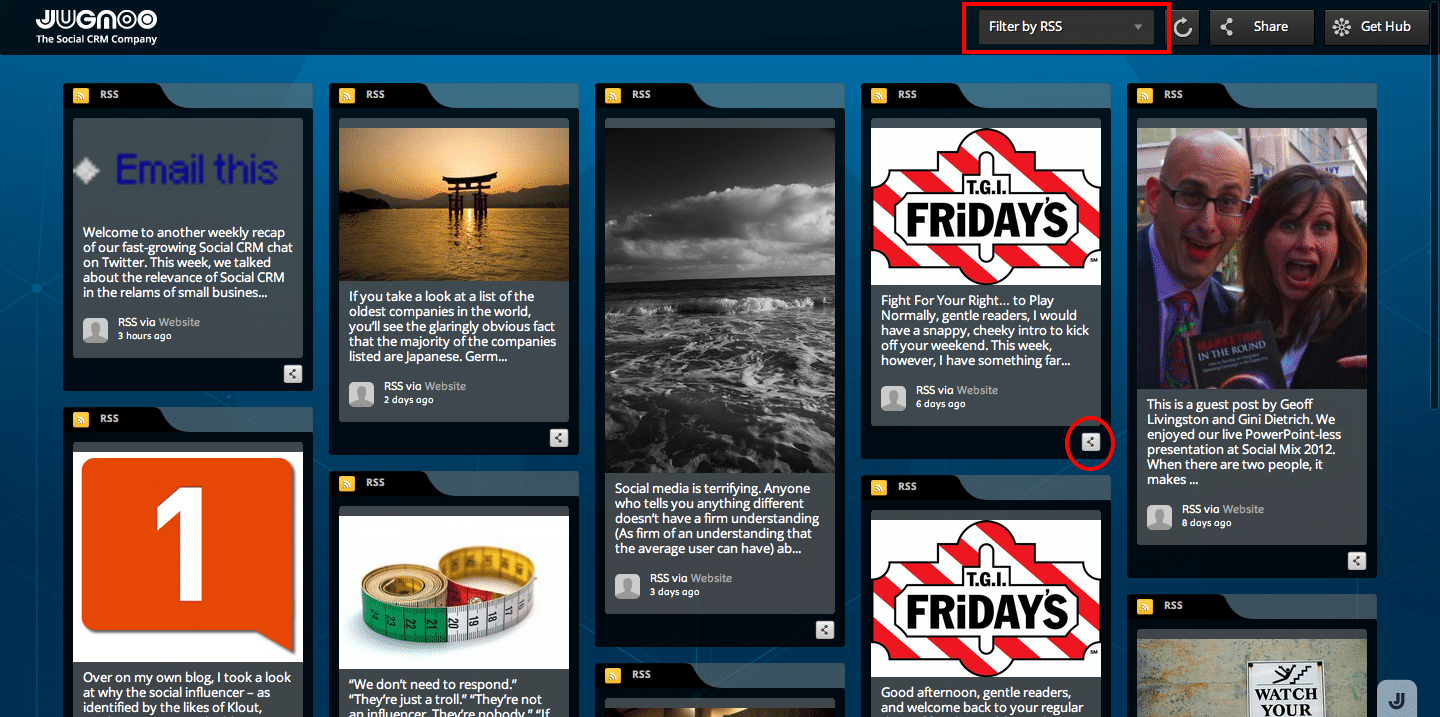
buzz RSS

Now, let’s say you want to connect more with the people talking about you from the Visualyzer results. You could set up a hub with feeds from their blogs, or Twitter account, or YouTube channel, etc, and use that to keep up-to-date with their latest updates or posts.

You can then reshare from the hub, send it as an email recommendation, tweet directly to the person, and more.

Let’s say @FeastInc, for example, tweeted that it was their pet’s birthday and you were a pet retailer. You could reply to them and wish them a Happy Pet Birthday, and then use the email function to send to your sales team and ask them to get in touch with @FeastInc to send them a goodie bag for their pet.

Or, you could see the URL for their most recent blog post, drop on over to leave a comment and mention the pet’s birthday in that comment too.

You’re building rapport; you’re showing you want to get to know them; and you’re rewarding for their support of you too.Who doesn’t like that?

These are just basic ideas using some cool tools that don’t even fall within the traditional social monitoring mix. When you partner them with the actual full social monitoring solution in the Jugnoo dashboard (released in the next 2-3 weeks) – well, the options become even more powerful.

And you still keep the fun factor of visuals, images and emotion, while making the connections that really count.

Works for me – you?

If @Klout is Fixed, Why Are They Profiling an 11-Year Old Kid?

Klout and minors

Klout and minors

Two days ago, social influence tool Klout published a blog post on how they had updated their algorithms to answer critics of their service.

From the post:

Today, we?re introducing some of the most significant product updates in Klout?s history. With these updates, we?ve concentrated on helping everyone to gain a clearer, more accurate understanding of how they influence other people through the ideas they share.

As part of the update, Klout promises “increased accuracy”. Which is great, as this is one of the core complaints about the service. They also promise more transparency, more data, real-world influence. And a shiny new site design…

However, one glaring omission from the post is the question of Klout and privacy.

There have been numerous posts written about Klout’s policy of creating profiles without the explicit permission of users, and the fact you have to opt out of the service if you don’t want profiled.

Worse still, though, was the discovery that minors under the age of 18 were being profiled by Klout, from something as innocuous as being connected to their parent on Facebook.

Due to the backlash against this practice from numerous bloggers, Klout CEO Joe Fernandez came out and stated “Klout has no interest in profiling minors”.

So, why does the Klout website have a profile for an 11 year old kid (click to expand)?

Klout Influence Report 11 year old

This is the son of a friend of mine, Jennifer, who brought it to my attention that both her kids were being profiled by Klout. Her son is the 11 year old pictured here, and her daughter is 14 later this year.

Both profiles are clearly there for all to see. Not only that, but her daughter’s profile on Klout shows who she influences. One is her brother, the other is her friend – also 14.

Klout Influence Report 14 year old

Jennifer spoke with both her kids, and neither of them even know what Klout is, never mind that they have a profile on there.

So, despite all the questions about privacy and minors, and despite Klout’s statements that this would be fixed, it’s clear the company is still adding profiles of children that fall under Klout’s own privacy terms.

Klout Privacy Policy

These terms have actually been updated, since it was previously under-18’s that weren’t “allowed” on Klout. Even so, is it really fair for any company to take a kid’s details and parade them on a site where numbers attract advertisers?

And while Klout advises parents to monitor their kids’ online activities, it’s hard to do this when you have to be logged into Klout to see your kids (if you opt out, you get redirected to a Facebook or Twitter sign-in page).

Now, it could be said that the kid shouldn’t be on Twitter (and thus, Klout) in the first place, since he’s under 13 years old. But as we move towards a more online world, kids are going to go online anyway – the best approach for many parents, and one that they’re taking, is to help guide them on the way.

With that in mind, isn’t it about time Klout quit adding profiles on an opt-out basis, and only has people on there who have voluntarily opted in? Maybe then parents wouldn’t have to worry about their kids being taken advantage of in this way.

Heck, there’s already enough online pitfalls to try and keep our kids safe from without a social score to worry about…

  • Update: The 11 year old also has a profile on Klout competitor Kred, despite their Terms of Service stating it’s for 13 years and older – more reasons for the opt-in process to be standard.
  • Update: Following an email from the 11 year old’s mother, Kred has made her kids’ pages on Kred inaccessible.

    Kred and minors

Is Social Media a Waste of Time?

Social media a waste of time

Social media a waste of time

It can be. For example:

  • If you don’t like doing legwork and want quick solutions regardless of quality, social media is a waste of time.
  • If you don’t like knowing what your customers are saying about you, social media is a waste of time.
  • If you think LinkedIn is a non-productive business platform for intelligent conversation and leads, social media is a waste of time.
  • If you like spending thousands on marketing and advertising, and don’t care about results through measurement, social media is a waste of time.
  • If you think the bottom line is all that matters, and relationship marketing to longer term success isn’t beneficial, social media is a waste of time.
  • If you don’t want some of the most in-depth intelligence gathering tools about your marketplace ever produced, social media is a waste of time.

Of course, if you’ve gotten this far and smiled at the reasons above, then you already know social media isn’t a waste of time.

Welcome to your advantage.

Introducing the @JugnooMe Tweet Visualyzer – Buzz Visualized

Over at Jugnoo, one of the things we’re spending a lot of R&D time on is natural language, and how conversations and people truly connect to each other.

It’s all well and good having a social monitoring platform that pops up keywords and alerts for you to track, but without the context of what these words mean and the bigger picture around them, then monitoring continues to be purely reactive.

To help us move toward our goal, we’ve just released our Tweet Visualyzer (or Buzz Visualized – your choice!).

Jugnoo tweet visualyzer

So how does it work?

There are seven tabs – What, When, Who, Word, How, Group and Tag Cloud. Each tab offers a different view, with information that can be broken down into individual tweets, words, platforms and more.

1. What

The first tab shows what’s being said and shows the top five topics as sorted by groups. As well as the groups showing the top five topics, it also shows you the people talking within that group. This can help brands identify who they should be connecting with for a promotion or outreach program, amongst other things.

2. When

The second tab shows the time of day of tweets shared. The great thing about this is it allows you to see when the most popular time for certain topics are which, again, can help businesses determine when they need to be on Twitter to reach a certain audience.

3. Who

The third tab shows the most active tweeter on a certain topic. For many businesses, knowing who’s most active helps filter down Instigators – perfect for identifying potential partners for a promotion, or connecting with brand advocates who are already promoting your brand.

4. Word

The fourth tab is where things really start to get interesting. As I mentioned at the start, Jugnoo’s looking to show how conversations and people relate to each other, and the context behind these conversations. By using the Word tab, you can now see how people group around a certain word. Highlight more words, and you’ll see which of these people roam between conversations. The likelihood of these people being the glue that ties all these interconnected groups of people together grows, and lets you see who you should be connecting with.

5. How

The fifth tab is a simple and quick way to see how people are tweeting. The reason we included it in the visualyzer is simple – by knowing what people are using, you can define your approach better. If you see a lot of people are using mobile browsers, then it can determine whether you need to concentrate more on mobile campaigns, or optimize your website for mobile visitors.

6. Group

The sixth tab complements the Word tab, and gives you a quick look at how people split into sub-groups around similar words. Again, this can help brands identify where conversations are taking place around keywords in their industry, and where people are drifting in and out of that conversation at a given time (if the keyword changes, for example).

7. Tag Cloud

The last tab gives you a look at all the words associated with your original keyword or hashtag search. This cloud is made up of people, words and any hashtag associated with that search. You can highlight as many words as you wish, which will the show you the Twitter users connected to these conversations. From there, you choose to view a new tag cloud that drills deeper into the new search. Again, this is ideal for really understanding the perception people have of you and your brand.

While it’s still a work-in-progress, we’re really happy with the way the Tweet Visualyzer is driving us to where we need to be, as far as context, conversations and natural language goes.

Even in this early build, we’re already seeing how it can connect the dots between the various pieces of an online conversation. As we evolve it, we’ll be adding other platforms to the mix too, and it’ll become a fully-fledged part of our monitoring and lead generation solutions (which I’ll be sharing more of in the near future).

The Tweet Visualyzer is currently open for everyone to use while we’re still in beta, so hop on over and try it out with your own searches – I look forward to hearing your feedback!

Note – once we come out of beta in the next month or so, we’ll be making the visualyzer a core part of our platform. You can sign up here (it’s currently free to use) to make sure you get full access to our suite of products.

Your Business Is Not the Story

Social Mix 2012

Social Mix 2012

Last week, on Thursday July 26, Jugnoo’s inaugural Social Mix 2012 conference took place in downtown Toronto.

A social media/business event, it saw the likes of Gary Vaynerchuk, Amber Mac, Geoff Livingston, Gini Dietrich and many more talk about building your brand and business success through social media.

Feedback has been amazing, and I was incredibly proud of the Jugnoo team pulling this off in just over three months!

I’ll be sharing more from the conference soon, both here and over at the Jugnoo blog – in the meantime, I just wanted to share my presentation, based around social search needing to be much smarter as we move forward and how good businesses will adapt to go beyond scripted responses.

Cheers!

  • « Go to Previous Page
  • Page 1
  • Interim pages omitted …
  • Page 10
  • Page 11
  • Page 12
  • Page 13
  • Page 14
  • Interim pages omitted …
  • Page 38
  • Go to Next Page »
© 2026 Danny Brown - Made with ♥ on Genesis