• Skip to primary navigation
  • Skip to main content
Danny Brown

Danny Brown

podcaster - author - creator

  • About
  • Podcasts
  • Journal

Insights

Of Blog Design Changes and Looking to the Future

Blog design

Blog design

Sometimes, I feel as if I should stay away from vacations and personal downtime completely. Case in point – I’m on vacation this week and the thing I did first? Redesigned the blog.

But… there is method behind my madness. Here’s the lowdown, for anyone interested in the thought process behind a blog design.

I’ve written about the changing paths of this blog before. Whereas it was originally a straightforward social media-led blog, I’d like to think it’s grown into something more as I’ve grown as a blogger.

Whereas previously the content has (for the most part) been of the written kind, my future plans include more multimedia, videos, presentations, ebooks and more. This leads naturally to the redesign, and the switch from a traditional blog format to a more website-type feel.

Finding Your Feet and Walking Different Paths

I’ve looked at the blogs of people like Adam Singer, Jason Falls, Brian Clark?and others, where the content has still been key, but there’s more to the experience for the visitor.

Sure, you can still read their blogs, but now there’s more to keep you interested and involved – digital downloads, resources and more. And it makes sense.

While there’s absolutely nothing wrong with a “traditional” blog look and feel, the reading patterns and behaviours of web visitors is constantly evolving. And, from speaking with colleagues and watching the analytics of this blog, many bloggers are moving to a site framework versus a blog one.

There are several benefits of this approach:

  • Information hub homepage, where you can inform the visitor what they can expect.
  • Highlight your most important content, from blog posts to subscription details, books and more.
  • Clean call-to-actions, including digital downloads, webinars, partner sites, etc.
  • The visual appeal that a home page can offer, without cluttering your blog index.

These are just a few benefits. There are many more – the ones that matter to you are the ones that should matter on your home page.

Branding and Bigger Voices

Prior to my most recent redesign (yes, it was only a short couple of months ago – sorry!), I’d always had an image of myself in the header. With the design prior to this makeover, I removed that image and went solely for the name.

There are supporters for both arguments – Marcus Sheridan is a fan of the image approach, while Gini Dietrich is more of the name/company look and feel.

For me, there’s nothing wrong with either – a personal blogger may prefer an image to help him or her stand out, while a simple name or icon (without the blogger’s picture) can help extend the blog into something not uniquely attached to the blogger.

For example, both Gini and Jason that I mentioned earlier have regular guest bloggers, and their “name” approach means the blog is suited for that multi-author approach.

Gini’s even mentioned that the blog is bigger than her, and that’s why she doesn’t want it to be known as Gini’s blog. Again, for me, that makes perfect sense.

A blog is whatever the blogger wants it to be, while respecting the community around it that shapes it how they’d like it to be. It’s why I went for the name approach versus the image one.

For me, that’s going to see the blog evolve into what (hopefully) will be a repository for both content and downloads, to help you meet your goals, whether that be in social media, marketing or blogging (at least for starters).

Taking an image away from the header, as well as building on a website-type design, makes that goal easier.

We’re Always Evolving

It’s taken me a few iterations to get the result you’re looking at now (and if you’ve come straight to this post, hit the Home tab on the navigation to see the full design).

Some of my previous designs I was really happy with at the time, while others (in hindsight) were essentially a stop gap while looking for the design that I’d be really happy with.

While there will no doubt be more changes in the future, I don’t think it’ll be anytime soon. Having found the look and feel I’ve been after, it’ll probably just be minor tweaks here and there (a logo versus just the name, for example, though still no image!).

But though the look and feel may change, the goal remains the same – to open up the blog to you, and let you continue to shape it, in the posts from guests as well as the awesome thoughts and questions you continue to share and push with when you comment here.

This blog is as much yours as it is mine, perhaps more so.

Designs may come and go – but the same old me will always be around, waiting to hear your voice. Here’s to continued growth and evolution.

Create and Measure a Social Media Campaign with the @JugnooMe Dashboard

JugnooMe social media dashboard

When we envisioned our?social media dashboard?JugnooMe, our key tenet was to make the social web simple, accessible and monetizable for everyone.

This means a solo entrepreneur; a full-on corporation; an agency looking after clients; a non-profit; realtors, franchisors and much, much more. But goals are one thing; making it happen are another.

One of the ways we?re making it happen, even during our beta stage, is by having a complementary suite of tools that dovetail into each other and offer a fully integrated solution because of it.

By doing this, it means you, the user, can create fully-fledged social media campaigns even while our products are still being fleshed out and added to.

To give you an idea of how you could use JugnooMe for your social media needs/campaign, here?s a simple overview of how you could use the tools to start, track and measure your campaign.

Step 1: Gather the Intelligence

Okay, so you?ve been told you need to get on social media because that?s where all your customers are. But are they? There are 7 billion people in the world. Let?s say half of them are kids ? that leaves 3 billion.

Even the mighty Facebook has less than a billion users. So, by definition, at least 2/3 of your customers may very well not be on social media. Your job is to find out if they are, and that?s where our Social Search option comes in.

JugnooMe social search

This feature allows you to enter keywords around the topics your potential customers would be talking about around your brand or the services you offer.

You can then filter these into Positive, Neutral and Negative, which is perfect if you want to make a soft sell around your product (Positive sentiment and non-invasive tweet about the Twitter conversation and topic) or protect your brand (Negative and your instant reply with a solution or correction to erroneous statements).

What Social Search also allows you to do is see if people are talking about your industry at all, and where about, which will then allow you to target your next steps.

Step 2: Creating the Campaign

Let?s say Social search shows you that there?s a desperate need for an answer to a question that hundreds of people are asking, but no-one seems to be responding too.

It could be a product and its reliability, or an upcoming area in the real estate market and what that means to potential buyers.

While you could simply reply via Twitter to the hundreds of individuals, it?d be a lot more effective (and profitable) to run something like a premium webinar, and then smartly promote into the search terms and conversations from your original results.

Now, while we can?t help you with the webinar creation, we can help you get the word out and measure. For instance, once you have the webinar booked, you could use our SVM (social video marketing) tool to create a short promotional video with snippets of eye-catching copy, images and sound.

JugnooMe video tool

Once you?ve uploaded the video (either to Jugnoo Media or YouTube ? more platforms will be supported soon), you can then start promoting your video and webinar across your chosen social networks, using our global J-Post option.

This currently allows you to post updates to Twitter, Facebook (profiles and Pages) and LinkedIn.

JugnooMe global post

You can use this feature with as many accounts as you wish ? so, if you?re a franchisor, for example, and you distribute offers across 100 franchisees, you could essentially have several hundred messages being created in one click to cover multiple locales and demographics.

To add to the buzz around your webinar, you could also create a special offer using our Facebook Coupon app, where you can promote a time-sensitive offer to raise sales interest in your webinar.

JugnooMe Facebook coupon

Now you have a fully integrated promotion across social media ? YouTube video, social network syndication and a Facebook coupon, allowing you to target your webinar audience on the platform they prefer.

But social media promotion is just one part ? so you need to make sure you?re measuring your webinar?s sign-up rate and buzz, so you can make amends to your campaign if and where needed.

Step 3: Measuring the Campaign

To know if you?re being successful or not, you need to get on the Analytics train. These will help you gauge where your biggest visitors are coming from; what platform or message is being most successful; where you need to focus more on, and much more.

To do this effectively, set up?a vanity URL?for each platform you?re promoting your webinar on, and make sure you have the sign-up page for the webinar itself on your own website.

Then, use our Analytics solution to set up your campaign(s).

JugnooMe analytics

Your campaign can be made up of certain goals ? X amount of traffic from the various networks you promote on, or how many people used the Facebook coupon discount code, etc.

By measuring the goals, you can see where you?re not getting as much traction as elsewhere, and decide whether or not you need to remain promoting there, use another platform, or just stop your promotion there full stop.

As well as the web analytics, you can use the Social Search option again to see how your campaign is being received on the various social networks.

JugnooMe social mentions

The benefit of adding your own webinar terms to the Social Search engine is you can reply to any questions as they are asked (even if not directed at you), gauge how positively or negatively your promotion is viewed (are you too hard-sell, and if so, what can you do to make the promotion more effective), etc.

You can also see who?s talking about you the most, and reward them with discounts or special codes for their own blog readers or followers. it?s a great way to build brand advocates around your webinar and brand, and that will last much longer than the webinar itself.

Additionally, when the webinar is running, you can add a Search stream to your Twitter dashboard, and use the feedback from it to tailor your approach during that webinar and for future ones.

JugnooMe Twitter feed

Step 4: Rinse and Repeat

And there you have it ? how to research, create, promote and measure a social media campaign pretty much all within the JugnooMe dashboard.

You can obviously take it as in-depth or as simple as you wish, using whatever features you feel would be best-suited to your own campaign(s).

Additionally, this type of integrated campaign can be created with the current beta toolset ? we have a lot of cool new features coming in the next couple of releases between now and August, to really give you the complete package for your own social media campaigns and needs.

Interested in how we can help you? Hop on over and?try JugnooMe out for yourself?? it?s free while in beta, and we?d love to see how you use it and how we can help you meet your social media goals!

Make It Your Mission To…

Click through the URLs of your commenters to find a new blog, leave a comment and share a new person with your community.

Thank 10 followers on each social network you’re on for being there with you.

Cull the networks you’re told you should be on to only the ones you need to be on.

Praise a work colleague or team you lead for the awesome work they’re doing.

Leave that last report at the office until the next day and spend time with those that really matter.

Buy a coffee a day for a homeless person.

Speak up for someone you know won’t speak up for themselves but deserve to be heard.

Call someone up you’ve let slip off your radar and make them feel remembered.

Instead of talking about how we’d like to change the world, let’s start by changing us first.

If You Want to Pitch A Blogger Successfully, DON’T Do This

Email pitch

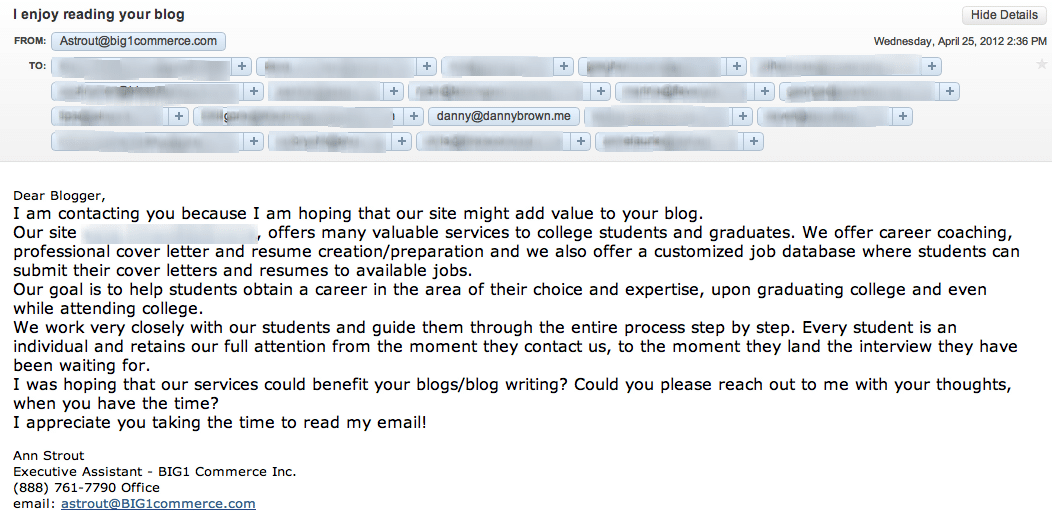
The email below arrived in my Inbox this afternoon (click to expand)

Email pitch

It was sent in the hope of garnering some press for the company’s website, that helps students connect with potential employers. Great – nothing wrong with that, and here’s to more companies helping students get a great start in life.

The problem is, the approach is all wrong and will probably put off every blogger they reached out to (and there were some big names in there). Here’s why:

  • The message header and the opening line don’t gel. The message header is great – “I enjoy reading your blog” is always an ego-stroke guarantee for a click-through. But then you get the generic “Dear Blogger” salutation. Bah.
  • Mass email, baby! As you can see, the email was sent to quite a few addresses and, better still, this was via open cc’d. This meant what should have (probably) been a private list now gave other people access to email addresses that the owner may not have want shared.
  • Lack of relevance. At no point in the email (apart from the standard opening blurb about being useful for the blog) is there a cohesive point made on why the company’s site would be relevant for my readers (or that of the other bloggers that were emailed).
  • A confidence-building domain… When I clicked through to the domain of the email sender, I was greeted with the image below.

Big1 domain

Now, it may be that the coolest website on the planet is due to arrive at the domain – who knows, even cooler than Chuck Norris! But for now, it raises alarm bells as to who’s behind the email and how well they’d serve the students they’re looking to help.

Simply put, it adds the finishing touches to an email that means well but does pretty much everything that goes against a solid blogger outreach program.

What They Could Have Done

Now, it may be that it’s a small company looking to get awareness and a foothold in the space, and they feel that bloggers with a certain audience reach can help. Or, they’ve heard blogging is the new advertising and it costs less money too.

Nothing wrong with that – most bloggers love to help promote something that’s relevant to their audience. The problem here is that the pitch fell flat at the first hurdle due to the approach.

What they could (should) have done is:

  • Ignore the mass email approach. Bloggers are generally busy people. If they feel a pitch isn’t truly targeted, they’ll ignore and move onto the next one. Try and really personalize the approach – use the blogger’s first name and a little overview of your understanding of the blog and audience. And, if you must use mass email, make it a BCC…
  • Use examples of relevance throughout. You don’t need to suck up to the blogger to get their attention, but maybe drop in 2-3 references to past posts that correlate to your service. Each reference builds your case – build the case and your job’s almost done.
  • Make sure you’re ready for investigation. Bloggers are successful because they’ve built trust with their audience. They won’t ruin that by not doing due diligence, and the first thing they’ll do is check you out. Make sure you’re ready for that – if your website isn’t built, don’t share your domain.

These are just really short suggestions based on this particular email and where it went wrong.?You also need a great boss who can educate you on best practices, just in case Ann is a junior and she’s been told to send a pitch like this. If so, her boss should be ashamed.

To really run a great blogger outreach program needs a very cohesive approach.?It also helps if you’ve been some part of the blogger’s audience beforehand – a tweet here, a blog comment there, etc.

Awareness of you means a better chance when it comes to sharing awareness of your product by the blogger in question.

Contrary to popular belief, bloggers do want to share your content – we just need a reason to do so.

Note: In his comment about this post, Frank Strong (who I respect immensely) questioned my outing of what may be a junior person at a PR agency. To clarify: this would never be a goal of mine.

If you try Google the name, nothing comes up. Nothing. Same with the company on LinkedIn. Which makes me think it’s a front for the “client” they’re pitching, which I did blur out.

Additionally, the blogger names that were on the email were all over the place. Two PR agencies; a sports blog; two tech blogs; a mobile phone blogger; a car forum and more. There was no rhyme or reason – it was just a blind pitch with a bunch of names thrown in for good measure.

With all that in mind, if someone is so indifferent that they don’t “exist” and are blasting out a generic message, then perhaps it makes no difference to blur or not.

Can We Still Trust Google?

what does google want to be

what does google want to be

It’s a question many are asking – can we still trust Google? (In fairness, it’s a question you could ask of any social company).

I’ve written about my falling out of “like” with Google on here a few times recently, and they still continue to piss me off. For example, I completely deleted my Google+ account but folks on there are still allowed to send me updates via email because Google thinks that’s okay.

Or, I tried to access my Google Analytics from my simple Account tab in Gmail, and Google wouldn’t let me progress any further until I “upgraded” to Google+. Yeah, right – piss off, Google, and take your spammy account growth ways with you.

However, I recognize that I’m biased, so I thought this infographic from BackgroundCheck.org was fairly interesting. It gives a nice cross-reference of Google’s history, missteps, and how the general public views online search, privacy and tracking.

For example:

  • I didn’t know that Google had been listed as “Hostile to Privacy” in 2007 by Privacy International, which is the lowest rating you can get.
  • 65% of web users don’t want their search personalized based on prior search history.
  • 73% of web users don’t want their results tracked.

It’s pretty telling stuff, and perhaps another reason why Google is getting so heavy-handed in its Google+ sign-up charge (they’re still quoting incorrect numbers due to the enforced Google+ sign-ups via using new Google products).

I don’t know – I never thought I’d see the day when I preferred Zuckerberg’s machine over anything else when it comes to privacy and operations. But Google’s making that easier every single day.

Ah well… onto the infographic (click to enlarge).

Mother, Can I Trust Google?

  • « Go to Previous Page
  • Page 1
  • Interim pages omitted …
  • Page 50
  • Page 51
  • Page 52
  • Page 53
  • Page 54
  • Interim pages omitted …
  • Page 174
  • Go to Next Page »
© 2026 Danny Brown - Made with ♥ on Genesis