• Skip to primary navigation
  • Skip to main content
Danny Brown

Danny Brown

podcaster - author - creator

  • About
  • Podcasts
  • Journal

Insights

Opening Up Social Media for Local Small Business

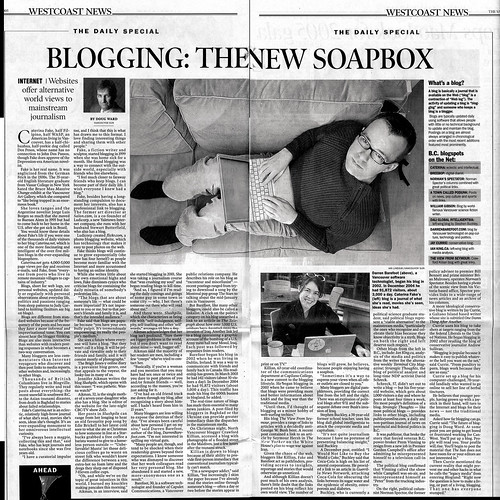
Vancouver Sun Article on BloggingWhile becoming more mainstream, social media still holds fear for many businesses, especially small local business.

Fear of time involved; fear of where to start; fear of where to be.

While this fear is understandable, it also means that many local small business owners miss out on social media and all the benefits it can offer, especially when it comes to competing with the big boys.

While I’ve written before about how expensive social media can be from a corporate campaign viewpoint, for small businesses it’s still one of the most cost-effective methods of being visible to your customers, new and existing. Twitter, Facebook, LinkedIn, YouTube – they all offer possibilities for the small business owner.

Then there’s the real workhorse – the blog. The best marketing tool you will ever have as a small business owner, a blog can be a myriad of things:

  • A promotional tool.
  • An information hub.
  • A resource centre.
  • Your own personal social network.
  • A live, ever-fresh FAQ section.

In fact, the only limitation to what a blog can do for you is the limitations you put on the blog itself. And again, this is where many small business owners – especially local small business owners – bypass social media’s strengths and opportunities.

Fear comes back in. Fear of what to blog about; fear of how to target an audience; fear of how to promote a new (or existing) blog; fear of setting yourself apart when there are so many other voices around.

Apart from that fear, perhaps the biggest stumbling block is setting up the blog in the first place. If you’re not doing it yourself, where do you find a designer (and for many small business owners, one that doesn’t break your budget or rip you off). Again, this fear is only natural.

Yet help is at hand.

In the next couple of weeks, a new course will be unveiled that takes the fear out of social media and blogging for small business owners. Some of the features will include:

  • Using social media and your blog to market your small business.
  • Using online tools to benefit your brick and mortar business (or a simple home-based one).
  • Getting a fully-functional blog and social media tools set up from day one.
  • Course “mentors” that bring a vast and comprehensive set of skills to the table (oh, and me).

These are just some of the features and benefits, with more to be announced over the coming weeks. It’s a course designed specifically for small and local business owners that get social media and its benefits (like blogs), but need that extra bit of help to really start utilizing it. Best of all, it won’t cost you anywhere near $22,000 a day…

More information will be available very soon. To make sure you get the latest updates, as well as details of what’s in store and who’ll be part of the course, you can sign up for the latest news via the newsletter form below. Don’t worry, you won’t be spammed and you definitely won’t be sold to any dodgy characters!

Social media and blogging was made for small business owners. Here’s a great chance to be that business – look forward to seeing you in a few weeks.

Get updates as they become available
* indicates required

Close

Creative Commons License photo credit: DBarefoot

Why the Headway Premium WordPress Theme Kicks Ass

When it comes to the Headway premium WordPress theme, there’s no question I’m incredibly biased about what it can do for bloggers.

I’ve written about it more than once on here, and I use it on the three sites I’ve created so far, with more to be shared soon. In fact, it’s the only product that I’ve fallen in love with so much that I’ve signed up as an affiliate. So yes, when it comes to premium WordPress themes, Headway stands head and shoulders above everything else (at least I think so).

Yet as much as I recommend the theme, it’s still only words (and obviously the design of this blog, the 12for12k site and Just Kickin’ It) that tell you some of the cool stuff Headway can do. Sure, I can say it’s easy to use and it really does make your life a hell of a lot easier when it comes to designing your blog/website. But words only tell half the story.

Which is why this video from David Wang is perfect. In less than ten minutes, he takes the standard Headway theme layout and transforms it into a great-looking business site. Sure, it’s just the home page and you still need to add all your other pages and posts. But as an example of just how quickly you can begin to build your blog/site, under ten minutes is pretty damn impressive! Have a look for yourself.

Now that you’ve seen how simple it is to make the Headway theme sing on WordPress, what else does it have in store for you? Currently version 1.6 is in beta, and I’ve been messing around with it behind closed doors. Some of the cool features include:

  • Live CSS editor. While the theme allows you to make a great website with absolutely no coding needed, it also allows you to get as down and dirty as you like with coding. The new live CSS box means you can drop CSS code in and see the changes take place right in front of your eyes – no saving and checking to see how it looks.
  • Skins and Templates. When Headway first hit the premium WordPress theme market, one of the things it promised was the option for skins. This is where you can upload a specially developed skin that changes the look of your blog completely (if you don’t want to design your look yourself). This is now live with Headway 1.6 and you can access them from within the dashboard or from dedicated theme stores.
  • Default Leaf set. Headway uses a system called Leafs, which is basically your content body and sidebars (albeit in a far cooler, interactive way). While you can use any mix of set-up for your blog, with a different sidebar on every page, Headway 1.6 allows the option of a standard leaf throughout your site. Perfect if you don’t want any extra work when designing your blog.
  • Automatic SEO slug clean-up. This is a great new feature that cleans up your search engine visibility by removing words like “the” and “and”, etc, that Google doesn’t really bother with. You can switch this on and off in the SEO area of Headway.

These are just some of the features that the guys behind the Headway theme will be bringing to you soon. The beta is almost ready to go live, and will be available as a free upgrade for existing users and available for purchase to new users imminently.

Watching the new features that developer Clay Griffiths puts out in each new update is almost like a game in betting on just what he won’t add in each new version – it’s that crazy how much he gives WordPress bloggers. And the support is second-to-none as well.

If you’re looking for a new premium WordPress theme, Headway delivers in spades. And as a special promotion, any purchases of the theme via this blog in March will see all affiliate earnings go to .

So, the best premium WordPress theme around and all Headway sales going to charity – what better time to upgrade your blog? Just click on the image to the right to get your copy.

  • Update: The Headway Developer License now allows you unlimited use of the theme with no need for additional license costs – a huge advantage over other premium themes.

Note: This blog no longer runs on the Headway framework. Instead, it’s a custom WordPress design by Lisa Kalandjian of SceneStealer Graphics.

Big Business Needs to Think Smaller

FreyaHere?s a question for you. If you?re in business, how do you treat your clients?

Or, to look at it another way, how do your clients treat you?

Is it with respect and?shared passion for doing the same work, or is it just having a need for each other and no more?

When dealing with a client, do you meet your deadlines or do you constantly offer excuses why their project isn?t ready? Do you work closely together, listen to/make suggestions for improving and strive for excellence on the fly, or do you simply turn in the work, take the money and walk?

I ask this?simply because it seems many big businesses have forgotten the art of either being a client or providing for one. From having a maze of contact information to wade through to losing the personal touch that won them the following of the customers in the first place, larger businesses are forgetting how to communicate.

So here?s an idea.

Go back to basics. Remember when you first started your business and you had time for everyone (because everyone was important)? Find that business owner again.

Ask yourself how you?re communicating and how you can improve. Are you using the online space effectively? Look at your Internet strategy and see how your brand is viewed. There?s a billion voices waiting to answer you and offer you invaluable advice and insight into making your brand the authority in your niche.

The question is, will you be listening?

Creative Commons License photo credit: fofurasfelinas

Rules of Business

Rules are the sticks of those in charge to beat us with.

Rules are the lines that are drawn to stop us overstepping the mark.

Rules are the barbed wire fences of self-important power mads.

Rules are the reason companies go bust and blue collar loses while executives move to the next golden handshake.

Rules, though, are made to be broken – just ask Adam and Eve.

If two tiny people can defy God, just imagine what you could do with a little imagination and a questioning of the rules.

Rules are only rules because we let them be. Sometimes it’s good to break them.


Asset Building

Your people are your assets. It doesn’t matter if you’re a business, a blogger, a non-profit or any mix of personal and professional outlet – your people are your assets.

Want to build a legacy? No-one’s going to know about anything you’re doing just from your voice alone; it’s what your people are saying about you that builds the legacy.

Want to create history? Your people are the ones that will share your stories down the ages.

Your people are your assets. Make sure you look after them.

  • « Go to Previous Page
  • Page 1
  • Interim pages omitted …
  • Page 100
  • Page 101
  • Page 102
  • Page 103
  • Page 104
  • Interim pages omitted …
  • Page 174
  • Go to Next Page »
© 2026 Danny Brown - Made with ♥ on Genesis