• Skip to primary navigation
  • Skip to main content
Danny Brown

Danny Brown

podcaster - author - creator

  • About
  • Podcasts
  • Journal

Journal

Haters Gonna Hate? Try Being Equal to Dog Crap

Opinions are great. They allow people to share their thoughts on something, and contribute to a conversation that otherwise may have passed them by.

Opposing opinions are even better, as they stop us from becoming too ego-centric and full of our own bunkum. Opposing opinions can make us re-evaluate our viewpoints with fact and make us better people for learning new ideas.

Of course, the problem with having opposing opinions to something is that, often, the people you?re questioning don?t like it. So they get snarky. Or, if that person?s a blogger, their adoring fans respond to your comment with a ?Haters gonna hate? reply.

Seriously, what the f*ck does that have to do with anything?

Because someone doesn?t have their nose up your demigod?s ass too, all of a sudden that makes them a hater? Get real.

You want hate? Try being gay in Jamaica. Or try being ethnic in some parts of Canada. Or?try being a woman in Afghanistan. Or try expressing your civil rights in Equatorial Guinea.

That?s hate, right there. Where your life is about as valued as dog crap.

The people living in these places and experiencing that hate every day would laugh in your face if you said an opinion on a blog post, or an online thought, meant you were a hater.

The sad thing is, it?s becoming more common to use the ?haters gonna hate? excuse for countering a different opinion.

I?ve seen social media leaders use it, or not do anything to discourage it in their readers, and I?ve seen people use it more when someone expresses a valid opinion or counter-point.

Here?s the thing though ? the ?haters gonna hate? exuse? It?s just a lame cop out by people that have usually been called out on crap, and have nothing valid to respond with.

It means your ass has been handed to you, and all you can come up with is the person that just handed you your ass is obviously a hater.

Trouble is, others see that you?ve been called out too with a valid counterpoint. And coming back with a ?haters gonna hate? soundbite just makes you look as lame as the term itself.

Especially when you put it into context alongside real hate in the world?

Writing vs Blogging – Is There a Difference?

Teens and technology

Many people view blogging and writing as both the same thing. After all, isn’t blogging just an extension to writing, and/or vice versa?

Instead of offering my view on this, I thought it’d be fun and interesting to open up and let you be the authors of this post.

So, writing versus blogging – is there a difference?

Over to you.

If We Lose the Right to Opinion, We Lose More Than Just Page Views

Back in 2009, I published a post about online watch sales company Melrose Jeweler?s.

The post dissected a press release Melrose had put out, suggesting how the actor Owen Wilson had been saved from suicide by seeing his wonderful Rolex watch, and realizing life was worth living.

Ridiculous, right? Not to Melrose, who positioned themselves as resellers of authentic Rolex watches, and used the news release to show just how awesome Rolex is, and why people should buy from their online store.

(Note: Rolex was never affiliated with Melrose, as has since been publicized by a subsequent lawsuit and the closure of Melrose.)

My original post was an opinion piece, and pretty scathing, questioning the ethics of Melrose and their publicity team. Shortly after the post went live, I received a Cease and Desist letter from Melrose?s lawyer, requesting I take the post down as it was harming his client.

I refused, and instead published a rebuttal post that took apart each of the lawyer?s ?statements?, and advised that the post would remain online, as is, as an opinion piece backed by facts.

I never heard from either Melrose or the lawyer again.

For me, that experience with Melrose showed the growing ?allure? of blogging and social media ? the ability for businesses to be challenged?on questionable practices, and be held to a higher standard.

It also showed the growing gap between bloggers and journalists, and why content consumers turned to blogs as opposed to print journalism.

While journalism was often red-taped by editorial decisions and boardroom approvals (based on what political party had the bigger sway with the owner of the paper), blogs could offer stronger opinion pieces that could go straight for the jugular, if you like.

A recent decision by French courts, however, could see the future of opinion pieces, and holding businesses to better standards, become redundant. Or worse.

Opinion Is Great ? As Long As It?s Positive

French fashion and literature blogger Caroline Doudet wrote a scathing review of her experience with the Il Giardino restaurant in the south west of France. Much like any blogger worth their salt, Doudet optimized the post title and content to rank in Google?s search algorithm.

Indeed, her post ? entitled ?The Place to Avoid in Cap-Ferret: Il Giardino? ? ranked so well it came up fourth in search results when Google users searched for that particular restaurant.

It was this placement ? and the accompanying review published by Doudet ? that upset the owner of the restaurant, who promptly sued and took Doudet to court.

In the ruling over the case, the judge ordered Doudet to amend the title of the post, so that it was less inflammatory, as well as pay the restaurant owner $2,000 in damages.

Following this ruling, Doudet actually deleted the post completely, but warns of the precedent this decision sets.

This decision creates a new crime of being too highly ranked on a search engine, or having too great an influence. What is perverse, is that we look for bloggers who are influential, but only if they are nice about people. Source.

That last sentence is particularly telling, both for bloggers and brands alike.

The Neutrality of the Web and the Betterment of Brands

The last few years has seen the rise of bloggers as a prominent feature in any brand?s marketing strategy. This can range from promotional or sponsored posts to working with influential bloggers in a certain field to work through crisis or emergencies.

The trust that bloggers have built with their audiences is hugely attractive to brands looking to reach those audiences ? it?s essentially one of the warmest ?leads? you (the brand) will have with your demographic. Get the relationship with the blogger right, get the approach to the audience right.

Much of this trust in the blogger stems from the fact the audience knows the blogger has their best interests at heart, and won?t shill for the sake of a few bucks.

Trust, after all, is the currency of any successful blogger.

If we get to the stage where that neutrality and power of opinion is removed because a restaurant owner didn?t like a review, or a brand didn?t like the fact a blogger only gave their product a mediocre review, then we?re taking a major step into losing any kind of protective layer between brands and questionable practices.

While the case of Doudet isn?t expected to set a legal precedent currently (it?s classed as an emergency order that?s causing harm to another party), that?s not to say it won?t be used as a weapon in the battle between brands controlling what?s said about them, and the content creators that are determined to hold these brands to a better modus operandi.

The signs are already there.

Review site Yelp has seen cases of reviewers being sued for their postings, while a bishop sued a blogger for an article where the victim claimed defamation, while the defendant claimed it was satire.

The latter example may be a more clear-cut one: after all, if you break the law, expect the consequences. However, the examples of brands suing against reviews and opinions that don?t offer a rainbows and unicorns view of their service or product is a troubling one.

[clickToTweet tweet=”If we lose the right to opinion, we lose more than page views and comments. #pureblogging” quote=”If we lose the right to opinion, we lose more than page views and comments.”]

If we lose the right to opine based on fact and experience, and instead are forced to remain silent or face the consequences, we lose more than just a few page views and comments ? we lose the very fabric of what makes the web what it is today.

The only winners when that happens are the brands that have something to hide ? the good brands already use negative opinion to improve their service and product.

Surely that?s something we all want, brands and bloggers alike?

More Blog Subscribers and Comments? Better Use Postmatic!

Original

Ask any blogger what their two main wishes are for their blogs, and eight times out of ten* you’ll probably get “more comments” and “more subscribers” as the answer.

*Note – eight times out of ten is not a scientific discovery, although it may be.

Especially for bloggers who thrive on engagement, more comments means more goals met. More comments also have a way of increasing subscribers, because if a reader leaves a comment, it means they’ve enjoyed the piece. If they’ve enjoyed the piece, it stands to reason that they’d want to subscribe to get more of the same content.

So, yeah: comments and subscribers.

The problem is, in recent years, many bloggers have complained (some rightly, some not so much) that blog comments have started to dwindle, as more readers took their discussions to other platforms, more often than not Facebook and Google+.

To counter that, third party comment plugins like Livefyre and Disqus offered workarounds – Livefyre’s SocialSync feature pulled in tweets and Facebook comments, while Disqus allowed you to tag Twitter users.

Then there was Comments Evolved, that allowed you to display comments from Livefyre, Disqus, Facebook, Google+, alongside your native WordPress comments. Unfortunately, while that plugin was useful, it stopped being supported.

However, much like many third party plugins (especially ones that have social network support built in), performance of a blog could be impacted, as Twitter and Facebook API calls slowed down response times.

Add to that the recent announcement by both Livefyre and Disqus that sponsored comments and ads would be appearing alongside “normal comments”, and the negativity these announcements received, the need for a solid native WordPress comment solution continued.

Until Postmatic came along, that is.

Postmatic? What’s That, Then?

While many other plugins offer a “unique” spin on how they approach blog comments, Postmatic actually delivers on that promise.

Postmatic free

Instead of having to comment via the web (although that’s still possible – more on that later), Postmatic allows you to get a new post by email, read it, and then comment on that post just by hitting reply to the email you’ve just read.

If you want to try it for yourself, simply leave a comment below this post and see what happens when other comments come in!

It’s so simple, you wonder why no-one has really thought of this sooner (there was a stripped down version of this for Disqus, but it was only for admins).

As well as being simple, it makes perfect sense.

Think about it – where do you spend most of your time during the day? A good bet would say email (perhaps second only to Clash of Clans) – so if you’re spending so much time in email, why wouldn’t you manage all your blog post interactions that way too?

In Postmatic?s own words,

We raise engagement by reaching your audience where they are – in their inbox. Except now with Postmatic, they can comment back and keep the conversation going just by hitting reply.

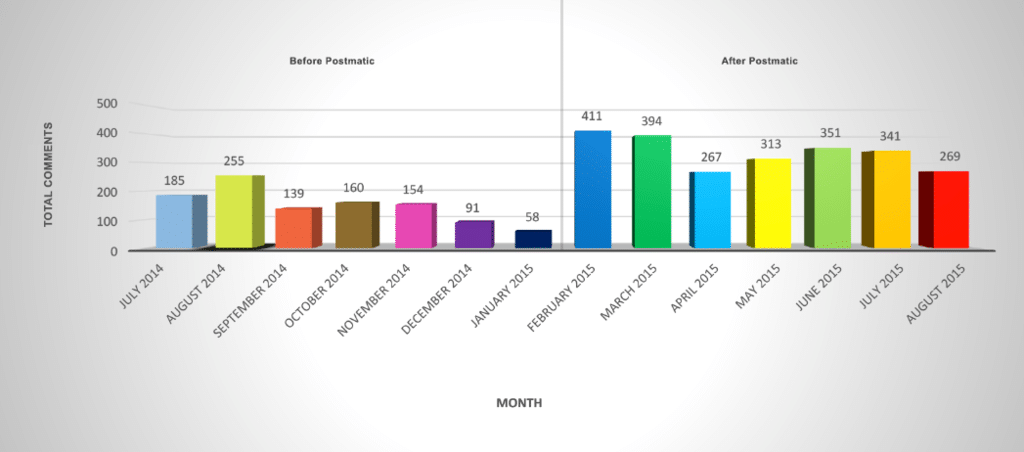
As a user of Postmatic since February this year, I can 100% agree that engagement levels have increased, as shown by the chart below.

Danny Brown Postmatic stats

As you can see, in the seven months prior to installing Postmatic, my comment count per month averaged 149 comments per month. In the seven months since implementing Postmatic, that jumps to 312.

That’s more than doubled my average comment count!

My posting schedule over these 14 months has remained pretty consistent (with the exception of one post per month more in May, June and July this year), as did my social shares – so how come Postmatic grew my comments and engagement when other plugins didn’t?

Simple – people felt comfortable commenting on my blog, because there were no extra hoops like social log ins, account creations, passwords, etc., to jump through.

Additionally, because Postmatic enables commenting by email, people could truly post a comment or reply whenever they wanted – at their desk, at the supermarket, at work, even while lazing at the beach having a cold drink (as I did, numerous times, over the summer).

However, as much as Postmatic raises engagement, there’s so much more to them than that.

Grow, Deliver, Engage, Value

Postmatic’s goal is simple – to reward bloggers for the love, sweat, time and money they put into their content.

To that end, they’ve created a four pronged approach so bloggers can focus on the specific area(s) they want to improve. While each area can work individually, it’s when you combine them that the magic truly happens.

1. Grow

It’s not just engagement that Postmatic grows. Pretty much every blogger also wants to grow their subscriber numbers, whether that’s via RSS subscribers or – more usually – email subscribers, and Postmatic delivers here too.

While there are a bunch of plugins like Optin Monster and Bloom that can help grow your email subscribers already, Postmatic offers a free alternative called, simply enough, Postmatic Optins.

While not as feature-intense as similar plugins, Postmatic Optins offers four flavours of optin forms: Popup over the page, Slider, Top Bar, and After Content.

Between them, these four options cover the most popular optin forms for email lists (with the exception of Exit Intent, which is scheduled for a future update).

As you can see, they don’t look too shabby either.

After content and slider

Each optin has five basic colour options, to help blend into your theme design better (you can also edit them via CSS). Additionally, the copy is fully customizable and supports HTML, so you can create very customized forms specific to your email list goals.

Not only that, but for the pop up and slider optins, you can choose when these display – after a set amount of time, after the reader scrolls to the end of a post, or after they leave a comment.

While there are only four optins at the moment, they more than cover the needs for the majority of bloggers looking to grow email subscription numbers.

In addition to the Optins, Postmatic also has a pretty cool Import and Invite set-up. The import option allows you to import subscribers from MailChimp, Mailpoet, Jetpack, and Subscribe to Comments Reloaded.

With the invite option, you can invite past commenters, commenters who are subscribed to replies but not posts, email lists and more (Postmatic do a great job of ensuring bloggers don’t abuse this option with clear wording around best practices).

2. Deliver

Not only does Postmatic help you grow your subscribers, it also delivers your posts directly to them.

Much like Feedblitz, Feedburner, and Mailpoet’s email delivery service, Postmatic sends out each new post by email to your subscribers. The free version of Postmatic sends the post via the mail service of your web host, while Postmatic Premium uses Mandrill and/or Mailgun, depending on network traffic.

While the free version of Postmatic is more than adequate for email delivery of your posts, it’s when you make the jump to premium that the service really shines.

Postmatic pricing comparison

As well as guaranteeing delivery of your email, the extra features and options available to premium users makes the current $9 per month per site a steal.

  • The ability to customize the header and footer of your email, using either images or widgets (Postmatic adds email widgets to your standard WordPress widgets).
  • The option to differentiate widgets depending on whether the email is a new post delivery, or a comment reply email.
  • Support for other third-party plugins, like Social Warfare sharing, and Skimlinks affiliate links (more on that later).
  • The ability to spam, trash or approve a moderated comment, all from your email.

However, in addition to the features above, and the comparisons in the image above, the key difference between the free and premium version of Postmatic is how the posts are delivered.

If you’re used to receiving posts from Jetpack or Subscribe2, you’ll know the basic look and feel of these emails. Nothing particularly wrong with them – just that they lack the bells and whistles of other email services (branding, images, etc). This is the same for the free version of Postmatic.

Postmatic Premium, on the other hand, converts your post, with all its formatting, to email-compatible HTML and wraps it in the customized template you’ve created with your own images and widget areas.

Postmatic premium

The result is a beautiful, uncluttered, content-focused email template ? with the added bonus that your subscribers can leave a comment (and reply to future ones) all from the comfort of that very same email!

3. Engage

As I mentioned earlier in the post, one of Postmatic’s main goals is to grow the engagement around a blog post. As highlighted by the chart showing my own blog’s engagement growth, this is a goal Postmatic are more than delivering on.

Other bloggers that have switched to Postmatic have also shared how it’s helped their own blogs when it comes to comments and engagement.

However, the mindset to comment via email can still be a big one to overcome – after all, we’ve commented via the web for so long, it’s become the only way we know.

While Postmatic quickly becomes second nature once you’ve actually used it, the team behind the plugin also recognize that some commenters will still prefer web commenting, which is why they’ve released Epoch.

Epoch

Pronounced “epic”, Epoch can best be described as a comment plugin that offers the best features of Disqus – real-time commenting, Ajax loading – while solving some major long-time complaints about native WordPress comments, like page cache support and CDN support, all while remaining SEO-friendly.

Because of the light design of the plugin, it doesn’t eat up resources the same way a Disqus would. Nor should you have any loading issues when trying to post a comment – anyone whose ever seen the little spinning circle of Disqus loading doom will appreciate Epoch’s approach here, especially on mobile.

Since Epoch supports Ajax commenting, every comment left on a post via the web will appear immediately, with no reloading of the page. You can see Epoch in action on this blog – just leave a comment if you’re reading this on the web.

While Epoch is a standalone plugin and can be used on any self-hosted WordPress blog, combining it with Postmatic sees some pretty cool stuff happening.

No matter if you’re commenting on the web, or from your email, every comment is updated in real-time. So, a web user could be leaving a comment, and a new one from an email subscriber could appear on the post – all without disrupting the web commenter.

Oh, and remember the Postmatic Optin option of the Slider or Popup only appearing after a comment has been left? If the blogger has Epoch activated, it will fill out the name and email part of the form, and the reader only has to click the subscribe button – how’s that for frictionless subscriber growth?

Epoch has three style settings when it comes to the look and feel of the comments on your site.

To help you choose which one is best for you, the plugin’s settings asks how much you’d like Epoch to take over that look and feel – “Completely”, “Use my typography and colours”, and “Minimally”.

  • Completely is Epoch’s own styling, and is the one that most resembles your typical third-party comments style like Disqus.
  • Use my own typography and colours is the best of both worlds, inasmuch that your own font and link colours will be used, while the style of the copy will closely resemble your existing comments.
  • Minimally simply gives you all the features of Epoch, while using your existing comment style. However, there may be some glitches based on your theme’s code, so this option may or may not work for you.
Epoch use my typo

My own preference is for using my own typography, as per the image above, but I also use the Completely option on other sites, and it’s an excellent alternative for anyone that prefers the Disqus approach to styling.

Epoch Completely style

Epoch recently came out of beta, but already it’s shaping up to be an excellent commenting option, and one that promises to make blog comments more fun and less complicated again – which is no bad thing at all.

4. Value

The last part of Postmatic’s four tiered approach to helping bloggers meet their goals is the question of value.

When you think of the word value, and its use around a blog, what do you think of?

  • Monetizing a blog?
  • The value a blogger brings to his or her readers, commenters and subscribers?
  • The value of a blogger to brands?
  • Sponsorship opportunities?

All of these, and more, are actually the definition of value when it comes to a blog. Think about it – you read/subscribe to a blog because of the value in the content, and the expertise that blogger brings.

You’re also happy to support that blogger through affiliate links, because of the value the blogger brings in recommending only products that would be valuable to you.

As a blogger, you might feel that the readership and engaged community you have built trust with is an ideal one to help you become a trusted partner for brands looking to do right by their customers.

All of these goals can be met by Postmatic.

  • A blogger grows their list, helping to add to their value to a brand or affiliates/sponsors.
  • A commenter grows their circle of connections, and feels their thoughts are valued more.
  • A blogger thinking of a community membership site can use Postmatic to deliver exclusive, behind-the-paywall conversations and value all from email.
  • Because of the approach to privacy Postmatic takes, commenters and subscribers can be more confident that they won’t be spammed, nor will their information be used for third parties and retargeting, making the relationship between blogger and subscriber more valuable.

These are just some of the ways value can be built via Postmatic.

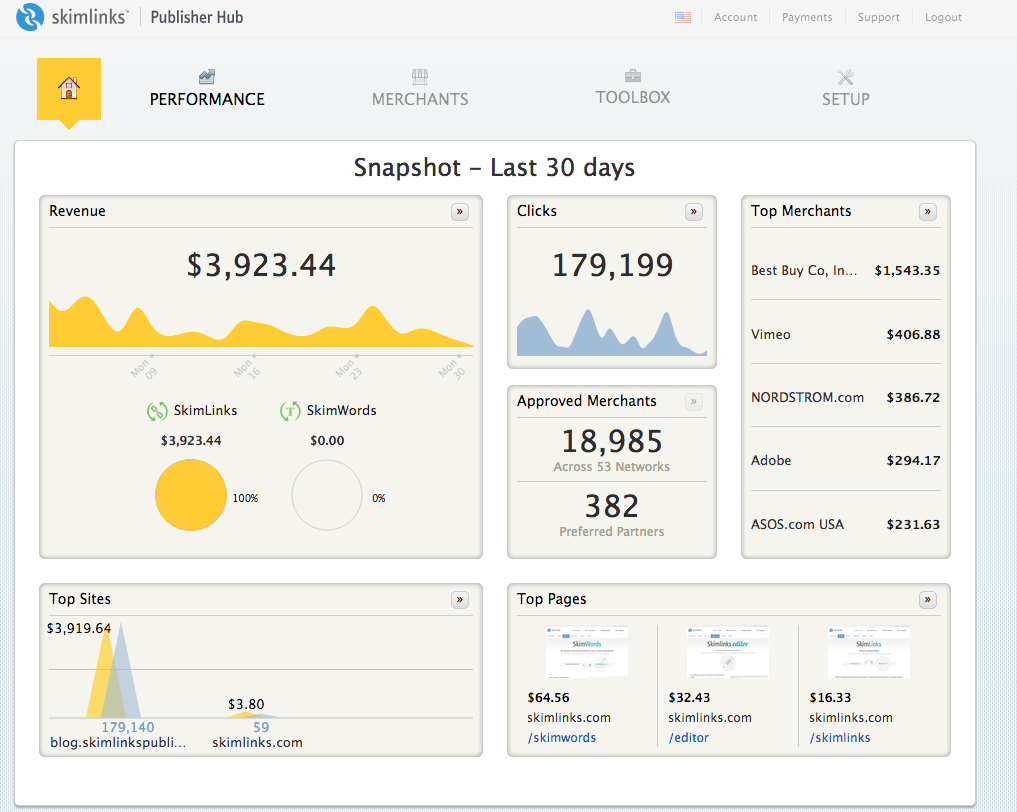
Additionally, they recently announced the support for Skimlinks in Postmatic emails.

skimlinks

Skimlinks is a pretty slick way of working with affiliate links.

  1. If you think Skimlinks is a good fit for your content you sign up on their site.
  2. Install a javascript snippet on your blog (or use their WordPress plugin) and you’re done.
  3. The next time you write about a product or service that has any sort of affiliate program, Skimlinks will intercept any clicks on links in your post, track the sales, and share the commission with you.

Skimlinks work from within Postmatic emails so tracking affiliate sales happens both on the web and in the inbox.

Now when you send an email out, the Skimlinks aren’t just restricted to your website. Couple this with some other vendors Postmatic are hoping to announce soon, and you should be starting to see why Postmatic is a developer to sit up and take notice of.

So, Should YOU Use Postmatic?

Uh, why have you read this far is you’re not interested?? 😉

Seriously, though, I can’t recommend Postmatic enough. I’ve tried pretty much every comment system around – Livefyre, Disqus, wpDiscuz, G+, Jetpack, Echo, IntenseDebate, etc., and Postmatic beats them all hands down (especially now they have Epoch).

Their Optins make it easy to grow subscribers, without the extra cost of other, more popular plugins.

Their support is second-to-none (seriously), and their willingness to listen to their users (and the readers of their users), to add new features and support for other plugins, is something all WordPress developers should take notes from.

Are they perfect? Not quite (but they’re close).

  • You won’t currently get analytics around your emails, but then Postmatic isn’t (currently) meant to replace a Mailchimp or AWeber. Instead, it’s about raising engagement, all while delivering beautiful emails that allow comments to start the moment a post is received.
  • The Optins don’t have analytics like Bloom does – but then, Bloom is premium and their analytics are fairly basic. Besides, it’s easy enough to use Google Analytics to set up tracking subscription statistics.
  • There’s also no weekly digest of emails – yet. However, if that’s something that you prefer over instant delivery of posts, look out for digests in the next major update of the plugin.

Postmatic keeps the features focused and the experience tight, with a major focus on getting people talking about your content, which means they don’t charge hundreds of dollars for the service like others do.

While the free version is fine, ask yourself this – if you could meet your goals as a blogger when it comes to subscribers, comments, brand partnerships, affiliate sales, membership site opportunities and more, would you be willing to spend just $9 per month for that?

I know I would. And did. And I haven’t looked back since.

A version of this post originally appeared on WPKUBE.

The Little Book of Inspiration Virtual Tour – Day 1

Tomorrow, Thursday October 8, sees my first non-business book, The Little Book of Inspiration, published by Morning Rain Publishing.

A collection of personal thoughts, philosophies, life lessons and more, my hope is that it will offer an escape from the times when life seems to be full of nothing but bad news stories.

Sharing real life examples of inspiration as well as hopes and dreams, The Little Book of Inspiration has been likened to Chicken Soup for the Soul, and I hope that proves to be the case for you, the reader.

Little Book of Inspiration

From the book’s description:

Yesterday, mortality may have caught up with me. Today, I welcomed it as a future friend who will simply help me remember the present?

Life moves pretty fast and, in this always-on-the-go world that we find ourselves in, it?s becoming ever-harder to pause and reflect on what we see.

Yet, if we don?t, we miss the opportunity to experience the things that could truly change our lives.

The Little Book of Inspiration?aims to be that opportunity to stop and savour not only the events around us, but the people, the experiences, the sights and sounds.

Through these inspiring stories and poems of love, redemption, and change, take a moment to really see all the inspirational treasures that are present.

Inspiration is all around us. All we have to do is look.

To celebrate the launch, I’m taking part in a special virtual tour across the web, and you can follow along.

A Virtual Tour, Eh?

Traditionally, when books are launched, authors often take off on book tours around the country to promote.

But this is fall in Canada, and I like my warmth! So… instead, I’ll be taking part in a virtual tour, and you’re invited to come along for the ride.

LBoI virtual tour

Each day between now and Sunday 18th October, a kind soul will be hosting me on their blog. This will take shape in various formats – guest post, Q&A, podcast, Blabs, and more.

It’s a nice way to get different viewpoints on the book, as well as meet bloggers and podcasters you may not have heard of yet.

On top of that, there’s a giveaway that you can get various entries to on each post, as well as a special discount code (more details of that soon).

Below, you’ll find the tour details and where I’ll be each day.

October 8: Book Release ? Morning Rain Publishing:?http://morningrainpublishing.com/its-here-buy-the-little-book-of-inspiration-today/

October 9: Review ? L.J. Ivers:?http://ljivers.co/2015/10/09/dear-danny-brown/

October 10: Review and Live Interview ? Mark Clifford: http://itsallmishegoss.com/the-little-book-of-inspiration-is-huge/ and?https://blab.im/mark-patti-clifford-danny-brown-and-his-new-book-the-little-book-of-inspiration

October 11: Guest Post ? Glenn R. Stansfield: www.glenrstansfield.com

October 12: ? Jennifer Pitt: www.mommiesdrink.com

October 13: Guest Post ? Corinne Rodrigues: http://everydaygyaan.com

October 14: ? Andrij Harasewych: http://andrij.co/

October 16: Interview / Q& A ? Jaclyn Aurore: http://www.jaclynaurore.com/

October 17: Possibility Partners Show ? Ande Lyons: https://www.youtube.com/user/AndeliciousAdvice

October 18: Editor Review (independent of the tour) ? Jennifer Bogart: http://jenniferbogart-author.blogspot.ca/

What I like about this kind of tour is that I get to meet some very cool people that I’ve known online for a while, but never met (or, in some cases, spoken to audibly).

Others, I’ve only just gotten to know in the last 6 months or so – so to have them kindly host the tour is a double treat!

Special Launch Week and Tour Offers

To celebrate both the publication of The Little Book of Inspiration, as well as the different experiences of the virtual tour, my publisher has come up with a cool giveaway as well as special offers.

Here they are.

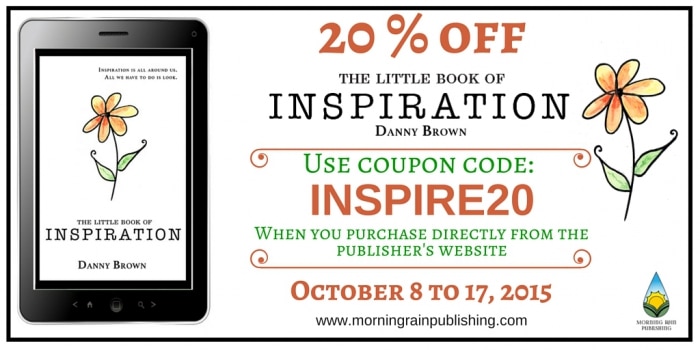
Save 20% when buying direct

As well as being able to buy the book from Amazon and Kobo, you can buy a digital version in the format of your choice (PDF, mobi, epub) direct from Morning Rain Publishing.

If you do this, use code INSPIRE20 at the checkout, and you’ll save 20% from the list price (between $2.99 and $3.99, depending where you are).

LBoI discount

Simply hop over to the book page on my publisher’s site, click on the “Morning Rain Publishing: Buy Now” image, and when you’re taken to the checkout, enter the INSPIRE20 code in the discount box and update cart.

Get an exclusive print from the book

Anyone that buys the book during launch week/the tour, whether it’s from Amazon, Kobo, or direct, will get an exclusive hi-res print of one of the chapters of the book, with artwork from Joanne Clendening, the book’s cover designer.

This also applies to anyone that’s kindly pre-ordered the book (and thank you!). Simply email a copy of your purchase receipt to Morning Rain at info@morningrain.ca, and they’ll send the print off to you!

A special Inspiration giveaway

As well as the above, Morning Rain Publishing are also supporting the launch of the book with a cool giveaway.

This includes a special Little Book of Inspiration notebook, a Morning Rain publishing tote, and a surprise gift!

LBoI giveaway

To enter the giveaway, you can either use your email, or log in with Facebook.

You’ll then have the option to receive other entries via sharing on Twitter, following Morning Rain on Twitter, visit their Facebook page, and more.

It’s simple – just choose your preferred entry method below and have at it!

a Rafflecopter giveaway

How You Can Support

So there you are. As if I wasn’t excited enough about the book launch already, now there’s a cool tour and some great offers for everyone who purchases the book.

As I mentioned in my post last week announcing the launch, this is a book that’s been a long time coming for me, and one I’m most proud of and excited about.

I really hope you feel inspired (see what I did there?) to purchase your own copy, and the words within offer you inspiration when needed.

You can buy from your preferred retailer below:

  • Amazon.com
  • Amazon Canada
  • Amazon UK
  • Amazon Worldwide (this link should automatically identify your country)
  • Kobo

You can also find it on Goodreads, if you like to leave reviews there. Speaking of reviews, please do leave one on your chosen platform – I’d love to hear what you think!

Don’t forget to hop on over to each stop on the virtual tour, and you can follow the stops on Twitter with the hashtag #BookofInspiration.

Tomorrow, the first leg stops at Morning Rain Publishing, as the Little Book of Inspiration is officially launched.

Here’s to being inspired.

This post contains a special Rafflecopter contest widget. If you’re viewing this post via email or RSS and can’t see the widget, you can click here to view the post directly and enter the giveaway.

  • « Go to Previous Page
  • Page 1
  • Interim pages omitted …
  • Page 42
  • Page 43
  • Page 44
  • Page 45
  • Page 46
  • Interim pages omitted …
  • Page 289
  • Go to Next Page »
© 2026 Danny Brown - Made with ♥ on Genesis