• Skip to primary navigation
  • Skip to main content
Danny Brown

Danny Brown

podcaster - author - creator

  • About
  • Podcasts
  • Journal

Latest posts from Danny Brown

Enjoy the latest posts from Danny Brown, and feel free to add your own thoughts in the comments after the post.

Why I’m Loving the Livefyre Comments System

Livefyre comments system

Livefyre comments systemRegular readers of this blog will have noticed the introduction of the Livefyre comment system.

While I’ve written in the past about my reasons to go back to the WordPress comments system, I saw Livefyre in use on a couple of blogs I enjoy and was intrigued enough to check the system out.

While it’s not perfect (and, to be fair, it’s still in beta), having used Livefyre for a week or so now, I’m really enjoying the experience.

So, what’s Livefyre comments all about then?

Comments and Community

On first inspection, Livefyre looks like much like the other main third-party comments systems (Disqus, IntenseDebate and Echo). Looking to combine real-time commenting with building a thriving blog community, Livefyre has all the usual requisites – threaded comments, voting, social sharing, etc.

But it’s when you start using Lifefyre that you can see the goal behind the company – to build a solid commenting community where everyone is “accountable” (this isn’t as Big Brother-ish as it sounds).

By not having the normal Name, Email and URL options, but instead letting you comment either by Twitter, Facebook or your own Livefyre account, the aim is to stop both comment trolls and spam, and improve the visitor experience to any blog with Livefyre installed.

At first, I wasn’t sure about this approach (and raised it in the comments over at the Livefyre blog). However, I can see what the Livefyre guys are trying to achieve with the non-open approach and I do applaud their goal.

And, I have to say, since installing Livefyre, my spam has been zero (I guess spam bots don’t have the patience to sign up for a dedicated account). So, in that respect, the Livefyre approach works.

Real-Time Chat and Replies

Similar to the system that both Disqus and Echo have, Livefyre offers a live comment stream that updates and refreshes as new entries are posted (using the same technology behind Friendfeed). Where Livefyre differs is with the “New Comment” notification bar that pops up when a new comment has been left.

As well as being a cool feature to let you know when someone’s left a new point of view, the immediate advantage this offers is the way that your comment system is now a true, live stream. Think of it as Twitter for blog comments.

When you see the notification, you can jump to the comment itself and hit Reply with your take. This looks similar to Twitter’s “@” option, and will reply directly to that person (or more – Livefyre supports multiple responses).

Livefyre real-time chat comments

If the commenter is still on the site, you can then start a back-and-forth debate all in real-time. Additionally, if the commenter signed in using their Twitter account, then the reply will ping back to them via Twitter and continue the conversation that way.

I’m already thinking of ways to implement this in some upcoming posts, but I think Livefyre’s onto a real winner with this feature.

Checking in to Comments

One of the very cool features that I like is the ability to check into a conversation. This is similar to being notified when a new comment is posted, but with one big difference – you can just follow the conversation without even checking the blog post out.

While this might go against the idea of blog commenting – how can you comment when you don’t know the topic? – it actually expands it. Think about it – you can be down your local sports bar and take part in a conversation about a game, without having seen it. That doesn’t matter – you know the topic and have your own views on the team, player(s), etc.

Livefyre’s check in option allows the same. Many bloggers (myself included) have bemoaned that the likes of Twitter and Facebook could be taking conversations away from your blog and over to these platforms. Sure, your post is being discussed, but unless you follow every outlet you won’t know where and who by.

With Livefyre’s check-in, folks that are connected to your readers can see the conversation that’s happening and jump in to discuss their point of view with their friends. While initially they might not read your post, the opportunity to do so grows with the conversation around it.

This, again, has the potential to be one of Livefyre’s defining benefits.

Other Features

As well as the three features I really like that I’ve highlighted above, Livefyre has a ton of other cool stuff up its sleeve. These include:

  • Comment voting and user reputation (and to give someone a negative vote, you have to use one of your positive votes – a great way to discourage flame wars).
  • Full SEO-friendliness.
  • On-page real-time moderation (Hide Comment or Delete – hide still keeps the comment, just not public, you have to click to open).
  • Ban abusive users.
  • Invite conversations with friends from other networks.
  • Multiple comment moderators and owners.
  • Ability to custom design your comments.
  • Live user count.
  • Email notification of new comments and replies.

So, by the sounds of it, Livefyre is the comment system everyone should use, right? Maybe. Maybe not.

Not Quite Perfect – Yet
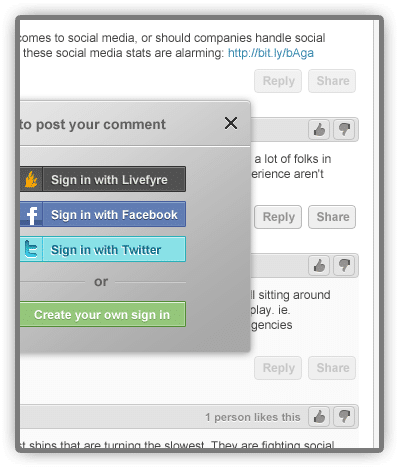
Livefyre sign in optionsAs I mentioned earlier in the post, Livefyre doesn’t allow for generic Name, Email and URL commenting.

You can use Twitter or Facebook to sign up with if you don’t want to open a Livefyre account (though to get the best from Livefyre, an account definitely helps), but you can’t just use a name and email to comment.

While this is great for combating spam and trolls, it might put bloggers off (as well as commenters who don’t want to sign in with Twitter or Facebook, nor create a Livefyre account).

(To be fair, I had my reservations about a non-URL comment system, but so far I haven’t had any issues because of it.)

It doesn’t (currently) support the CommentLuv system either, which is a shame, as this is one of my all-time favourite comment add-ons. Having said that, though, Livefyre CEO Jordan Kretchmer has said he’d love to talk to Andy Bailey (the CommentLuv creator) to see what can be done.

Also, because you have the option to delete your comment (or restart it to correct mistakes), it can lead to duplicate comments. This is only in the blog dashboard, admittedly, but it can throw comment counts off until you delete the non-comment.

It also seems to share the same “bug” that Disqus often has, in that when you click on “Read Comments” (or similar) at the top of a blog post, you aren’t automatically taken to the comments area. However, this could be a bug that will be ironed out when Livefyre comes out its beta stage.

I’d also like to see some way that comments made on Twitter or Facebook (or other social networks) could be seamlessly transferred back to the blog post and into the bigger conversation for true social integration, as opposed to the social mentions approach that Disqus has. Livefyre have said they have some cool upcoming features, so who knows?

Should You Use Livefyre?

So, I guess the main question that’s left is should you use Livefyre when it’s out of beta?

As someone who’s previously spoken on why I don’t use third-party comment systems, I have to say Livefyre has changed my mind. Not only are all your comments saved to WordPress in case you want to change back, all the threaded discussions are saved as well, so the comments don’t look funky if you switch Livefyre off (something all too obvious when moving away from Disqus).

Also, while the idea of a velvet rope comment community seems at odds with “normal” open comments, Livefyre doesn’t actually feel like a closed community. With more than 500 million Facebook users, and 150 million Twitter users, even if you don’t want to create a Livefyre account you should be covered.

And the immediate effect on spam and comment trolls can’t be discounted (though I’ve been hugely fortunate with the great community here when it comes to comments and respect).

The system is also mobile-friendly, which isn’t always the case with other third-party systems (I tested with my BlackBerry browser and had no issues).

My take? If you like the idea of real-time chat and a comments system that fosters respect and accountability, as well as a ton of other cool features, Livefyre is the best third-party option around.

Even if you’re not a fan of anything but standard WordPress comments because of the “overkill” options that can happen with third-party comments, Livefyre offers a really clean solution that’s almost the next best thing to vanilla WordPress comments.

The service so far has also been awesome. Combine that with a pretty cool product, and you can’t ask for much more than that.

In that respect, I can’t recommend Livefyre enough.

If you’re interested in signing up for the beta of Livefyre Comments, hop on over to the homepage and you can request it there.

  • Note – Livefyre is currently available for the WordPress (self-hosted version) platform, with TypePad and Tumblr versions to follow.
  • Update: I’ve since reverted to the vanilla WordPress comments as part of my blog redesign.

The 7 Day Blog Challenge

We love blogs and the 7 day blog challenge

We love blogs and the 7 day blog challenge

Here’s a little experiment I’d love for you to join me in. Let’s call it the 7 Day Blog Challenge.

Instead of sharing the usual suspects when it comes to bloggers and their latest posts, let’s widen our arc. Instead of staying within our normal boundaries, let’s push the ejector seat button and clear the space next to us for some new voices.

Let’s face it, as blog readers we can all be guilty of sticking to what and who we know, as opposed to finding new blood. So let’s encourage each other to diversify a bit, and really help other bloggers get the recognition they deserve.

Interested? Here’s how the 7 Day Blog Challenge will work.

Blog Readers

Sure, it’s great to read the latest from Seth Godin, Darren Rowse or copyblogger, but while they might have a great post that you want to share, do they really need that one extra push? Could their blog survive one less social share, and have it go to one of their commenters instead?

So.

  • Find a comment that interests you, and click through to their blog.
  • Take the time to read through the last 4-5 posts.
  • Comment on their post(s), and let them know you’ve found a new blog to enjoy.
  • Share the post with your network(s).
  • Subscribe to the new blog.
  • Rinse and repeat for another 6 new bloggers (so one a day).

Bloggers

We are who we are because of our readers. And many of these readers turn into commenters, some very regularly. And many of these commenters have blogs. So why not highlight them more?

  • Choose one of your commenters each day, and drop by their blog to read, comment and/or subscribe.
  • Share with your own readers – either highlight them in a post of yours, or via Twitter, your Facebook Page, or similar.
  • Add their blog to your blogroll (if you have one) or post a round-up at the end of the week of the great new bloggers you’ve found.
  • If you’re on Twitter, create a list (maybe Blogs I Read, for example), and tweet a link out to one of the blogger’s posts.
  • When replying to a comment of theirs, tell other commenters this is an example of the great mindset they’ll find over at that person’s blog.

Blogging takes time, commitment, and most of all love. If a blogger doesn’t love what they’re doing, that can soon come across and make the blog less enjoyable.

It can be hard for bloggers, especially newer ones, to keep going when they feel no-one is reading. Let’s take 7 days out of our normal blogging routine and share the love with more than just the usual suspects.

I’ll be sharing my 7 new blogs starting on Friday. Care to join me?

Image: tarop

Sayers and Doers

There are two kinds of people in the world – sayers and doers.

Sayers sure can talk a lot about a great many things. They might even talk about some of the things they’ve done, or are going to do.

Doers, on the other hand, actually do all the things that sayers talk about and then some more on top, just for good measure.

What side of the equation do you fit?

Making Homelessness Visible Through Social Media

Danny Brown, Mark Horvath, Troy Claus

Danny Brown, Mark Horvath, Troy Claus

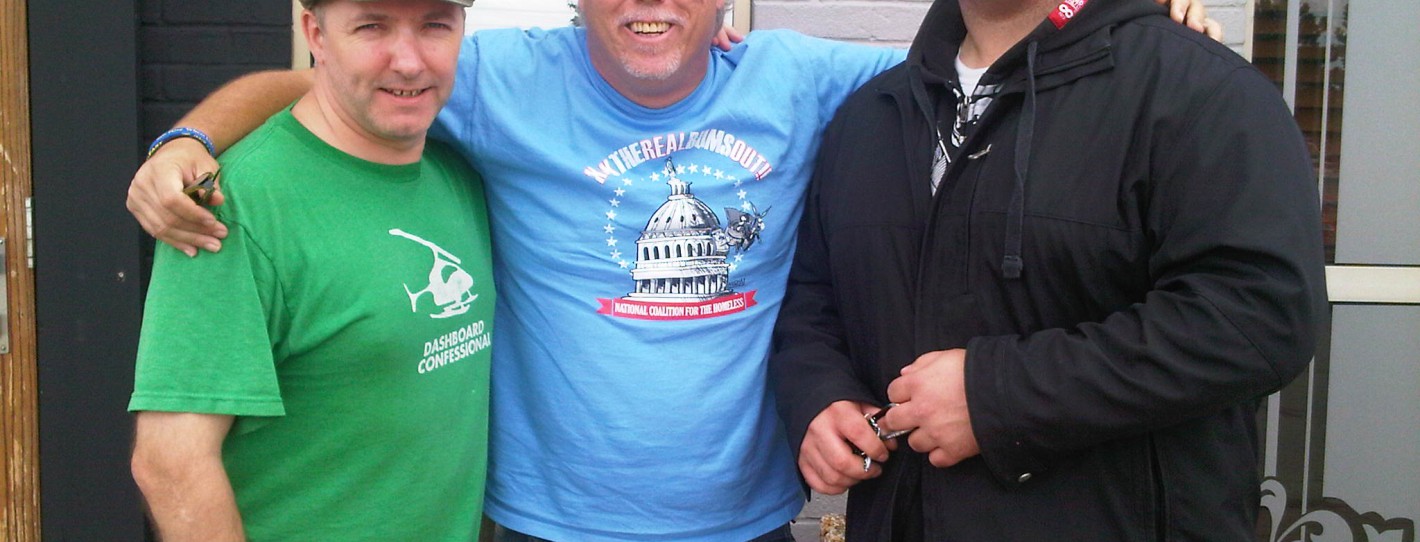
This weekend just gone, I was honoured to meet a guy I’ve admired for a long, long time, Mark Horvath (Mark’s in the centre, my business partner Troy Claus is on the right).

Based out of Los Angeles, Mark is someone with an incredible story. Fifteen years ago, Mark was homeless and sleeping on the streets of Hollywood.

But he managed to get back on his feet, and then some. He was at the top of his game – working in Hollywood, bringing some of the best-known shows on television to viewers across the world, a great future – Mark was living the American dream.

Then the economy collapsed. Mark fell into a mix of drug and alcohol abuse, lost his job, became homeless, and lost his way. He fought hard to get back on his feet again, and get his life in order. And he did. But he’s always just one step away from being homeless again.

From that time, Mark took the experience of being homeless, and the stories of the people he met on the street, and created Invisible People. A site full of video, it shares the stories of the homeless in L.A. and beyond, and lets you see the person behind the stereotypical image we let ourselves create when we see a homeless person.

It’s been a huge success and has opened a lot of eyes to what homelessness really is. Hint – it’s not all drug abuse and choice.

Now Mark has a new project, and one I really hope you’ll check out and offer your support to.

We Are Visible

We Are Visible is a simple idea – and simple ideas are often the best. Many homeless use their local library’s Internet-enabled computers to connect with others, and try and learn new skill sets that could help them get back on their feet.

They also can find medical help; companies and organizations that help the homeless; lost family and loved ones; and so much more. Yet often they only know the basic email and Internet access.

As Mark’s shown, social media offers an incredible platform to not only connect, but tell stories. And this is exactly what We Are Visible aims to do, by making social media simple for anyone homeless to understand, and use.

There are videos that show you how to set up a Gmail account, as well as a Twitter and Facebook profile. Additionally, We Are Visible shows you how to set up a free blog, and connect your profiles to it.

You can then share your story through the main We Are Visible social networks, as well as be put in touch with other homeless folks. And, where possible, be connected to companies that could help you get back on your feet and/or off the streets.

Last Christmas, 12for12k partnered with Mark to show people how they could help the homeless in their own towns and cities, and we’ll be doing something very similar this year again, starting in November.

In the meantime, however, We Are Visible is a brilliant concept, and one that I’m honoured to share with you. Please, check the program out, and if you feel you can help raise awareness of it, get in touch with Mark and see how you can help.

One way is to order promo cards (if you’re in the U.S.) and these can be ordered here. More information will be available via the networks below.

– We Are Visible website.
– We Are Visible on Twitter.
– We Are Visible on Facebook.

Facebook Loves Porn, Hates Health Advice

Facebook porn 1

Check Your Package testicular cancer campaign

Yep, hands up, that’s a bit of a link-bait title. But I make no bones about it, after reading an article in the Toronto Star today on how Facebook is saying no to a testicular cancer ad by Toronto Public Health for being too “threatening”.

The ad in question is the one at the top of this post (or a version of it).

Seems a great ad, no? It’s provocative in a fun way – always good for catching eyeballs. And it also shares an important message for a disease that can affect a large percentage of the male population, especially younger men. So, win-win all round.

Except Facebook doesn’t agree.

According to the story in the Toronto Star and HealthZone.ca, Facebook won’t approve the ad because it’s not deemed suitable for their audience. According to an email from Facebook ad employee Roger Lu:

The image must not focus on a specific body part, particularly a man?s crotch, and the ?Check Your Package? headline was unacceptable.

Facebook also called the use of the phrase “Men 18-35 are at risk” threatening, as well as being against Facebook’s ad policy of not calling out ages. Which seems kind of ironic, considering part of Facebook ad audience targeting is choosing which age demographic you want to reach.

So, cut a long story short, Facebook seems to be against the Toronto Public Health ad because it shows a guy’s groin and has some questionable wording.

This could probably be a bit more understandable if it was a sexual ad with provocative language. But it’s not – it’s a health ad with some startling but real statistics.

To gauge how idiotic the Facebook stance appears to be, I did a little searching on Facebook pages and profiles. Here are some profile pics and page images that popped up, according to the search terms.

Facebook porn 1

Facebook porn 2

These are a couple of the tamer ones, both from the profiles and the search results themselves.

So, it appears Facebook is pretty happy having full-on and open sex pictures, with some pretty funky descriptions, but not a health ad that could save a ton of lives amongst many of Facebook’s users.

My friend Christina Kingston shared a post about Facebook’s contradictory stance, but I can’t find the link unfortunately. It was another example of Facebook having an issue with something harmless while okaying – or seeming to okay – something that could be more “harmful”, depending on the viewer.

I don’t know about you, but seems they have a bit of a mixed up approach, no?

  • « Go to Previous Page
  • Page 1
  • Interim pages omitted …
  • Page 174
  • Page 175
  • Page 176
  • Page 177
  • Page 178
  • Interim pages omitted …
  • Page 283
  • Go to Next Page »
© 2026 Danny Brown - Made with ♥ on Genesis