• Skip to primary navigation
  • Skip to main content
Danny Brown

Danny Brown

podcaster - author - creator

  • About
  • Podcasts
  • Journal

Latest posts from Danny Brown

Enjoy the latest posts from Danny Brown, and feel free to add your own thoughts in the comments after the post.

Digital Storytellers and TEDx Ottawa

As you may or may not know, I’ll be speaking at the TEDx event in Ottawa on Sunday December 6, which takes place at the Bitheads Theatre in downtown Ottawa (it’s an actual movie theatre).

I’m really honoured to have been asked, and I’m looking forward to seeing the other speakers and guests at what should be an awesome event.?Allan Isfan,?Susan Murphy,?Kneale Mann and others are doing an incredible job putting it all together.

So what will I be talking about?

My theme will be Digital Storytellers – What We Can Learn from George Lucas. Although to be honest, that title could be kind of misleading since the Lucas element may (or may not) be a small one!

Suffice to say, what really drives me forward and inspires me is how things come together and can really effect change, whether that be from a technological viewpoint, a business one, a personal one or a philanthropic one. Heck, there are many more than these that I’ve just mentioned – the possibilities are pretty much endless.

I know the flow of what I’ll be chatting about, and the examples I’ll be using and yes, George Lucas and Star Wars will be amongst them! I’ve had some cool (I hope!) concepts come to me as I’ve thought more about TEDx Ottawa and TED itself, and how I can mesh that with the ideas I have. Hopefully they’ll be interesting enough to the good folk who’ll be in attendance on the Sunday.

If you’re in or around the area on December 6, TEDx Ottawa looks set to be a really sweet event and you can still apply for tickets (applications close midnight on Monday November 9). The current speaker list can be found here. I think the event will be streamed live as well if you can’t make it, but I’m not 100% sure on that.

Look forward to seeing you there if you’re going – it should be a great weekend.

Don’t Do a Google

If actions speak louder than words, and a picture paints a thousand words, take a look at this image and ask yourself what message it portrays.

If you’re a business owner, would you bring out a new product that could change the way your customers use your service (and that of your competitors) forever, yet not allow them to use it via your service?

That’s like? a restaurant that employs the best chef then delivers the food to the restaurant across the street. Or Ford coming up with an amazing safety feature and then making it work in every vehicle except Ford cars and trucks. It’s using your smarts and then opening up the brains to everyone but your team.

You’re not doing a Google, are you?

Why Headway 1.5 is the Future of WordPress Theme Design

Bold claim? No – seriously, the new Headway 1.5 premium WordPress theme has just raised the bar so far ahead of the rest of the WordPress theme developers it’s scary.

I’ve been using the Headway theme on this blog for around 3 months now. In that time, I’ve been consistently impressed with the way it allows changes on the fly to any part of your theme, simply by using its drag-and-drop design. I’ve also been impressed with the way it allows the choice of blog design with or without custom CSS or HTML coding. More than anything, I’ve been impressed with the support and business ethics of the developer Clay Griffiths and his father Grant.

So, yeah, I’m already a huge fan of Headway. Now, though? The game just got raised for premium WordPress themes with Headway 1.5 and it’s going to change the way you look at blog and website design forever. Here’s why.

Visual Editor

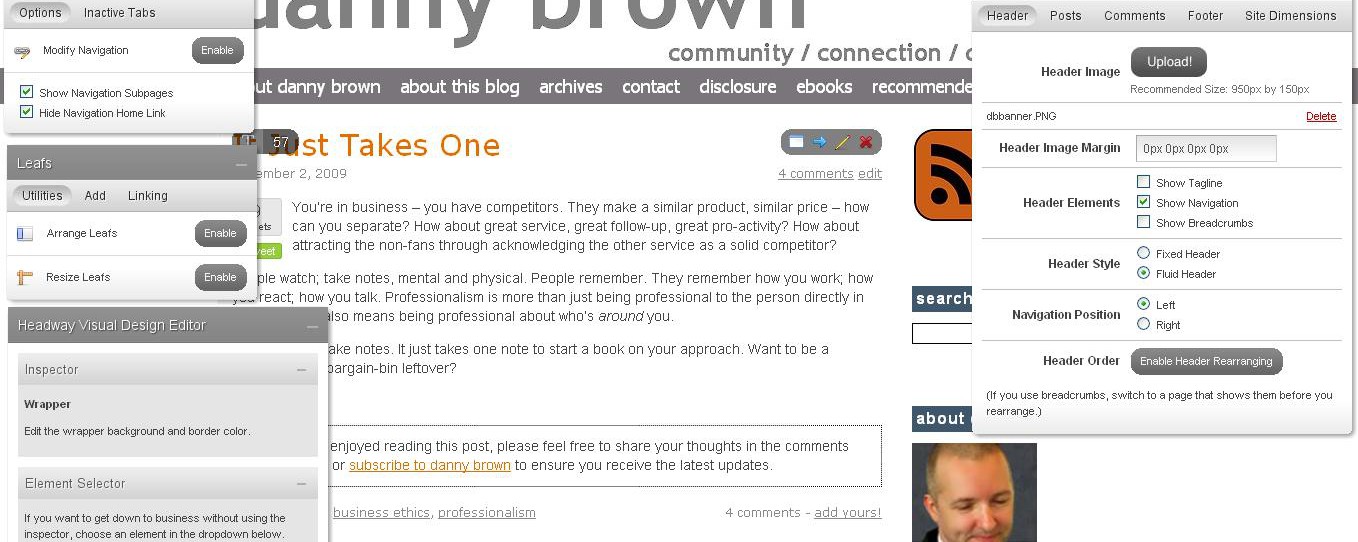
Yes, you read that right – Visual Editor. If you think that making changes, saving and then checking how it looks on a standard WordPress design is a pain, wait until you get a load of Headway 1.5’s Visual Editor. Simply put, once you’ve used it you’ll wonder how you ever managed without it before (right-click on the image below and open in new tab to see the Visual Editor layout).

When you’re logged into your WordPress admin area, open up your main homepage and at the top right you’ll see a box that says “Enter Visual Editor.” Click that and be prepared to be blown away.

Four boxes will open up (which you can place anywhere on your screen, and minimize/maximize as needed) – Site Configuration, Navigation, Leafs and Headway Visual Design Editor. These are all overlaid on your live web design so any changes you want to make you can see happen in front of your eyes as it’s being done. To enter any of the Headway 1.5 visual editor modes, simply click on the area you want to change.

So, for example, I want to change the colour of my navigation menu. I’ll click my mouse onto the navigation bar, and the Headway Visual Editor box will open up a drop-down menu titled Navigation Item. To make sure I’m on the right area of my design to edit, I can click on the “Call This Element Out” box and it will highlight the area I’m about to edit. Cool, huh?

From there, I can change the text colour, the navigation bar colour, the right border colour and dimension, as well as the font I want, the size of the font, whether it’s upper case or lower case and if I want the text to be bold or normal. I can even choose the spacing between the letters. I make my changes and then hit Save – and that’s it. You can mess with the colours and text before saving and really get the design that you want.

This goes for any area of your blog design – main content, hyperlinks, sidebar widgets, footers, headers, post titles. If you can select it on page, you can edit it. Of course, there’s a lot more to the Visual Editor feature than just pretty colours – so what else is there? The main one you’ll be using is the site configuration.

Site Configuration

The site configuration box on Headway 1.5 allows you to set up your blog anyway you want and is a huge addition to the Visual Editor. By choosing from the tabs at the top of the configuration box, you can play with the following:

  • Header – choose if you want to upload a custom image; if you want to show a blog tagline (if you don’t use a custom header); show navigation and breadcrumbs (or not); fixed or fluid header; header re-arranging enabled (drag the header above or below the nav bar); and a really cool feature, right or left navigation menu position, all from the click of a mouse.
  • Posts – set up the meta for each post; how many featured posts you have; whether you have small or regular width teaser posts under your main content; and disable excerpts.
  • Comments – choose whether to allow comments on pages as well as posts; avatars or not; set up a default avatar and avatar size.
  • Footer – choose from a fixed or fluid footer; and what copyright and admin links to have showing as well (a nice touch to prevent the need to edit in your footer CSS).
  • Site dimensions – does exactly what it says on the tin. Choose how wide your site design is (standard width 950 pixels with 20px wrapper).

You also have a Navigation box, which allows you to show navigation sub-pages, hide the Home link, and lets you drop-and-drag the navigation bar to re-arrange the position of the page tabs. And if you want to have drop-down navigation menus without having to resort to CSS coding, Headway 1.5 does that too.

The Headway 1.5 Leafs box is also incredibly cool. Leafs are essentially Headway’s content and sidebar boxes, and allow you to truly customize your look and feel. Choose from 1 sidebar, 2 sidebars, left or right positioning, and widgetized footers. True to form, the Visual Editor allows you to play to your heart’s content with the Leafs box:

  • Enable both Arrange Leafs and Resize Leafs, so you can make your content box and sidebar as wide or as narrow as you want just by dragging the box around.
  • Add Leafs – choose from Content, Widget Ready Sidebar, Text/HTML leaf, Featured Post, RSS/Recent Posts, Image Rotator (have up to four rotating images in the same box); About (about me, company or blog); Twitter updates; and Photo Gallery.
  • Linking – amazing little tool that allows you to link a complete leaf to anywhere on your blog. From pages to blog content, categories, archives, etc – seriously, this little feature kicks ass and once again shows the power and versatility of Headway 1.5.

Oh, and did I mention you can do all of this right before your eyes? Add in the fact that there will be Headway skins available soon (and the option to develop and give away/sell), as well as Certified Developer Licenses and a Youtube channel for you to connect your videos with, and it’s clear that Clay and Grant Griffiths are really looking out for WordPress users.

Headway 1.0 was an outstanding first release and clearly made some other premium WordPress theme developers sit up and take notice. Ease of use, CSS/HTML coding, first class search engine optimization capabilities and built-in social media integration – all that and more made the first release pretty special. With Headway 1.5 the game has been changed again.

While there are some great premium themes around, I think it’s fair to say that Headway 1.5 is head and shoulders above what anyone else is currently doing, whether you use the Visual Editor or your own custom CSS/HTML (or both combined).

If you’re serious about your WordPress site theme design, watch the video below then?buy Headway 1.5 – it really is that good.

Note: This blog no longer runs on the Headway framework. Instead, it’s a custom WordPress design by Lisa Kalandjian of SceneStealer Graphics.

  • Disclaimer. I’ve been impressed with the Headway premium WordPress theme from the start and it’s the only theme I’ve ever set an affiliate account up with. If you’re thinking of buying it and do so via any of my links, 50% of the affiliation revenue will be donated to the current 12for12k charity on your behalf.

Happy Hallowe’en!

Happy Hallowe’en folks – have a great evening and make sure to take a healthy mix of candy and beer! (Except for the kids – maybe just candy for these little guys…)

Do Good, Look Good

As you may know, I’m part of the 12for12k social media-led charity initiative that supports a different charity each month throughout 2009.

October’s chosen charity is Musicians on Call, an amazing group of folks that take the healing power of music to bed-ridden hospital patients. They currently operate in four cities across the U.S. and amazingly a whole program can be operated for one year with just $10,000.

Tonight sees a live concert take place to help raise funds and awareness for MoC and arranged by fellow 12for12k supporter Richard Marti. This is at the Rock Cafe and Smokin’ Rock Restaurant in Rocky Hill, CT, with a great line-up of artists and original music – more details are here and it promises to be a great night.

Sadly, October has been really quiet as far as donations go. Awareness has been awesome, and thank you so much for that, but it’d be great to help out more from a fund-raising front. So, here’s a special offer/challenge and every donor is eligible.

If we can break the $10,000 mark between now and midnight PST on October 31 that will enable a full one-year support program, I will offer the following to one lucky name drawn after the event:

  • Copy of the Headway premium WordPress theme
  • A domain name
  • A two-year web host package with Bluehost
  • Website or blog set-up with up to five pages of design
  • Two hours of consultancy time and a checklist report for maximizing your website or blog presence

Combined, this is worth over $2,000 and is a great way to kick-start your online presence if, a) you don’t already have one or, b) you need to boost yours.

So, what do you say guys – ready to either donate or share via Twitter, Facebook, friends and colleagues and help 12for12k and Musicians on Call crack that magic $10k mark?

Note: This blog no longer runs on the Headway framework. Instead, it’s a custom WordPress design by Lisa Kalandjian of SceneStealer Graphics.

  • « Go to Previous Page
  • Page 1
  • Interim pages omitted …
  • Page 212
  • Page 213
  • Page 214
  • Page 215
  • Page 216
  • Interim pages omitted …
  • Page 283
  • Go to Next Page »
© 2026 Danny Brown - Made with ♥ on Genesis