• Skip to primary navigation
  • Skip to main content
Danny Brown

Danny Brown

podcaster - author - creator

  • About
  • Podcasts
  • Journal

Latest posts from Danny Brown

Enjoy the latest posts from Danny Brown, and feel free to add your own thoughts in the comments after the post.

3 Simple Ways to Be Cleverly Quiet in Social Media

We’re told by those that know that we should be in social media. Not just in it, though, but participating.

Jumping in; joining conversations; leading the way; growing our audiences while talking with them at the same time.

And of course, in an ideal world, we should and would follow the above and more.

Problem is, we don’t live in an ideal world.

Time or budget restrictions. Fear of the big scary world that is social media. Lack of buy-in from decision-makers in our workplace, and so on.

All decent points, all valid arguments.

But even if you can’t justify participating actively in social media, there are a ton of ways you can be cleverly quiet in social media and know all you need to know too.

Here are just three. Best of all, they’re all free too.

Use the Search, Luke

A vastly under-used yet hugely effective source of silent participation are the various search options in social media. Twitter, Facebook, YouTube, LinkedIn, Slideshare and virtually every other social media platform you can think of has a search function.

Just like Google’s search box, all you need do is type in the keywords relevant to you and see what’s being talked about when it comes to you and the customers you’re after.

It doesn’t stop there. You can save searches on Twitter, for example, and then jump back in any time and see what’s new in your industry – it’s basically an ever-growing resource centre.

Search is your friend – look after it.

Real-Time or Your Time

So we know search is your friend. But one of the arguments against social participation is the time involved, and that same argument can also be used against searches – you have to always be there. Which is why alerts are also your friend.

By plugging your keywords into real-time search and monitoring platforms, then setting up alerts for them, you can get the information you need to know at your convenience.

Tools like Google Alerts, Social Mention, Surchur and others allow you to set up search parameters and then choose when you want to receive that information. Hourly, daily, weekly, as it happens – you choose. There might be some words less important to you than others, so choose the important ones for more frequent updates, then the others as you see fit.

Alerts are also your friend, since they let us decide when (and if) we need to jump in on something.

Subscribe to Knowledge

According to Technorati’s last State of the Blogosphere, there are more than 133 million blogs out there (probably more since that report came out a year ago). That’s a heck of a lot of blogs – and many of them cover business. Which covers social media.

By combining social and “normal” searches, tags like Technorati’s own social media tags and reading blogs that offer excellent research and information, you can soon build up a great knowledge base on the topics you need to know about to help your business.

Then, to make sure you don’t miss out on that information, make sure you subscribe either by that blog’s RSS feed, or by email subscription so you get all the latest news as soon as it’s published.

Your Turn

Like I said at the start of this post, you don’t need to participate actively in social media to benefit from it. Obviously the more active you are, the more beneficial it’ll be. But if time and resources are currently against you, then silent participation can still benefit you immensely.

How about you – what ways are you using social media silently to benefit you and/or your business?

Creative Commons License photo credit: buddygirlgreetings

Why I’m Loving BlogOnCloud9

First, I just want to say none of the BlogOnCloud9 links in this post are affiliate, in case you thought this was just a blatant sales pitch…

About a couple of months ago, I noticed that my site was having loading issues. I ran it through a load time analyzer and was shocked at how long it could take to load.

Especially with it being reported that Google would look less favourably on slow-loading sites.

My host at the time was Hostgator, and while they’re a great host, my concern was that by sharing bandwidth with other sites, mine would eventually suffer. Step up the search for a new web host.

One of the blogs I read a lot is that of Mark Jaquith, and he had a post about WordPress and how certain hosts weren’t really set up for it (and I’m not saying this is the case with Hostgator, just to be clear).

In the comments of that post, Ronald Huereca mentioned a host called BlogOnCloud9. What caught my eye was the mention that they use Rackspace, who I’d been looking at, and how they seemed perfect for WordPress and were very security-conscious. So I decided to look into BlogOnCloud9. And was very pleasantly surprised.

The guys at BlogOnCloud9 set the service up because they were also WordPress lovers frustrated at how the platform wasn’t always taken seriously by web hosts. They have a rich history with WordPress, with their involvement with ContentRobot, and so decided to set up their own dedicated service just for WordPress blogs.

Reading up some more on them, I contacted the BlogOnCloud9 guys with some questions about moving servers, their service, and just general questions on hosting, etc. They replied the same day, with a great personal touch (something that continues today), and really made me feel like their most important customer. Something that every business should do.

So I decided to go ahead with it and the move was smooth as marble. There was no downtime; the guys had me up on a dummy site to ensure I was happy with everything; and the transfer from Hostgator to BlogOnCloud9 was completed with no drama at all.

Since then, the performance and support continues to convince me I made the right move, and it’s the reason I recommend BlogOnCloud9 for any WordPress blog or site, and for clients that are overhauling their web presence.

Should you check out BlogOnCloud9? Well, here are some features if you’re interested:

  • Custom installation tailored to your needs.
  • Configuration and plug-in installation for security, SEO, performance and analytics.
  • One-to-one support and forum support for all WordPress questions (not just your blog).
  • Nightly back-ups emailed to you in case your blog goes down for any reason (using the awesome Back-Up Buddy plug-in).
  • Easy upgrade options to different plans, depending on your growth/new domains.

Because I have a few domains, I chose the Expert Plan that also gives me five development areas. This is where I can essentially create a clone of my blog to redesign, mess with template, try new features, etc, without damaging my live blog. Then I just flip the switch to set live.

If this post comes across as a bit promotional for BlogOnCloud9, I make no apologies for that. Just like you, I believe in sharing great products and service, and BlogOnCloud9 falls into both these categories and then some.

And like I said at the start, none of the links here are affiliate links (though BlogOnCloud9 does offer that if you’re interested) so I’m not even posting just to make a fast buck…

Anyhoo… this is why I’m loving BlogOnCloud9 and if you’re serious about WordPress and blogging/site host, you could do a lot worse than check them out.

Cheers!

How NOT to Win Friends and Influence People

DSNR Media spams Facebook page of Danny Brown

When is sharing information useful, and when is it just spamming off the back of someone else’s community?

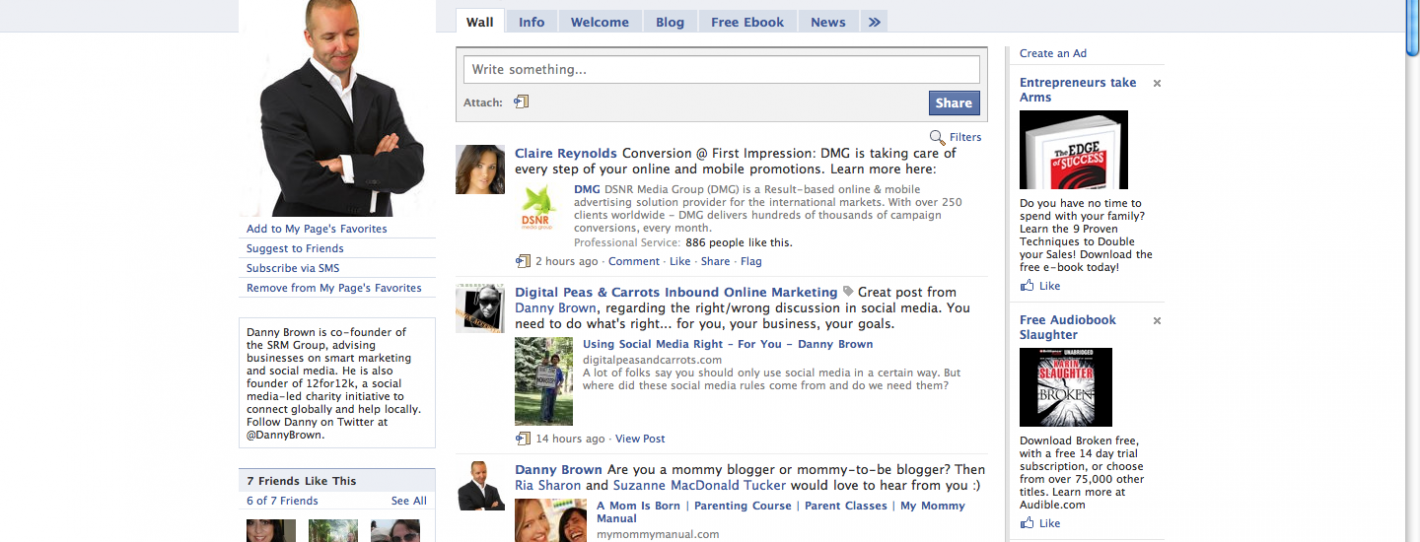
I ask because when I logged into my Facebook page today to post an update on a future Bonsai Interactive event, I was met with this at the top of my wall (click to expand).

DSNR Media spams Facebook page of Danny Brown

It was posted by Claire Reynolds on behalf of the DSNR Media Group. At least I think it’s by Claire on behalf of DSNR, since Claire’s Facebook profile has her located in the U.K., while DSNR are based in Israel.

DSNR describe themselves as “a recognized global provider of result-based online and mobile advertising solutions… with cutting edge optimization tools.” Really, DSNR?

So spamming your message onto a Facebook wall is considered cutting edge? Shilling your wares without permission is your great advertising solutions? Posting links to your service where they may or may not be relevant to the audience is ethical?

Here’s a heads-up – spam is not cool.

You can paint it whatever way you like, but you’re spamming.

You’re an online advertising company, so I’m pretty sure you’re aware of Permission Marketing from Seth Godin. Even though it was written over 10 years ago, it’s still more than relevant today. Check it out – it’s a great read and might open your eyes as to why your current spamming approach isn’t welcome.

In the meantime, I’m removing your post on my wall. I respect the community I have over there, and I don’t want them spammed by you either.

Have a great week.

Using Social Media Right – For You

Chris Brogan wrote a post the other day about connecting your Twitter profile to LinkedIn. His take was that it’s annoying, and you should only be sharing some of your Twitter stuff.

There are a ton of folks that say you shouldn’t be tweeting about what you had for breakfast, or how silly your cat is. Doing that means you’re not using Twitter right.

Then you have folks that say you shouldn’t connect Foursquare to your Twitter account, because no-one wants to know that you’re sitting on a patio having a cold one somewhere, or you’re in Best Buy getting a game for your Xbox 360.

Again, it’s “not the right way” to use the service.

Here’s a little heads up – there’s no right or wrong way to use social media.

There is a right way to use it for you and your needs, though, and that’s different.

To take Chris’s point about Twitter and LinkedIn, I worked with a client in the service industry. They used Twitter to help resolve issues and technical queries. We fed their Twitter feed into LinkedIn and Facebook.

Because of this, they won three big clients who were impressed at how quickly they resolved issues, and how concerned they were for their customers. Where did these clients come from? Two from LinkedIn and one from Facebook. The three new clients equated to six figure contracts – something that would have been missed had the Twitter account of my client not been linked up elsewhere.

As for not using Twitter to share personal stuff? Look at Twitter’s own description of the service – “Twitter is a rich source of instant information. Stay updated. Keep others updated. It’s a whole thing.” Nowhere does it say, “Please keep this business related.”

And sharing what you’re up to on Foursquare allows others to see your tastes. We keep complaining about ineffective advertising – by sharing what we like, we’re allowing marketers and advertisers insights into what we’d like to see from them. Seems like a win-win (as long as they don’t abuse our trust, obviously).

This whole “doing social media right” mindset seems to miss the mark. Who said that using Twitter or LinkedIn should be one way and one way only? Where did these “social media rules” come from? I don’t recall seeing a Social Media Ten Commandments movie. You?

Social media is just like anything else – people will either like what you’re doing or not. They’ll either agree with your viewpoint or they won’t. The ones that agree will be your customers; the ones that don’t probably weren’t a good fit anyways.

And isn’t that the way business and personal relationships have always been anyway?

Creative Commons License photo credit: QualityFrog

Facebook Pisses Off Users. Again.

Bonsai Interactive Facebook Page

For all its cool connectivity features and business tools, Facebook can still manage to piss users off even when it’s trying to be helpful.

Whether it’s new privacy features gone mad, or redesigns to the site itself, Facebook always seems to divide its userbase between happy, non-chalant and hate. Now a new feature for Facebook Page admins – Getting Started – seems to be getting more criticism than praise.

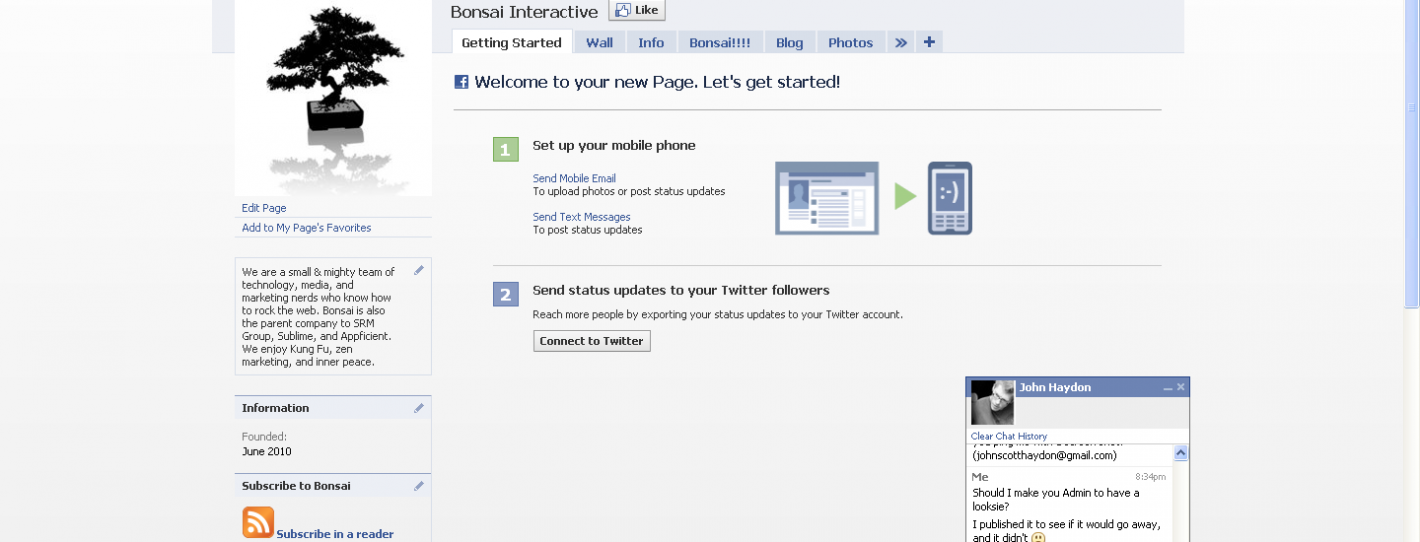
I only noticed it when I jumped on to design the new Bonsai Interactive Facebook Page. Instead of the normal tabs along the menu like Wall, Info and Photos, there was also a new tab called Getting Started.

Bonsai Interactive Facebook Page

As it suggests, it offered some tips on how to set your Facebook Page up. Great – anything that helps new Page users get the best from their Page has to be great, right?

Hey, it’s Facebook – so, no, is the short answer.

Since I already know how to set a Page up, I went to hide the tab. And found that I couldn’t. There was no way for me to drag it into non-displayed tabs, nor was there an option for me to delete the tab either.

In fact, the only way I could get rid of the damn thing was to link my Twitter account to the Page, as well as my mobile phone.

Riiiiiight…

The social side of me wants to think that this is just a way to connect your accounts together and make it easy to populate your Facebook Page from either Twitter or your mobile phone.

The cynical side of me sees it as another way for Facebook to have more information about you, and then possibly open up that information (purposely or not) to mobile ad companies and Twitter spammers.

I opened up a Help Ticket on Facebook last Thursday, asking how to remove. As of writing this post, no-one from Facebook has actually answered.

But there are plenty of other frustrated users complaining about this “helpful” addition.

Facebook upsets Page Admins

Like I say, I can see the benefit of having a Getting Started tab, especially for new Page users. But not having a way to delete or remove it manually, while it takes up a tab that could be used for something more beneficial to the Page, seems kinda lame to me (I had to link my Twitter and mobile accounts and then remove access to get rid of the tab).

What’s your take on it? Have you seen this new feature yet, and is it useful or just another Facebook faux pas?

  • « Go to Previous Page
  • Page 1
  • Interim pages omitted …
  • Page 182
  • Page 183
  • Page 184
  • Page 185
  • Page 186
  • Interim pages omitted …
  • Page 283
  • Go to Next Page »
© 2026 Danny Brown - Made with ♥ on Genesis