• Skip to primary navigation
  • Skip to main content
Danny Brown

Danny Brown

podcaster - author - creator

  • About
  • Podcasts
  • Journal

social sharing

Oh Noes, Google+ is Removing Its Share Counts – Who Cares?

/endsarcasm

I could just leave this post here, and it’d be enough for my take on the news that Google+ (yeah, remember that?) is removing share counts from its sharing button.

Much like Twitter did a couple of years back, Google’s platform will no longer show how many times your post or article has been shared on its network.

And, as expected, content creators are making all sorts of noise about this loss. Which is understandable, given they make money from a social sharing plugin, amongst other things.

But, in the grand scheme of things, does this really matter?

Social Proof, or Social Proof is in the Pudding?

At the start of last year, I removed social sharing buttons from my blog altogether after a couple of experiments around their value, both perceived and real.

My take was (and remains) they’re simply an interruptive part of the content consumption for both reader and post author.

The experiment (for my blog, at least) bore that belief out, with more shares happening as a result of there being no share buttons – go figure!

Now, the argument from many social sharing button fans is that it makes it easier to get shares, thereby increasing your share count, thereby making your posts seem more popular.

This is called “social proof” – by having large numbers of shares, visitors to your site will believe you’re more influential than other bloggers, and will therefore share your content versus similar content elsewhere.

[clickToTweet tweet=”Oh noes, Google+ is removing counts from its sharing button. It’s a disaster! /endsarcasm” quote=”Social proof via social sharing numbers – valid authority metric, or fuzzy fluff?”]

And, to a degree, that can be true. But is that adding to your goals?

  • Does a thousand shares of your latest post mean you have a thousand new subscribers, or a thousand new customers for your online store?
  • Are the shares going out to the right audience when being shared?
  • Are the shares delivering on the message when a visitor comes to your site from it?

These are just three simple examples, but let’s break then down a little further.

Shares versus results

So let’s say your post gets a thousand shares across various networks. How does that impact your content goals? Are you just raising awareness, or is there a strategy behind the shares?

Numbers of shares are all good, but if all that’s happening is your post getting more numbers on your sharing buttons, are these numbers actually providing any value?

Especially when social media users are more likely to share a link than click on it.

Is it the right audience?

So your reader/visitor shared on Twitter, or Facebook, or Google+. Great – more eyeballs for your content, right? Or is it?

Who are the followers of your sharer? Because that’s what really matters – not the amount of shares, but the relevance of that share to new eyeballs.

Although not 100% definitive, this graphic shows how little online content can mean in the grand scheme of things when it comes to what’s shared on social media (using the U.S. as an example).

This ties back to relevance to the visitor – if your sharer is primarily followed by non-buyers of your product, or non-readers of your topics, I don’t care how many times that post is shared, it’s probably not going to mean much in the grand scheme of things.

Does your site deliver?

Most social media sharing is done via mobile now, given the mobile-first nature of the various networks, and their individual apps.

So let’s say a share goes out via a desktop visitor, and is clicked on by a mobile reader – except your site still isn’t set up for mobile visitors (yes, this still happens in 2017!).

Your visitor is going to bounce from the site pretty much immediately, and you’ve lost a potential prospect – but, hey, that sharing count looks great, right?

The Argument Against Share Counts

As I mentioned at the start of this post, there are a lot of people who put social share counts into a bracket of value.

And, for some, maybe that number beside the sharing button validates their content, and they offer examples of why it’s important – and that’s fine.

But, for me at least, the arguments don’t completely hold up.

Social share counts attract advertisers

Maybe they do – initially. But if your analytics don’t back up the numbers, you can bet the advertiser(s) will look elsewhere.

After all, what do you think is more attractive to an advertiser looking for a blog partner – 1,000 shares with 12 visits, or 1,000 visits with no share numbers in site?

Fewer shares can lead to less interaction

Again, maybe, maybe not. As my own experiment showed, having no sharing buttons didn’t negatively impact my blog or the goals I have for it, including interaction.

Besides, what type of interaction are you looking for?

  • Visits?
  • Comments?
  • Subscribers?
  • Downloads?
  • Bookmarking?

There are many forms of interaction, and you don’t need share counts to encourage that.

Share Counts versus Content Goals

Look, I get it – social sharing is a success metric for some, and that’s all good. If that’s part of your content goals, knock yourself out.

But by focusing on the share numbers versus what’s happening behind these numbers (many of which can be inflated any way), you get sucked into creating content to attract shares, as opposed to content to meet goals.

And that type of content will never attract the kind of quality visitors you want, regardless of how many times it’s shared.

So, stop worrying about share counts. Start concentrating on what really matters, then work out how to get there.

Everything else is just a distraction.

Why Social Sharing Buttons Might Not Be Needed on Your Blog

At the end of last year, I ran a little experiment on what would happen if you removed social sharing options from your blog.

My curiosity stemmed from a couple of things: a really interesting blog post I read from Sam Solomon, and the fact that my blogging goals had changed drastically.

Instead of talking about social media, marketing, and all the usual business stuff, I moved to a more personal style and one that was driven by conversations through email using the Postmatic service.

Following that experiment, I shared the results at the beginning of this year, and they were a little surprising.

While seeing a little drop in social traffic due to the buttons being removed, direct traffic rose.

Not only that but actual share counts rose too, from 392 shares for the posts before removing sharing options, to 511 for the posts where there were no on-page sharing buttons.

So, clearly, people were still happy to share, despite the need to manually copy-paste to their choice of social network.

Since that experiment, I’ve gone back and forth on whether to keep social sharing buttons on or remove them altogether and simply offer the content.

Following another, slightly longer experiment with them removed, I’m switching them off for good, as the “benefits” of social sharing plugins/buttons may not be all they’re cracked up to be.

Distraction-Free Content Will Continue to Be Shared

For the last 6-7 weeks, there have been no sharing buttons on here. Instead, blog posts published since then have either been read via email by subscribers, RSS subscribers, or direct shares on social.

In leading up to the switch off, the breakdown of traffic looked like this:

db-channels-with-social

The main section to look at is the yellow one, which relates to social media traffic. That accounts for 4.9% of traffic to my blog, which is minimal (and plays into my bigger strategy).

Given it’s such a small percentage of my audience, my thinking was would it really matter if I switched off sharing buttons anyway, and concentrate on more valuable metrics like subscribers, direct/referrals, and search?

After switching the sharing options off, this is what the breakdown of traffic looked like:

db-channels-without-social

Again, the yellow section relates to social – but instead of a drop, there’s a small increase, from 4.7% to 5.3%. This equates to another 546 visitors from social media in the comparable period.

So, as far as social media traffic is concerned, visits went up when social sharing buttons were switched off.

Adding to that discovery, I went back and compared how many shares overall happened between the two six-week periods – the first for when social sharing options were on-page, the second for when they were removed.

The result? The same as the experiment earlier this year.

  • With sharing buttons: 1,829 shares
  • Without sharing buttons: 2, 144 shares

That’s an increase of 315 shares with on-page options removed. Which, again, suggests perhaps social sharing options on-page aren’t as big a deal as they’re promoted to be.

Won’t Removing Social Shares Impact Traffic and Goals?

Of course, social sharing is but one part of a blog’s overall “success” and content strategy. Every blogger has different goals, different success metrics, different ideas of what works and what doesn’t work.

However, one of the goals all bloggers (or at least, most bloggers) would say remains important regardless of blog style is traffic to the site.

After all, if your content doesn’t get seen, does it even exist?

So I compared the six weeks prior to switching off social sharing options to the six weeks following it:

db-comparable-sessions

As you can see, with the exception of Pages per Session, every metric was up:

  • 1,536 more Sessions
  • 1,473 more Users
  • 1,503 more Pageviews

Additionally, the Bounce Rate (how quickly people leave after viewing just one page) dropped dramatically. For me, I’m not so bothered, as I don’t have a Related Posts or similar option on single posts.

However, for any content creator looking to make their site more sticky, reducing Bounce Rate by more than a third isn’t too shabby a result.

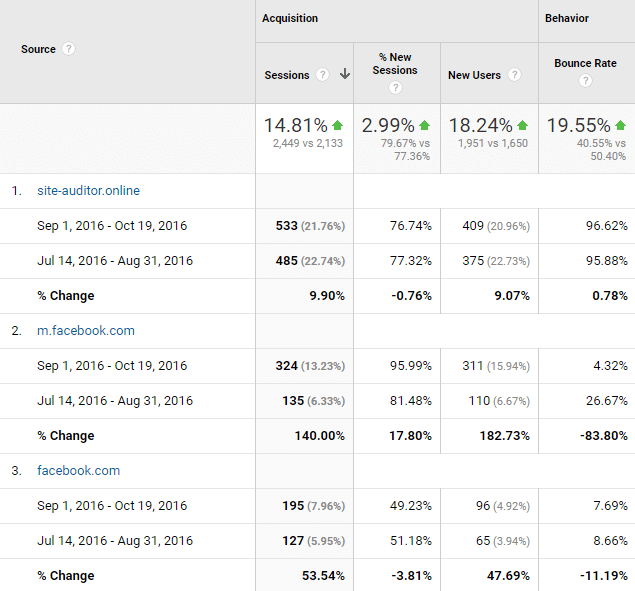
Digging further into the two date ranges, I also saw an increase in direct traffic from Facebook:

db-facebook-comparison

As you can see from the simple comparison above, mobile Facebook traffic saw a 140% increase in Sessions and almost 183% increase in new visitors.

Looking at the desktop version of Facebook, there’s also an increase there (though not to the same level of mobile). More than 53% new Sessions, and almost 48% increase in new visitors.

This suggests that mobile sharing is far more effective (and most mobile browsers have built-in sharing options, so no need for on-page buttons) and that it’s not just the same Facebook users/visitors who are manually sharing and clicking through.

Which, if your goal is to continue growing a new audience while looking after your existing one, is a nice metric to see.

The final goal comparison for me was subscribers, and how removing any distraction would alter that.

  • Six weeks with sharing options on: 147 new subscribers
  • Six weeks with sharing options off: 361 new subscribers (of which 207 came from the after content sign up form)

That’s quite the jump.

Given the level of content output remained the same, both anecdotal and empirical evidence would suggest the lack of sharing options alongside the after content subscription form focused attention on my goal – subscribers.

Especially since before switching off the sharing options, the majority of my conversions for subscribers came via my Exit Intent pop-up box.

Social Sharing is Not for Everyone, and Some Caveats

For me, given this is the second time I’ve run this experiment, and the results are pretty much the same both times, social sharing options on-page aren’t an effective tactic.

Indeed, the goals I have for my blog are almost universally met by removing the buttons and truly focusing attention on what really matters – content, conversion, engagement.

It’s not just me, either.

A couple of weeks back, I received an email from Benjamin Houy, of FrenchTogether.com. Benjamin has a much higher trafficked site than I do and had come across my post on sharing buttons.

He was curious about the usefulness of social sharing buttons too, as he’d carried out similar experiments to mine in the past and these had been inconclusive.

Benjamin and I have been exchanging emails over the last few days, and his own findings are pretty interesting:

benjamin-social-traffic
benjamin-social-warfare

As you can see from Benjamin’s social data above, social traffic also plays a small part in his bigger traffic picture, accounting for only 1,300+ Sessions from an overall 193,000 sessions.

But social sharing options on-page (in Benjamin’s case, Social Warfare) accounted for about 10% of all Social Sessions.

Note: As you can see, Social Warfare is being tracked from the beginning of October, so I’m only comparing the date range it was switched on when looking at how it contributed to social media metrics.

As Benjamin himself mentions, it’s clear to him that – for his site and traffic, at least – most people are sharing manually on social media, or using browser extensions like Buffer, as shown by Benjamin’s comparison between on-page buttons and Buffer’s browser app.

social-warfare-clicky
buffer-clicky

Which brings up the question: do you need social media sharing buttons on your blog or website? I’d suggest no – but with some caveats.

  • This analysis is based on my blog, which has been going for eight years, so I (technically) should have an audience willing to share regardless of methodology;
  • A third of my audience is mobile-first, meaning they more than likely use mobile browser sharing versus on-page;
  • 60% of my audience fall within the 18-34 age group, meaning (again) mobile browsing would be their first option;
  • Three of the Top Five interest groups of my traffic relate to Technology, Mobile, and Social Media Enthusiasts, indicating they aren’t averse to using browser extensions and sharing directly via copy/paste linking.

For your own blog, the results might be very different, and your audience make-up could include visitors that prefer on-page sharing of some form or another.

Additionally, new blogs without a decent subscriber base may find it easier to build awareness via social sharing buttons and a strong call-to-action to share a post via these buttons.

Like anything, your own data and knowledge should drive your decisions.

The one thing I would say, though, is that with social networks increasingly trying to keep you on their platforms when it comes to content (Facebook Instant, Facebook Notes, Twitter Moments, LinkedIn Pulse), social sharing looks to be fighting a multi-front battle.

If your concentration lies towards getting shares that drive traffic to your site and you think on-page buttons are the way to do that, make sure that thinking is backed up by hard data from your analytics.

My data, and that of Benjamin’s, suggest on-page options are not the driver of traffic many people feel they are. Instead, manual sharing (where readers can add extra thoughts of their own to the share) would appear to be more effective.

Check your analytics. Check your own experiences. Compare your goals to how social sharing is impacting these goals, and especially compare which sharing option is driving toward them.

Then make a calculated and educated decision on whether sharing buttons are really needed, or if they’re just a distraction.

If they turn out to be a distraction, why continue to use them?

An Experiment in Removing Share Buttons Altogether

Sharing

Unless you’ve been hiding under a social media rock recently, you probably know about Twitter removing their share counts.

This meant that, as of November 20, any blog posts that had some form of Twitter sharing button (native or third-party) would no longer be able to show how many times that post had been shared on Twitter.

Cue content marketers and social media sharing companies decrying the move, with dramatic quotes about it “being the death of Twitter”.

#SaveOurShareCounts Tweets

Because, yes, Twitter has nothing more serious to worry about than whether or not it shows share counts…

For the rest of us, it didn’t mean as big a deal. At the end of the day, a share count is simply one metric of a blog post’s “success”.

Given there are enough shady companies and scripts out there that can artificially inflate these numbers, it’s not even a great metric.

Personally, I’d rather go by engagement, reactions (as in discussions and thoughts elsewhere), and growth (either subscribers, readers or share of voice) as metrics that matter.

But it made me wonder – with so many people getting up in arms about a little number, what would they actually feel like if you removed the option to share via on-site buttons altogether?

And so I’m going to find out.

To Quickly Share or Not to Share

Last year, I read a post from a few other bloggers who were discussing the value of social sharing buttons, and whether they helped or hindered sites.

One of the best articles I read was from Sam Solomon, called Why I’m Done With Social Media Buttons.

Sam’s main premise was from a designer’s angle, and how sharing buttons could ruin the user experience.

Yet he also shared a couple of case studies that looked at on-page sharing, and the results weren’t great.

While he admits that he didn’t do any real conversion tracking on his own site before switching off, his points around the topic are very valid, and worth the read.

His closing argument has remained with me since reading his post:

If people really love your content, they?ll share it.

And it’s true.

Yes, having on-page buttons may make it easier – but then do they take away from other calls to action that you’re trying to achieve (comments, subscriptions, etc)?

For example, this company saw conversions increase when they removed their share buttons, which is clearly a more important metric than how many tweets they got.

But perhaps that shouldn’t come as too big of a surprise – it’s simply following the golden rule of marketing: that you have one main CTA and that’s your primary KPI (key performance indicator).

You then set secondary CTAs and KPIs based on the key one – but only if they don’t jeopardize your main one.

If you take this to your blog, your core CTA might be to get a comment. Or it might be to get a subscriber. Or to download an ebook, or something similar.

I’m going to hazard a guess that these will come before social sharing. So are we diluting our goals by the [apparent] importance on social sharing buttons?

Time to find out.

Setting 30 Days Comparable Metrics

If I look at my Google Analytics, I can see how much social traffic means to my blog.

In the last 30 days, my breakdown has been as follows:

  • DB analytics chartOrganic search – 58%
  • Direct – 22.3%
  • Social – 9.5%
  • Referral – 9%
  • Other and email – 1%

Just looking at that simple pie chart, I can see that – in the grand scheme of things – social isn’t a huge part of this blog’s traffic.

While 10% might mean X amount of visits, I tend to find the bounce rate (how soon someone leaves a page) higher for social traffic than search or direct.

Additionally, if I look deeper into my social analytics, I can see that both Facebook and Twitter are the key social drivers – Twitter accounts for 31% of social traffic, Facebook accounts for 29%.

That’s almost 2/3 of all my social traffic coming from just two networks.

So, truth be told, for this particular blog, maybe social isn’t a key driver of visits, even though I’ve continuously made it easier to share with ever-improved social sharing options.

Of course, the argument could be made that perhaps the content just wasn’t shareworthy. In which case, get off my lawn! 😉

One thing I do find interesting (and another reason for this experiment) is that when I look at both my Google Analytics as well as Share Tally, I can see there are a solid number of shares from Buffer and Pocket.

These are two platforms that my current social sharing solution doesn’t support – which suggests that readers are still happy to cut and paste a blog post’s URL onto their preferred platform of choice.

Well, I guess I’m about to find out.

For the next 30 days, I’m not going to enable on-page sharing for the posts I publish.

Instead, whenever a reader enjoys a post and wants to share it, they’ll need to grab the URL and paste it directly into Twitter, or Facebook, etc.

If they do, great. If they don’t, well, maybe great, maybe not – I guess we’ll see based on traffic comparisons as well as network activity.

Either way, I’m interested to see how removing share buttons impacts the shareability of this blog.

Let the fun begin!

Video: Why Flare Social Sharing is Much More Than Just a Sharing App

Influence marketing metrics

For many content creators, regardless if they’re bloggers, media companies, agencies or full-on publishers, ease in sharing your content is key in helping you attract a wider audience.

With a host of different options for this, especially when it comes to WordPress (the self-hosted version), it can be difficult to choose which one offers the best choices and features.

Personally, I’ve tried multiple solutions, from free options to premium options like MashShare and Ultimate Social Deux. However, the social sharing option I always came back to was the Flare sharing plugin, from Filament Apps (owned by Digital Telepathy).

From the early version last year, Flare (and now Flare Pro) has become my de-facto option when it comes to social sharing options on my blog, and those I manage.

From customer insights to full branding options, as well as one of the best solutions when it comes to optimizing social sharing for mobile browsers, Flare (for me) is the only sharing solution any content creator serious about increasing reach and understanding their audience should be using (but I’m biased).

This video shows why (expand the video to full screen and HD for best viewing). To try Flare for your own blog, hop on over here to create an account.

Enjoy.

http://youtu.be/GlcauBFkJQA

Creative Social Sharing to Promote Your Blog

Devotion

How are you sharing your blog? How are you making sure your content is found and then shared?

Are you promoting yourself via social networks, or are you leaving that to your readers? Do you make sure potential clients know about your blog, if you’re using it as a business platform?

Are you simply using the standard sharing options -?Twitter,?Facebook, etc – or are you thinking of ways you can be a little creative when it comes to sharing your blog socially?

Let’s face it, if you’re using your blog as a business platform then the more eyeballs it gets, the better for finding potential new clients or customers. Even a personal blog can benefit from extra visitors.

So here’s a few ways you can get outside the normal views of retweets and shares, and promote your blog to a bigger crowd that may miss it otherwise.

Social Sharing Groups

The most oft-used method of sharing a blog post is via social sharing buttons on the post itself.

These are either located at the top and/or bottom of the post, or to the side. I use a mix of both – Digg Digg to offer the floating share bar to the left of this post, and Share This at the bottom.

But why not take this a little further, and create a social sharing group?

For example, one of the best resources for traffic to this blog is Stumbleupon. This is a great social sharing platform that lets you “stumble” the web, and allows you to give either a thumbs up or down to the site you’re currently on (you can also leave a review if you like).

Stumbleupon social sharing network

What happens then is that the site is put into the Stumbleupon library, so anyone else using the stumble option could land on your blog. If they then like it, they give you a thumbs up and your currency increases on Stumbleupon. It’s easier than it sounds, and it’s a great passive traffic generator.

So create a Stumble group.

Grab about 10 of your online friends, and help promote each other’s blogs. Anytime a new post is published, have one of the group stumble it, then you can give it a thumbs up.

You can then take this idea to other social bookmarks -?Reddit,?Digg,?Sphinn, etc.?Just make sure you also highlight a lot of other great sites too – don’t create the group just to promote your work, that’s just spammy.

Turn Posts into Ebooks

You blog. You write. A lot. Depending on whether you’re a niche blogger or not, you might have a lot of posts on similar topics, or even run a blog series of interconnected posts.

So why not turn them into an ebook?

The market for ebooks is huge, and offers a great way for you to either give back to your blog community for reading you, or sell them as part of your business offerings.

Write a crafts blog? Put together some of your favourite tips and publish as an ebook. Chef? Collate some of your favourite recipes and sell them via your blog. And so on – the possibilities for what’s in your ebook are endless.

I put together a bunch of my short form posts on Posterous as a free ebook with some simple marketing ideas, and so far it’s been downloaded just over 2,000 times. So ebooks are definitely a great way to both give back and get back.

Turn Your Blog into a Slide

One of the best platforms around at the moment is Slideshare. Essentially taking PowerPoint presentations to the next level, Slideshare also allows uploads of PDF’s, documents and other presentations.

Slideshare online presentations

It then turns these into slideshows that you can either grab the embed code for or download to your hard drive, as well as the normal sharing options on Twitter and Facebook.

You can even add audio or talk tracks, or turn your slides into mini-movies.

So working from your ebook idea, collate some of your best posts on a topic and create a presentation. Edit the posts accordingly to make the best use of Slideshare’s capabilities (perhaps a connecting image, statistic or similar), and then upload and choose your sharing settings.

If folks like it and decide to embed on their own blog, you instantly have a new audience. That could go one step further, and businesses could pick up your kick-ass presentation and use it as a training resource.

The next potential step from that is to bring you on board to expand on your initial ideas – so now your original blog post has become both a training resource and a client lead.

Just Getting Started

These are just three ways that you could take the normal social sharing option, and add a little extra to help promote your blog.

You could also use the WordPress application on LinkedIn, or?Networked Blogs for Facebook as another couple of alternatives. Or you could re-purpose old posts for publication elsewhere.

The thing is, just because you already have sharing options in place doesn’t mean you need to stop there. The great thing with blogs is that they can be essentially timeless, given the right post and topic. Why not use that?

How about you – what are you doing to extend the reach of your blog? Feel free to share your tips on what works for you in the comments.

Creative Commons License photo credit:?sigmaman

© 2026 Danny Brown - Made with ♥ on Genesis