• Skip to primary navigation
  • Skip to main content
Danny Brown

Danny Brown

podcaster - author - creator

  • About
  • Podcasts
  • Journal

social media dashboard

Create and Measure a Social Media Campaign with the @JugnooMe Dashboard

JugnooMe social media dashboard

When we envisioned our?social media dashboard?JugnooMe, our key tenet was to make the social web simple, accessible and monetizable for everyone.

This means a solo entrepreneur; a full-on corporation; an agency looking after clients; a non-profit; realtors, franchisors and much, much more. But goals are one thing; making it happen are another.

One of the ways we?re making it happen, even during our beta stage, is by having a complementary suite of tools that dovetail into each other and offer a fully integrated solution because of it.

By doing this, it means you, the user, can create fully-fledged social media campaigns even while our products are still being fleshed out and added to.

To give you an idea of how you could use JugnooMe for your social media needs/campaign, here?s a simple overview of how you could use the tools to start, track and measure your campaign.

Step 1: Gather the Intelligence

Okay, so you?ve been told you need to get on social media because that?s where all your customers are. But are they? There are 7 billion people in the world. Let?s say half of them are kids ? that leaves 3 billion.

Even the mighty Facebook has less than a billion users. So, by definition, at least 2/3 of your customers may very well not be on social media. Your job is to find out if they are, and that?s where our Social Search option comes in.

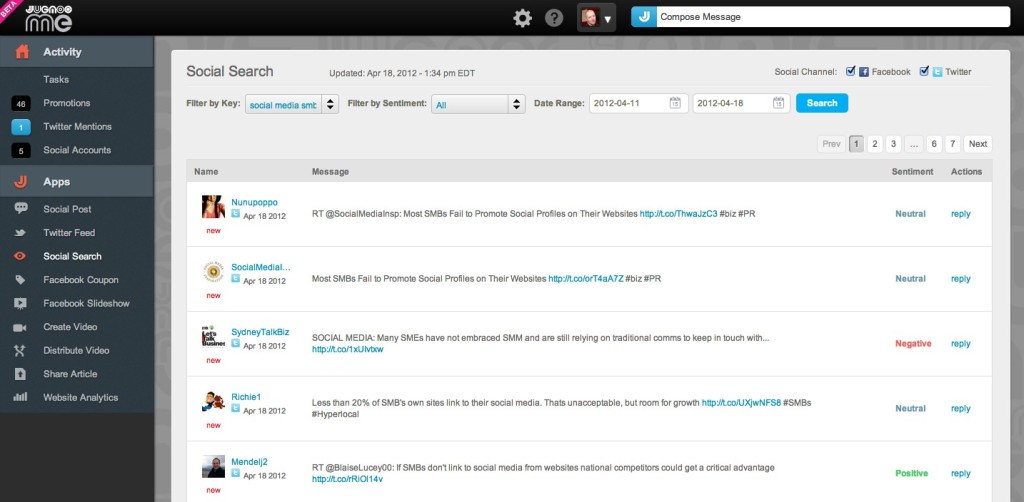
JugnooMe social search

This feature allows you to enter keywords around the topics your potential customers would be talking about around your brand or the services you offer.

You can then filter these into Positive, Neutral and Negative, which is perfect if you want to make a soft sell around your product (Positive sentiment and non-invasive tweet about the Twitter conversation and topic) or protect your brand (Negative and your instant reply with a solution or correction to erroneous statements).

What Social Search also allows you to do is see if people are talking about your industry at all, and where about, which will then allow you to target your next steps.

Step 2: Creating the Campaign

Let?s say Social search shows you that there?s a desperate need for an answer to a question that hundreds of people are asking, but no-one seems to be responding too.

It could be a product and its reliability, or an upcoming area in the real estate market and what that means to potential buyers.

While you could simply reply via Twitter to the hundreds of individuals, it?d be a lot more effective (and profitable) to run something like a premium webinar, and then smartly promote into the search terms and conversations from your original results.

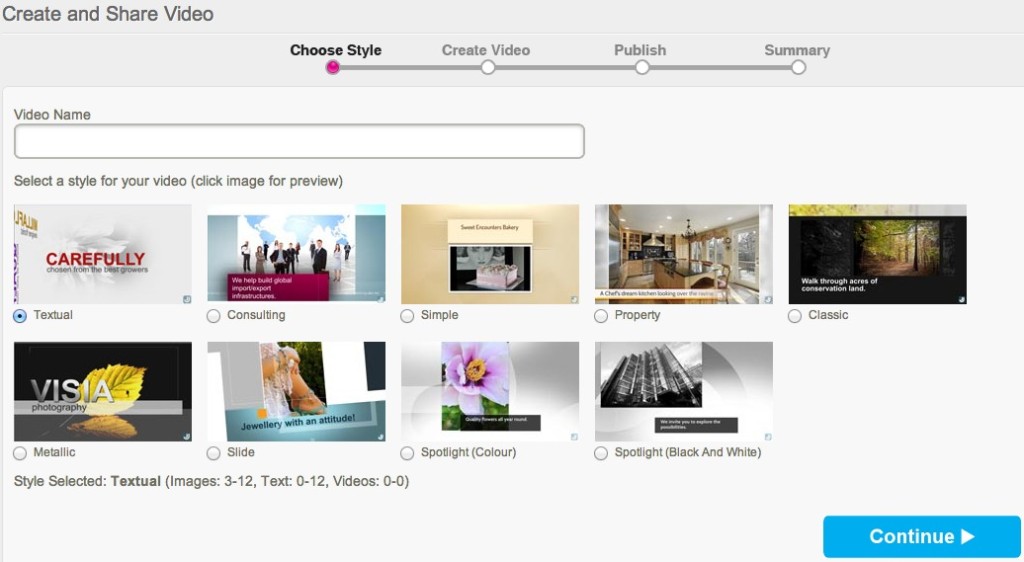
Now, while we can?t help you with the webinar creation, we can help you get the word out and measure. For instance, once you have the webinar booked, you could use our SVM (social video marketing) tool to create a short promotional video with snippets of eye-catching copy, images and sound.

JugnooMe video tool

Once you?ve uploaded the video (either to Jugnoo Media or YouTube ? more platforms will be supported soon), you can then start promoting your video and webinar across your chosen social networks, using our global J-Post option.

This currently allows you to post updates to Twitter, Facebook (profiles and Pages) and LinkedIn.

JugnooMe global post

You can use this feature with as many accounts as you wish ? so, if you?re a franchisor, for example, and you distribute offers across 100 franchisees, you could essentially have several hundred messages being created in one click to cover multiple locales and demographics.

To add to the buzz around your webinar, you could also create a special offer using our Facebook Coupon app, where you can promote a time-sensitive offer to raise sales interest in your webinar.

JugnooMe Facebook coupon

Now you have a fully integrated promotion across social media ? YouTube video, social network syndication and a Facebook coupon, allowing you to target your webinar audience on the platform they prefer.

But social media promotion is just one part ? so you need to make sure you?re measuring your webinar?s sign-up rate and buzz, so you can make amends to your campaign if and where needed.

Step 3: Measuring the Campaign

To know if you?re being successful or not, you need to get on the Analytics train. These will help you gauge where your biggest visitors are coming from; what platform or message is being most successful; where you need to focus more on, and much more.

To do this effectively, set up?a vanity URL?for each platform you?re promoting your webinar on, and make sure you have the sign-up page for the webinar itself on your own website.

Then, use our Analytics solution to set up your campaign(s).

JugnooMe analytics

Your campaign can be made up of certain goals ? X amount of traffic from the various networks you promote on, or how many people used the Facebook coupon discount code, etc.

By measuring the goals, you can see where you?re not getting as much traction as elsewhere, and decide whether or not you need to remain promoting there, use another platform, or just stop your promotion there full stop.

As well as the web analytics, you can use the Social Search option again to see how your campaign is being received on the various social networks.

JugnooMe social mentions

The benefit of adding your own webinar terms to the Social Search engine is you can reply to any questions as they are asked (even if not directed at you), gauge how positively or negatively your promotion is viewed (are you too hard-sell, and if so, what can you do to make the promotion more effective), etc.

You can also see who?s talking about you the most, and reward them with discounts or special codes for their own blog readers or followers. it?s a great way to build brand advocates around your webinar and brand, and that will last much longer than the webinar itself.

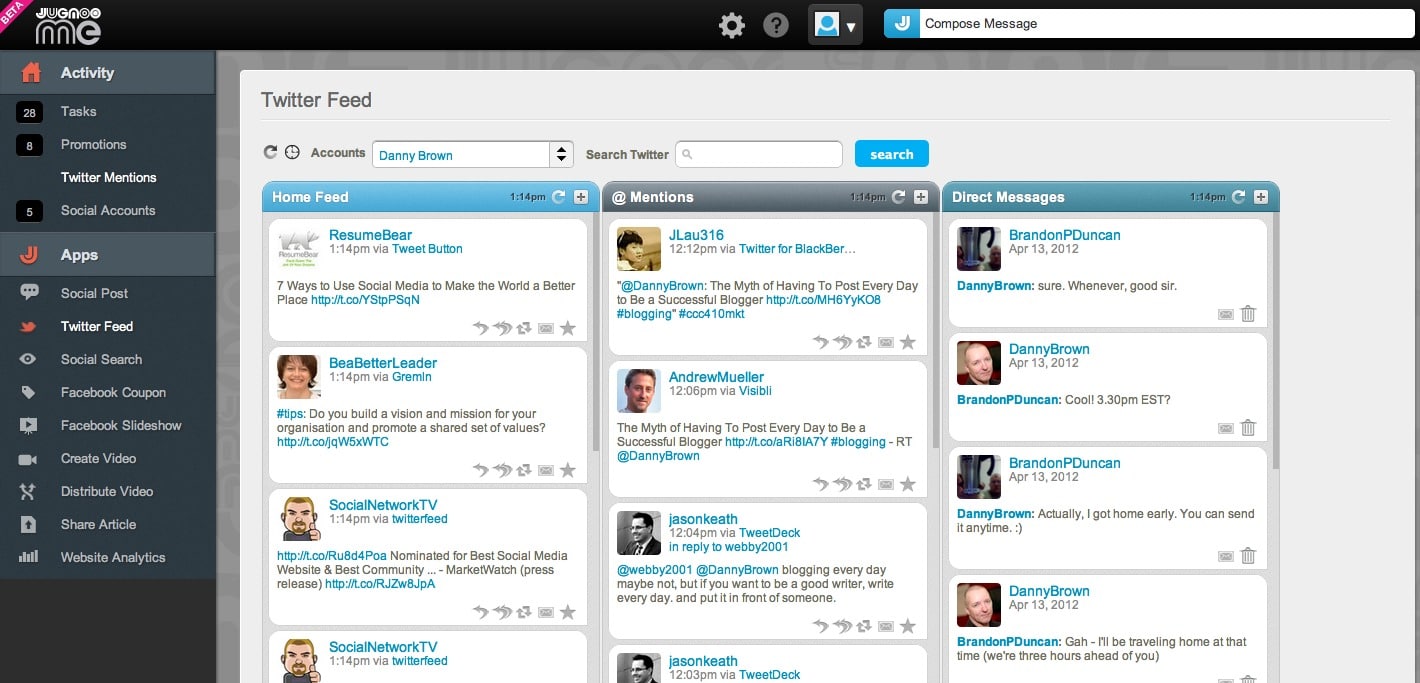
Additionally, when the webinar is running, you can add a Search stream to your Twitter dashboard, and use the feedback from it to tailor your approach during that webinar and for future ones.

JugnooMe Twitter feed

Step 4: Rinse and Repeat

And there you have it ? how to research, create, promote and measure a social media campaign pretty much all within the JugnooMe dashboard.

You can obviously take it as in-depth or as simple as you wish, using whatever features you feel would be best-suited to your own campaign(s).

Additionally, this type of integrated campaign can be created with the current beta toolset ? we have a lot of cool new features coming in the next couple of releases between now and August, to really give you the complete package for your own social media campaigns and needs.

Interested in how we can help you? Hop on over and?try JugnooMe out for yourself?? it?s free while in beta, and we?d love to see how you use it and how we can help you meet your social media goals!
The Art of Growing Up in Public as @JugnooMe v2.0 is Released

JugnooMe social media dashboard

JugnooMe social media dashboard

Tuesday April 17 was a big day for JugnooMe, the social business platform from parent company Jugnoo, as we launched a major update to the platform.

Originally launched as a private beta late last year, we’ve come a long way since these early days. A lot of this has been by listening to the feedback of our early beta users, as well as monitoring social media channels to understand the pain points of our target audience(s).

Couple that with a very cool and agile team that’s focused on bringing the most kick-ass social media all-in-one solution to market, and yesterday’s release was a very big step in the Jugnoo journey.

So, what is JugnooMe and what are these new features? Let’s begin.

The JugnooMe Vision

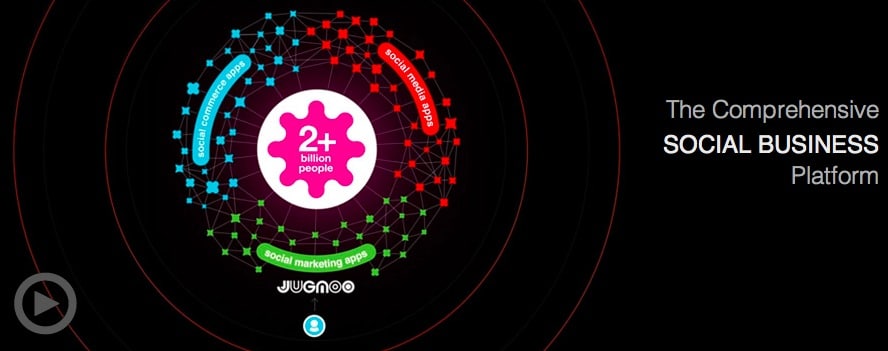
In a nutshell, JugnooMe is simply a way of bringing all the best features of various social media tools on the market today, and having them all live under a single, unified dashboard.

This then helps business owners that struggle with time and resources to manage their time more effectively, which results in them being able to focus more on ther core business and make profits.

Jugnoo

It also helps the solo entrepreneur, the blogger, the stay-at-home parents, the franchisors, the non-profits and more be far more effective in their own use of social media, from content creation to distribution and measuring.

Simply put, we’re here to help anyone make the social web simple, accessible and monetizable. Because at the end of the day, while followers and friends are great, the mortgage people don’t let us pay for our homes by retweets…

JugnooMe is the first salvo in this overall goal of Jugnoo’s – there’s much more to come, but for now we’re solely concentrating on our social media dashboard offerings. Which brings us to the update.

JugnooMe 2.0 – More Than Just an Update

For anyone that used our early beta, the change is a pretty big one from that platform. But then, that’s to be expected for any company that wants to grow properly, as opposed to just turning up and hoping early buzz will be enough to gain you success.

For me, personally, it’s the difference between watching a young child struggle to find their balance and a confident youngster that throws away the training wheels on their new bike.

Yes, I’m incredibly biased, but I’m also incredibly proud of the whole team here and the strides they’ve taken. For example:

New and Improved User Interface and Navigation

Our design team completely revamped the experience inside the dashboard, and made the navigation a lot more user-friendly and intuitive. The side navigation is (currently) broken down into two key areas, Activity and Apps. This helps you get straight to the area that matters to you the most.

Jugnoo navigation

Our minimized top navigation keeps everything simple and uncluttered, and is more for the maintenance area of your experience, including setting up your business details, websites, social keywords and more.

It’s a far cry from our first iteration and kudos to our designers for the makeover.

It’s All About the Apps, Baby!

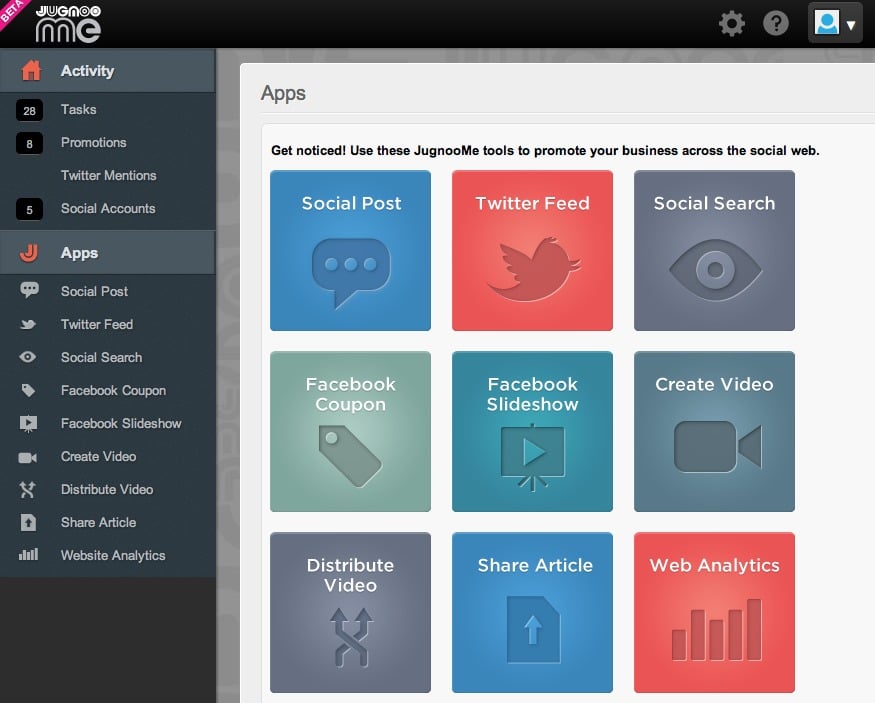
As JugnooMe continues our journey to help make social media simple for everyone, one of the ways we’re going to achieve this is by an apps-based system.

Jugnoo apps

While I can’t go into too much detail here, since it’s proprietary and includes some cool new features scheduled for the next update, we want to make the JugnooMe experience your experience.

So, while we might offer X amount of solutions, you would only find benefit from a few. Instead of us cluttering up your dashboard, you now just have the apps that make sense to you.

This could be Social Dashboard, Analytics, Facebook Promotions and Video tools.

We think it’s a more elegant approach and also allows users to create their own plans as we introduce our premium solutions in the next couple of months (the beta of JugnooMe is currently free for everyone to use).

Currently the apps are all active, but the option to pick and choose is most definitely in the schedule for the next iteration.

Social Sentiment Beta

As human beings, we all want to be liked. We can say we don’t, and feign indifference, but criticism often stings while love and cookies make us smile (I think that’s the right comparison). Anyhoo…

Social media users are no different, and one of the ways to gauge whether we’re viewed as cookies or crankies is by sentiment analysis. This lets us know if we’re seen in a positive, negative or neutral light.

As part of this new JugnooMe release, we’ve opened up our sentiment engine (beta version) to our users, to help us educate the algorithm better for your needs.

Social search sentiment

This will allow you a simple overview of the sentiment behind a tweet or Facebook update, and reply immediately from within the dashboard area.

Our future sentiment engine will also include forums, blogs and other social networks, and offer more interactive features to help you protect your brand reputation whether you’re a business or solo professional. For now, though, it gives you an idea of where we’re going.

Facebook Promotions

While we’ve always had Facebook Promotions from the start in the form of simple coupons for special offers, we’ve significantly increased the number of templates available.

Additionally, you can also create a Facebook Slideshow app, complete with product/service description and URL to your dedicated sales page or store. The Slideshow sits on a tab on your Facebook Page, and you can create as many slideshows as you wish (for multiple products or storefronts).

Again, this is one of our new beta features and is just the start – look out for more Facebook apps in future releases.

Video Killed the Radio Star

At least, it did according to The Buggles. However, even though we know radio is still alive and well, there’s nothing quite like a cool promo video to either highlight your business, brand, products, events or more.

With this in mind, our updated SVM – social video marketing – platform now has more templates than ever before, ranging from Property (perfect for realtors) to Consultant (agency videos), Spotlight B&W (ideal for portfolios) to Simple (great for invites or special events).

Social video marketing

We’ll be continuing to add templates with each new release, and may even drop the odd new one is just as a surprise in-between releases!

Statistics and More Statistics!

If there’s one thing we pretty much all agree on, it’s that it’s always nice to have a quick overview of just how you or your business is performing. Sure, individual stats and reports are cool, but a one-pager can be even cooler when in a rush.

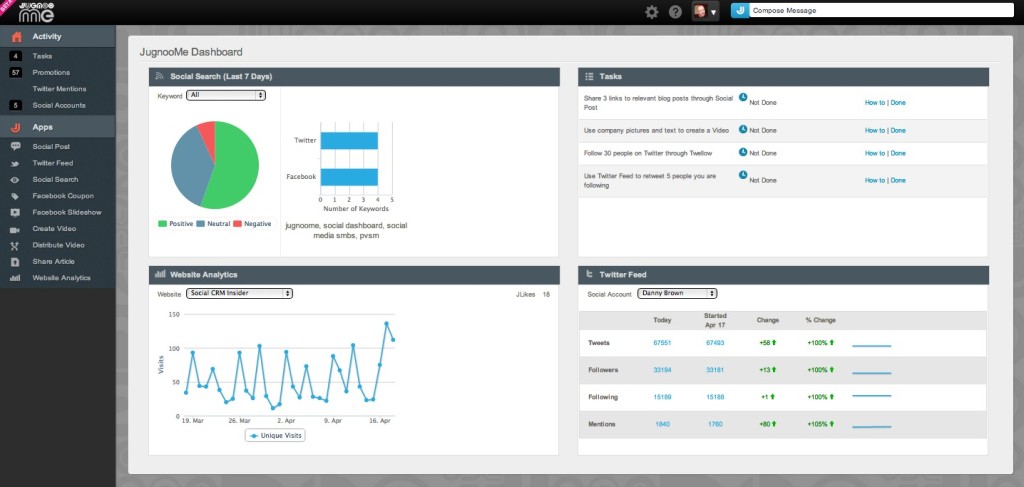
Our new Activity Landing Page has a simple yet effective collection of your most important information – Social Search results (including sentiment), Website Analytics, Twitter statistics (for now) and Tasks (not as evil as they sound, but quick tips to get you more effective with our platform and social media).

Social media dashboard activity

From there, you can dive into the areas you need more information on, and then make the necessary changes to be more effective and share online via our universal J-Post option, that allows you to update your Twitter, Facebook, Linkedin, YouTube and Posterous accounts.

It’s Cool But It’s Just the Beginning

These are just some of the main features in the new update. There are more inside – the ability to make default posting profiles (if you use more networks than others) as well as an optional social media plugin in the shape of a toolbar you can display on your website.

This lets visitors share your content as well as connect with you by email or visit your storefront. If you don’t have a business but still want to use the plugin, you can choose not to display your contact or Google Map information.

Note: If you do use the toolbar, it’s currently ad-supported (meaning pop-up ads will display briefly from the plugin). Future versions will allow paid opt-out or ad partnership options.

To say this is a major update would be an understatement – we really have released what is essentially a new product altogether. But it’s just the start.

We have a very aggressive release schedule for the rest of this year, including coming out of beta once our solutions are locked down, with some very cool features and tools coming your way that you won’t find anywhere else (promise!).

Add to that a huge social media event that Jugnoo is hosting in the fine city of Toronto this July (more details very soon!) and we’re definitely looking to make our statement about who we are and where we want to be.

And that includes you every step of the way. We’re always listening to feedback and this release is a result of that – and we’re not going to stop listening. We really want to make a platform that anyone and everyone can use, and want to use because it’s geared towards them.

Ready to have a look at JugnooMe? Check out our video below for a clearer idea on how we can help the everyday business owner, then hop on over to our sign-up page and we’ll get you onboard sharpish – see you on the other side!

[youtube]http://www.youtube.com/watch?v=zQuHRICtXmk[/youtube]

Woot Woot, JugnooMe is Here – And You’re Invited to the Open Beta!

JugnooMe beta

JugnooMe beta

Back in November, I?shared?a brief introduction to JugnooMe, the?first salvo from the Toronto-based?start-up I joined that month.

Since then, we’ve been working like crazy loons to bring our product(s) from?creation, to private beta, to fixes, changes and more.?Yesterday, all that hard work came to fruition as we launched the first release into open beta, with the JugnooMe social dashboard.

So what is it and?how can it help you?

Taking Your Business Social

At?Jugnoo, our goal is simple – to make the social web?simple, accessible and?monetizable for everyone, regardless of expertise, budget and?resources.

To do this, we’re creating a suite of tools that will enable both people and businesses to make the most of their presence online, as well as transfer that to success offline. These include mobile, media and social properties, the first of which is JugnooMe.

The?product itself is?constantly evolving (with the next set of?updates coming in March), but the first release includes features such as:

  • Single social media dashboard supporting multiple platforms and accounts
  • Aggregated Twitter dashboard
  • Social Search and keyword tracking
  • SVM, or social video marketing suite
  • Social post to multiple accounts and social networks
  • In-house analytics to track web campaigns and visitor behaviour

While there are tools already on the market that offer this, our “advantage”, if you like, is that we bring everything under one roof.

This ties back into our ethos of making the social web easy for everyone. And the easier something is, the more time you can spend concentrating on ways to make money from your time online.

We’re Just Getting Started

As?I mentioned, JugnooMe?launched into Open Beta yesterday. Because of the beta status, we’ll be?listening to our users and?adding the kind of tools to really make the?evolving JugnooMe?experience one that helps our community grow they way they want to, at the speed they’re comfortable with.

This will include educational tools like Social Advisor, that will help break down the intricacies of social media with newsletters, webinars, videos and more. And one thing we guarantee at Jugnoo is that we’re always listening, so if a feature makes sense, we’ll add it.

We have an aggressive release schedule in the next 3-6 months, as we move from open beta into full production mode. Social commerce and business will be a key part of these releases, and the tools for our users will reflect that. Oh, and did I mention JugnooMe is free?

For now, here’s a short overview of the beta, made with our very own SVM video platform that’s part of our dashboard.

[youtube]http://www.youtube.com/watch?v=GaZv8sFrEuw[/youtube]

I’m really excited at what’s in store, and would love to have you in?the beta and help us make the platform the kind of social dashboard and business tool that makes sense of?the social web?for you.

If you’re interested, you can get more details and sign up here.

See you there?

© 2026 Danny Brown - Made with ♥ on Genesis