• Skip to primary navigation
  • Skip to main content
Danny Brown

Danny Brown

podcaster - author - creator

  • About
  • Podcasts
  • Journal

jugnoo

6 Small But Sweet Updates to Jugnoo and Other Stuff

Jugnoo social crm

Over the last few months, lots of folks have asked why they’d want to use Jugnoo versus their current platform of choice (say, Hootsuite, Tweetdeck, Trackur, etc).

It’s a fair question – all are good platforms with their own strengths. The easy answer (at first) is to make clear that Jugnoo is more than just a social dashboard or search platform – it’s a full-on business solution.

The next thing to show is that everything at Jugnoo has been built from the ground up to work in tandem with each other. Our social dashboard doesn’t just allow you to keep up with your networks, but also shows sentiment and intent that’s normally reserved for social monitoring.

Our social monitoring solution doesn’t just keep you on top of what’s being said about your brand or competitors, it also ties into our visual data solution that creates context out of disparate conversations online.

Jugnoo buzz visualyzer
(click image to expand)

Our visual data solution not only shows you in clear, buzz-driven analysis what’s being said and by whom, but it also connects that information to our patent-pending lead generation platform, where we can help you identify where an opportunity is as well as track all the actions that happened around that lead after your connected with them.

Which brings us back to the social dashboard, where you can continue that connection, as well as create specific promotions for that audience using our Social Hub (for example, if you wanted to help promote your charity goals, like the SMAC! Sock Monkeys Against Cancer campaign).

When you compare all we offer against all others offer, it starts to paint a picture of why you might want to check Jugnoo out, especially when it comes to the current pricing model while still in beta we’re due to come out of beta mode before the end of the year).

So, sure, we have all the “big stuff” taken care of – but that’s how it should be. It’s the little things that make the difference to the user experience, and we’re taking care of that too. Here are just six ways we’re doing that today.

1. Facebook Comments as a Stream

Jugnoo Facebook Comments stream
(click image to expand)

One of the great things about our users is they’re always helping us improve the platform. A suggestion we had after our last update was to enable the option of saving Facebook comments as a separate stream in the dashboard. This would allow users to have select conversations open and keep up-to-date with these, as opposed to trying to jump back into updates later. We thought that was a great idea, so we’ve implemented that feature.

2. Rich Media Embed

Jugnoo video embed
(click image to expand)

No-one wants to have to jump through hoops to view something online. You wouldn’t go to a blog, see a small part of a feature image or video and have to click to another site to see it in full. Social dashboards should be the same and, yes, we were a little behind the game here while we focused on our bigger visual data solutions. But consider that corrected now, with the ability to view images and watch videos in-stream.

3. Twitter Followers Stream

Jugnoo twitter followers
(click image to expand)

Another request from our users was to enable the option of a stream dedicated to your Twitter followers. This allows you to see your new follows (making it easier to thank them), as well as the profiles and tweet history of that person, to see if they’re a fit for you. A simple change but one that can help you connect just that little bit better.

4. Full Twitter Profile Information

Jugnoo twitter profile
(click image to expand)

When we updated the last time around, we introduced the social profile box across accounts. This let you see at a glance the key information on the user you’d just connected with. However, again, Twitter was left wanting a little as we concentrated on Facebook and how its open graph gave us more information to play with. Now, though, you get the same full experience on Twitter – timeline, mentions to that person and their favourite tweets. It’s not a huge update, but it is one we should have launched earlier. Lessons learned!

5. Predictive Twitter Usernames

(click image to expand)

Unless you’re already in a conversation with someone on Twitter, or you know their username outright (not always an easy thing), it can be a pain to locate someone to start a conversation. This is where the predictive username feature comes into play – simply start typing the first letters of the person you want to chat with and Jugnoo will offer you options to select from. Choose the user and send your message.

6. Link Previews

Jugnoo link preview
(click image to expand)

One of the downsides of social media can be the amount of phishing that goes on, especially on Twitter – sending someone a link to you (usually by DM) that allows the sender to hack your account and take over your profile (if you click the link). Additionally, you don’t know if a link to a blog post is something you’d be interested in reading before you click through, wasting time if it does turn out to be a wet noodle of a post. The new link preview option lets you see what you’re clicking through to and help you prevent both phishing attempts and crappy content views. Bonus!

And There’s More…

These are just six little updates that make the bigger Jugnoo user experience in general a lot smoother and cleaner, but they’re just a very small part of what’s coming in the next few weeks.

As I mention in the post, integration and collaborative solutions are a key part of what we’re trying to achieve here. We already have social teams to allow multiple users on the same account, and this will be enhanced with workflow, so you can allocate the right task to the right person and keep track of progress.

One of the things we’re really excited about, and one that ties everything together, is how we’re going to be integrating the dashboard stuff with the more visual solutions we provide. While I can’t go into too much detail at the minute, get ready for social dashboards to really be taken to the next level, both visually and operationally…

We have some fun times ahead – maybe it’s time to check us out and see for yourself how we can help you with your goals on social media.

Note: the features above are scheduled to be released to users a week today, on November 14.
A Special @JugnooMe Invite to @Seesmic Users #Seesmic

Jugnoo social crm

Jugnoo social crm

Dear Seesmic User,

As the news of Seesmic being acquired by Hootsuite settles and you look to decide what you wish to do next, we’d love to offer you another option to moving to Seesmic’s new home.

As someone who used Seesmic back when it was a simple video-sharing tool, and seeing how it progressed to a full social dashboard, it was kinda bittersweet to see it lose its independence.

Ryan Holmes, the CEO of Hootsuite, has already stated:

If someone is a casual user of Seesmic, go this way [e.g. to Twitter]. We’ve always been very focused on the Enterprise.

While this is great for Enterprise-level users, it’s probably not so great for solo entrepreneurs, smaller or mid-sized businesses, or even casual users of Seesmic.

This is where Jugnoo would like to help and offer another option for you.

More Than Just a Social Dashboard

As a Seesmic user, you already know how to manage your social accounts across multiple networks, as well as uploading rich media and creating search streams, etc.

However, social media – whether you’re a casual user or a business user – is much more than just being able to have multiple streams and team members.

You also need context of your social media activity; your most influential conversations; multimedia promotional tools; analytics and much, much more. This is where Jugnoo and our Social CRM solution takes your Seesmic experience to the next level.

Here are just some features, some you’ll already know, others you’ll want to know:

Social Dashboard

Jugnoo social dashboard
The Jugnoo social dashboard (click to expand)

Much like Seesmic, the Jugnoo social dashboard allows you to consolidate several social accounts under the one roof.

Currently supported platforms include Twitter, Facebook (Profiles and Pages), LinkedIn, YouTube, Buffer, Posterous, Tumblr and Google, with more being added regularly.

This allows you to post updates to more than one network, and our Buffer partnership ensures you can schedule these updates at a time when the majority of your audience is online.

Multiple Search Streams

Jugnoo saved searches
Multiple saved search streams (click to expand)

As well as being able to update your networks, you can also set up various streams just for search purposes. This is perfect for brand monitoring; customer service; keywords; reputation management; competitive analysis; and much, much more.

You can then just choose which streams you have open in your browser, and our responsive design ensures the optimum amount of information is on display at any given time.

Oh, and if you’re a regular Twitter chat attendee, and use a stream dedicated to the hashtag, we automagically populate your tweet with the chat hashtag when you reply to someone – bonus!

Social Monitoring

Jugnoo social monitoring
Jugnoo social monitoring (click to expand)

While being able to manage multiple accounts is all well and good, if you’re not measuring then you’re not using social media to the full potential for your business.

With Jugnoo’s social monitoring solution, we help you understand the impact of your online actions. Who’s talking about you; where are they; who are they; how are they describing you; and more.

Better still, not only does our social monitoring show you at a glance how your business is doing on social media, we also have the tools that partner with monitoring seamlessly to take your understanding of your audience to the next level.

Social Analytics

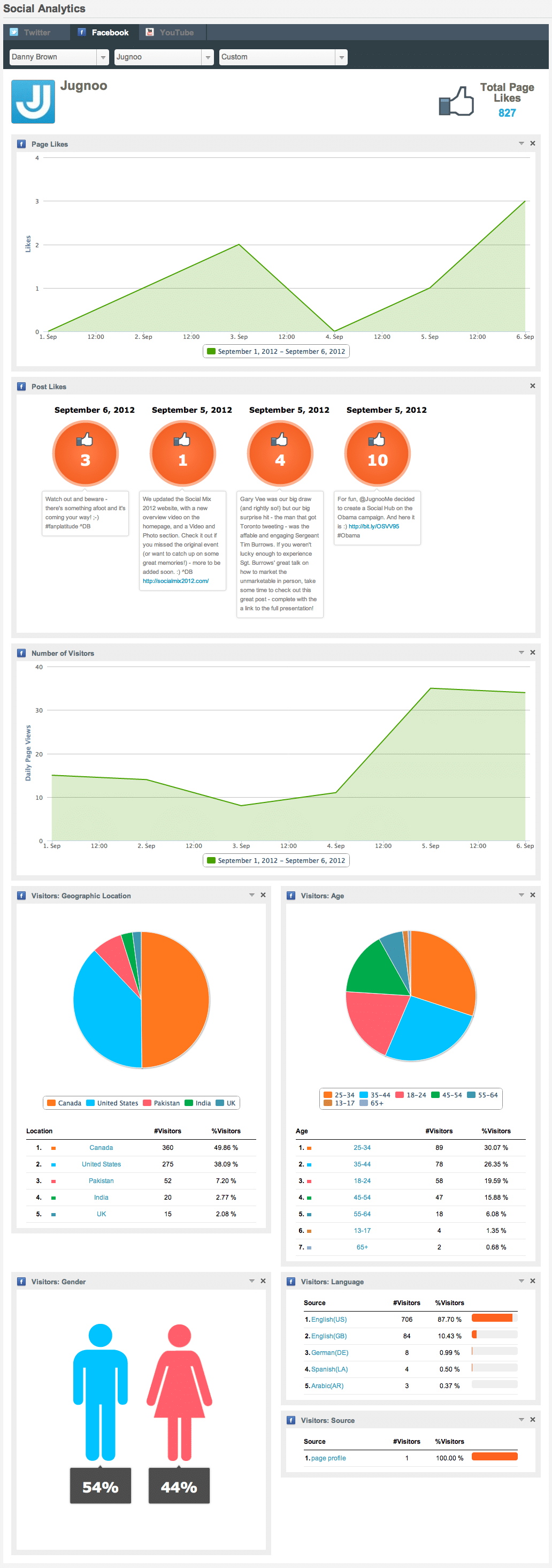
Facebook analytics
Facebook analytics (click to expand)

Understanding your followers and fans is key to helping you create the kind of content they want to consume. Create that kind of content, and the likelihood of your audience sharing your product or service increases, and this then helps you improve your offering as feedback comes in.

With Jugnoo’s social analytics, you can begin to learn more about your Facebook, Twitter and YouTube audience.

While the information primarily looks at peg counts, reach and views in the current version, our imminent update will dive deeper into the make-up of your audience, including purchase intent history and more.

Tweet Visualyzer?

Jugnoo Buzz Visualized
Jugnoo Buzz Visualized (click to expand)

Currently for Twitter only, but with more platforms to be added soon, Jugnoo’s Tweet Visualyzer? takes your monitoring and keyword searches to a visually attractive and easy-to-manage playground.

Not only does the Tweet Visualyzer? show you who’s saying what and when they’re saying it, it groups conversations and participants of these conversations together based on the context of the conversation itself.

What does this mean for your business? Simple – now you can truly see who drives the most buzz around your business, enabling you to initiate contact with them on a possible ambassador program, where they become your voice to their audience.

It’s taking social influence to its natural next stage.

Social Hub

Jugnoo Social Hub Lennox Lewis
Jugnoo Social Hub Lennox Lewis (click to expand)

The great thing about the social web is there’s so much choice for the consumer. The bad thing about the social web is there’s so much choice for the consumer – at least, as far as trying to keep their attention on your core products and services.

While some social users may prefer twitter, others love Facebook, while others look to blogs for recommendations, purchases, etc. This is where Jugnoo’s Social Hub comes in.

For brands, you can collate all your main social feeds and rich media – Twitter, Facebook, YouTube, RSS, Pinterest and Instagram, etc – and display them on a hub that’s the equivalent of Pinterest on steroids.

Visitors can then browse, share, save and recommend. Not only that, with Social Hub 2.0 due imminently, you’ll be able to offer e-commerce solutions directly from the hub – if your visitor sees something they like, they can buy it there and then.

For consumers, they can collate their favourite brands into one area and only receive the offers they’re interested in, increasing the likelihood of a sale from the hub.

It’s a win-win all round.

Social Teams

Jugnoo social teams
Jugnoo social teams (click to expand)

For most businesses, it’s no longer just a one-man job when it comes to your social media strategy and community management.

Instead, it’s more likely to be social teams that run a campaign and account – sales, marketing, customer service, community management, content curators and more.

This is where the Jugnoo social teams solution helps. You can allocate team members to different teams; define user roles (from full admin to content sharer only and everything in-between); choose which social networks are used in the team; and more.

Add in our Workflow solution – released next month – and you have a fully-fledged social workroom with tasks, reports and more across your business.

Video Marketing

People, by nature, are visual creatures, and it’s why images and videos are the most popular items when it comes to sharing across social networks. With that in mind, enter Jugnoo’s Social Video Marketing suite.

With our video marketing software, you can both create and distribute powerful marketing messages to your audience. Or educational videos. Or fun videos – the choices are only limited by your needs.

We provide you with a library of templates, with more added regularly, as well as images and soundtracks to use in your videos.

You can also upload your own, and the editing suite allows you to crop, cut, focus and much more to create a truly engaging and professionally-edited video.

It’s no surprise that this is one of the most popular features of Jugnoo’s userbase.

How Does $20 per Month Sound For All This and More?

As you can see, Jugnoo offers a host of features and solutions that take it beyond being “just a social media dashboard.” As Jure Klepic of The Huffington Post writes:

Jugnoo is far more powerful than Hootsuite.

As kind as Jure’s words are, we’re not resting on our laurels. While the features here are in-depth and cohesive, they’re just part of the bigger picture.

Coming in the next couple of weeks you’ll see more social networks, RSS feeds, customs streams (multiple networks in a single stream) and more. There’s also our lead generation solution that will identify and delegate sales opportunities based on language, keywords and sentiment tracking.

Add to that our mobile app – release date the next eight weeks – and, as you can see, it’s quite the package – and one you can have it all for just $20 per month.

Yes, you read that correctly:

$20 per month for all the above features and the upcoming ones.

This is to both celebrate us coming out of our beta mode in October, and to show that – as a loyal Seesmic user – you don’t have to be limited to either moving to a new owner or using the basic Twitter and Facebook features.

Not only that, but when you transfer from Seesmic to Jugnoo, we’ll lock you in at our special $20 per month offer for life, even when we add new features and solutions.

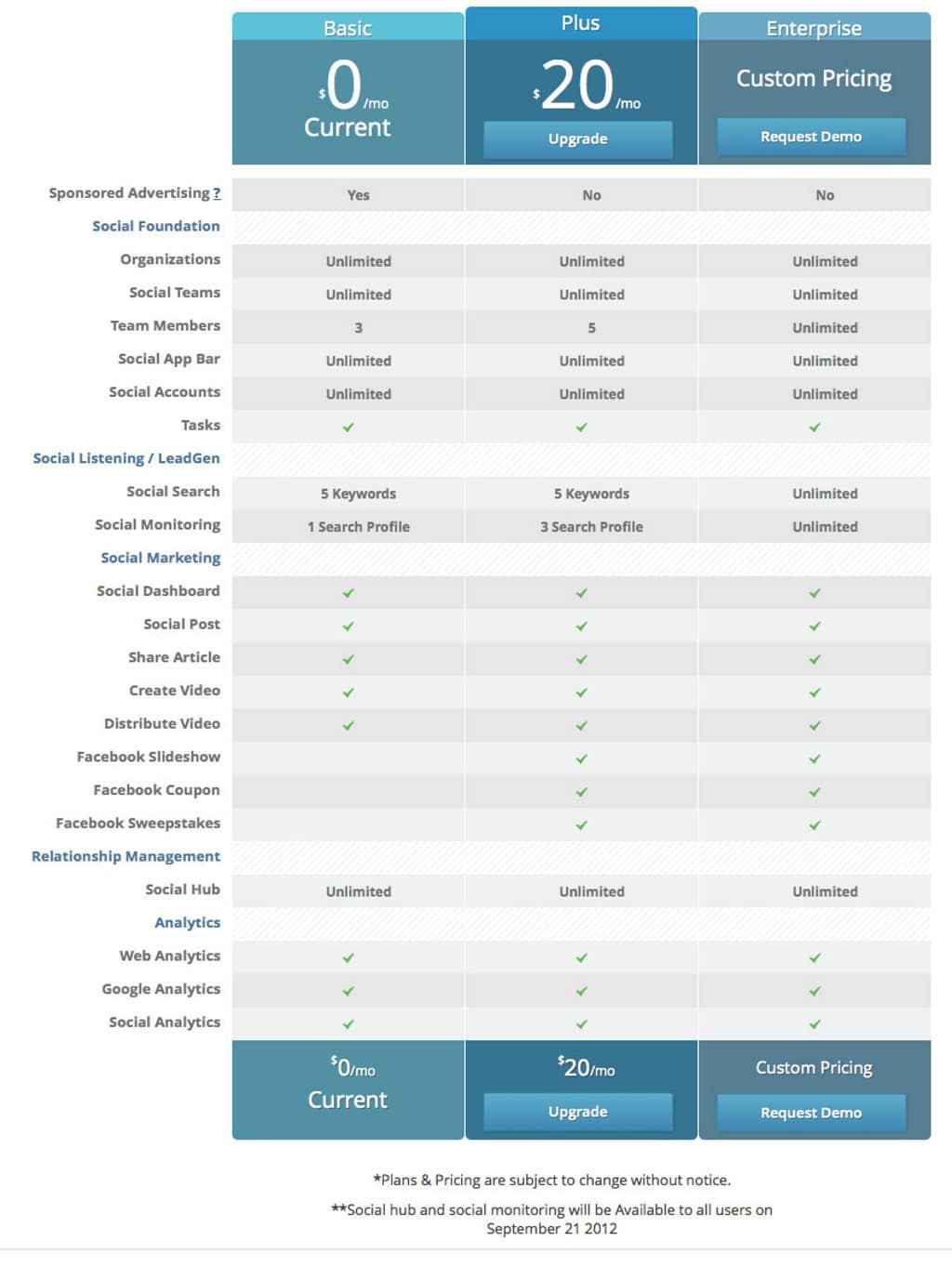
As a quick comparison, Jugnoo offers 5 team members for $20 per month. To get the same team numbers on Hootsuite, you’d have to pay $50 per month:

Hootsuite pricing plans
Hootsuite pricing plans (click to enlarge)

We know how much you need a social dashboard – but we also know that you need more than that to truly be effective with your time and success.

We’re sorry to see Seesmic disappear, too – as fans of both the product and of Loic and his team. With this offer, we’d like to try and make your next decision a little less hard.

If you’re ready to check us out free for 30 days, click here or on the Pricing Plan details below to get started.

We look forward to giving you a warm welcome aboard the Jugnoo experience.

Note – Social Teams will be available on September 14. Social Monitoring and Social Hub will be available to all users on September 21.

Jugnoo pricing plan

How to Use @JugnooMe to Make Social Monitoring Fun and Help Find and Build Brand Advocates

Jugnoo social crm

Jugnoo social crm

Over at Jugnoo, we’ve been tinkering away on a few updates to our solutions.

Between now and the end of September, there are even more cool updates being dropped in, and these will turn our dashboard into the fully-fledged offering that’s going to answer a lot of questions around social media, especially that all-important ROI question.

In the meantime, however, there are some pretty funky features and complementary tools that you can use right now. Case in point – social monitoring.

We all know how important social monitoring (or listening) is when it comes to your business or clients. Brand reputation, lead generation, customer service and more can all be optimized through a smart monitoring strategy.

The problem is, sometimes this can be very mundane and uninspiring. So, to counter that and make social monitoring a little more fun (while still helping get effective and actionable results), here are a few ways Jugnoo can help make things more fun.

Start Your Engines, Please

The first place to start is via our social search option. When you set up keywords in our platform, the most popular results are shown alongside your social analytics (for this example I’m just using Twitter – we also support Facebook and YouTube, with more platforms to come in the next release).

When you’re logged in the Jugnoo dashboard, click onto your social analytics icon and select your Twitter account. As long as you’ve set up a social search, you’ll see the keywords underneath your Most Popular Tweets (click to expand).

Twitter social analytics on Jugnoo

Click on the keyword, and you’ll be taking to the first fun part of the monitoring – our Tweet Visualyzer? (again, this will be expanded to feature more platforms in future iterations).

Once you’ve opened up the Visualyzer, the fun can begin.

The Simple (and Fun!) Way to Measure Buzz

One of the reasons we built our Tweet Visualyzer? was to make sense of the conversations on Twitter that can get noisy and confusing fast.

By separating the tweets into a simple and very visual solution, you can see what conversations are more popular, who’s having them and how they’re connected.

So, when you click your chosen keyword from the social analytics screen on the Jugnoo dashboard, you’ll see the same one on our Visualyzer. You can change views by using the top navigation, to switch from words to bubbles to usernames and more.

Now, let’s say you want to see who your biggest advocates are, so you can surprise and reward them with unique offers, or invite them to be official partners with your brand.

By clicking on the Who icon (the little head and shoulders guy), you can immediately see who’s talking about you the most:

Buzz who

In our example, you can see @FeastInc, @AtlasSymposium and @JeremyDeMello are three people who are talking about Jugnoo a lot. Hovering over their usernames, you can then see what exactly they’re saying about your brand.

This allows you to identify a potential approach to partnership, or see what kind of stuff they like. This can help you find what would be a cool surprise and delight package to send them.

By knowing what they like and other preferences, it enables you to be smarter about your approach when reaching out to them.

Once you have that information, then you can really add to the fun yet effective monitoring options, and continue to build the fledgling relationship.

Hub, Hub and Away!

This is where the third part of the puzzle comes into play – the Jugnoo Social Hub?.

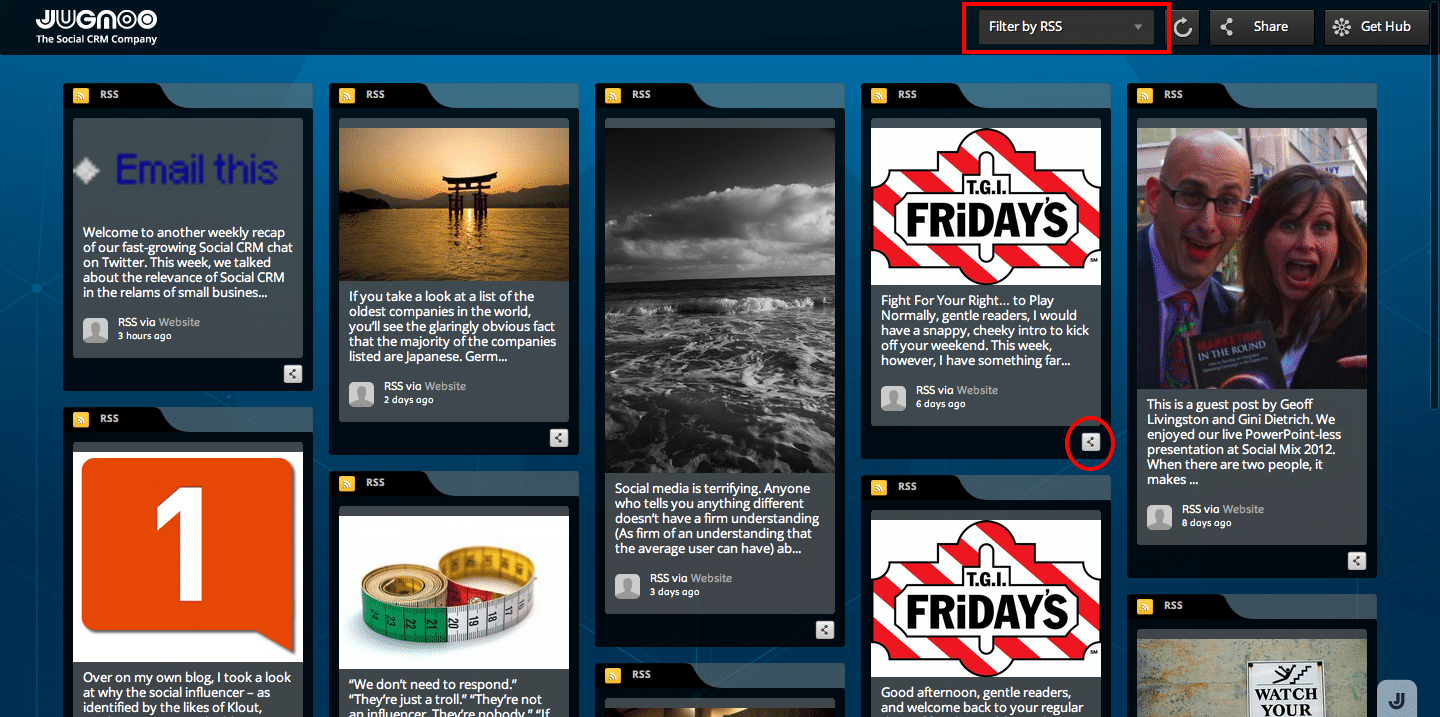
Kinda like a Pinterest board on steroids, our Social Hub? allows you to grab RSS feeds from various social networks and create a living, breathing hub where the most recent news around your choices can be displayed.

buzz RSS

Now, let’s say you want to connect more with the people talking about you from the Visualyzer results. You could set up a hub with feeds from their blogs, or Twitter account, or YouTube channel, etc, and use that to keep up-to-date with their latest updates or posts.

You can then reshare from the hub, send it as an email recommendation, tweet directly to the person, and more.

Let’s say @FeastInc, for example, tweeted that it was their pet’s birthday and you were a pet retailer. You could reply to them and wish them a Happy Pet Birthday, and then use the email function to send to your sales team and ask them to get in touch with @FeastInc to send them a goodie bag for their pet.

Or, you could see the URL for their most recent blog post, drop on over to leave a comment and mention the pet’s birthday in that comment too.

You’re building rapport; you’re showing you want to get to know them; and you’re rewarding for their support of you too.Who doesn’t like that?

These are just basic ideas using some cool tools that don’t even fall within the traditional social monitoring mix. When you partner them with the actual full social monitoring solution in the Jugnoo dashboard (released in the next 2-3 weeks) – well, the options become even more powerful.

And you still keep the fun factor of visuals, images and emotion, while making the connections that really count.

Works for me – you?

The Jugnoo Social Strategy Manifesto

Jugnoo social crm strategy

At Jugnoo, we’re in the middle of a very aggressive summer release schedule (including a new website!), with several big updates to our social dashboard.

I’ll be sharing more information about these shortly, and how they can help your business (especially from a social CRM angle), but in the meantime, I thought I’d share our “manifesto”.

These are the four key tenets that define us as a company, and how we intend to help you understand your customers better, as well as build loyalty with your customers.

Jugnoo social strategy

Cementing everything we represent as both a company and as a technology platform, our message is simple:

1. Stimulus

Create awareness and stimulus at the very moment customers or prospects are the most receptive to your product or service. Target the right audience using Social Intelligence. Result:? Generate Leads.

2. Research

Consumers and businesses research online from numerous sources before making any purchase decisions. Be visible and engage prospects as they evaluate which brand or product to purchase. Result: Promote Product and Brand.

3. Buy

Make your business social, engaging and recommendation-based. Result: Increase Sales.

4. Experience

Listen to customers in real-time through Social Monitoring. Satisfy current customers and prospects to show that they matter, building increased loyalty and advocacy. Result: Loyalty and Advocacy.

As I said, we’re on a very aggressive release schedule, and there are a lot of cool tools and visual data solutions that we’ll be sharing soon – not to mention increased social analytics, team workflows, social hubs and some fun additions to our existing social dashboard.

Stay tuned – and if you want to check us out in the meantime and get used to the dashboard prior to our updates, you can .

Cheers!

© 2026 Danny Brown - Made with ♥ on Genesis