• Skip to primary navigation
  • Skip to main content
Danny Brown

Danny Brown

podcaster - author - creator

  • About
  • Podcasts
  • Journal

blogging

Why Headway 1.5 is the Future of WordPress Theme Design

Bold claim? No – seriously, the new Headway 1.5 premium WordPress theme has just raised the bar so far ahead of the rest of the WordPress theme developers it’s scary.

I’ve been using the Headway theme on this blog for around 3 months now. In that time, I’ve been consistently impressed with the way it allows changes on the fly to any part of your theme, simply by using its drag-and-drop design. I’ve also been impressed with the way it allows the choice of blog design with or without custom CSS or HTML coding. More than anything, I’ve been impressed with the support and business ethics of the developer Clay Griffiths and his father Grant.

So, yeah, I’m already a huge fan of Headway. Now, though? The game just got raised for premium WordPress themes with Headway 1.5 and it’s going to change the way you look at blog and website design forever. Here’s why.

Visual Editor

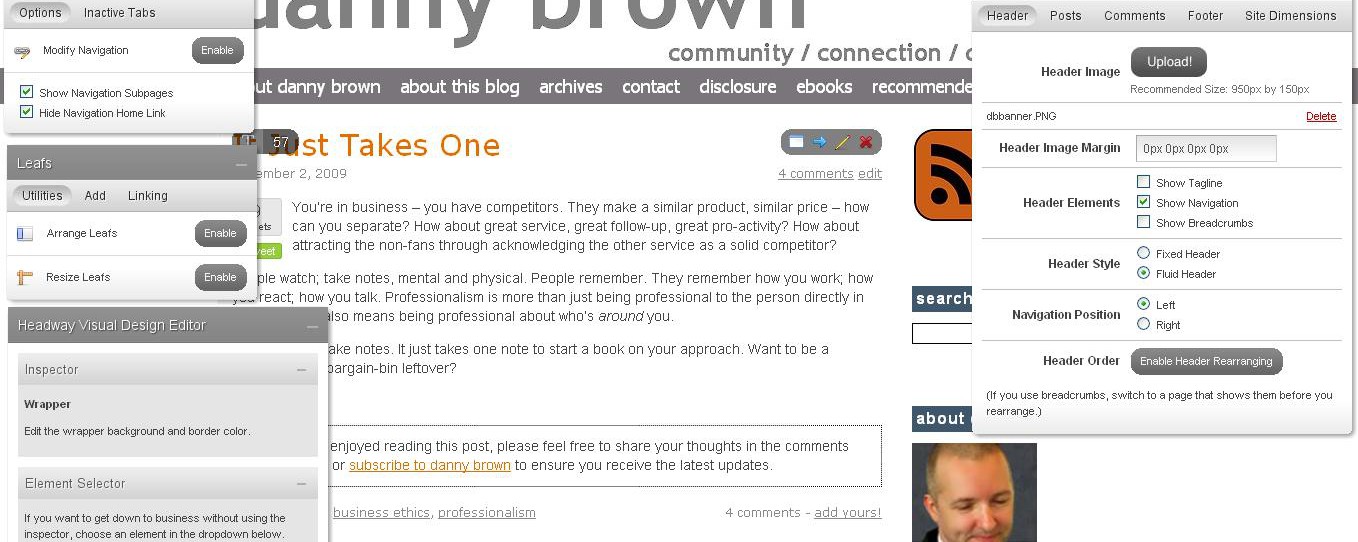
Yes, you read that right – Visual Editor. If you think that making changes, saving and then checking how it looks on a standard WordPress design is a pain, wait until you get a load of Headway 1.5’s Visual Editor. Simply put, once you’ve used it you’ll wonder how you ever managed without it before (right-click on the image below and open in new tab to see the Visual Editor layout).

When you’re logged into your WordPress admin area, open up your main homepage and at the top right you’ll see a box that says “Enter Visual Editor.” Click that and be prepared to be blown away.

Four boxes will open up (which you can place anywhere on your screen, and minimize/maximize as needed) – Site Configuration, Navigation, Leafs and Headway Visual Design Editor. These are all overlaid on your live web design so any changes you want to make you can see happen in front of your eyes as it’s being done. To enter any of the Headway 1.5 visual editor modes, simply click on the area you want to change.

So, for example, I want to change the colour of my navigation menu. I’ll click my mouse onto the navigation bar, and the Headway Visual Editor box will open up a drop-down menu titled Navigation Item. To make sure I’m on the right area of my design to edit, I can click on the “Call This Element Out” box and it will highlight the area I’m about to edit. Cool, huh?

From there, I can change the text colour, the navigation bar colour, the right border colour and dimension, as well as the font I want, the size of the font, whether it’s upper case or lower case and if I want the text to be bold or normal. I can even choose the spacing between the letters. I make my changes and then hit Save – and that’s it. You can mess with the colours and text before saving and really get the design that you want.

This goes for any area of your blog design – main content, hyperlinks, sidebar widgets, footers, headers, post titles. If you can select it on page, you can edit it. Of course, there’s a lot more to the Visual Editor feature than just pretty colours – so what else is there? The main one you’ll be using is the site configuration.

Site Configuration

The site configuration box on Headway 1.5 allows you to set up your blog anyway you want and is a huge addition to the Visual Editor. By choosing from the tabs at the top of the configuration box, you can play with the following:

  • Header – choose if you want to upload a custom image; if you want to show a blog tagline (if you don’t use a custom header); show navigation and breadcrumbs (or not); fixed or fluid header; header re-arranging enabled (drag the header above or below the nav bar); and a really cool feature, right or left navigation menu position, all from the click of a mouse.
  • Posts – set up the meta for each post; how many featured posts you have; whether you have small or regular width teaser posts under your main content; and disable excerpts.
  • Comments – choose whether to allow comments on pages as well as posts; avatars or not; set up a default avatar and avatar size.
  • Footer – choose from a fixed or fluid footer; and what copyright and admin links to have showing as well (a nice touch to prevent the need to edit in your footer CSS).
  • Site dimensions – does exactly what it says on the tin. Choose how wide your site design is (standard width 950 pixels with 20px wrapper).

You also have a Navigation box, which allows you to show navigation sub-pages, hide the Home link, and lets you drop-and-drag the navigation bar to re-arrange the position of the page tabs. And if you want to have drop-down navigation menus without having to resort to CSS coding, Headway 1.5 does that too.

The Headway 1.5 Leafs box is also incredibly cool. Leafs are essentially Headway’s content and sidebar boxes, and allow you to truly customize your look and feel. Choose from 1 sidebar, 2 sidebars, left or right positioning, and widgetized footers. True to form, the Visual Editor allows you to play to your heart’s content with the Leafs box:

  • Enable both Arrange Leafs and Resize Leafs, so you can make your content box and sidebar as wide or as narrow as you want just by dragging the box around.
  • Add Leafs – choose from Content, Widget Ready Sidebar, Text/HTML leaf, Featured Post, RSS/Recent Posts, Image Rotator (have up to four rotating images in the same box); About (about me, company or blog); Twitter updates; and Photo Gallery.
  • Linking – amazing little tool that allows you to link a complete leaf to anywhere on your blog. From pages to blog content, categories, archives, etc – seriously, this little feature kicks ass and once again shows the power and versatility of Headway 1.5.

Oh, and did I mention you can do all of this right before your eyes? Add in the fact that there will be Headway skins available soon (and the option to develop and give away/sell), as well as Certified Developer Licenses and a Youtube channel for you to connect your videos with, and it’s clear that Clay and Grant Griffiths are really looking out for WordPress users.

Headway 1.0 was an outstanding first release and clearly made some other premium WordPress theme developers sit up and take notice. Ease of use, CSS/HTML coding, first class search engine optimization capabilities and built-in social media integration – all that and more made the first release pretty special. With Headway 1.5 the game has been changed again.

While there are some great premium themes around, I think it’s fair to say that Headway 1.5 is head and shoulders above what anyone else is currently doing, whether you use the Visual Editor or your own custom CSS/HTML (or both combined).

If you’re serious about your WordPress site theme design, watch the video below then?buy Headway 1.5 – it really is that good.

Note: This blog no longer runs on the Headway framework. Instead, it’s a custom WordPress design by Lisa Kalandjian of SceneStealer Graphics.

  • Disclaimer. I’ve been impressed with the Headway premium WordPress theme from the start and it’s the only theme I’ve ever set an affiliate account up with. If you’re thinking of buying it and do so via any of my links, 50% of the affiliation revenue will be donated to the current 12for12k charity on your behalf.
And the Winner Is…

A couple of weeks back I ran a “mini contest”, if you like, to celebrate this blog’s first full year. The gist was as follows – up for grabs was the Headway premium WordPress theme (used on this very blog) as well as a copy of Trust Agents and Six Pixels of Separation. All you needed to do to “win” was tell me why you wanted Headway.

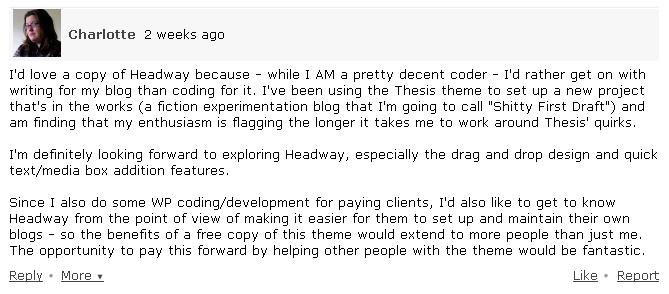
Well, the votes are in – as in, I’ve made my mind up – and my favourite reason (and the one that wins the Headway theme) is this one:

As someone who changed from Thesis to Headway for the very reasons Charlotte mentions, I feel her “pain”. And the use of “shitty first draft” just seals the deal – anyone designing a new blog or site knows that feeling all too well!

So, congratulations to Charlotte – I’ll be contacting you soon with the details.

For the books, I’ve added a couple more – two copies of Gary Vaynerchuk’s Crush It! (review coming soon). So, without further ado…

  • Copy of Trust Agents – James Hayes
  • Copy of Six Pixels of Separation – Jon Buscall (he asked so nicely!)
  • Copy of Crush It! – Ching Ya and SW Hood

Thanks again, guys, for helping to make this blog so enjoyable to write, and I’ll be in touch soon for shipping details. Cheers!

Note: This blog no longer runs on the Headway framework. Instead, it’s a custom WordPress design by Lisa Kalandjian of SceneStealer Graphics.

Have Your Say

Colourful armySo there are a few new changes/tweaks/additions (delete where applicable) coming to this blog soon, and I’d love your help to decide on how it pans out. After all, you guys are the real stars around here – I just offer somewhere to hang.
The first change I’m thinking about is the design. I’m tempted to go for either a fairly minimalistic look – think something akin to Posterous – or a more magazine feel like this one.

I’ll still be using the Headway theme to make it customized to how I’d like it, I’m just not sure which way to go. Thoughts?

Secondly, I’m starting a new interview series on video using wetoku. This lets you have a split-screen chat on video which viewers can watch live then, once the chat is over, the video can be embedded directly onto your blog or website. I think it’s a really cool little app and one that could take blogging into a whole new sphere.

And I’d like you to choose the guests.

Let me know who you’d love to see, and why. Pretty much anyone in the social media, marketing, digital space, PR field or similar – I’ll do my best to get them on. I’m not promising I’ll be successful – I don’t hold that much sway – but I am stubborn if nothing else!

So, a couple of changes, and I’d love for you to help me one way or another, if that’s okay with you?

Leave your suggestions for either option – blog theme or wetoku – in the comments and I’ll take it from there. Cheers!

  • Update October 25 – Going by comments on here and Twitter, it looks like minimal design is preferred – so, this is the new look that you’re seeing now. Thanks for your thoughts!

Note: This blog no longer runs on the Headway framework. Instead, it’s a custom WordPress design by Lisa Kalandjian of SceneStealer Graphics.

Creative Commons License photo credit: maistora

Happy Birthday and a Present for You

Day One Hundred Twenty NineSo as I mentioned in my previous post, it’s been pretty quiet around here this week as I’ve eased in to a new project.

So quiet, in fact, that I never realized that this blog’s one-year anniversary had come and gone on September 30.

To be honest, it doesn’t feel like a year. Not sure if that’s a good or bad thing, but it seems only yesterday I decided to go full-on self-hosted blogging as opposed to the Blogger and WordPress.com ones I’d run before. Guess it’s true that time really does fly when you’re having fun. And it sure has been fun so far!

Looking over the archives, the blog’s evolved since the very first post. So here, in no particular order, are some of the highlights of the last 12 months.

Stats and Facts

  • 354 posts (including this one) with 4,598 approved comments so far
  • At time of writing, 3809 subscribers either by RSS feed or email
  • 5 theme design changes, with the most recent moving from Thesis to Headway
  • Google Page Rank of 5 and Alexa Rating of 75,598 (at time of writing)
  • Featured in the AdAge Power 150 list
  • Syndicated through the iEntry, WebProNews, Newstex and Social Media Today networks

While I’m nowhere near the big numbers and lists that other bloggers have or are featured on, I don’t think it’s too bad a start. Besides, numbers are just to keep calculator makers happy. I’m also only too aware and grateful of how big a part you guys have played by visiting, reading and subscribing, so thank you sincerely for continuing to pop by.

Favourites, Funnies and Fights

Of course, a blog’s made up of three main things – posts, readers and comments and there sure has been an eclectic mix of all three over the last 12 months. Again, in no particular order, here are some of my favourites from over the course of the year. Be warned – some comments include fruity language!

  • Favourites. Probably one of my favourite personal posts was Pale Blue Dots. I’m always looking to be inspired and the video inspiration behind this post is a prime example. The same would go for Celebrating the Mountains, I guess, where I suggest we all encourage each other. I’m also really grateful for the conversation that opened up around Virtual Stalking – A Real World Problem. A viewpoint can instigate change and there are some great ones on display in that post. Speaking of viewpoints, the ones that were shared on Are You Abusing Your Social Media Voice? were brilliant, and another reason why companies need to look at the bigger picture in this space.
  • Funnies. Life can be a serious thing – we can be swept up in our work, personal issues, financial worries and more. It’s good to laugh now and again, and Sue Murphy offers that with You Know You’re Not a Social Media Guru When… Back in July, you could also take part in the Social Media Drinking Game (which could get you very drunk, very quick!). There’s also some decidedly obvious bullshit at play when someone says My Gift to You – Hurry, Offer Ends Soon! Be wary of the sales pitch…
  • Fights. I guess a blog isn’t a blog unless there are some scraps along the way, and this one’s no different. One of the first was when I asked Does Twitter Monitor Its Brand? The comments came flying in, and are (I feel) a good example of open comment policy. People have points of view – if you’re going against something, offer supporters of that something to have a voice too. The most recent was my Response to Barbara Talisman’s Misinformed 12for12k Post, which saw an amazing show of community for which I can never say thank you enough.

Combine guest posts from amazingly talented people, interviews about social media, videos, and even a Blog Talk Radio addition, and it’s been an eventful first year to say the least! So, where’s this present for you, I hear you ask?

To celebrate the first year (and hopefully many more), I want to offer a little thank you. As I mentioned, I now use the Headway Theme for my blog. I’d like to buy someone a copy for their blog (note – it has to be self-hosted and on WordPress). Just leave a comment why you’d like Headway for your blog and the best reason gets the theme – simple! I’ll also help you get it up and running on your blog.

I’ll leave this open for a week from today. Additionally, the second best comment will receive a copy of Chris Brogan and Julien Smith’s Trust Agents, and the third best comment will receive a copy of Mitch Joel’s Six Pixels of Separation.

Thanks for joining me on the ride so far, guys, I really appreciate it, and hope I can keep you coming back for more of what you’d like to read.

Cheers!

Creative Commons License photo credit: Dustin Diaz

Note: This blog no longer runs on the Headway framework. Instead, it’s a custom WordPress design by Lisa Kalandjian of SceneStealer Graphics.

The Great A-Lister Myth

Maravilla Park / MagnificosWho’s your favourite blogger? Your favourite actor or actress? Your favourite author? Comedian, musician, artist, sports star and any other medium where A-lister seems to be a well-used description?

Now ask yourself – are these people really A-listers?

So a blogger has 20,000 or 50,000 subscribers. Does that make him or her an immediate A-list blogger? Or does it just make them an A-list blogger to those 20,000+ subscribers?

Say that blogger’s content is about marketing. Or PR. Or Internet news. Or some other kind of media-related information.

Is it going to be relevant to someone who wants to read about Murray Mints? Probably not. So, to that reader, the blogger who writes about Murray Mints becomes an A-lister, because the content is meaningful for them.

Take it to other mediums. Let’s look at movies. People like Steven Spielberg and George Lucas are hailed as A-listers because their movies are generally accepted to be big at the box office. But does that make them more of an A-lister than someone like Danny Boyle, whose indie movies have generally kicked the blockbuster fare into a cocked hat when it comes to substance?

The point is, A-lists and those on them are relevant to the audience. Your blog can be full of amazing content but if it means squat to me, you’re not an A-lister (at least, not to me). My A-listers are the people I learn from, or who make a difference in my day with their blogs. You can see some of these folks here. But even that’s relevant to me, and may offer little to you.

There’s nothing wrong with tagging folks A-listers. Just don’t hold them up as some sort of Holy Grail when they’re only really A-listers for their audiences.

If you want real, everyday A-listers, take a look in the mirror. You’re an A-lister and you probably don’t even know it. You work to feed your family and keep a roof over your head. You go to movies you have no interest in seeing because your kid wants to. You offer unconditional love and security to your partner when he or she needs it. That’s real A-list work right there.

What defines your A-list?

Creative Commons License photo credit: !unite

  • « Go to Previous Page
  • Page 1
  • Interim pages omitted …
  • Page 9
  • Page 10
  • Page 11
  • Page 12
  • Page 13
  • Go to Next Page »
© 2026 Danny Brown - Made with ♥ on Genesis