• Skip to primary navigation
  • Skip to main content
Danny Brown

Danny Brown

podcaster - author - creator

  • About
  • Podcasts
  • Journal

Archives for 2012

Make It Your Mission To…

Click through the URLs of your commenters to find a new blog, leave a comment and share a new person with your community.

Thank 10 followers on each social network you’re on for being there with you.

Cull the networks you’re told you should be on to only the ones you need to be on.

Praise a work colleague or team you lead for the awesome work they’re doing.

Leave that last report at the office until the next day and spend time with those that really matter.

Buy a coffee a day for a homeless person.

Speak up for someone you know won’t speak up for themselves but deserve to be heard.

Call someone up you’ve let slip off your radar and make them feel remembered.

Instead of talking about how we’d like to change the world, let’s start by changing us first.
If You Want to Pitch A Blogger Successfully, DON’T Do This

Email pitch

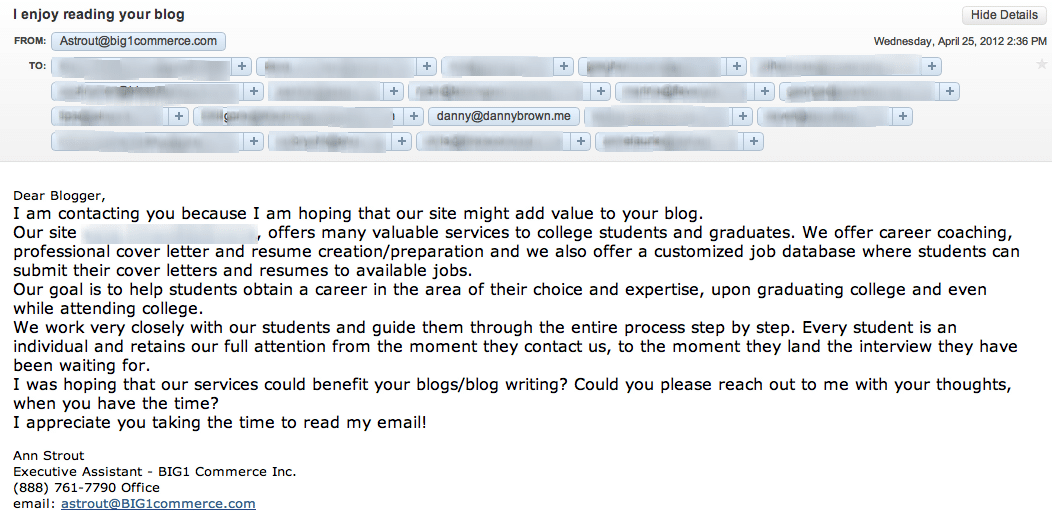
The email below arrived in my Inbox this afternoon (click to expand)

Email pitch

It was sent in the hope of garnering some press for the company’s website, that helps students connect with potential employers. Great – nothing wrong with that, and here’s to more companies helping students get a great start in life.

The problem is, the approach is all wrong and will probably put off every blogger they reached out to (and there were some big names in there). Here’s why:

  • The message header and the opening line don’t gel. The message header is great – “I enjoy reading your blog” is always an ego-stroke guarantee for a click-through. But then you get the generic “Dear Blogger” salutation. Bah.
  • Mass email, baby! As you can see, the email was sent to quite a few addresses and, better still, this was via open cc’d. This meant what should have (probably) been a private list now gave other people access to email addresses that the owner may not have want shared.
  • Lack of relevance. At no point in the email (apart from the standard opening blurb about being useful for the blog) is there a cohesive point made on why the company’s site would be relevant for my readers (or that of the other bloggers that were emailed).
  • A confidence-building domain… When I clicked through to the domain of the email sender, I was greeted with the image below.

Big1 domain

Now, it may be that the coolest website on the planet is due to arrive at the domain – who knows, even cooler than Chuck Norris! But for now, it raises alarm bells as to who’s behind the email and how well they’d serve the students they’re looking to help.

Simply put, it adds the finishing touches to an email that means well but does pretty much everything that goes against a solid blogger outreach program.

What They Could Have Done

Now, it may be that it’s a small company looking to get awareness and a foothold in the space, and they feel that bloggers with a certain audience reach can help. Or, they’ve heard blogging is the new advertising and it costs less money too.

Nothing wrong with that – most bloggers love to help promote something that’s relevant to their audience. The problem here is that the pitch fell flat at the first hurdle due to the approach.

What they could (should) have done is:

  • Ignore the mass email approach. Bloggers are generally busy people. If they feel a pitch isn’t truly targeted, they’ll ignore and move onto the next one. Try and really personalize the approach – use the blogger’s first name and a little overview of your understanding of the blog and audience. And, if you must use mass email, make it a BCC…
  • Use examples of relevance throughout. You don’t need to suck up to the blogger to get their attention, but maybe drop in 2-3 references to past posts that correlate to your service. Each reference builds your case – build the case and your job’s almost done.
  • Make sure you’re ready for investigation. Bloggers are successful because they’ve built trust with their audience. They won’t ruin that by not doing due diligence, and the first thing they’ll do is check you out. Make sure you’re ready for that – if your website isn’t built, don’t share your domain.

These are just really short suggestions based on this particular email and where it went wrong.?You also need a great boss who can educate you on best practices, just in case Ann is a junior and she’s been told to send a pitch like this. If so, her boss should be ashamed.

To really run a great blogger outreach program needs a very cohesive approach.?It also helps if you’ve been some part of the blogger’s audience beforehand – a tweet here, a blog comment there, etc.

Awareness of you means a better chance when it comes to sharing awareness of your product by the blogger in question.

Contrary to popular belief, bloggers do want to share your content – we just need a reason to do so.

Note: In his comment about this post, Frank Strong (who I respect immensely) questioned my outing of what may be a junior person at a PR agency. To clarify: this would never be a goal of mine.

If you try Google the name, nothing comes up. Nothing. Same with the company on LinkedIn. Which makes me think it’s a front for the “client” they’re pitching, which I did blur out.

Additionally, the blogger names that were on the email were all over the place. Two PR agencies; a sports blog; two tech blogs; a mobile phone blogger; a car forum and more. There was no rhyme or reason – it was just a blind pitch with a bunch of names thrown in for good measure.

With all that in mind, if someone is so indifferent that they don’t “exist” and are blasting out a generic message, then perhaps it makes no difference to blur or not.

3 Ways to Repurpose Old Content to Create New Premium Products

Monetize your blog

Monetize your blog

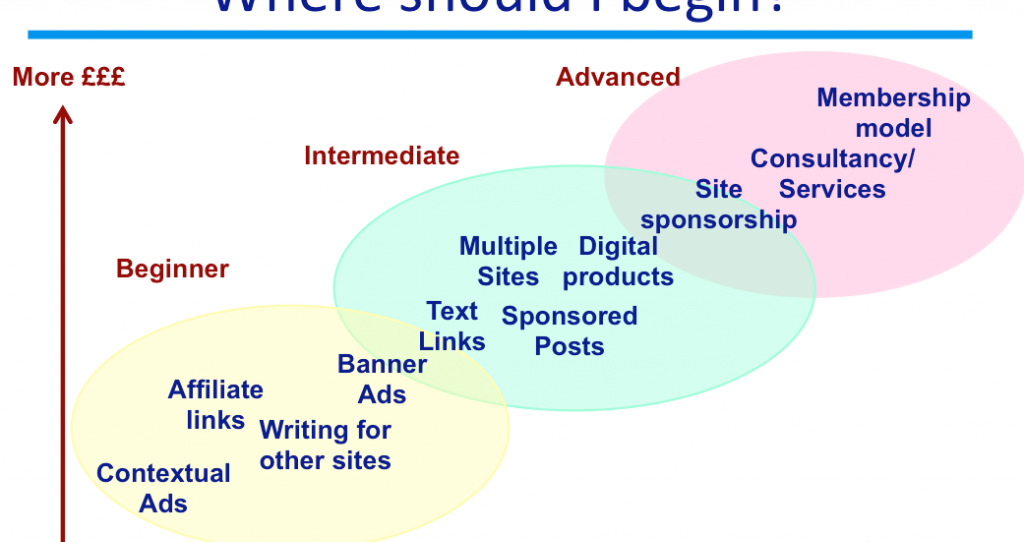
One of the biggest questions many bloggers ask is how to monetize their blog. Search for that on Google, for example, and you?ll get?over four million results.

From having advertisements on your blog to selling affiliate links (or your own product), it?s clear that bloggers want to be able to make money from blogging ? it?s just a matter of how (and?without upsetting your readers).

Yet instead if trying to come up with new ways to monetize your blog, why not dig back into your archives and use stuff you?ve already created? After all, that offers a simpler and quicker way for you to start monetizing, and also gives you a ready audience, because they?re topics that people want to hear about (which we?ll see in the post).

So, with that in mind, here are?three ways for you to monetize your blog with some of your older content.

Create a Premium Ebook

Parables of BusinessLast year, I started writing blog posts that were akin to short stories. I?d offer business ideas and strategies through these posts, but wrap them in stories that could be looked at as fables.

These posts were incredibly popular, and gave me the idea to create an ebook around them and add new content as well to enhance the older posts, and then release it as a premium ebook.

That ebook was?The Parables of Business, and it?s since sold just under?a thousand copies. Multiply that by the $15 price for the ebook, and you can see that it was a great way to make the content from my blog profitable.

Look back at your content, and see if there?s an ongoing theme that can be fine-tuned and made available as a premium publication. It could be an educational series; a series on blogging tips; a series on health, or whatever your blog talks about. Look at the comments from these posts, and see if there were any unanswered questions.

Take these questions and turn them into brand new sections of your ebook, to make sure you offer value for any loyal readers. Add some new resources, and get your ebook professionally designed to make it a more attractive proposition. Then start selling and promoting (and even consider?an affiliate program?to help you reach more potential buyers).

By being a blogger, you?re already a writer (unless you?re a video blogger or podcaster) ? so why not sell books too?

Create an Educational Video Download

Premium videoVideo is an incredibly powerful medium.

Not only can a video enhance a point more than any written word could, purely from an ?Okay,?now?I see what you mean? standpoint, it?s also a great way to revamp old content.

Check your analytics, and see which posts had the most traction. That suggests that there?s an audience for that content, and while your written word may have been popular, a video overview will be even more so.

Create a video that shows how to maximize the SEO of your blog and content; or how to set up a WordPress site from scratch (including finding the best host); or how to understand the basics of coding so other bloggers can improve their own site design.

If you can write about something, you can almost universally create a video about it. Make it valuable and something that?s clearly needed, and a premium video download can be a great addition to your monetization strategy.

Host a Premium Webinar

Premium webinarBouncing off the video download idea, an equally effective way to monetize old content is to build a webinar around it.

Did you write a post that looked at the importance of theme design and readability when it comes to reader growth?

Or did you write a post about the best way to take advantage of new technologies?

Any time you write a post about something that can help someone overcome issues or improve their process, it immediately becomes valuable.

If the written word becomes valuable, you can imagine how?valuable a?live webinar, with the ability to ask questions on the fly and see something happen in real-time, can be.

Again, look at your analytics and see where the most popular content has been. Combine that with something like?InboxQ?to get an idea of current needs and wants of potential customers for your webinar, and you can soon build a session that people will pay to attend.

If You Can Create It, You Can Sell It

These are just three ideas to get you started on ways to use old content to get new ways to monetize your blog. There are more ? blog consultancy services based on old content research, for example, or a members-only forum to answer the questions your readers are asking the most.

As a start, though, they should help you get started with selling your content that you take time and love to create. Because let?s face it ? if it can be created, it can be sold. Quality never has a price limit on it.

All you need to do is find the content you feel offers the most value and opportunity to turn into a premium offering. The good news is, the audience is waiting ? you just need to provide.

This post originally appeared on For Bloggers By Bloggers, where you’ll find daily blogging tips to help you grow your blog and make it the best it can be. Subscribe today to make sure you get the latest updates as soon as they’re published.?

image:?My Blogging Journey

Can We Still Trust Google?

what does google want to be

what does google want to be

It’s a question many are asking – can we still trust Google? (In fairness, it’s a question you could ask of any social company).

I’ve written about my falling out of “like” with Google on here a few times recently, and they still continue to piss me off. For example, I completely deleted my Google+ account but folks on there are still allowed to send me updates via email because Google thinks that’s okay.

Or, I tried to access my Google Analytics from my simple Account tab in Gmail, and Google wouldn’t let me progress any further until I “upgraded” to Google+. Yeah, right – piss off, Google, and take your spammy account growth ways with you.

However, I recognize that I’m biased, so I thought this infographic from BackgroundCheck.org was fairly interesting. It gives a nice cross-reference of Google’s history, missteps, and how the general public views online search, privacy and tracking.

For example:

  • I didn’t know that Google had been listed as “Hostile to Privacy” in 2007 by Privacy International, which is the lowest rating you can get.
  • 65% of web users don’t want their search personalized based on prior search history.
  • 73% of web users don’t want their results tracked.

It’s pretty telling stuff, and perhaps another reason why Google is getting so heavy-handed in its Google+ sign-up charge (they’re still quoting incorrect numbers due to the enforced Google+ sign-ups via using new Google products).

I don’t know – I never thought I’d see the day when I preferred Zuckerberg’s machine over anything else when it comes to privacy and operations. But Google’s making that easier every single day.

Ah well… onto the infographic (click to enlarge).

Mother, Can I Trust Google?

The Art of Growing Up in Public as @JugnooMe v2.0 is Released

JugnooMe social media dashboard

JugnooMe social media dashboard

Tuesday April 17 was a big day for JugnooMe, the social business platform from parent company Jugnoo, as we launched a major update to the platform.

Originally launched as a private beta late last year, we’ve come a long way since these early days. A lot of this has been by listening to the feedback of our early beta users, as well as monitoring social media channels to understand the pain points of our target audience(s).

Couple that with a very cool and agile team that’s focused on bringing the most kick-ass social media all-in-one solution to market, and yesterday’s release was a very big step in the Jugnoo journey.

So, what is JugnooMe and what are these new features? Let’s begin.

The JugnooMe Vision

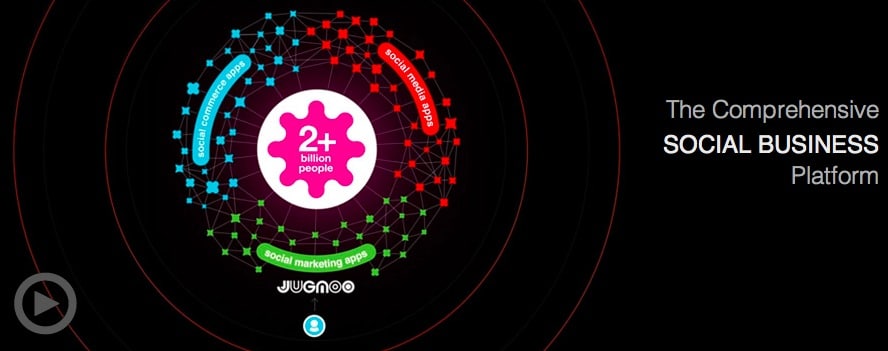
In a nutshell, JugnooMe is simply a way of bringing all the best features of various social media tools on the market today, and having them all live under a single, unified dashboard.

This then helps business owners that struggle with time and resources to manage their time more effectively, which results in them being able to focus more on ther core business and make profits.

Jugnoo

It also helps the solo entrepreneur, the blogger, the stay-at-home parents, the franchisors, the non-profits and more be far more effective in their own use of social media, from content creation to distribution and measuring.

Simply put, we’re here to help anyone make the social web simple, accessible and monetizable. Because at the end of the day, while followers and friends are great, the mortgage people don’t let us pay for our homes by retweets…

JugnooMe is the first salvo in this overall goal of Jugnoo’s – there’s much more to come, but for now we’re solely concentrating on our social media dashboard offerings. Which brings us to the update.

JugnooMe 2.0 – More Than Just an Update

For anyone that used our early beta, the change is a pretty big one from that platform. But then, that’s to be expected for any company that wants to grow properly, as opposed to just turning up and hoping early buzz will be enough to gain you success.

For me, personally, it’s the difference between watching a young child struggle to find their balance and a confident youngster that throws away the training wheels on their new bike.

Yes, I’m incredibly biased, but I’m also incredibly proud of the whole team here and the strides they’ve taken. For example:

New and Improved User Interface and Navigation

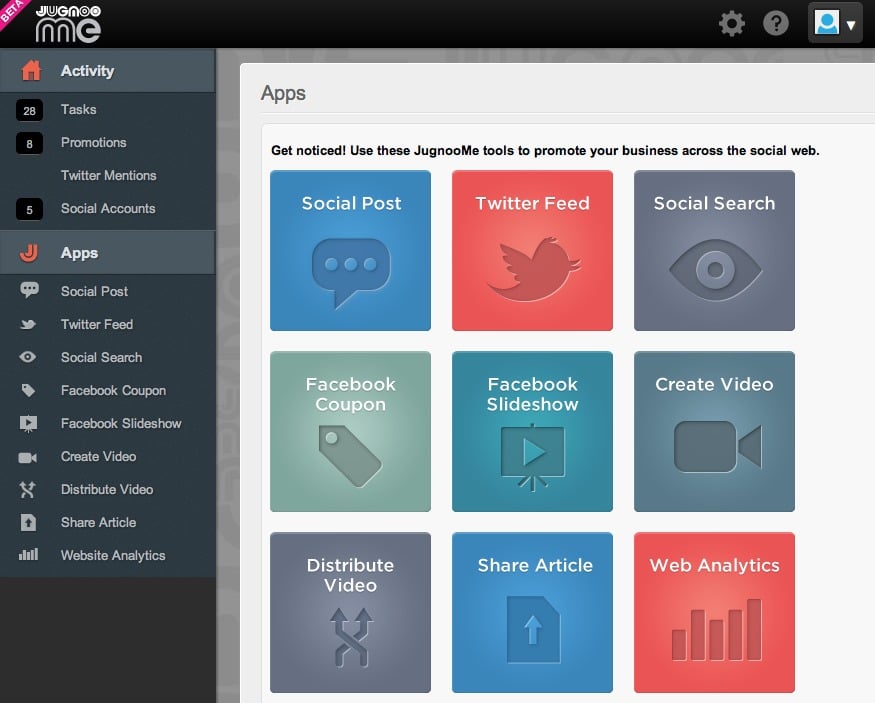
Our design team completely revamped the experience inside the dashboard, and made the navigation a lot more user-friendly and intuitive. The side navigation is (currently) broken down into two key areas, Activity and Apps. This helps you get straight to the area that matters to you the most.

Jugnoo navigation

Our minimized top navigation keeps everything simple and uncluttered, and is more for the maintenance area of your experience, including setting up your business details, websites, social keywords and more.

It’s a far cry from our first iteration and kudos to our designers for the makeover.

It’s All About the Apps, Baby!

As JugnooMe continues our journey to help make social media simple for everyone, one of the ways we’re going to achieve this is by an apps-based system.

Jugnoo apps

While I can’t go into too much detail here, since it’s proprietary and includes some cool new features scheduled for the next update, we want to make the JugnooMe experience your experience.

So, while we might offer X amount of solutions, you would only find benefit from a few. Instead of us cluttering up your dashboard, you now just have the apps that make sense to you.

This could be Social Dashboard, Analytics, Facebook Promotions and Video tools.

We think it’s a more elegant approach and also allows users to create their own plans as we introduce our premium solutions in the next couple of months (the beta of JugnooMe is currently free for everyone to use).

Currently the apps are all active, but the option to pick and choose is most definitely in the schedule for the next iteration.

Social Sentiment Beta

As human beings, we all want to be liked. We can say we don’t, and feign indifference, but criticism often stings while love and cookies make us smile (I think that’s the right comparison). Anyhoo…

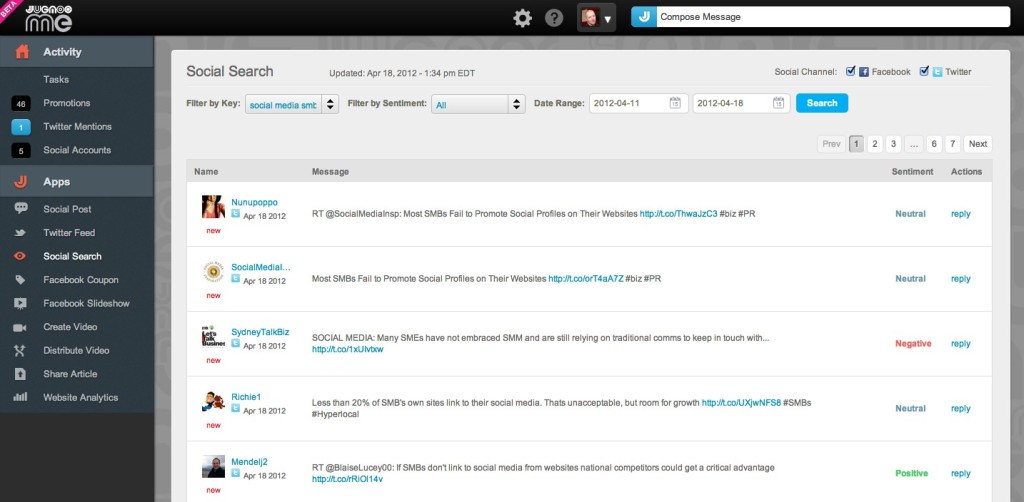
Social media users are no different, and one of the ways to gauge whether we’re viewed as cookies or crankies is by sentiment analysis. This lets us know if we’re seen in a positive, negative or neutral light.

As part of this new JugnooMe release, we’ve opened up our sentiment engine (beta version) to our users, to help us educate the algorithm better for your needs.

Social search sentiment

This will allow you a simple overview of the sentiment behind a tweet or Facebook update, and reply immediately from within the dashboard area.

Our future sentiment engine will also include forums, blogs and other social networks, and offer more interactive features to help you protect your brand reputation whether you’re a business or solo professional. For now, though, it gives you an idea of where we’re going.

Facebook Promotions

While we’ve always had Facebook Promotions from the start in the form of simple coupons for special offers, we’ve significantly increased the number of templates available.

Additionally, you can also create a Facebook Slideshow app, complete with product/service description and URL to your dedicated sales page or store. The Slideshow sits on a tab on your Facebook Page, and you can create as many slideshows as you wish (for multiple products or storefronts).

Again, this is one of our new beta features and is just the start – look out for more Facebook apps in future releases.

Video Killed the Radio Star

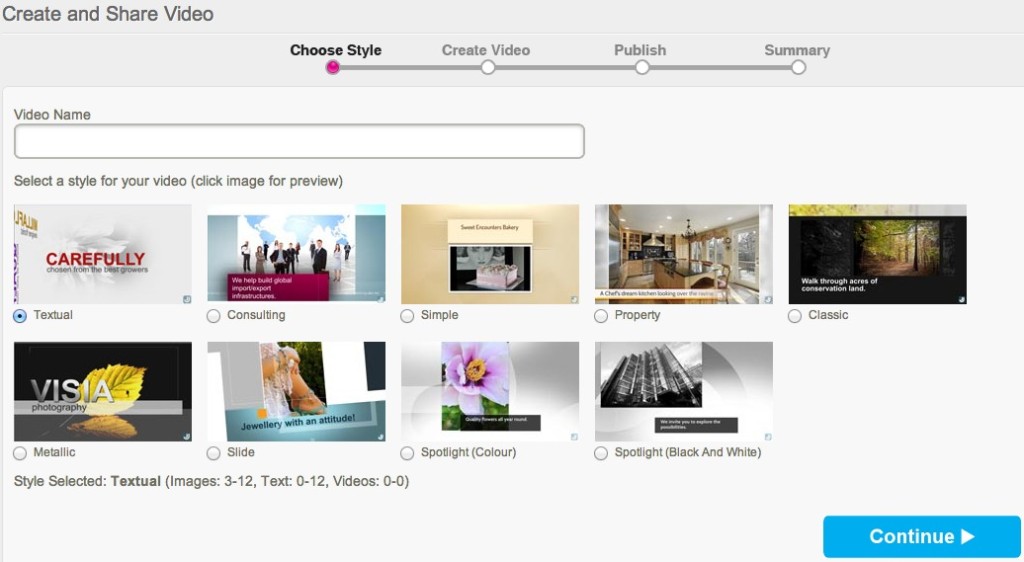
At least, it did according to The Buggles. However, even though we know radio is still alive and well, there’s nothing quite like a cool promo video to either highlight your business, brand, products, events or more.

With this in mind, our updated SVM – social video marketing – platform now has more templates than ever before, ranging from Property (perfect for realtors) to Consultant (agency videos), Spotlight B&W (ideal for portfolios) to Simple (great for invites or special events).

Social video marketing

We’ll be continuing to add templates with each new release, and may even drop the odd new one is just as a surprise in-between releases!

Statistics and More Statistics!

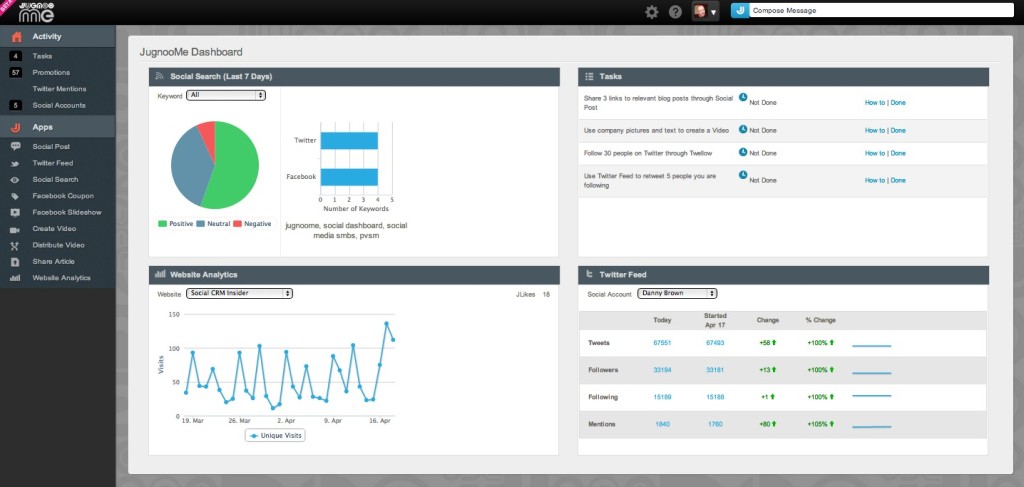
If there’s one thing we pretty much all agree on, it’s that it’s always nice to have a quick overview of just how you or your business is performing. Sure, individual stats and reports are cool, but a one-pager can be even cooler when in a rush.

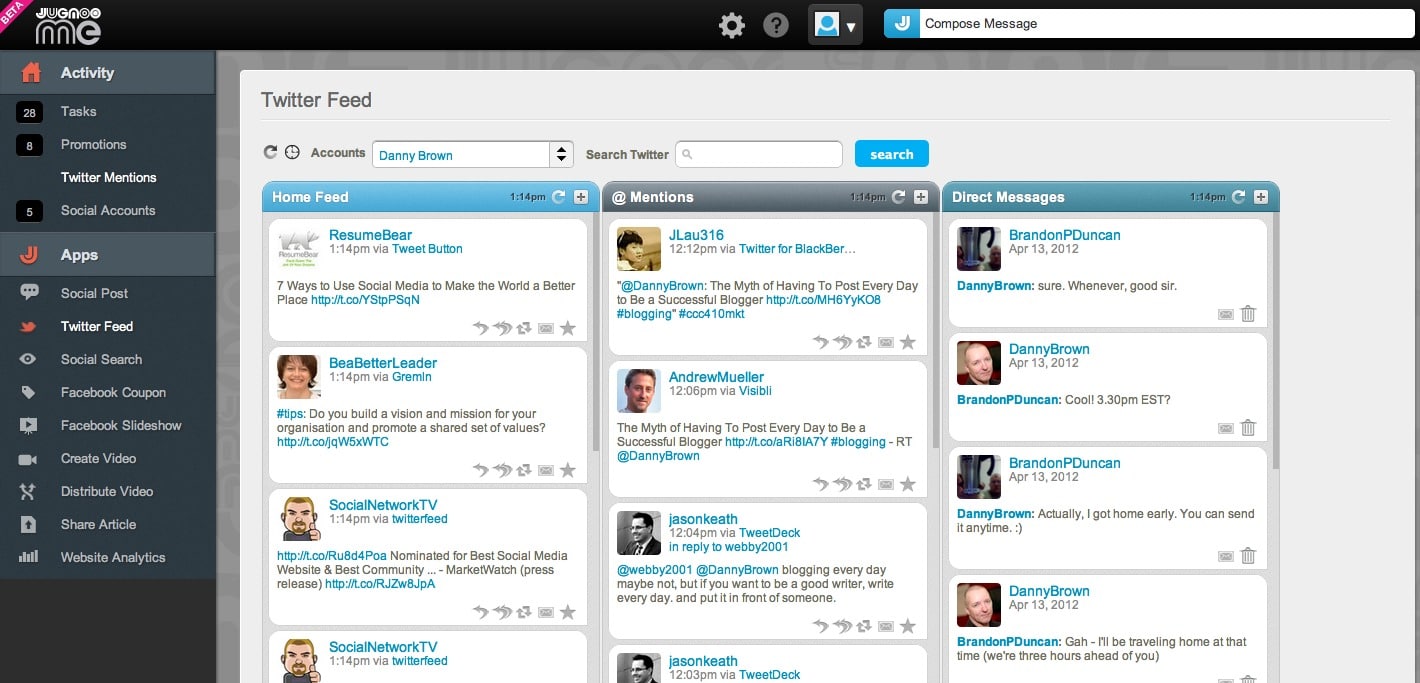
Our new Activity Landing Page has a simple yet effective collection of your most important information – Social Search results (including sentiment), Website Analytics, Twitter statistics (for now) and Tasks (not as evil as they sound, but quick tips to get you more effective with our platform and social media).

Social media dashboard activity

From there, you can dive into the areas you need more information on, and then make the necessary changes to be more effective and share online via our universal J-Post option, that allows you to update your Twitter, Facebook, Linkedin, YouTube and Posterous accounts.

It’s Cool But It’s Just the Beginning

These are just some of the main features in the new update. There are more inside – the ability to make default posting profiles (if you use more networks than others) as well as an optional social media plugin in the shape of a toolbar you can display on your website.

This lets visitors share your content as well as connect with you by email or visit your storefront. If you don’t have a business but still want to use the plugin, you can choose not to display your contact or Google Map information.

Note: If you do use the toolbar, it’s currently ad-supported (meaning pop-up ads will display briefly from the plugin). Future versions will allow paid opt-out or ad partnership options.

To say this is a major update would be an understatement – we really have released what is essentially a new product altogether. But it’s just the start.

We have a very aggressive release schedule for the rest of this year, including coming out of beta once our solutions are locked down, with some very cool features and tools coming your way that you won’t find anywhere else (promise!).

Add to that a huge social media event that Jugnoo is hosting in the fine city of Toronto this July (more details very soon!) and we’re definitely looking to make our statement about who we are and where we want to be.

And that includes you every step of the way. We’re always listening to feedback and this release is a result of that – and we’re not going to stop listening. We really want to make a platform that anyone and everyone can use, and want to use because it’s geared towards them.

Ready to have a look at JugnooMe? Check out our video below for a clearer idea on how we can help the everyday business owner, then hop on over to our sign-up page and we’ll get you onboard sharpish – see you on the other side!

[youtube]http://www.youtube.com/watch?v=zQuHRICtXmk[/youtube]

  • « Go to Previous Page
  • Page 1
  • Interim pages omitted …
  • Page 17
  • Page 18
  • Page 19
  • Page 20
  • Page 21
  • Interim pages omitted …
  • Page 26
  • Go to Next Page »
© 2026 Danny Brown - Made with ♥ on Genesis